1
1
2
3
4
5
6
6
E
D
F
G
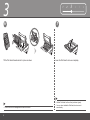
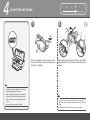
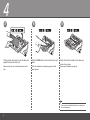
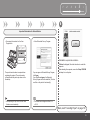
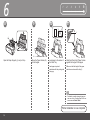
Close the Top Cover (D).
Make sure the Inner Cover (E) is closed.
• Wait for about 5 minutes until the POWER lamp (green) (F) stops flashing and stays lit then operating noise stops, and go to the next step.
• The printer may make some operating noises when preparing to print. This is normal operation.
• If the Alarm lamp (G) flashes orange, make sure that the Print Head and the ink tanks are correctly installed.