1
 Part 1: Preparing the NAS
i.
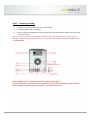
Connect the power cord to the AC Power Input Socket.
ii.
Connect network cable to LAN0 port.
iii.
Press the Power On/Off Switch the front panel to power the NAS. Wait for at least 3 minutes for the
system to start up.
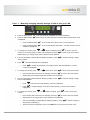
Note: The current IP address of LAN0 (eth0) is displayed in the LCD display panel. If a DHCP server is
available, a DHCP IP will be assigned to eth0. If not, eth0 will use the default IP address 172.16.0.1 subnet
mask 255.255.0.0.
Note: If a DHCP server is available, skip Part 1.1 and proceed to Part 2.
If a remote computer is able to connect to IP address 172.16.0.1 (after making necessary changes in
network setting of remote computer), skip Part 1.1 and proceed to Part 2.