1
Chapter 6 Video ...........................................71
6.1
6.2
6.3
Introduction ..................................................................................
Installation of video driver .........................................................
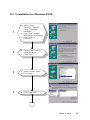
6.2.1 Installation for Windows 95/98 ...........................................
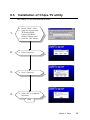
Installation of Chips-TV utility ..................................................
72
72
73
75
Chapter 7 Audio ..........................................77
7.1
7.2
Introduction .................................................................................. 78
Installation of audio driver ......................................................... 78
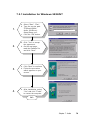
7.2.1 Installation for Windows 95/98/NT ..................................... 79
Chapter 8 PCI Bus Ethernet Interface .......81
8.1
8.2
8.3
Introduction ..................................................................................
Installation of Ethernet driver ....................................................
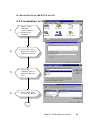
8.2.1 Installation for MS-DOS and Windows 3.1 ........................
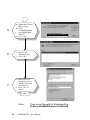
8.2.2 Installation for Windows 95 ................................................
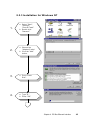
8.2.3 Installation for Windows NT ...............................................
Further information ....................................................................
82
82
82
83
85
87
Appendix A Programming the Watchdog
Timer .........................................................89
A.1
Programming the watchdog timer ............................................. 90
Appendix B Installing PC/104 Modules .....93
B.1
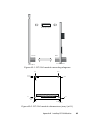
Installing PC/104 modules .......................................................... 94
Appendix C Pin Assignments ....................97
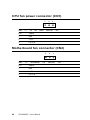
CPU fan power connector (CN1) .......................................................... 98
Motherboard fan connector (CN2) ...................................................... 98
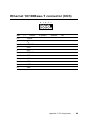
Ethernet 10/100Base-T connector (CN3) ............................................. 99
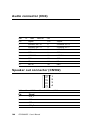
Audio connector (CN4) ........................................................................ 100
Speaker out connector (CN502) .......................................................... 100
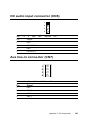
CD audio input connector (CN6) ........................................................ 101
Aux line-in connector (CN7) ............................................................... 101
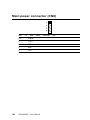
Main power connector (CN8) ............................................................. 102
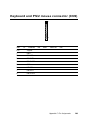
Keyboard and PS/2 mouse connector (CN9) ..................................... 103
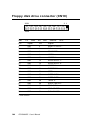
Floppy disk drive connector (CN10) .................................................. 104
PC/104 connectors (CN11) .................................................................. 105
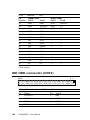
IDE HDD connector (CN12) ............................................................... 106