1
RKP215 / RKP217 / RKP219
User Manual
13. Start Up
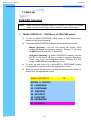
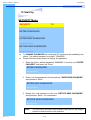
PORTNAME Menu
PORTNAME
Bank
1
01
SYSTEM 01
02
☼ SYSTEM 02
03
☼ SYSTEM 03
04
☼ SYSTEM 04
05
☼ SYSTEM 05
06
☼ SYSTEM 06
07
☼ SYSTEM 07
08
☼ SYSTEM 08
09
SYSTEM 09
?X
Bank Session
5
PC Name
Session
6
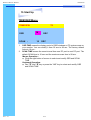
Use “Tab” key to select session like Bank, PC, OSD, SCAN, CHANGE PASSWORD, CONSOLE ON/OFF, etc…
Bank Session
Use Page Up & Page Down to switch previous or next bank
PC Name Session
1.
“☼” next to the PC name represents the PC system is powered on
Mouse Operation :
1.
Click the arrow key “5” or down arrow key “6” to scroll upward or
downward of the PC name list.
2.
Right click the highlighted PC name for editing PC
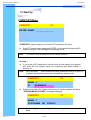
Keyboard Operation :
1.
Use up key “é“ or the down key “ê“ from the keyboard to select port
for destination PC name
2.
Press “Ins” key or for editing PC name
Note: PC name should not be more than 8 characters.
3.
Rev. : 1.0
When editing is finished press “Enter”.
P.26