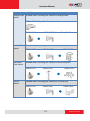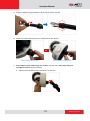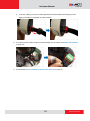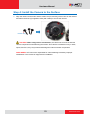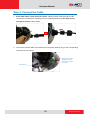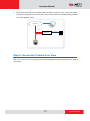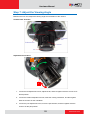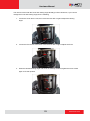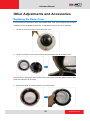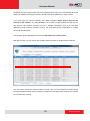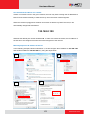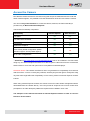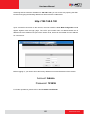
1
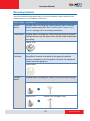
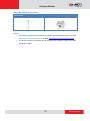
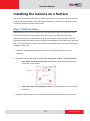
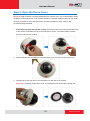
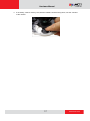
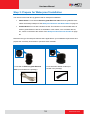
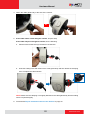
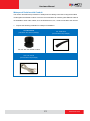
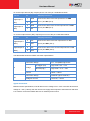
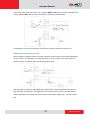
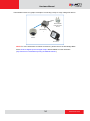
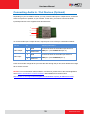
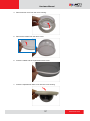
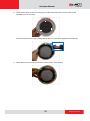
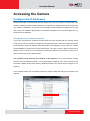
Outdoor Dome Series Hardware Manual E89 2014/01/21 Hardware Manual Table of Contents Precautions ............................................................. 4 Safety Instructions .................................................................................... 6 Introduction ............................................................. 7 The List of Models ..................................................................................... 7 Package Contents...................................................................................... 8 Physical Description ................................................................................. 9 Mounting Options .....................................................................................11 Other Mounting Accessories ................................................................. 13 Installing the Camera on a Surface ..................... 14 Step 1: Drill the Holes .............................................................................. 14 Step 2: Open the Dome Cover ................................................................ 15 Step 3: Prepare for Waterproof Installation ........................................... 17 Waterproof Solution with Naked Cable ................................................. 18 Waterproof Solution with Conduit .......................................................... 20 Step 4: Install the Camera to the Surface .............................................. 24 Step 5: Connect the Cable ...................................................................... 25 Step 6: Access the Camera Live View .................................................... 26 Step 7: Adjust the Viewing Angle ........................................................... 27 Step 8: Close the Dome Cover................................................................ 29 Other Connections................................................ 30 Connecting the DI/DO Devices (Optional) ............................................. 30 Connecting Audio In / Out Devices (Optional) ...................................... 34 2 www.acti.com Hardware Manual Other Adjustments and Accessories .................. 35 Replacing the Dome Cover ..................................................................... 35 Using a Memory Card .............................................................................. 39 How to Insert the Memory Card ............................................................ 39 How to Remove the Memory Card ........................................................ 39 Accessing the Camera ......................................... 40 Configure the IP Addresses .................................................................... 40 Access the Camera.................................................................................. 44 3 www.acti.com Hardware Manual Precautions Read these instructions You should read all the safety and operating instructions before using this product. Heed all warnings You must adhere to all the warnings on the product and in the instruction manual. Failure to follow the safety instruction given may directly endanger people, cause damage to the system or to other equipment. Servicing Do not attempt to service this video device yourself as opening or removing covers may expose you to dangerous voltage or other hazards. Refer all servicing to qualified service personnel. Trademarks All names used in this manual are probably registered trademarks of respective companies. Liability Every reasonable care has been taken during the writing of this manual. Please inform your local office if you find any inaccuracies or omissions. We cannot be held responsible for any typographical or technical errors and reserve the right to make changes to the product and manuals without prior notice. 4 www.acti.com Hardware Manual Federal Communications Commission Statement This equipment has been tested and found to comply with the limits for a class B digital device, pursuant to Part 15 of the FCC Rules. These limits are designed to provide reasonable protection against harmful interference in a residential installation. This equipment generates, uses, and can radiate radio frequency energy and, if not installed and used in accordance with the instructions, may cause harmful interference to radio communications. However, there is no guarantee that interference will not occur in a particular installation. If this equipment does cause harmful interference to radio or television reception, which can be determined by turning the equipment off and on, the user is encouraged to try to correct the interference by one or more of the following measures: Reorient or relocate the receiving antenna. Increase the separation between the equipment and receiver. Connect the equipment into an outlet on a circuit different from that to which the receiver is connected. Consult the dealer or an experienced radio/TV technician for help. Warning: Changes or modifications to the equipment that are not expressly approved by the responsible party for compliance could void the user’s authority to operate the equipment. European Community Compliance Statement This product has been tested and found to comply with the limits for Class B Information Technology Equipment according to European Standard EN 55022 and EN 55024. In a domestic environment, this product may cause radio interference in which cause the user may be required to take adequate measures. 5 www.acti.com Hardware Manual Safety Instructions Cleaning Disconnect this video product from the power supply before cleaning. Attachments Do not use attachments not recommended by the video product manufacturer as they may cause hazards. Do not use accessories not recommended by the manufacturer Only install this device in a dry place protected from weather Servicing Do not attempt to service this video product yourself. Refer all servicing to qualified service personnel. Damage Requiring service Disconnect this video product from the power supply immediately and refer servicing to qualified service personnel under the following conditions. 1) When the power-supply cord or plug is damaged 2) If liquid has been spilled, or objects have fallen into the video product. 3) If the inner parts of video product have been directly exposed to rain or water. 4) If the video product does not operate normally by following the operating Instructions in this manual. Adjust only those controls that are covered by the instruction manual, as an improper adjustment of other controls may result in damage, and will often require extensive work by a qualified technician to restore the video product to its normal operation. Safety Check Upon completion of any service or repairs to this video product, ask the service technician to perform safety checks to determine if the video product is in proper operating condition. 6 www.acti.com Hardware Manual Introduction The List of Models This hardware manual contains the following models: E89 10MP Outdoor Dome with D/N, Adaptive IR, Basic WDR, Vari-focal lens 7 www.acti.com Hardware Manual Package Contents Camera Mounting Screw Kit Hexagon Screwdriver Drill Template Conduit Gland Cable Gland Terminal Block (for Audio In/Out) Quick Installation Guide Drill Template Terminal Block (for DI/DO) Warranty Card 8 www.acti.com Hardware Manual Physical Description NOTE: The camera images in this documentation are for reference only. Actual camera may slightly differ. 1) Ethernet Port Connects to a network using an Ethernet cable. 2) Memory Card Slot Insert a memory card into this slot for local recording purposes. See Using a Memory Card on page 39 for more information. NOTE: Supports microSDHC and microSDXC cards. 3) Digital Input / Output (DI/DO) This connector connects to digital input or output devices, such as an alarm trigger, panic button, etc. Digital Input (DI) and Digital Output (DO) devices are used in applications like motion detection, event triggering, alarm notifications, etc. See Connecting the DI/DO Devices (Optional) on page 30 for information on how to connect DI/DO devices to your camera. 9 www.acti.com Hardware Manual 4) Audio Input / Output This connector connects to audio input and output devices, such as microphones and speakers, using the bundled terminal block. See 10 www.acti.com Hardware Manual Connecting Audio In / Out Devices (Optional) on page 34 for more information. 5) Reset Button The purpose of reset button is to restore the factory default settings of the camera, including the administrator’s password. The reset button can be used for following purposes: 1. The administrator’s password has been forgotten and therefore the camera cannot be accessed. 2. In case of IP address, mask, or allow/deny filter related issues, resulting with inability to modify these settings. 3. In case of connectivity issues or abnormal video quality. How to do the reset properly? Press and hold the reset button for 5 seconds. 11 www.acti.com Hardware Manual Mounting Options There are several mounting options that you can use to install the camera. Select the most suitable solution for your installation environment. Mount Types Accessories Surface Mount Suitable when mounting the camera directly walls or ceilings Flush Mount Suitable when mounting the camera discretely above dropped ceilings wherein only the dome cover will be visible underneath without extra accessories. See Installing the Camera on a Surface on page 14 for mounting instructions. the ceiling. PMAX-1015 Gang Box Converter Suitable for locations which require the use of gang boxes. The Gang Box Converter is attached to the gang box and the camera is installed on the Gang Box Converter. All cables are hidden inside the gang box. PMAX-0804 Pendant Mount Suitable when mounting the camera on hard and high ceilings. PMAX-0101 PMAX-0103 (Straight Tube with Bracket) PMAX-0101 PMAX-0102 (Straight Tube) 12 www.acti.com Hardware Manual Mount Types Accessories Straight Wall Mount Suitable when mounting the camera on straight walls. PMAX-0308 (L-Type Wall Mount) PMAX-0101 PMAX-0305 (Heavy Duty Wall Mount) Vertical Pole Mount Suitable when mounting the camera on vertical poles. Horizontal Pole Mount Suitable when mounting the camera on horizontal poles. PMAX-0101 PMAX-0101 Corner Mount PMAX-0305 PMAX-0102 PMAX-0503 PMAX-0503 Suitable when mounting the camera on a corner wall. PMAX-0101 PMAX-0305 13 PMAX-0402 www.acti.com Hardware Manual Other Mounting Accessories Accessories PMAX-0104 (Extension Tube) PMAX-0700 (Junction Box) NOTE: For more information about the mounting solutions and accessories, please check the Mounting Accessory Selector in our website (http://www.acti.com/mountingselector). The above mounting accessories are not included in the package. Contact your sales agents to purchase. 14 www.acti.com Hardware Manual Installing the Camera on a Surface This section describes the procedures in installing the camera on a flat surface such as a hard or dropped ceiling and straight or tilted walls. Before installation, make sure the wall or the ceiling can bear more than the weight of the camera. Step 1: Drill the Holes Before drilling the holes on the ceiling or wall, note the direction of the connectors side of the camera, which is also the opposite side of the camera logo. This influences the camera placement and where you should drill the hole where the cables will pass through or how the cables will go along the ceiling or wall. For outdoor wall installations, if the cables will go along the wall, it is recommended to install the camera with the cables going down the wall to eliminate the possibility of water leak. 1. Attach the supplied drill template on the surface according to the preferred camera orientation. 2. Determine how the cables will be routed: pass through the surface or along the surface. If the cables will pass through the surface, drill the cable hole and the three (3) screw holes on the surface. Cable hole If the cables will be routed along the surface, just drill the three (3) screw holes on the surface. 3. Detach the drill template from the surface and insert the plastic plugs into the screw holes. 15 www.acti.com Hardware Manual Step 2: Open the Dome Cover NOTE: To avoid scratches or leaving fingerprints on the dome cover, it is recommended to retain the plastic covering the dome cover until the camera is completely installed. However, the plastic has been removed on some of the pictures in this documentation to show clarity of the procedures being described. 1. If the cables will pass through the surface, remove the metal cap covering the bottom hole of the camera, and attach the cap to the side hole to close it. The cables will be routed to pass this hole from the surface. 2. With the bundled hex screwdriver, loosen the three (3) screws securing the dome cover. 3. Carefully lift to open the dome cover and place it on the side of the camera. NOTE: Do not abruptly lift the dome cover; it is attached to the camera with a spring wire. 16 www.acti.com Hardware Manual 4. If necessary, insert a memory card, with the metallic contacts facing down, into the card slot of the camera. 17 www.acti.com Hardware Manual Step 3: Prepare for Waterproof Installation The camera comes with two (2) glands used for waterproof installation: Cable Gland: For use with an Exterior-grade Ethernet cable. Exterior-grade Ethernet cables are already waterproof. See Waterproof Solution with Naked Cable on page 18. Conduit Gland: For use with a flexible conduit. This solution is recommended when an exterior-grade Ethernet cable is not available or other cables, such as DI/DO devices, etc., will be connected to the camera. See Waterproof Solution with Conduit on page 20. Determine the type of waterproof solution that is applicable to your installation requirements and prepare the necessary accessories or purchase extra materials. Cable Gland For use with an Exterior-grade Ethernet cable (not included in the package). Conduit Gland For use with 1/2” flexible conduit (not included in the package) 18 www.acti.com Hardware Manual Waterproof Solution with Naked Cable This section describes the procedures in using the bundled cable gland and an exterior-grade Ethernet cable. 1. Disassemble the cable gland as shown below: Body (with Washer) Sealing Insert with Claw Clamping Nut 2. Insert the clamping nut into the Ethernet cable. 3. Insert the sealing insert with claw. 19 www.acti.com Hardware Manual 4. Attach the cable gland body to the hole of the camera. or Attach to Camera Side Hole Attach to Camera Bottom Hole 5. If the cable will be routed along the surface, skip this step. If the cable will pass through the surface, do the following: a. Pull the network cable through the bottom conduit hole. b. Insert the sealing insert with claw into the cable gland body and then attach the clamping nut to complete the cable solution. NOTE: Make sure the clamping nut is tightly attached to the cable gland body and the sealing insert is squeezed tightly. 6. Proceed with Step 4: Install the Camera to the Surface on page 24. 20 www.acti.com Hardware Manual Waterproof Solution with Conduit This section describes the procedures to waterproof the cabling connections using the bundled conduit gland and flexible conduit. This is the recommended if an exterior-grade Ethernet cable is not available or when other cables, such as DI/DO devices, etc., will be connected to the camera. 1. Prepare the following materials for waterproof installation: Flexible Conduit 1/2" Trade size Conduit Gland (included in the camera package) (not included in the package) For use with 1/2” flexible conduit Network Cable CAT 5 or CAT 6 (not included in the package) 21 www.acti.com Hardware Manual 2. Disassemble the bundled conduit gland as shown below: Lock Nut Sealing Insert Body Clamping Nut NOTE: In this installation, the conduit gland body can be securely attached to the mount kit; therefore the use of lock nut is not necessary. Please set the lock nut aside. 3. Pull the network cable through the flex conduit. If connecting other input/output devices, pull the cables through the flex conduit without connectors. The terminal blocks will be attached once the cables pass through the camera hole later. 4. Insert the clamping nut through the flex conduit. 22 www.acti.com Hardware Manual 5. Insert the sealing insert and attach it at the end of the flex conduit. 6. Screw the conduit gland body to the conduit hole of the camera. or Attach to Side Conduit Hole Attach to Bottom Conduit Hole 7. If the cables will be routed along the surface, skip this step. If the cable will pass through the surface, do the following: a. Pull the network cable through the bottom conduit hole. 23 www.acti.com Hardware Manual b. Insert the sealing nut into the conduit gland body and then attach the clamping nut as tightly as possible to complete the cable solution. 8. If connecting other cables, attach the terminal blocks to the cables. See Other Connections on page 30. 9. Proceed with Step 4: Install the Camera to the Surface on page 24. 24 www.acti.com Hardware Manual Step 4: Install the Camera to the Surface 1. Align the camera screw holes and the cable hole (if necessary) to the holes on the surface and attach the three (3) supplied screws (with rubber) to secure the camera. Rubber Ring CAUTION: When using electric screwdrivers, be careful not to touch the internal camera components while attaching the screws. Since electric screwdrivers vary in sizes, speed, and force, they may bruise and damage the internal camera components. DISCLAIMER: ACTi will not be responsible for camera damage caused by improper installations or the misuse of equipment for installation. 25 www.acti.com Hardware Manual Step 5: Connect the Cable 1. If the cable will be routed along the surface, pull the network cable through the side conduit hole and attach the clamping nut to the conduit gland body. If the cable passes through the surface, skip to step 2. or Using Flex Conduit Using Naked Cable 2. Connect the network cable to the Ethernet port and other cables (if any) to the corresponding connectors on the camera. Digital Input / Output (DI/DO) Connector Audio Input / Output Connector Ethernet Port 26 www.acti.com Hardware Manual 3. Connect the other end of the network cable to a switch or injector. Then, connect the switch or injector to a network or PC and a power source. See Power-over-Ethernet (PoE) example connection diagram below. Network Ethernet Cable Ethernet Cable (Data) Ethernet Cable (Data + Power) PoE Injector / PoE Switch Power Cable AC Power Source Camera Step 6: Access the Camera Live View See Accessing the Camera on page 40 for more information on how to access the Live View of the camera. 27 www.acti.com Hardware Manual Step 7: Adjust the Viewing Angle Based on the live view, adjust the viewing angle and orientation of the camera. Camera Parts Overview Adjustment Procedures 3 2 1 1. Loosen the tilt adjustment screws, adjust the tilt, and then tighten back the screws to fix the tilt position. 2. Loosen the rotation adjustment screw, rotate the viewing orientation, and then tighten back the screw to fix the orientation. 3. Loosen the pan adjustment screw, move the pan direction, and then tighten back the screw to fix the pan position. 28 www.acti.com Hardware Manual The camera comes with the focus and viewing angle already pre-fixed. However, if you need to change the focus and viewing angle, do the following: 1. Loosen the zoom lever screw, then move the lever left or right to adjust the viewing angle. 2. Loosen the focus lever screw, then move the lever left or right to adjust the focus. 3. When the desired viewing angle and focus are already achieved, tighten the lever screws again to fix their position. 29 www.acti.com Hardware Manual Step 8: Close the Dome Cover 1. Tighten the three (3) screws to attach the dome cover to the camera body. 2. Remove the plastic covering the dome cover. Final installation will look like the illustration below. 30 www.acti.com Hardware Manual Other Connections This section describes the procedures in preparing the external devices that you can connect to the camera. The camera supports Digital Input and Output (DI/DO) and Audio Input and Output devices using the bundled terminal blocks. The use of these devices, however, is optional. Connecting the DI/DO Devices (Optional) Depending on your surveillance needs, you may connect digital input or output devices to your camera to trigger events or notifications. Digital Input (DI) devices can be used to notify the camera about an activity in the camera site. DI can be triggers of events. For example, you can connect a “panic button” to the camera; as such when the panic button is pressed, the alarm signal will be sent through the camera. Other common DI device applications are emergency button, smoke detector, passive infrared sensor, etc. Digital Output (DO) devices are external devices that are activated by the camera upon an event inside the camera. For example, you can connect an “alarm horn” to the camera; as such when an event occurs inside the camera (e.g. detected intruder), the alarm horn will sound. Other common DO device applications are motion-triggered lights, electric fence, magnetic door locks, etc. You can connect up to two DI and two DO devices to your camera. Press and hold the orange tab as you insert the wire through the pin slot, then release the orange tab to secure the wire. 1 2 3 4 5 31 6 7 8 www.acti.com Hardware Manual To connect input devices (DI), map the pins to one of the pin combinations below: Device Pin Mapping Instructions Digital Input 1 1 GND (DI1) 3 DI1 Digital Input 2 5 GND (DI2) 7 DI2 Connect the wires of the first input device to GND (Pin 1) and DI1 (Pin 3). Connect the wires of the second input device to GND (Pin 5) and DI2 (Pin 7). To connect output devices (DO), map the pins to one of the pin combinations below: Device Pin Mapping Instructions Digital Output 1 2 12V (DO1) 4 DO1 Digital Output 2 6 12V (DO2) 8 DO2 Connect the wires of the first output device to 12V (Pin 2) and DO1 (Pin 4). Connect the wires of the second output device to 12V (Pin 6) and DO2 (Pin 8). The table below shows the DI/DO connection specifications: Device Connection design DI TTL - compatible logic levels To trigger (low) Logic level 0: 0V ~ 0.4V Normal (high) Logic level 1: 3.1V ~ 30V Voltage Current 10mA ~ 100mA Connection design Transistor (Open Collector) Voltage & Current < 24V DC, < 50mA DO Typical Connection Based on these specifications, if the DI device has a voltage of 0V ~ 30V or the DO device has a voltage of < 24V (< 50mA), then the camera can supply internal power to these devices and there is no need to connect the DI/DO device to an external power source. 32 www.acti.com Hardware Manual In this case, wire connection to Pins 1 to 4. Use the GND and DI1 pins to connect a DI device and use the 12V and DO1 pins to connect a DO device. See wiring scheme below: Consequently, to connect a second DI or DO device, wire the connection to Pins 5 to 8. High Voltage DO Device Connection Even though the camera provides 12V power, this may not be enough for some high voltage DO devices, such as a ceiling light or a motor that opens or closes a gate. In this case, there is a need to connect an external relay. See wiring scheme below: Note that when choosing an appropriate relay, please refer to its specifications and make sure they match the above design. The triggering circuit voltage has to be around 12V DC and the switch-controlled circuit voltage has to match the external power supply (e.g. 110V AC or 220V AC). 33 www.acti.com Hardware Manual The illustration below is a graphic example of connecting a relay to a high voltage DO device. 110V-220V AC External Power Source Relay (DO1 Device) ) Camera Illuminator NOTE: For more information on DI/DO connections, please refer to the Knowledge Base article All about Digital Input and Digital Output downloadable from the link below (http://www.acti.com/kb/detail.asp?KB_ID=KB20091230001). 34 www.acti.com Hardware Manual Connecting Audio In / Out Devices (Optional) Depending on your surveillance needs, you may connect audio input or output device, such as an active microphone or speaker, to your camera. In this case, you need to connect the audio input/output device to the supplied audio terminal block. 1 2 3 4 To connect audio input / output devices, map the pins to one of the pin combinations below: Device Pin Mapping Instructions 1 GND 2 AUDIO.OUT 3 GND 4 AUDIO.IN Audio Output Audio Input Connect the wires of the audio output device to GND (Pin 1) and AUDIO.OUT (Pin 2). Connect the wires of the audio input device to GND (Pin 3) and AUDIO.IN (Pin 4). Press and hold the orange tab as you insert the wire through the pin slot, then release the orange tab to secure the wire. NOTE: For more information about AUDIO in connections, please refer to the Knowledge Base article How to Use Audio-in of ACTi Cameras, downloadable from the link below (http://www.acti.com/support/KnowledgeBase/outside/detail.asp?KB_ID=KB20100114003). 35 www.acti.com Hardware Manual Other Adjustments and Accessories Replacing the Dome Cover For more discrete surveillance needs, the bundled dome cover can be replaced with a smoke, vandal proof cover available for purchase. To replace the dome cover, do the following: 1. Loosen the three (3) screws to open the dome cover. 2. Using a screwdriver, remove the screw securing the spring wire to the dome cover. NOTE: Hold the spring wire as the screw is being removed to avoid the sudden release of the screw and cause it to fly in the air. 3. Remove the three (3) screws to detach the cover bracket. 36 www.acti.com Hardware Manual 4. Remove dome cover from the cover housing. 5. Remove the rubber from the dome cover. 6. Insert the rubber into the replacement dome cover. 7. Insert the replacement dome cover into the cover housing. 37 www.acti.com Hardware Manual 8. There are 3 indents on the cover housing; note the indent (a) which is on the center of the extended curve of the cover. a c b Place the bracket on the cover housing with the arrow on the bracket aligned to the indent (a). 9. Attach the three (3) screws to secure the bracket to the cover housing. 38 www.acti.com Hardware Manual 10. Fit the screw into the spring wire that is attached to the camera. Note the screw placement as shown below. 11. There are two (2) screw holes on the bracket, attach the screw to the right screw hole using a screwdriver. Final installation should look like the illustration below. 39 www.acti.com Hardware Manual Using a Memory Card The camera supports local video recording or saving of snapshots to a memory card. NOTE: Supports microSDHC and microSDXC cards. How to Insert the Memory Card Insert a memory card into the card slot with the metallic contacts facing down the camera. Push the card until it clicks into place. How to Remove the Memory Card In case there is a need to remove the card, make sure to access the camera Web Configurator to safely “unmount” the card first (see the camera Firmware manual for more information). Once unmounted from the firmware, push the card to eject it from the slot. 40 www.acti.com Hardware Manual Accessing the Camera Configure the IP Addresses In order to be able to communicate with the camera from your PC, both the camera and the PC have to be within the same network segment. In most cases, it means that they both should have very similar IP addresses, where only the last number of the IP address is different from each other. There are 2 different approaches to IP Address management in Local Area Networks – by DHCP Server or Manually. Using DHCP server to assign IP addresses: If you have connected the computer and the camera into the network that has a DHCP server running, then you do not need to configure the IP addresses at all – both the camera and the PC would request a unique IP address from DHCP server automatically. In such case, the camera will immediately be ready for the access from the PC. The user, however, might not know the IP address of the camera yet. It is necessary to know the IP address of the camera in other to be able to access it by using a Web browser. The quickest way to discover the cameras in the network is to use the simplest network search, built in the Windows system – just by pressing the “Network” icon, all the cameras of the local area network will be discovered by Windows thanks to the UPnP function support of our cameras. In the example below, we successfully found the camera model that had just connected to the network. 41 www.acti.com Hardware Manual Double-click on the camera model name, the default browser of the PC is automatically launched and the IP address of the target camera is already filled in the address bar of the browser. If you work with our cameras regularly, then there is even a better way to discover the cameras in the network – by using IP Utility. The IP Utility is a light software tool that can not only discover the cameras, but also list lots of valuable information, such as IP and MAC addresses, serial numbers, firmware versions, etc, and allows quick configuration of multiple devices at the same time. The IP Utility can be downloaded for free from http://www.acti.com/IP_Utility With just one click, you can launch the IP Utility and there will be an instant report as follows: You can quickly notice the camera model in the list. Click on the IP address to automatically launch the default browser of the PC with the IP address of the target camera filled in the address bar of the browser already. 42 www.acti.com Hardware Manual Use the default IP address of a camera: If there is no DHCP server in the given network, the user may have to assign the IP addresses to both PC and camera manually to make sure they are in the same network segment. When the camera is plugged into network and it does not detect any DHCP services, it will automatically assign itself a default IP: 192.168.0.100 Whereas the default port number would be 80. In order to access that camera, the IP address of the PC has to be configured to match the network segment of the camera. Manually adjust the IP address of the PC: In the following example, based on Windows 7, we will configure the IP address to 192.168.0.99 and set Subnet Mask to 255.255.255.0 by using the steps below: 1 3 2 4 43 www.acti.com Hardware Manual Manually adjust the IP addresses of multiple cameras: If there are more than 1 camera to be used in the same local area network and there is no DHCP server to assign unique IP addresses to each of them, all of the cameras would then have the initial IP address of 192.168.0.100, which is not a proper situation for network devices – all the IP addresses have to be different from each other. The easiest way to assign cameras the IP addresses is by using IP Utility: With the procedure shown above, all the cameras will have unique IP addresses, starting from 192.168.0.101. In case there are 20 cameras selected, the last one of the cameras would have the IP 192.168.0.120. Later, by pressing the “Refresh” button of the IP Utility, you will be able to see the list of cameras with their new IP addresses. Please note that it is also possible to change the IP addresses manually by using the Web browser. In such case, please plug in only one camera at a time, and change its IP address by using the Web browser before plugging in the next one. This way, the Web browser will not be confused about two devices having the same IP address at the same time. 44 www.acti.com Hardware Manual Access the Camera Now that the camera and the PC are both having their unique IP addresses and are under the same network segment, it is possible to use the Web browser of the PC to access the camera. You can use any of the browsers to access the camera, however, the full functionality is provided only for Microsoft Internet Explorer. The browser functionality comparison: Functionality Internet Explorer Other browsers Live Video Yes Yes* Live Video Area Resizable Yes No PTZ Control Yes Yes Capture the snapshot Yes Yes Yes No Yes Yes Video overlay based configuration (Motion Detection regions, Privacy Mask regions) All the other configurations * QuickTime (http://www.apple.com/quicktime/download/) has to be installed in PC first before using any non-Internet Explorer browsers to be able to get live video feed from the camera with those browsers. It is a free and open source cross-platform multimedia player. Disclaimer Notice: The camera manufacturer does not guarantee the compatibility of its cameras with QuickTime – since it is a third party software, the third party has the right to modify their utility any time which might affect the compatibility. In such cases, please use Internet Explorer browser instead. When using Internet Explorer browser, the ActiveX control for video stream management will be downloaded from the camera directly – the user just has to accept the use of such control when prompted so. No other third party utilities are required to be installed in such case. The examples in this manual are based on Internet Explorer browser in order to cover all functions of the camera. 45 www.acti.com Hardware Manual Assuming that the camera’s IP address is 192.168.0.100, you can access it by opening the Web browser and typing the following address into Web browser’s address bar: http://192.168.0.100 Upon successful connection to the camera, the user interface called Web Configurator would appear together with the login page. The HTTP port number was not added behind the IP address since the default HTTP port of the camera is 80, which can be omitted from the address for convenience. Before logging in, you need to know the factory default Account and Password of the camera. Account: Admin Password: 123456 For further operations, please refer to the Firmware User Manual. 46 www.acti.com Copyright © 2014, ACTi Corporation All Rights Reserved 7F, No. 1, Alley 20, Lane 407, Sec. 2, Ti-Ding Blvd., Neihu District, Taipei, Taiwan 114, R.O.C. TEL : +886-2-2656-2588 FAX : +886-2-2656-2599 Email: [email protected]