1
Hardware Manual
Table of Contents
Precautions ............................................................. 4
Safety Instructions .................................................................................... 6
Introduction ............................................................. 7
The List of Models ..................................................................................... 7
Package Contents...................................................................................... 8
Physical Description ................................................................................. 9
Mounting Options .....................................................................................11
Other Mounting Accessories ................................................................. 13
Installing the Camera on a Surface ..................... 14
Step 1: Drill the Holes .............................................................................. 14
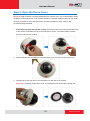
Step 2: Open the Dome Cover ................................................................ 15
Step 3: Prepare for Waterproof Installation ........................................... 17
Waterproof Solution with Naked Cable ................................................. 18
Waterproof Solution with Conduit .......................................................... 20
Step 4: Install the Camera to the Surface .............................................. 24
Step 5: Connect the Cable ...................................................................... 25
Step 6: Access the Camera Live View .................................................... 26
Step 7: Adjust the Viewing Angle ........................................................... 27
Step 8: Close the Dome Cover................................................................ 29
Other Connections................................................ 30
Connecting the DI/DO Devices (Optional) ............................................. 30
Connecting Audio In / Out Devices (Optional) ...................................... 34
2
www.acti.com