1
DCN Next Generation System Startup
i
en | 17
i
Note
The data layout is identical to the Microphone
activity logging in Synoptic Microphone control
and Microphone Management, to make
processing easier when both loggings are
routed to the same comport. The data layout is
defined as follows:
<action code><state><seatnumber><CR><LF>
where:
action code
% error
state
1 default
error code
The error code is a 4 digit hexadecimal number that indicates
which error has occurred and
can have the following values:
1701 CCU not available
3208 Unit disconnected
Examples:
%13208<CR><LF> Unit disconnected
If you are inserting a header more than 20
characters long, the text box scrolls
horizontally. To view a header longer than 20
characters, use the left and right arrow buttons
on the keyboard.
To define the number of copies:
•
Select the ‘Number of Copies’ field and type in the
required number.
i
•
Tip
The up and down arrow buttons on the righthand side of this field can be used to scroll to
the required number. The maximum number of
copies that can be printed is nine.
When you have specified all relevant print
parameters:
•
Printing error messages
If you wish to have a permanent record of all error
messages, there is a facility, which allows all error
messages to print out. You can also specify
parameters relating to the printing of the error
message. To do so:
Tip
Click on the ‘Print’ push button.
The appropriate information will be printed.
i
Note
Clicking on the ‘Cancel’ push button removes
the dialogue box without carrying out the
dialogue box function. This applies to all
‘Cancel’ options in Startup.
Click on the ‘Print’ push button.
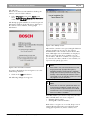
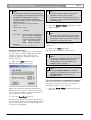
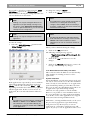
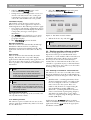
The following dialogue box appears:
i
Note
Although ‘Auto Start Config...’ is a Global
Setting, it is not dealt with in this section. The
‘Auto Start Config...’ Information is in
paragraph 3.2.4
3.1.4 Accessing System Configuration information
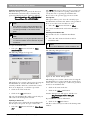
This function provides you with a list of the number
and type of every unit connected to the Central
Control Unit (CCU). To access the list:
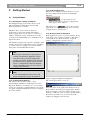
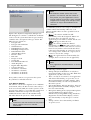
Figure 8 The ‘Print Error Messages’ dialogue box.
•
This dialogue box contains a text box for entering a
page header and a field for entering the number of
copies required. To enter a header:
•
Select the ‘Page Header’ text box.
An appropriate title for the error messages list may
be entered up to 80 characters long (although only 20
characters are displayed in the text box). This text
box may also be left blank.
Bosch Security Systems B.V. | 2005 January | 9922 141 70512
Select the ‘System Config!’ option from the main
menu bar.