1
TIMER OPERATION
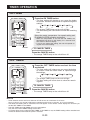
ON TIMER
1 Press the ON TIMER button.
• The orange TIMER lamp on the unit will light.
• The time setting will count down to show the remaining
time.
1
CANCEL
Select the mode, temperature, fan speed setting and
PLASMACLUSTER operation as desired.
• When the temperature is set with the ON TIMER, the
temperature will show in the display for 5 seconds and
then return to the time display.
• If you do not change the setting, the unit will operate using the most recent setting.
TO CANCEL TIMER
Press the CANCEL button.
• The orange TIMER lamp on the unit will turn off.
OFF TIMER
the OFF TIMER button and set the time
1 asPress
desired.
• The time setting will change as you press the button
as follows. Hold the button down to speed through
the settings.
0.5h 1.0h 1.5h
10h
11h 12h
• The orange TIMER lamp on the unit will light.
• The time setting will count down to show the remaining time.
TO CANCEL TIMER
the CANCEL button.
1 Press
• The orange TIMER lamp on the unit will turn off.
CANCEL
NOTES
• Timer duration can be set from a minimum of half an hour to a maximum of 12 hours.
Up to 9.5 hours, you can set in half-hour increments and from 10 to 12 hours, in 1-hour increments.
• The latest time setting will be memorized and will appear on the remote control display the next time you
set the OFF TIMER or ON TIMER.
• The OFF TIMER and ON TIMER can not be set together.
Only the most recent TIMER setting will be valid.
• If a power failure occurs while the OFF TIMER or ON TIMER is set, the TIMER setting will be cancelled and
will not be retrieved even after the power is restored.
E-20
ENGLISH
• The time setting will change as you press the button
as follows. Hold the button down to speed through the
settings.
0.5h 1.0h 1.5h
10h
11h 12h