1
Using your BTE Sound Processor 15
14 BTE Sound Processor User Guide
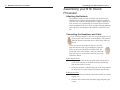
Changing the Rechargeable PowerCel
Typically, you will only change the rechargeable PowerCel when
it has depleted its charge. However, you may also wish to return
to the start-up settings of the BTE by disconnecting, waiting 5
seconds and then reconnecting the PowerCel. For example, if you
are unsure of which program you are on (listening to) or of the
settings, by removing and then reattaching the rechargeable
PowerCel, your BTE will automatically return to the first program
at a comfortable loudness level.
When you are not using your BTE, you should remove the
PowerCel. Removing the PowerCel turns off the BTE. As long as
the PowerCel is connected, the BTE continues to operate, so the
PowerCel life continues to drain.
NOTE: Make sure that you rotate usage of your PowerCels. This
will ensure optimal PowerCel life.
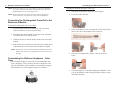
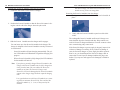
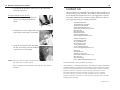
Removing the rechargeable PowerCel module:
1. Slide the PowerCel in a forward direction until it releases from
the BTE electronics module.
4. Slide the PowerCel module onto the BTE electronics module
until it engages.
WARNING:
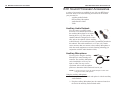
Replace with PowerCel provided by Advanced Bionics only.
Use of another PowerCel may present a risk.
CAUTION:
Do not attempt to operate your system with the PowerCels
improperly inserted as it may damage the internal components
of the processor.
NOTE TO EUROPEAN CUSTOMERS:
For proper disposal of rechargeable PowerCel modules, please return depleted PowerCel modules to the
local Advanced Bionics Corporation representative
or Advanced Bionics SARL.
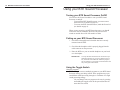
Using the Telephone
Your audiologist will indicate when you should begin to use the
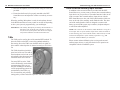
telephone with your new BTE. You can use the telephone by placing the speaker directly over the microphone located within your
BTE at the base of the earhook, over the auxiliary microphone, or
over the microphone a the end of the T-Mic accessory (See BTE
Sound Processor Accessories).
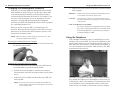
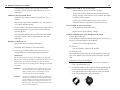
Attaching the rechargeable PowerCel module:
1. Locate the slide tracks on the underside of the BTE electronics module and the top of the PowerCel module.
2. Position the PowerCel module so the PowerCel contact is
toward the back of the BTE electronics module (see the photo
above).
3. Guide the PowerCel module into the tracks on the BTE electronics module.
NOTE: Do not force the PowerCel module onto the BTE electronics module; the PowerCel is designed to be inserted
in only one direction.
Remember, the headpiece microphone is not activated and therefore, placing the telephone over the headpiece will not assist you
in listening to a caller on the telephone. You should practice with
several telephones, some with adjustable volume, to find what
works best for you. Initially, you may want to practice using the