1
ENGLISH
ENGLISH
How to Use
To prevent electric shock, insert the plug
fully into the wall socket and do not expose
your Orbit Sound System
to rain or moisture.
4
First, carefully remove
your Orbit Sound System and
its accessories from the packaging.
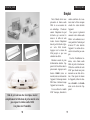
Based on the size of your
iPod® choose the docking
adaptor that best fits the size
of your model. Slip the docking adaptor into the docking
station. Your iPod® will insert
in the front of the docking
adaptor. Press it down until
you hear a clicking sound.
Then, connect the power
adaptor to the back of your
Orbit Sound System and to a
wall socket. Press the POWER
button on the back of the
unit. A blue LED light will
turn on when the unit system
is on.
If you are using the iPod®
Classic, connect the auxiliary
cable from the headphones
into the “Audio In” outlet on
the back of your Orbit Sound
System.
You can also connect your
Orbit Sound System to your
computer or laptop. Connect
your computer to your Orbit
Sound System using the PC
input port on the back of the
unit. The PC connector cable
is not included.
Once you’re finished setting up your Orbit Sound
System, you’re ready to play.
Use the controls on your
iPod® to select a song or
playlist. Press the VOLUME+
and VOLUME- buttons on the
front of the unit to adjust the
volume.
5