1
Documentation
OpenScape Voice
OpenStage 40 SIP, OpenStage 40 G SIP
OpenStage Key Module 40
User Guide
Communication for the open minded
V1 R3.x
V1 R4.x
Siemens Enterprise Communications
www.siemens-enterprise.com
Important information
Important information
Q
For safety reasons, the telephone should only be supplied
with power:
• using the original power supply unit.
Part number: L30250-F600-C14x (x: 1=EU, 2=US,
3=UK) or
• in a LAN with PoE (Power over Ethernet), which complies with the IEEE 802.3af standard.
Use only original Siemens accessories. The use of other accessories may be hazardous and will render the warranty
and the CE marking invalid.
Never open the telephone or a key module. Should you encounter any problems, contact your service personnel.
Trademarks
The device conforms to the EU directive 1999/5/EC as attested by the CE marking.
All electrical and electronic products should be disposed of
separately from the municipal waste stream via designated
collection facilities appointed by the government or the local authorities.
Proper disposal and separate collection of your old appliance will help prevent potential damage to the environment
and human health. It is a prerequisite for reuse and recycling of used electrical and electronic equipment.
For more detailed information about disposal of your old appliance, please contact your city office, waste disposal service, the shop where you purchased the product or your
sales representative.
The statements quoted above are only fully valid for equipment which is installed and sold in the countries of the European Union and is covered by the directive 2002/96/EC.
Countries outside the European Union may impose other
regulations regarding the disposal of electrical and electronic equipment.
2
Important information
Location of the telephone
•
•
•
•
•
The telephone should be operated in a controlled environment with an
ambient temperature between 5•C and 40•C.
To ensure good speakerphone quality, the area in front of the microphone (front right) should be kept clear. The optimum speakerphone
distance is 50 cm.
Do not install the telephone in a room where large quantities of dust
accumulate; this can considerably reduce the service life of the telephone.
Do not expose the telephone to direct sunlight or any other source of
heat, as this is liable to damage the electronic components and the
plastic casing.
Do not operate the telephone in damp environments such as bathrooms.
Product support on the internet
Information and support for our products can be found on the Internet at:
http://www.siemens-enterprise.com/.
Technical notes, current information about firmware updates, frequently
asked questions and lots more can be found on the Internet at:
http://wiki.siemens-enterprise.com/.
3
Contents
Important information . . . . . . . . . . . . . . . . . . . . . . . . . .2
Trademarks . . . . . . . . . . . . . . . . . . . . . . . . . . . . . . . . . . . . . . . . . . . . . . . 2
Location of the telephone . . . . . . . . . . . . . . . . . . . . . . . . . . . . . . . . . . . . 3
Product support on the internet . . . . . . . . . . . . . . . . . . . . . . . . . . . . . . . 3
General information. . . . . . . . . . . . . . . . . . . . . . . . . . .11
About this manual . . . . . . . . . . . . . . . . . . . . . . . . . . . . . . . . . . . . . . . . .
Symbols used in the manual . . . . . . . . . . . . . . . . . . . . . . . . . . . . . .
Service. . . . . . . . . . . . . . . . . . . . . . . . . . . . . . . . . . . . . . . . . . . . . . . . . .
Intended use . . . . . . . . . . . . . . . . . . . . . . . . . . . . . . . . . . . . . . . . . . . . .
Telephone type . . . . . . . . . . . . . . . . . . . . . . . . . . . . . . . . . . . . . . . . . . .
Speakerphone quality and display legibility . . . . . . . . . . . . . . . . . . . . . .
Single-line telephone/multi-line telephone. . . . . . . . . . . . . . . . . . . . . . .
11
11
12
12
12
12
13
Getting to know your OpenStage phone . . . . . . . . .14
The user interface of your OpenStage 40/40 G. . . . . . . . . . . . . . . . . . .
Ports on the underside of the phone. . . . . . . . . . . . . . . . . . . . . . . . . . .
Using network ports more efficiently . . . . . . . . . . . . . . . . . . . . . . .
Key Module . . . . . . . . . . . . . . . . . . . . . . . . . . . . . . . . . . . . . . . . . . . . . .
OpenStage Key Module. . . . . . . . . . . . . . . . . . . . . . . . . . . . . . . . . .
OpenStage Key Module 15 . . . . . . . . . . . . . . . . . . . . . . . . . . . . . . .
Keys. . . . . . . . . . . . . . . . . . . . . . . . . . . . . . . . . . . . . . . . . . . . . . . . . . . .
Function keys. . . . . . . . . . . . . . . . . . . . . . . . . . . . . . . . . . . . . . . . . .
Audio keys . . . . . . . . . . . . . . . . . . . . . . . . . . . . . . . . . . . . . . . . . . . .
Navigator . . . . . . . . . . . . . . . . . . . . . . . . . . . . . . . . . . . . . . . . . . . . .
Programmable sensor keys . . . . . . . . . . . . . . . . . . . . . . . . . . . . . . .
Trunk keys (on multi-line phones only). . . . . . . . . . . . . . . . . . . . . . .
Keypad . . . . . . . . . . . . . . . . . . . . . . . . . . . . . . . . . . . . . . . . . . . . . . .
Display . . . . . . . . . . . . . . . . . . . . . . . . . . . . . . . . . . . . . . . . . . . . . . . . . .
Idle mode. . . . . . . . . . . . . . . . . . . . . . . . . . . . . . . . . . . . . . . . . . . . .
Idle-display view and icons . . . . . . . . . . . . . . . . . . . . . . . . . . . . . . .
Context-dependent displays . . . . . . . . . . . . . . . . . . . . . . . . . . . . . .
Telephony interface . . . . . . . . . . . . . . . . . . . . . . . . . . . . . . . . . . . . . . . .
Single-line view . . . . . . . . . . . . . . . . . . . . . . . . . . . . . . . . . . . . . . . .
Multi-line view . . . . . . . . . . . . . . . . . . . . . . . . . . . . . . . . . . . . . . . . .
Phonebooks. . . . . . . . . . . . . . . . . . . . . . . . . . . . . . . . . . . . . . . . . . . . . .
Personal phonebook . . . . . . . . . . . . . . . . . . . . . . . . . . . . . . . . . . . .
LDAP directory. . . . . . . . . . . . . . . . . . . . . . . . . . . . . . . . . . . . . . . . .
Messages . . . . . . . . . . . . . . . . . . . . . . . . . . . . . . . . . . . . . . . . . . . . . . .
Voicemail . . . . . . . . . . . . . . . . . . . . . . . . . . . . . . . . . . . . . . . . . . . . .
Calls . . . . . . . . . . . . . . . . . . . . . . . . . . . . . . . . . . . . . . . . . . . . . . . . .
4
14
15
16
17
17
18
19
19
19
20
21
22
24
26
26
26
27
29
29
30
32
32
33
34
34
35
Telephone menu . . . . . . . . . . . . . . . . . . . . . . . . . . . . . . . . . . . . . . . . . .
Program/Service menu . . . . . . . . . . . . . . . . . . . . . . . . . . . . . . . . . .
User settings . . . . . . . . . . . . . . . . . . . . . . . . . . . . . . . . . . . . . . . . . .
Administration . . . . . . . . . . . . . . . . . . . . . . . . . . . . . . . . . . . . . . . . .
Control and monitoring function . . . . . . . . . . . . . . . . . . . . . . . . . . . . . .
Contributing to environmental protection by saving energy . . . . . . . . .
37
37
37
38
38
39
Basic functions . . . . . . . . . . . . . . . . . . . . . . . . . . . . . . 40
Secure voice transmission. . . . . . . . . . . . . . . . . . . . . . . . . . . . . . . . . . .
Answering a call . . . . . . . . . . . . . . . . . . . . . . . . . . . . . . . . . . . . . . . . . .
Answering a call via the handset . . . . . . . . . . . . . . . . . . . . . . . . . . .
Answering a call via the loudspeaker (speakerphone mode) . . . . . .
Answering a call via the headset . . . . . . . . . . . . . . . . . . . . . . . . . . .
Directed pickup . . . . . . . . . . . . . . . . . . . . . . . . . . . . . . . . . . . . . . . . . . .
Accept call . . . . . . . . . . . . . . . . . . . . . . . . . . . . . . . . . . . . . . . . . . . .
Picking up the held call . . . . . . . . . . . . . . . . . . . . . . . . . . . . . . . . . .
Switching from handset to speakerphone mode . . . . . . . . . . . . . . . . .
Switching from speakerphone mode to the handset . . . . . . . . . . . . . .
Switching from headset to speakerphone mode . . . . . . . . . . . . . . . . .
In standard mode. . . . . . . . . . . . . . . . . . . . . . . . . . . . . . . . . . . . . . .
In U.S. mode . . . . . . . . . . . . . . . . . . . . . . . . . . . . . . . . . . . . . . . . . .
Open listening . . . . . . . . . . . . . . . . . . . . . . . . . . . . . . . . . . . . . . . . . . . .
Activating/deactivating the microphone . . . . . . . . . . . . . . . . . . . . . . . .
Ending a call. . . . . . . . . . . . . . . . . . . . . . . . . . . . . . . . . . . . . . . . . . . . . .
Group call. . . . . . . . . . . . . . . . . . . . . . . . . . . . . . . . . . . . . . . . . . . . . . . .
Making calls. . . . . . . . . . . . . . . . . . . . . . . . . . . . . . . . . . . . . . . . . . . . . .
Off-hook dialing . . . . . . . . . . . . . . . . . . . . . . . . . . . . . . . . . . . . . . . .
On-hook dialing . . . . . . . . . . . . . . . . . . . . . . . . . . . . . . . . . . . . . . . .
Immediate dialing. . . . . . . . . . . . . . . . . . . . . . . . . . . . . . . . . . . . . . .
Dialing using the hot or warm line function . . . . . . . . . . . . . . . . . . .
Redial. . . . . . . . . . . . . . . . . . . . . . . . . . . . . . . . . . . . . . . . . . . . . . . . . . .
Consulting a second party . . . . . . . . . . . . . . . . . . . . . . . . . . . . . . . . . . .
Switching to the held party (alternating) . . . . . . . . . . . . . . . . . . . . .
Putting on hold and retrieving successively or simultaneously . . . .
Connecting parties . . . . . . . . . . . . . . . . . . . . . . . . . . . . . . . . . . . . . .
Call forwarding. . . . . . . . . . . . . . . . . . . . . . . . . . . . . . . . . . . . . . . . . . . .
Programming call forwarding . . . . . . . . . . . . . . . . . . . . . . . . . . . . . .
Activating/deactivating call forwarding. . . . . . . . . . . . . . . . . . . . . . .
Activating call forwarding for all calls . . . . . . . . . . . . . . . . . . . . . . . .
Call forwarding chain . . . . . . . . . . . . . . . . . . . . . . . . . . . . . . . . . . . .
Callback . . . . . . . . . . . . . . . . . . . . . . . . . . . . . . . . . . . . . . . . . . . . . . . . .
Requesting callback . . . . . . . . . . . . . . . . . . . . . . . . . . . . . . . . . . . . .
Responding to a callback . . . . . . . . . . . . . . . . . . . . . . . . . . . . . . . . .
Permitting callback on busy/no reply . . . . . . . . . . . . . . . . . . . . . . . .
Calling back missed calls . . . . . . . . . . . . . . . . . . . . . . . . . . . . . . . . . . . .
40
40
41
41
42
43
43
44
45
45
46
46
46
46
47
47
48
51
51
52
53
54
55
56
57
58
59
60
61
63
64
65
66
66
67
68
69
5
Programmable sensor keys . . . . . . . . . . . . . . . . . . . .70
List of available functions . . . . . . . . . . . . . . . . . . . . . . . . . . . . . . . . . . .
Programming sensor keys. . . . . . . . . . . . . . . . . . . . . . . . . . . . . . . . . . .
Beginning programming . . . . . . . . . . . . . . . . . . . . . . . . . . . . . . . . .
Beginning programming . . . . . . . . . . . . . . . . . . . . . . . . . . . . . . . . .
Programming enhanced functions. . . . . . . . . . . . . . . . . . . . . . . . . . . . .
Repertory dial. . . . . . . . . . . . . . . . . . . . . . . . . . . . . . . . . . . . . . . . . .
Feature toggle . . . . . . . . . . . . . . . . . . . . . . . . . . . . . . . . . . . . . . . . .
Forwarding. . . . . . . . . . . . . . . . . . . . . . . . . . . . . . . . . . . . . . . . . . . .
Using sensor keys . . . . . . . . . . . . . . . . . . . . . . . . . . . . . . . . . . . . . . . . .
Example 1: Calling saved number . . . . . . . . . . . . . . . . . . . . . . . . . .
Example 2: Call Waiting toggle Activating/deactivating . . . . . . . . . .
Example 3: Immediate ring . . . . . . . . . . . . . . . . . . . . . . . . . . . . . . .
Resetting sensor keys . . . . . . . . . . . . . . . . . . . . . . . . . . . . . . . . . . . . . .
70
71
71
72
72
72
74
75
76
76
76
76
77
Enhanced phone functions. . . . . . . . . . . . . . . . . . . . .78
Incoming calls . . . . . . . . . . . . . . . . . . . . . . . . . . . . . . . . . . . . . . . . . . . . 78
Accepting calls via the headset . . . . . . . . . . . . . . . . . . . . . . . . . . . . 78
Deflecting a call . . . . . . . . . . . . . . . . . . . . . . . . . . . . . . . . . . . . . . . . 78
Rejecting a call . . . . . . . . . . . . . . . . . . . . . . . . . . . . . . . . . . . . . . . . . 80
Configuring call forwarding . . . . . . . . . . . . . . . . . . . . . . . . . . . . . . . 80
Placing a call on hold . . . . . . . . . . . . . . . . . . . . . . . . . . . . . . . . . . . . 82
Call waiting (second call) . . . . . . . . . . . . . . . . . . . . . . . . . . . . . . . . . 86
Transferring a call. . . . . . . . . . . . . . . . . . . . . . . . . . . . . . . . . . . . . . . 90
CTI calls . . . . . . . . . . . . . . . . . . . . . . . . . . . . . . . . . . . . . . . . . . . . . . 93
Making calls. . . . . . . . . . . . . . . . . . . . . . . . . . . . . . . . . . . . . . . . . . . . . . 95
Dialing with the DDS key . . . . . . . . . . . . . . . . . . . . . . . . . . . . . . . . . 95
Dialing from the local phonebook . . . . . . . . . . . . . . . . . . . . . . . . . . 95
Dialing from the LDAP database . . . . . . . . . . . . . . . . . . . . . . . . . . . 95
Dialing a phone number from a list . . . . . . . . . . . . . . . . . . . . . . . . . 96
Using autodial delay. . . . . . . . . . . . . . . . . . . . . . . . . . . . . . . . . . . . . 97
Conference . . . . . . . . . . . . . . . . . . . . . . . . . . . . . . . . . . . . . . . . . . . . . 100
Local conference . . . . . . . . . . . . . . . . . . . . . . . . . . . . . . . . . . . . . . 100
System-based conference . . . . . . . . . . . . . . . . . . . . . . . . . . . . . . . 103
Phonebooks and call lists . . . . . . . . . . . . . . . . . . . .105
Local phonebook . . . . . . . . . . . . . . . . . . . . . . . . . . . . . . . . . . . . . . . . .
Creating a new contact . . . . . . . . . . . . . . . . . . . . . . . . . . . . . . . . .
Editing a contact . . . . . . . . . . . . . . . . . . . . . . . . . . . . . . . . . . . . . .
Deleting a contact . . . . . . . . . . . . . . . . . . . . . . . . . . . . . . . . . . . . .
Deleting all contacts. . . . . . . . . . . . . . . . . . . . . . . . . . . . . . . . . . . .
Searching for a contact . . . . . . . . . . . . . . . . . . . . . . . . . . . . . . . . .
6
105
105
105
106
106
107
LDAP database . . . . . . . . . . . . . . . . . . . . . . . . . . . . . . . . . . . . . . . . . .
Finding an LDAP entry . . . . . . . . . . . . . . . . . . . . . . . . . . . . . . . . . .
Extended LDAP editing . . . . . . . . . . . . . . . . . . . . . . . . . . . . . . . . .
Quick search . . . . . . . . . . . . . . . . . . . . . . . . . . . . . . . . . . . . . . . . .
Call lists . . . . . . . . . . . . . . . . . . . . . . . . . . . . . . . . . . . . . . . . . . . . . . . .
Editing entries . . . . . . . . . . . . . . . . . . . . . . . . . . . . . . . . . . . . . . . .
Delete all entries . . . . . . . . . . . . . . . . . . . . . . . . . . . . . . . . . . . . . .
108
108
109
110
111
111
111
Making calls with multiple lines . . . . . . . . . . . . . . 112
Incoming calls . . . . . . . . . . . . . . . . . . . . . . . . . . . . . . . . . . . . . . . . . . .
Accepting calls for the primary line . . . . . . . . . . . . . . . . . . . . . . . .
Accepting calls for secondary lines . . . . . . . . . . . . . . . . . . . . . . . .
Making calls. . . . . . . . . . . . . . . . . . . . . . . . . . . . . . . . . . . . . . . . . . . . .
Manual trunk seizure . . . . . . . . . . . . . . . . . . . . . . . . . . . . . . . . . . .
Automatic trunk seizure . . . . . . . . . . . . . . . . . . . . . . . . . . . . . . . . .
Dialing the last dialed number . . . . . . . . . . . . . . . . . . . . . . . . . . . .
Forwarding calls on primary line . . . . . . . . . . . . . . . . . . . . . . . . . .
During calls . . . . . . . . . . . . . . . . . . . . . . . . . . . . . . . . . . . . . . . . . . . . .
Making and receiving calls on a single line . . . . . . . . . . . . . . . . . .
Making and receiving calls with multiple lines . . . . . . . . . . . . . . . .
Putting a line on hold . . . . . . . . . . . . . . . . . . . . . . . . . . . . . . . . . . .
Lines with hot or warm line function . . . . . . . . . . . . . . . . . . . . . . .
Busy override. . . . . . . . . . . . . . . . . . . . . . . . . . . . . . . . . . . . . . . . .
Direct station selection keys . . . . . . . . . . . . . . . . . . . . . . . . . . . . . . . .
Calling a station directly . . . . . . . . . . . . . . . . . . . . . . . . . . . . . . . . .
Call pickup . . . . . . . . . . . . . . . . . . . . . . . . . . . . . . . . . . . . . . . . . . .
Deflecting a call to a DSS station . . . . . . . . . . . . . . . . . . . . . . . . .
LED display on DSS keys. . . . . . . . . . . . . . . . . . . . . . . . . . . . . . . .
Making calls in an executive-secretary team . . . . . . . . . . . . . . . . . . . .
Sample scenarios. . . . . . . . . . . . . . . . . . . . . . . . . . . . . . . . . . . . . .
Accepting a call . . . . . . . . . . . . . . . . . . . . . . . . . . . . . . . . . . . . . . .
Connecting a call . . . . . . . . . . . . . . . . . . . . . . . . . . . . . . . . . . . . . .
DSS keys can be used . . . . . . . . . . . . . . . . . . . . . . . . . . . . . . . . . .
Using line overview . . . . . . . . . . . . . . . . . . . . . . . . . . . . . . . . . . . .
Settings for MultiLine (keyset) . . . . . . . . . . . . . . . . . . . . . . . . . . . . . .
Displaying the line in the "Overview" tab . . . . . . . . . . . . . . . . . . . .
Setting the time for a delayed ringer . . . . . . . . . . . . . . . . . . . . . . .
Configuring the "Overview" tab display . . . . . . . . . . . . . . . . . . . . .
Line preview . . . . . . . . . . . . . . . . . . . . . . . . . . . . . . . . . . . . . . . . .
Rollover for a line . . . . . . . . . . . . . . . . . . . . . . . . . . . . . . . . . . . . . .
112
112
112
113
113
114
114
114
115
115
115
116
117
118
119
119
120
121
121
122
122
124
125
127
127
128
128
129
130
131
132
7
Privacy/security . . . . . . . . . . . . . . . . . . . . . . . . . . . . .133
Deactivating the ringer . . . . . . . . . . . . . . . . . . . . . . . . . . . . . . . . . . . .
Do not disturb . . . . . . . . . . . . . . . . . . . . . . . . . . . . . . . . . . . . . . . . . . .
Enabling do not disturb via a key . . . . . . . . . . . . . . . . . . . . . . . . . .
Enabling do not disturb via the idle menu . . . . . . . . . . . . . . . . . . .
Allowing "Do not disturb" . . . . . . . . . . . . . . . . . . . . . . . . . . . . . . . .
Security . . . . . . . . . . . . . . . . . . . . . . . . . . . . . . . . . . . . . . . . . . . . . . . .
User password. . . . . . . . . . . . . . . . . . . . . . . . . . . . . . . . . . . . . . . .
Phone locking . . . . . . . . . . . . . . . . . . . . . . . . . . . . . . . . . . . . . . . .
133
134
134
134
135
136
136
138
Mobility . . . . . . . . . . . . . . . . . . . . . . . . . . . . . . . . . . . .140
Mobility scenarios . . . . . . . . . . . . . . . . . . . . . . . . . . . . . . . . . . . . . . . .
Logging on and off at the same phone . . . . . . . . . . . . . . . . . . . . .
Logging on and off at different phones . . . . . . . . . . . . . . . . . . . . .
Logging on and off at the same phone . . . . . . . . . . . . . . . . . . . . . . . .
Logging on to the phone . . . . . . . . . . . . . . . . . . . . . . . . . . . . . . . .
Logging off from the phone . . . . . . . . . . . . . . . . . . . . . . . . . . . . . .
Logging on at different telephones . . . . . . . . . . . . . . . . . . . . . . . . . . .
Logging on with forced logoff at a remote phone . . . . . . . . . . . . .
Logging on with forced, delayed logoff at a remote phone . . . . . .
140
140
140
141
141
142
143
143
144
OpenScape Voice functions. . . . . . . . . . . . . . . . . . .145
Feature toggle key. . . . . . . . . . . . . . . . . . . . . . . . . . . . . . . . . . . . . . . .
Making anonymous calls . . . . . . . . . . . . . . . . . . . . . . . . . . . . . . . . . . .
Deactivating . . . . . . . . . . . . . . . . . . . . . . . . . . . . . . . . . . . . . . . . . .
Activating . . . . . . . . . . . . . . . . . . . . . . . . . . . . . . . . . . . . . . . . . . . .
Temporarily activating anonymous calling for the next call . . . . . .
Temporarily deactivating anonymous calling for the next call . . . .
Creating a list for selective calls . . . . . . . . . . . . . . . . . . . . . . . . . . . . .
For call acceptance . . . . . . . . . . . . . . . . . . . . . . . . . . . . . . . . . . . .
For call rejection. . . . . . . . . . . . . . . . . . . . . . . . . . . . . . . . . . . . . . .
Anonymous calls . . . . . . . . . . . . . . . . . . . . . . . . . . . . . . . . . . . . . . . . .
Rejecting . . . . . . . . . . . . . . . . . . . . . . . . . . . . . . . . . . . . . . . . . . . .
Accepting. . . . . . . . . . . . . . . . . . . . . . . . . . . . . . . . . . . . . . . . . . . .
Using abbreviated dialing . . . . . . . . . . . . . . . . . . . . . . . . . . . . . . . . . .
Call tracing . . . . . . . . . . . . . . . . . . . . . . . . . . . . . . . . . . . . . . . . . . . . . .
Hunt group functions. . . . . . . . . . . . . . . . . . . . . . . . . . . . . . . . . . . . . .
Making a line busy . . . . . . . . . . . . . . . . . . . . . . . . . . . . . . . . . . . . .
Marking the last line in the hunt group chain. . . . . . . . . . . . . . . . .
Reachability . . . . . . . . . . . . . . . . . . . . . . . . . . . . . . . . . . . . . . . . . . . . .
Serial call . . . . . . . . . . . . . . . . . . . . . . . . . . . . . . . . . . . . . . . . . . . .
Parallel call . . . . . . . . . . . . . . . . . . . . . . . . . . . . . . . . . . . . . . . . . . .
Parking a call . . . . . . . . . . . . . . . . . . . . . . . . . . . . . . . . . . . . . . . . . . . .
Call park . . . . . . . . . . . . . . . . . . . . . . . . . . . . . . . . . . . . . . . . . . . . .
Unparking. . . . . . . . . . . . . . . . . . . . . . . . . . . . . . . . . . . . . . . . . . . .
8
145
146
146
146
147
147
148
148
149
150
150
150
151
151
152
152
153
154
154
155
157
157
157
Silent Monitoring . . . . . . . . . . . . . . . . . . . . . . . . . . . . . . . . . . . . . . . . .
Active silent monitoring . . . . . . . . . . . . . . . . . . . . . . . . . . . . . . . . .
Muted silent monitoring. . . . . . . . . . . . . . . . . . . . . . . . . . . . . . . . .
Code table for OpenScape Voice functions. . . . . . . . . . . . . . . . . . . . .
158
158
159
160
Individual phone configuration . . . . . . . . . . . . . . . 161
Display . . . . . . . . . . . . . . . . . . . . . . . . . . . . . . . . . . . . . . . . . . . . . . . . .
Adjusting the display to a comfortable reading angle . . . . . . . . . .
Setting contrast . . . . . . . . . . . . . . . . . . . . . . . . . . . . . . . . . . . . . . .
Adjusting the brightness . . . . . . . . . . . . . . . . . . . . . . . . . . . . . . . .
Background lighting . . . . . . . . . . . . . . . . . . . . . . . . . . . . . . . . . . . .
Contrast for the OpenStage Key Module. . . . . . . . . . . . . . . . . . . .
Date and time . . . . . . . . . . . . . . . . . . . . . . . . . . . . . . . . . . . . . . . . . . .
Setting the time . . . . . . . . . . . . . . . . . . . . . . . . . . . . . . . . . . . . . . .
Setting the date . . . . . . . . . . . . . . . . . . . . . . . . . . . . . . . . . . . . . . .
Setting daylight saving time. . . . . . . . . . . . . . . . . . . . . . . . . . . . . .
Automatic daylight saving time . . . . . . . . . . . . . . . . . . . . . . . . . . .
Time display format . . . . . . . . . . . . . . . . . . . . . . . . . . . . . . . . . . . .
Date display format . . . . . . . . . . . . . . . . . . . . . . . . . . . . . . . . . . . .
Audio . . . . . . . . . . . . . . . . . . . . . . . . . . . . . . . . . . . . . . . . . . . . . . . . . .
Volumes . . . . . . . . . . . . . . . . . . . . . . . . . . . . . . . . . . . . . . . . . . . . .
Settings . . . . . . . . . . . . . . . . . . . . . . . . . . . . . . . . . . . . . . . . . . . . .
Tone and indication with an unsecured voice connection . . . . . . .
Key click. . . . . . . . . . . . . . . . . . . . . . . . . . . . . . . . . . . . . . . . . . . . . . . .
Setting the language and country . . . . . . . . . . . . . . . . . . . . . . . . . . . .
Selecting a language . . . . . . . . . . . . . . . . . . . . . . . . . . . . . . . . . . .
Country-specific setting . . . . . . . . . . . . . . . . . . . . . . . . . . . . . . . . .
Context menu . . . . . . . . . . . . . . . . . . . . . . . . . . . . . . . . . . . . . . . . . . .
Activating/deactivating automatic menu display . . . . . . . . . . . . . .
Setting the display time . . . . . . . . . . . . . . . . . . . . . . . . . . . . . . . . .
Network information . . . . . . . . . . . . . . . . . . . . . . . . . . . . . . . . . . . . . .
Resetting user data . . . . . . . . . . . . . . . . . . . . . . . . . . . . . . . . . . . . . . .
Initiating the reset . . . . . . . . . . . . . . . . . . . . . . . . . . . . . . . . . . . . .
161
161
161
162
163
164
165
165
165
166
167
168
168
169
169
170
175
176
177
177
179
181
181
181
182
183
183
Call recording. . . . . . . . . . . . . . . . . . . . . . . . . . . . . . . 184
Call recording modes . . . . . . . . . . . . . . . . . . . . . . . . . . . . . . . . . . .
Explanations of recording . . . . . . . . . . . . . . . . . . . . . . . . . . . . . . . . . .
Recordable calls . . . . . . . . . . . . . . . . . . . . . . . . . . . . . . . . . . . . . . .
Non-recordable calls . . . . . . . . . . . . . . . . . . . . . . . . . . . . . . . . . . .
Enhanced functions: . . . . . . . . . . . . . . . . . . . . . . . . . . . . . . . . . . .
184
185
185
185
186
9
The following features are not supported:. . . . . . . . . . . . . . . . . . .
Recording tips . . . . . . . . . . . . . . . . . . . . . . . . . . . . . . . . . . . . . . . .
Multiline . . . . . . . . . . . . . . . . . . . . . . . . . . . . . . . . . . . . . . . . . . . . .
Recording calls . . . . . . . . . . . . . . . . . . . . . . . . . . . . . . . . . . . . . . . . . .
Using the call recording feature . . . . . . . . . . . . . . . . . . . . . . . . . . .
Automatic call recording . . . . . . . . . . . . . . . . . . . . . . . . . . . . . . . .
Manual call recording . . . . . . . . . . . . . . . . . . . . . . . . . . . . . . . . . . .
Call recording with AutoStart . . . . . . . . . . . . . . . . . . . . . . . . . . . . .
Controlling call recording . . . . . . . . . . . . . . . . . . . . . . . . . . . . . . . .
Consultation during call recording . . . . . . . . . . . . . . . . . . . . . . . . .
Second call during call recording . . . . . . . . . . . . . . . . . . . . . . . . . .
Call recording while alternating . . . . . . . . . . . . . . . . . . . . . . . . . . .
Your call is paused and reconnected during the recording. . . . . . .
Setting up a conference during recording . . . . . . . . . . . . . . . . . . .
Adding conference participants during the recording . . . . . . . . . .
Your call is included in a conference during the recording. . . . . . .
Putting a line on hold manually during the recording . . . . . . . . . . .
186
186
186
187
187
187
188
188
189
189
190
191
191
192
192
193
193
Web interface (WBM) . . . . . . . . . . . . . . . . . . . . . . . .195
General . . . . . . . . . . . . . . . . . . . . . . . . . . . . . . . . . . . . . . . . . . . . . . . .
Calling up the Web interface . . . . . . . . . . . . . . . . . . . . . . . . . . . . . . . .
Administrator Pages . . . . . . . . . . . . . . . . . . . . . . . . . . . . . . . . . . .
User pages. . . . . . . . . . . . . . . . . . . . . . . . . . . . . . . . . . . . . . . . . . .
User menu . . . . . . . . . . . . . . . . . . . . . . . . . . . . . . . . . . . . . . . . . . .
195
195
195
196
197
Fixing problems . . . . . . . . . . . . . . . . . . . . . . . . . . . . .201
Caring for your telephone . . . . . . . . . . . . . . . . . . . . . . . . . . . . . . . . . .
Troubleshooting. . . . . . . . . . . . . . . . . . . . . . . . . . . . . . . . . . . . . . . . . .
Contact partner in the case of problems . . . . . . . . . . . . . . . . . . . . . . .
Labeling keys. . . . . . . . . . . . . . . . . . . . . . . . . . . . . . . . . . . . . . . . . . . .
201
201
202
202
Local user menu . . . . . . . . . . . . . . . . . . . . . . . . . . . .203
Opening the user menu on the phone . . . . . . . . . . . . . . . . . . . . . . . . 203
User menu display. . . . . . . . . . . . . . . . . . . . . . . . . . . . . . . . . . . . . . . . 203
Key functions . . . . . . . . . . . . . . . . . . . . . . . . . . . . . . . . . . . . . . . . . 211
Index. . . . . . . . . . . . . . . . . . . . . . . . . . . . . . . . . . . . . . .213
10
General information
General information
About this manual
This document contains general descriptions of the technical options,
which may not always be available in individual cases. The respective features must therefore be individually defined in the terms of the contract.
If a particular function on your phone is not available to you, this may be
due to one of the following reasons:
• The function is not configured for you or your telephone. Please contact your system support representative.
• Your communications platform does not feature this function. Please
contact your Siemens sales partner for information on how to upgrade.
This user guide is intended to help you familiarize yourself with OpenStage
and all of its functions. It contains important information on the safe and
proper operation of your OpenStage phone. These instructions should be
strictly complied with to avoid operating errors and ensure optimum use of
your multifunctional telephone in the network.
These instructions should be read and followed by every person installing,
operating or programming an OpenStage phone.
For your own protection, please read the section dealing with safety
in detail. Follow the safety instructions carefully in order to avoid endangering yourself or other persons and to prevent damage to the
unit.
This user guide is designed to be simple and easy to understand, providing
clear step-by-step instructions for operating your OpenStage phone.
Administrative tasks are dealt with in a separate manual. The Quick Reference Guide contains quick and reliable explanations of frequently used
functions.
Symbols used in the manual
Settings
Operations and settings that can be made both at the phone and over the
Web interface are indicated by an icon and page reference.
V
z
is a reference to an operation or setting performed directly on the
phone
is a reference to an operation or setting performed via the Web interface
11
General information
Call recording
.
~
/
@
Switch on recorder (standby mode)
Switch off recorder
Start recording
Stop recording
Service
The Siemens service department can only help you if you experience problems or defects with the phone.
Should you have any questions regarding operation, your specialist
retailer or network administrator will gladly help you.
For queries regarding connection of the telephone, please contact
your network provider.
If you experience problems or defects with the phone, please dial the service number for your country.
Intended use
The OpenStage phone is a desktop unit designed for voice transmission
and for connection to the LAN. It can also be used as a workstation device.
Any other use is regarded as unauthorized.
Telephone type
The phone name data can be found on the name plate on the base of the
device; The exact product name and serial number are specified here. Specific details concerning your communications platform can be obtained
from your service technician.
Please have this information ready when you contact our service department regarding faults or problems with the product.
Speakerphone quality and display legibility
•
•
12
To ensure good speakerphone quality, the area in front of the telephone
(front right) should be kept clear).
The optimum handsfree distance is 20 in. (50 cm).
Proceed as follows to optimize display legibility:
– Turn the phone to tilt the display. This ensures you have a frontal view
of the display while eliminating light reflexes.
– Adjust the contrast as required Æ page 161.
General information
Single-line telephone/multi-line telephone
Your OpenStage 40 is a "multi-line telephone". This means that multiple
lines can be configured, which is not the case with single-line phones.
Each line is assigned an individual phone number which you can use to
make and receive calls.
The programmable sensor keys function as line keys on multi-line phones
Æ page 22.
The "Overview" tab on the telephony interface provides information about
the lines configured on your phone and the current status of each line
Æ page 30.
A number of specific features must be considered when using a multi-line
phone to make and receive calls Æ page 112.
13
Getting to know your OpenStage phone
Getting to know your OpenStage phone
The following sections describe the most frequently used operating elements and the displays on your OpenStage phone.
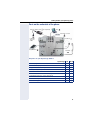
The user interface of your OpenStage 40/40 G
8
2
3
4
5
6
7
1
14
1
You can make and receive calls as normal using the handset.
2
The graphic display permits intuitive operation of the phone
Æ page 26.
3
You can customize your telephone by assigning phone numbers and
functions to the programmable sensor keys Æ page 26.
4
You can use function keys when conducting a call to access frequently used functions (such as, Disconnect) or to open the Program/Service menu and mailbox Æ page 19.
5
Audio keys are also available, allowing you to optimally configure
the audio features on your telephone Æ page 19.
6
The 5-way navigator is a convenient navigation tool Æ page 20.
7
The keypad can be used to enter phone numbers and text
Æ page 24.
8
Incoming calls are visually signaled via the call display.
Getting to know your OpenStage phone
Ports on the underside of the phone
Power supply unit
(if required)
PC
Network switch
Countryspecific
cable
Headset
Key Module
Handset
Properties of your OpenStage 40/40 G
OpenStage
LCD display, 40 x 6 characters
Illuminated display
Programmable sensor keys
Full-duplex speakerphone function
Headset
10/100 Mbps Ethernet switch Æ page 16
1000 Mbps Ethernet switch Æ page 16
Interface for key modules
Wall mounting
40
;
;
6
;
;
;
-
;
;
40 G
;
;
6
;
;
-
;
;
;
15
Getting to know your OpenStage phone
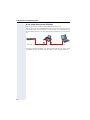
Using network ports more efficiently
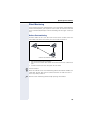
OpenStage 40 has a built-in 10/100 Mbps Ethernet switch.
OpenStage 40 G has a 1000 Mbps Ethernet switch. This means that you
can connect a PC to the LAN directly via the phone. The telephone-PC connection option must first be activated on the telephone by service personnel.
Network switch
OpenStage 40/40 G
PC
Using this connection option saves one network port for each switch used
and requires fewer or shorter network cables when arranged correctly.
16
Getting to know your OpenStage phone
Key Module
OpenStage Key Module
The OpenStage Key Module is a key module attached to the side of the
phone that provides 12 additional illuminated, programmable keys.
Like keys on the phone, these keys can be programmed and used according to your needs Æ page 21.
You can attach up to two OpenStage Key Modules to your OpenStage 40.
To operate an OpenStage Key Module, you always require a power
supply unit Æ page 2.
17
Getting to know your OpenStage phone
OpenStage Key Module 15
The OpenStage Key Module 15 is a key module attached to the side of the
phone that provides an additional 18 illuminated, programmable sensor
keys.
Like keys on the phone, these keys can be programmed and used according to your needs. Labeling keys see Æ page 202.
You can only attach one OpenStage Key Module 15 to your OpenStage 40.
You cannot combine the OpenStage Key Module 15 with the
OpenStage Key Module.
18
Getting to know your OpenStage phone
Keys
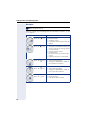
Function keys
Key Function when key is pressed LED display
s End (disconnect) call.
, Open redial list
none
none
r Activate/deactivate forwarding Red: Call forwarding is activated
N Open phone menu Æ page 37 Red: Menu is active
O View messages Æ page 34
Red: New voicemail or missed calls
Audio keys
Key Function when key is pressed
p Activate/deactivate microphone (also for speakerphone mode)
o Activate/deactivate the headset.
- Decrease the ring, handset, and loudspeaker volume.
loudspeaker for speakerphone mode and open
n Activate/deactivate
listening
+ Increase the ring, handset, and loudspeaker volume.
19
Getting to know your OpenStage phone
Navigator
Before using the telephone, remove the protective covering from
the navigator surface.
With this control, you can manage most of your phone’s functions, as well
as its displays.
Operation
Functions when key is pressed
Press the c key.
•
•
•
•
Call up the context menu
Perform action
Go down a level
Call up the context menu in the idle
display
Press the a key.
•
•
Short press: One level back
Long press (held down): Go back to
the first level of the settings menu
Cancel function
Quit the context menu
In input fields:
Delete character to the left of the
cursor
Open line overview in idle mode
•
•
•
•
20
Press the d key.
•
•
•
Scroll downwards
Select element below
Long press (held down): Jump to
the end of the list/menu
Press the b key.
•
•
•
Scroll upwards
Select element above
Long press (held down): Jump to
the start of the list/menu
Press the i key.
•
•
•
Confirm input
Perform action
Call up the context menu
Getting to know your OpenStage phone
Programmable sensor keys
Your OpenStage 40 telephone features six programmable lit sensor keys.
Increase the number of programmable sensor keys by connecting a
key module Æ page 17.
Mirea, Ch.
Level 2
Touch the key briefly to activate the programmed function or dial the stored
number Æ page 76.
If you hold the key pressed, you are prompted as to whether to start programming this function key.
If the prompt is not displayed or a programmed function is not executed, then you can only launch key programming via the user menu
Æ page 71 (ask your service personnel about the current setting).
Only for repdial keys can you also program the second level for direct destination selection.
You can label these keys with internal and external phone numbers or frequently used functions (platform-dependent; please contact the responsible service personnel).
The configured phone number or function name is displayed next to the
key.
The status of a function is shown by the LED on the corresponding sensor
key.
Line and DDS keys can only be programmed by service personnel
via the service menu.
Meaning of LED displays on function keys
LED
Meaning of function key
S Off
The function is deactivated.
R On
The function is activated.
T Flashing1 Indicates the function status.
[1] In this manual, flashing sensor keys are identified by this icon, regardless of the flashing interval. The flashing interval represents different statuses, which are described in detail in
the corresponding sections of the manual.
21
Getting to know your OpenStage phone
Trunk keys (on multi-line phones only)
The programmable sensor keys on multi-line phones function as trunk
keys. Each key programmed with the "Line" function is handled as a line.
This means up to five lines can be configured.
A distinction is drawn here between primary, secondary and phantom
lines. Each of these line types can be used on a private or shared basis
Æ page 22.
Primary line
All multi-line telephones have a primary line. This line can be reached in the
usual manner via your public phone number. Incoming calls are signaled on
this line.
To avoid conflict between individual multi-line phones, the functions
"Do not disturb" and "Call forwarding" can only be used for the primary line.
Secondary line
The secondary line on your phone is used as a primary line by another subscriber of the line trunk group. Your primary line, which is configured on another telephone in the line trunk group, simultaneously functions as the
secondary line on that telephone.
Phantom line
Phantom lines are not used as primary lines by any telephones in the line
trunk group. Phantom lines are established when the number of lines provided by a communications system exceeds the number of available
telephones.
Line utilization
• Private line: A line that is used by a single telephone. This line cannot
be used as a secondary line by another telephone.
• Shared line: A line that is configured on multiple telephones. The line
status (if configured) is displayed in the "Overview" tab for all telephones that share this line. If, for example, a shared line is being used
by a telephone, a status message indicating that this line is busy is displayed on all other telephones.
• Direct call line: A line with a direct connection to another telephone.
The line status is indicated by the LED in addition to the display in the
"Overview" tab Æ page 30.
22
Getting to know your OpenStage phone
LED display
LED
Explanation
S Not lit
The phone is in idle mode.
Flashing
T Flickering
•
•
Incoming call on the line (Æ page 112)
"Hold reminder" is activated (Æ page 83)
•
•
Outgoing call on the line
The incoming call was prioritized and selected in accordance with the "Automatic line selection for incoming calls" option
Fast blinking The line is on "Hold"
Blinking
R Illuminated
Call forwarding is activated
The line is busy
23
Getting to know your OpenStage phone
Keypad
You can only use the digits 1 to 9 and 0 as well as the * and # characters
when dialing a number. The h navigation key is used to delete from right
to left.
In cases where text input is possible, you can use the keypad to input text,
punctuation and special characters in addition to the digits 0 to 9 and the
hash and asterisk symbols. To do this, press the numerical keys repeatedly.
Example: To enter the letter "h", press the number 4 key on the keypad
twice. When entering the text, all available characters for this key are displayed. After a short while, the character in focus is displayed in the input
field.
To speed up the input, you can confirm your entry by pressing "g"
on the navigator after you have selected the required character.
To enter a digit in an alphanumerical input field, press the relevant
key and hold it down. You no longer need to scroll through the entire
list of possible characters.
Character overview (depends on the current language setting)
Key
1x
2x
1
]
1
a
b
c
2
d
e
f
3
g
h
i
4
j
k
l
5
6 m
n
o
6
ö
p
q
r
s
7
t
u
v
8
ü
9 w
x
y
z
9
2
3
4
5
7
8
0
(
3x
4x 5x 6x
ä
ß
0
[1]
[2]
[1] Next letter in upper case (active for maximum one second)
[2] Switch to digit input
) .
24
,
? !
’
"
-
(
)
@ /
:
_
Getting to know your OpenStage phone
Multi-function keys
Key Function during text input
) Write special characters.
Function when held down
Deactivate the ring tone
between upper and
Activate the telephone lock.
( Switch
lower case
Alphabetic labeling of dial keys is also useful when entering vanity numbers (letters associated with the phone number’s digits as indicated on the
telephone spell a name, e.g. 0700 - PATTERN = 0700 - 7288376).
Text editor
A function menu appears under the character selection field in certain situations (such as, when labeling programmable sensor keys). You can enter
punctuation marks and special characters and switch between the entry of
alphanumeric characters in lower and upper case and straightforward digit
entry.
You can select further editor functions via the navigator:
• OK – Confirm and terminate the entire input
• Cancel – Cancel your entries without saving
• Mode Configuration via the key (
– 123 (# -> ABC) – Numerical entry
– ABC (# -> Abc) – Upper-case characters
– Abc (# -> abc) – Initial character upper case
– abc (# -> 123) – Lower-case characters
• Move cursor left to add or delete characters
• Move cursor right to add or delete characters
• Copy – Copy a visible character string
• Paste – Insert a copied a character string at a cursor position
25
Getting to know your OpenStage phone
Display
Your OpenStage 40 comes with a tilt-and-swivel black-and-white LCD display. Adjust the tilt and contrast to suit your needs (Æ page 161).
Idle mode
If there are no calls taking place or settings being made, your
OpenStage 40 is in idle mode.
Press the O key to return to the idle display again, for example,
from a call list (Æ page 34). To return to the idle display again from
the phonebook (Æ page 37) or the Service menu (Æ page 37),
press the N key. You can also configure a "Show telephone
screen" function however for both cases (see Æ page 70) to return
to the idle mode screen again.
Status bar
10:29 am
Mon 17.11.06
Level 2
Mirea, Ch.
S
07
Toussaint.
Rüscher
Programmable sensor
key list Æ page 26
Context-dependent
displays Æ page 27
Stahl, Ing
01234567
Iller, Zin
Own phone number
The left area contains the status bar on the first line and is followed by a
five-line field for comprehensive context-specific displays. The right area is
used for labeling the programmable sensor keys.
Idle-display view and icons
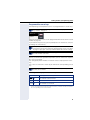
The time, weekday, and date are displayed in the status bar.
In addition, different icons represent different situations and switches:
Icon
Explanation
The ring tone is deactivated.
The "Do not disturb" function is activated.
The phone lock is activated.
A mobile user is logged on to the telephone.
The microphone is deactivated.
26
Getting to know your OpenStage phone
Context-dependent displays
Depending on the situation at hand, the graphic display on your OpenStage
phone displays different content, to which you can respond intuitively.
Information on actual events
The following icons appear centered on the display when your phone is idle
and signal current properties or events.
Example: You missed two calls in your absence.
02
You have two new voice messages that you can open by pressing O
Æ page 34.
Icons for events
Icon
Explanation
You received new voice messages.
New entries have been added to the call lists.
Local call forwarding is active.
Context menus
An arrow beside a selected entry indicates the existence of a context
menu that you can open by pressing the i or g buttons on the navigator
(Æ page 20). The range of functions available is situation-specific.
Consultation
Hold
Blind transfer call
1st entry
(selected on callup)
Selected entry
Disconnect
After a connection is set up – you are called or you make call – the context
menu appears automatically under the current connection for the configured time (e.g. 20 seconds).
You can define how long the context menu should be displayed. You can
deactivate the automatic display so that the g key on the navigator must
be pressed to see the context menu of the connection Æ page 181.
27
Getting to know your OpenStage phone
Idle display context menu
The following functions (where released) can be accessed by pressing the
right key on the navigator:
Redial {1} 1234
Ringer off
Do not disturb off
Mobile logon
Cancel call backs
First entry (selected when you call
up the menu, if you have already
dialed a phone number)
Selected entry
Only available when configured to support mobility
Directed pickup
Pop-up menus
In many operating situations, suitable functions or information is offered in
an automatic pop-up window.
Example: You set up a consultation call. The pop-up menu opens and offers
suitable functions for selection with the navigator.
012345|
Level 2
Dial
Mirea, Ch.
Redial {1}
Toussaint.
Retrieve held call
Rüscher
Stahl, Ing
Iller, Zin
A pop-up window automatically closes as soon as you have performed an
action.
To suppress information pop-up windows, press i on the navigator.
28
Getting to know your OpenStage phone
Telephony interface
Single-line view
Additional information is displayed in the telephony interface when your
phone rings, when you dial a number or during a call, for instance.
The same information is available on multi-line telephones for the
selected line in the line overview.
Example:
Icon indicating call status
Smith Michael
{ 3:16
08912345678
Call duration
Current call(s)
Consultation
Hold
Blind transfer call
Disconnect
Context menu with situation-specific
options
Icons for frequent call states
Icon
Explanation
The call is active
The call has been disconnected
You have placed the call on hold (e.g. consultation hold).
Your call partner has placed the call on hold
{
The voice connection is secure.
}
The voice connection is not secure.
Detailed descriptions of the various functions can be found in the
sections "Basic phone functions" Æ page 40 and "Enhanced phone
functions" Æ page 78.
Press the O key to return to the telephony interface again, for
example, from a call list (Æ page 34). To return to the telephony
interface again from the phonebook (Æ page 37) or the Service
menu (Æ page 37), press the N key. You can also configure a
"Show telephone screen" function however for both cases (see
Æ page 70) to return to the telephony interface screen again.
29
Getting to know your OpenStage phone
Multi-line view
You can use the h key to switch between two tabs on the telephony interface:
• "[My phone]" tab - represents the primary line or the line view of a selected line Æ page 29
• "Overview" tab - configurable overview of the secondary lines
Æ page 22
In idle mode: Press the h key:
Example:
Overview
[My phone] gBohr, Niels
Line 1
Level 2
My phone
Line busy
Line 2
Line 1
Line key labeling
Æ page 22
Line 2
Line status
Line name
Status icon
The status icons provide information about the state of the relevant line.
Icon
Explanation
Call for the corresponding line.
Call from a DSS line.
Call for a line with suppressed ring tone Æ page 132.
"Hold reminder" is activated Æ page 83.
The line is currently not available.
The line is busy.
Please note the LED displays for the line keys Æ page 23.
30
Getting to know your OpenStage phone
Context in the line overview
In the context menu of a selected line you have the following options with:
• Own free line
– Select
– View
• Own line with active call
– Hold
– Clear (replace handset)
– View1
• Own line with held call
– Retrieve
– View
• Other free line
– Select
– View
• Other line with active call
– Hold
– Clear (replace handset)
– View
• Other line with held call
– Retrieve
– View
• Other line busy
– View
1
The telephony view is displayed as a preview after a period of time set by the service personnel.
31
Getting to know your OpenStage phone
Phonebooks
In addition to a local phonebook, there is a connection to the LDAP corporate directory if service personnel have made the necessary settings.
Both phonebooks can be accessed via the telephone menu (Æ page 37).
You can configure a sensor key for the local phonebook.
Personal
Option
Bernoulli, Daniel
Bohr, Niels
Chadwick, James
Curie, Marie
Faraday, Michael
Search contacts
When in the phonebook or directory list view, press the keypad key that
corresponds to the first letter of your search term.
A field opens for you to enter the search term:
UK
J KL 5
(Abc)
The cursor jumps to the first entry in the list that matches the character you
entered in the search field.
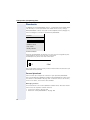
Personal phonebook
You can store up to 100 private contacts in your personal phonebook.
These are displayed in alphabetical order in the phonebook list. How to create contacts is described in Æ page 105. A contacts consists of an entry
with a "Last name", "First name" and a number.
Managing contacts
All saved contacts are listed in alphabetical order on the "Personal" menu.
You can use the "Options" context menu to
• create new contacts Æ page 105
• delete the entire phonebook list Æ page 106
32
Getting to know your OpenStage phone
Using contacts
The following functions are available via the context menu of a selected
contact:
• Calling a contact Æ page 95
• Editing a contact Æ page 105
• Deleting a contact Æ page 106
LDAP directory
If you have access to an LDAP directory (contact the responsible service
personnel), you can search contacts in a company-wide directory. A userfriendly, advanced search function is available for this.
Searching for a contact
• Simple search Æ page 108
• Quick searchÆ page 110.
Using a contact
Calling a contactÆ page 95
33
Getting to know your OpenStage phone
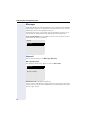
Messages
Depending on the type and configuration of your communications platform
(contact the relevant service personnel), messages from services, such as,
HiPath Xpressions can be displayed in this list.
When new messages are received, a message appears (Æ page 27) on
the idle display and the LED on the O (Æ page 19) key lights up.
To access the menu: Press the O key and use the navigator to select
and confirm the relevant submenu.
Records
Messages
Calls
Voicemail
You will find voicemails in the Messages directory.
Messages Directory:
The following default entry appears in the list: Voice mail
Voice mail
No new messages
Alternative call: Hold down the O key.
If your system is appropriately configured (contact the relevant service personnel), you can call the voice mailbox directly and immediately play back
the messages saved.
34
Getting to know your OpenStage phone
Calls
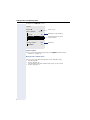
This list appears as soon as you receive new missed calls if you select the
option Calls in the Records menu. You can then scroll back to the Calls
menu with the backspace key. The following calls or call attempts are
logged as call lists:
Calls
Missed
Dialed
Received
Forwarded
The number of missed calls and unchecked calls is shown on the idle display.
Call lists
All calls to your phone are time-stamped and logged in consecutive order
in the call lists.
Each call list may contain up to 30 entries. Once this limit is reached, the
oldest entry in the log is deleted.
Multiple calls from the same number are only listed once. The number of
call attempts is logged in the "Details" context menu and additionally in the
"Missed Calls" log in the list display.
The list contains the phone number as well as the time of the last call.
If you connected a call partner with his/her consultation or second
call partner, his/her phone number will be shown in the call list
"Received".
Callers with suppressed numbers are listed as "Unknown" in the call
lists.
Only calls to the primary line are received on multi-line phones
(Æ page 13).
35
Getting to know your OpenStage phone
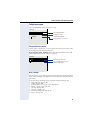
Example of the Missed call list:
Missed
Options g
(Busch, Wilhelm
11178
(Benz, Karlg
235689
(Lessing, Ephraim
2568900
Time of call
12:11
(2)
Number of call attempts
10:25
Selected new entry with
context menu
(1)
7:22
Old entry
(1)
Call list options
You can select the following function in the Options context menu:
Delete all Æ page 111
Entry-specific context menu
You can select the following functions for an individual entry:
• Dial Æ page 96
• Details Æ page 111
Call attempts with date and time (up to ten can be saved)
• Delete Æ page 111
36
Getting to know your OpenStage phone
Telephone menu
Open the telephone menu using the N key.
Settings
Personal
Local phonebook
Phone book
Company-wide
LDAP phonebook
Settings
Program/Service menu
Program/Service menu
You can make settings here as a user and use this menu to navigate to the
password-protected administration area.
Accessing the menu: Settings select and confirm and then select and
confirm the required menu using the navigator.
Settings
User
Settings for the user
Admin
Password-protected administration area
User settings
You can use the "User" menu to make local function settings for your OpenStage and to configure the appearance of your display to your personal requirements.
Select one of the following menus with the navigator (Æ page 20):
• "Date and time" Æ page 165
• "Audio" Æ page 169
• "Configuration" e.g. Æ page 79 or Æ page 101
• "Phone" Æ page 70 Æ page 161
• "Locality" Æ page 165
• "Security" Æ page 136
• "Network information" Æ page 38
• "Reset" Æ page 183
37
Getting to know your OpenStage phone
Network information
Information about the IP address or name which was assigned to the
phone in the network and therefore the HTML address of the web interface.
V View information on the phone Æ page 182
Contact your service personnel or refer to the OpenStage Administration Manual for more on the network information values listed
here.
Perform reset
V Personal settings made via the telephone menu or the web interface can
be reset to factory settings.Æ page 183
Administration
You can access the administration area via the "Admin" function and by entering the administration password.
Refer to the administration manual supplied with your phone for more detailed information on this topic.
Control and monitoring function
A control or monitoring function can be activated on your phone for service
purposes by remote maintenance.
Control function
Service personnel have the option to activate and deactivate features of
the phone via remote maintenance. During maintenance the handset, microphone, loudspeaker and headset are deactivated. You are additionally
informed on the display that the control function is active.
Monitoring function
In order to detect malfunctioning of a phone for example, the service personnel install a monitoring function. You can use your phone as normal during monitoring. However you will first be informed about the operation
with a message on the display and prompted to allow monitoring.
If service personnel have activated a function on your phone, which continuously transmits operating data to a server, you will see the flashing
icon
in the upper display line.
38
Getting to know your OpenStage phone
Contributing to environmental protection by saving
energy
The user can save energy actively using the energy settings on the
telephone and in this way contribute to protecting the environment.
To reduce energy consumption, you can
• reduce the brightness of the display (the default setting is 50 percent
and is preset Æ page 162).
• set the background lighting to switch off automatically after a certain
period of time. To save a large amount of energy, the time can be
reduced to one minute. The default value is 5 minutes (Æ page 163).
• reduce the ring volume (set by default to 50 % Æ page 169).
39
Basic functions
Step by step
Basic functions
Please read carefully the introductory chapter
"Getting to know your OpenStage phone"
Æ page 14 before performing any of the steps described here on your phone.
Secure voice transmission
Prerequisite: The secure voice communication option
must be activated by your service personnel.
If you call a party or receive a call from a party over a secure connection, a padlock icon1 appears on the other
party’s row on your graphic display. You can opt to have
voice connections that are no longer secure indicated
by a brief alerting tone and a window with the message
"Unencrypted call" (see Æ page 175).
Answering a call
Your OpenStage phone rings with the tone signal set
when an incoming call is received. The call is also visually signaled on the call display.
If transmitted, calling party information (name, phone
number) appears on the graphic display.
If you have set a pattern melody or a ringtone
Æ page 171 on your phone, it is possible that service personnel have preset a different ringtone or
deactivated the ringtone, depending on the call
type (e.g. an external or internal call).
An incoming call will interrupt any ongoing telephone setting operations. When the call ends,
you can press the N key to return to the point
in the menu structure where you were interrupted.
1. Closed for secure or open for nonsecure voice communication
40
Basic functions
Step by step
Answering a call via the handset
The phone is ringing. The caller is displayed.
^ Lift the handset.
if nec. +- Set the call volume.
Answering a call via the loudspeaker
(speakerphone mode)
The phone is ringing. The caller is displayed.
The pop-up menu opens:
Select and confirm the option shown. The n key
lights up.
Accept?
or
n Press the key shown. The key lights up.
The speakerphone function is activated.
if nec. +- Set the call volume.
Suggestions for using speakerphone mode:
• Tell the other party that speakerphone mode is active.
• Adjust the call volume while speakerphone mode is
active.
• The ideal distance between the user and the phone
in speakerphone mode is 50 cm.
41
Basic functions
Step by step
Answering a call via the headset
Prerequisite: A headset is connected.
Make sure your headset port is set up properly
Æ page 174.
The phone is ringing. The o key flashes.
o Press the key shown.
if nec. +- Set the call volume.
Answering calls automatically via the headset
Prerequisite: The service personnel have additionally
configured a key with the "Auto-Headset function (AICS
Zip tone) (Æ page 70).
S Press the "Auto-Headset" sensor key to activate auto-
matic call answering. This key and the headset key illuminate.
A short acoustic signal is heard on the headset for a call
and the connection is established.
If you want to manually answer calls again, deactivate
the automatic answering function using the "AutoHeadset" key. Both keys are off.
42
Basic functions
Step by step
Directed pickup
You can pick up a call signaled at an absent coworker’s
phone. If a colleague has placed a call on hold on their
multi-line phone you can also pick up this call.
Accept call
Prerequisite: You know the coworker’s internal phone
number and the function is configured for you in OpenScape Voice.
A coworker’s phone rings.
Directed pickup?
Select and confirm the option shown in the idle phone’s
context menu.
or
^ Lift the handset.
or
n Press the key shown.
Directed pickup?
Select and confirm the option shown.
j Enter and confirm the relevant phone’s internal number.
You are connected to the calling party either via the
handset or in speakerphone mode.
43
Basic functions
Step by step
Picking up the held call
Prerequisite: Your colleague has placed a call on hold
on their multiline phone Æ page 116.. You know the coworker’s internal phone number and the function is configured for you in OpenScape Voice.
Directed pickup? f
Select and confirm the option shown in the idle phone’s
context menu.
or
^ Lift the handset.
or
n Press the key shown.
Directed pickup? f
Select and confirm the option shown.
j Enter and confirm the relevant phone’s internal number.
You are connected to your colleague’s held call either via
the handset or in speakerphone mode.
44
Basic functions
Step by step
Switching from handset to speakerphone mode
Make note of the two different processes and activate your preferred setting as required
Æ page 173.
Prerequisite: You are conducting a call via the handset
and the microphone and loudspeaker functions have
been activated by service personnel.
Open listening in standard mode
n and \ Hold down the key and replace the handset. Then release the key and proceed with your call.
Open listening in US mode
If open listening is set to US mode, you do not have to
hold down the loudspeaker key when replacing the
handset to switch to speakerphone mode.
n Press the key shown.
\ Replace the handset. Proceed with your call.
{ or }
A secure voice communication is indicated by a
closed padlock icon on the graphic display; a nonsecure voice communication is indicated by an
open padlock icon on the graphic display (see
also Æ page 40)
Switching from speakerphone mode to
the handset
Prerequisite: You are conducting a call in speakerphone mode.
^ Lift the handset.
n The key shown goes out.
45
Basic functions
Step by step
Switching from headset to speakerphone mode
In standard mode
n Press and hold the key (open listening ist activated),
o Press the key shown. Speakerphone mode is activated.
In U.S. mode
n Press the key shown.
o Press the key shown. Speakerphone mode is activated.
Open listening
You can let other people in the room join in on the call.
Let the other party know that you have turned on the
loudspeaker.
Prerequisite: You are conducting a call via the handset.
Activating
n Press the key shown.
Deactivating
n Press the lit key.
Switching to speakerphone mode
n \ Hold down the lit key and replace the handset.
46
Basic functions
Step by step
Activating/deactivating the microphone
You can temporarily switch off the handset microphone
to prevent the other party from listening in while you
consult with someone in your office.
Prerequisite: You are conducting a call.
Deactivating the microphone
p Press the key shown.
Activating the microphone
p Press the lit key.
Ending a call
s Press the key shown.
or
Disconnect?
Select and confirm the option shown in the connections’s context menu.
or
\ Lit key pressed
or In speakerphone mode
n Press the lit key.
47
Basic functions
Step by step
Group call
Your service personnel can incorporate multiple telephones in a call pickup group. If your telephone belongs
to a pickup group, you can also accept calls intended for
other members of the group.
A group call is displayed on the phone. Service personnel may have made the following settings for signaling:
Telephone status
Ring on group call
= Yes
Ring on group call
= No
Ringer on
Silent
Ringtone
Loudspeaker
Beep
Loudspeaker
in
Handset
Connection
Ringtone
Loudspeaker
Beep
Handset
Ringer off
Handset
Beep
Open listening Handset and loudspeaker
Beep
Handset and loudspeaker
Headset
Beep
Headset
Ringtone
Loudspeaker
Headset
Beep
Open listening Headset and loudspeaker
Beep
Headset and loudspeaker
Speakerphone mode
Beep
Loudspeaker
Beep
Loudspeaker
Silent
Nothing
Nothing
in
Handset
Connection
Nothing
Beep
Handset
Handset
Beep
Open listening Handset and loudspeaker
Beep
Handset and loudspeaker
Headset
Nothing
Beep
Headset
Headset
open listening
Beep
Headset and loudspeaker
Beep
Headset and loudspeaker
Speakerphone mode
Beep
Loudspeaker
Beep
Loudspeaker
The volume settings can be found from Æ page 169.
48
Basic functions
Step by step
Further service personnel settings for group calls:
• The group call can be picked up both by lifting the
handset and via the "Pickup call" menu option.
• The group call be picked up via the "Pickup call"
menu option but not by just lifting the handset.
• A key is programmed for call pickup.
• A pop-up menu is opened with the Call pickup key
when a group call is waiting.
Picking up a group call with the call pickup key
Prerequisite: The Call pickup key is configured. Your
service personnel have set up the group call such that it
is only displayed through flashing of the Call pickup key.
The phone can also ring when idle.
A group call is waiting. The Call pickup key flashes. The
group call is not shown on the display.
R Press the sensor key with the "Call pickup" function.
The group call is now shown on the display with
Pickup: Caller
for: Station
The pop-up menu opens:
Picking up a group call immediately via the pop-up
menu
Prerequisite: Your service personnel have set up the
group call such that it will be shown immediately on the
display and the pop-up menu will open.
A group call is waiting and is shown on the display with
Pickup: Caller
for: Station
49
Basic functions
Step by step
Picking up a group call
The pop-up menu opens:
Pickup call?
Confirm.
or
^ Lift the handset (only if the appropriate function is set
by your service personnel)
or
R Press the sensor key with the "Call pickup" function or
press it again if call answering was initiated via the key.
The speakerphone function is activated.
Ignoring a group call
Ignore?
50
Select and confirm the option shown. The phone stops
signaling the group call.
Basic functions
Step by step
Making calls
If you selected the option "Busy When Dialing"
Æ page 99, you will not be interrupted by an incoming call. In this case, the caller hears the busy
signal.
Off-hook dialing
^ Lift the handset.
j Enter the number if nec. Use the navigator Æ page 20
to correct entries as necessary.
In the pop-up menu:
Dial
Confirm or wait until the dial delay expires (see
Æ page 97).
or In the pop-up menu:
Redial {1} S. Hawking
Select and confirm the option shown.
The connection is set up.
If you are using a dial plan and Immediate dialing
is set (see Æ page 53), dialing is automatically
performed as soon as the character string entered matches an entry in the dial plan.
51
Basic functions
Step by step
On-hook dialing
The connection is set up with on-hook dialing via the
loudspeaker (speakerphone mode) or via a connected
headset.
n Press the key shown.
or
o Press the key if a headset is connected.
and/or
j Enter the station number.
i Press or wait until the dial delay expires (see
Æ page 97).
or In the pop-up menu:
Redial {1} S. Hawking
Confirm.
First enter the number
First enter the number. The loudspeaker or headset key
illuminate when you enter the first digit.
j Enter the station number. If nec. Use the navigator
Æ page 20 to correct entries as necessary.
Dial
Confirm or wait until the dial delay expires (see
Æ page 97).
The connection is set up.
If you are using a dial plan and Immediate dialing
is set (see Æ page 53), dialing is automatically
performed as soon as the character string entered matches an entry in the dial plan.
52
Basic functions
Step by step
Immediate dialing
Immediate dialing should only be activated if service
personnel has configured and approved a dial plan.
Immediate dialing is deactivated by default. For this reason after entering the number you must either confirm
the "Dial" option or wait until the dial delay expires to set
up the connection. If Immediate dialing is configured,
your call is automatically dialed as soon as the string entered matches an entry in the dial plan.
Activating or deactivating immediate dialing
z You can also configure this setting via the Web interface
Æ page 195.
N Press the key shown.
Settings
Select and confirm the option shown.
User
Select and confirm the option shown.
if nec.j Enter and confirm the User password.
Configuration
Select and confirm the option shown.
Outgoing calls
Select and confirm the option shown.
Immediate dialling
Select and confirm the option shown.
Yes
Select and confirm the option shown in the context
menu.
Save & Exit
Confirm
53
Basic functions
Step by step
Dialing using the hot or warm line function
Your service personnel can configure a hot or warm line
for your phone.
If you lift the handset of the phone or press the loudspeaker key
• with a hot line immediately or
• with a warm line after a defined period of time,
• a number specified by service personnel is dialed.
Examples:
• The phone in the lift immediately dials the reception
number.
• The phone at a patient’s bed dials the ward number
e.g. after a minute if no other number is dialed.
54
Basic functions
Step by step
Redial
Redialing from the call list
Only calls to the primary line are received on
multi-line phones (Æ page 13).
, Press the key shown.
You are automatically directed to the Dialed list in the
Calls menu.
Niels, Bohr
07:06 am
Select and confirm the entry you want.
The phone number associated with the list entry is dialed.
Redialing from the pop-up menu
^ Lift the handset.
or
n Press the key shown.
Redial {1} S. Hawking
Confirm.
The last phone number entered is dialed.
Redialing from the idle menu
Redial {1} S. Hawking
Select and confirm from the idle display context menu
(Æ page 28). The last phone number entered is dialed.
{ or }
A secure voice communication is indicated by a
closed padlock icon on the graphic display; a nonsecure voice communication is indicated by an
open padlock icon on the graphic display (see
also Æ page 40)
55
Basic functions
Step by step
Consulting a second party
You can call a second party while a call is in progress.
The connection to the first party is placed on hold.
Prerequisite: You are conducting a call.
Consult
Select and confirm the option shown in the connections’s context menu.
or Start conference
Konferenz starten
Select and confirm the option shown in the context
menu for the call connection when you intend to set up
a conference with the new participant. You can also use
an already configured Conference key in this instance.
j Call the second party.
If you are using a dial plan and Immediate dialing
is set (see Æ page 53), dialing is automatically
performed as soon as the character string entered matches an entry in the dial plan.
Ending or canceling a consultation call
Disconnect & return
Select and confirm the option shown in the second party’s context menu.
The consultation call is disconnected. The call with the
first party is resumed.
Ending the first call
Disconnect
Select and confirm the option shown in the first call’s
context menu.
The connection to the second party remains active.
If you want to use the phonebook or a call list
for the consultation, select Hold in the context
menu instead of Consult or press the Hold key
and then select the required call list
(Æ page 105).
Alternatively you can select a phonebook or call
list without using the Hold functions - the active
call is automatically placed on Hold.
56
Basic functions
Step by step
Switching to the held party (alternating)
Prerequisite: You are conducting a consultation call.
Alternate?
Select and confirm the option shown in the connection’s context menu.
It does not matter which context menu is open
when alternating. The "Alternate" function appears in both menus (active and passive connection).
You can switch back and forth between two subscribers by repeatedly selecting and confirming
"Alternate".
Ending an alternate operation
Disconnecting the held call:
Disconnect?
Select and confirm the option shown in the held connection’s context menu.
The held call is disconnected. The active call continues.
Disconnecting the active call:
Disconnect & return?
Select and confirm the option shown in the active connection’s context menu.
The active call is disconnected. The held call remains on
hold and can be managed via the context menu.
57
Basic functions
Step by step
Putting on hold and retrieving successively or
simultaneously
Putting an active call on hold
Prerequisite: You are conducting a consultation call
Æ page 56 or have accepted a second call Æ page 86.
The "Hold" sensor key must be configured Æ page 70
S Press the "Hold" key. The key lights up. The consultation
or second call and the first call are put on hold.
Retrieving the first call
b Switch to the first call.
R Press the illuminated "Hold" key. You are connected
with the other party. The consultation or second call
continues on hold.
Retrieving the second call
d Switch to the held consultation or second call
R Press the illuminated "Hold" key. You are connected
with the other party. The first called is put on "Hold"
again.
58
Basic functions
Step by step
Connecting parties
You can connect the first party with the party you consulted, clearing down your connection to both parties in
the process.
Prerequisite: You are conducting a consultation call
Æ page 56 and call joining must be allowed Æ page 59.
Complete Xfer?
Select and confirm the option shown in the active connection’s context menu.
The active and held calls are joined. The active call and
the consultation call are cleared down.
or Connect by hanging up
] or n Replace the handset or, if you are in speakerphone
mode, press the loudspeaker key. The other two parties
are now connected to one another.
Allowing call joining
z You can also configure this setting via the Web interface
Æ page 195.
N Press the key shown.
Settings
Select and confirm the option shown.
User
Select and confirm the option shown.
if nec.j Enter and confirm the User password.
Configuration
Select and confirm the option shown.
Connected calls
Select and confirm the option shown.
Allow call joining = Yes
f
Select and confirm the option shown.
Yes
l
Select and confirm the option shown in the context
menu.
Option = Save & Exit
l
Confirm.
59
Basic functions
Step by step
Call forwarding
You can forward calls for your phone to another phone.
On multi-line telephones (Æ page 13), you can
only configure call forwarding for the primary
line.
Three forwarding conditions can be programmed in the
forwarding menu:
• All Calls
• Busy
• On no reply
Because of its direct impact, "All Calls" call forwarding
has the highest priority followed by "No reply" and
"Busy".
If active, "All Calls" call forwarding is indicated on the
graphic display when the phone is idle.
Forwarded calls can be logged in a call list (see
Æ page 35).
The Edit call forwarding menu offers you three Destination options. These destination options are assigned
to the forwarding types.
All calls (off/on)
Destination
Busy (off/on)
Destination
No reply (off/on)
Destination
One phone number may already be assigned to each
destination. The destination option could then be Destination 12345, for instance.
60
Basic functions
Step by step
Programming call forwarding
Configuring destination phone numbers for call forwarding
You can configure up to five destination phone numbers
for call forwarding. These destination phone numbers
can then be assigned different forwarding types. You
can then enable one of the forwarding types
(Æ page 63).
r Press the key shown.
The pop-up menu opens:
Edit call forwarding
Select and confirm the option shown.
An overview of call forwarding settings appears.
You can also enter the call forwarding settings via
the user menu (Æ page 80).
Destination
Select the destination option for one of the following
forwarding types:
• All calls
• Busy
• No reply
Confirm the destination selected.
You can use each of the three Destination options to save destination phone numbers for the
relevant forwarding type.
Edit favourites
Select and confirm the option shown in the context
menu.
Destination 1
Select and confirm the option shown.
j Enter and confirm the destination phone number.
Define additional destination phone numbers for destination 2 to 5, as necessary.
Save & Exit
Select and confirm the option shown.
61
Basic functions
Step by step
Assigning a destination phone number to a call
forwarding type
r Press the key shown.
The pop-up menu opens:
Edit call forwarding
Select and confirm the option shown.
An overview of call forwarding settings appears.
Destination
Select the destination option for one of the following
forwarding types:
• All calls
• Busy
• No reply
Confirm the destination selected.
08972228596
Select and confirm a destination number from the list.
Save & Exit
Select and confirm the option shown.
Defining the ring duration before call forwarding on
no reply
You can define how often the phone should ring before
the "No reply" form of call forwarding activates.
This setting is only available if the "Server features" function was deactivated by the service
personnel.
z You can also configure this setting via the Web interface
Æ page 195.
Prerequisite: The phone is idle.
r Press the key shown.
The pop-up menu opens:
Edit call forwarding
Select and confirm the option shown.
An overview of call forwarding settings appears.
Duration
Select and confirm the option shown.
j Enter a value for the duration.
Save & Exit
62
Select and confirm the option shown.
Basic functions
Step by step
Activating/deactivating call forwarding
z You can also configure this setting via the Web interface
Æ page 195.
Prerequisite: At least one destination phone number is
programmed (Æ page 62).
r Press the key shown.
The pop-up menu opens:
Edit call forwarding
Select and confirm the option shown.
An overview of call forwarding settings appears.
All calls
Select and confirm the option shown.
or
Busy
Select and confirm the option shown.
or
No reply
Select and confirm the option shown.
On
Select and confirm "On" or "Off" in the context menu.
Save & Exit
Select and confirm the option shown.
63
Basic functions
Step by step
Activating call forwarding for all calls
Use the r function key to activate call forwarding for
all calls.
z You can also configure this setting via the Web interface
Æ page 195.
Prerequisite: There is at least one forwarding destination programmed Æ page 61.
r Press the key shown.
The pop-up menu opens:
Select and confirm the option shown. The r key
lights up. Call forwarding is activated.
Accept
If the phone is idle, the call forwarding icon K appears
on the graphic display with the destination phone number.
Deactivating call forwarding for all calls
r Press the lit key.
The pop-up menu opens:
The pop-up menu disappears after around five seconds
and the r key goes out.
or
Accept
64
Select and confirm the option shown.
Call forwarding is deactivated.
Basic functions
Step by step
Call forwarding chain
Sometimes calls to a station are forwarded to another
station which also has call forwarding or DND activated.
This can create a call forwarding chain consisting of several telephones where the last member of the chain is
your phone.
A popup window opens on your phone’s screen with
the following information:
• Who is calling
• Who forwarded first or last.
• The reason for the forwarding is displayed by an
icon.
You can set whether the station that forwarded first or
last is displayed (see Æ page 81).
65
Basic functions
Step by step
Callback
You can request a callback if the station called is busy or
if nobody answers.
You receive a callback when the other party’s line becomes free.
This option must be activated by your service
personnel.
On multi-line telephones Æ page 13, only the
callback requests for your primary line are
logged.
Requesting callback
Prerequisite: The station called is busy or nobody answers.
In the pop-up menu:
Call back?
Select and confirm the option shown.
Deleting callback requests
You can delete scheduled callback requests if you no
longer need to return a call, for example, at the end of
the working day.
Prerequisite: At least one callback was requested.
Cancel call backs?
Disconnect?
66
Select and confirm the option shown in the idle display
(Æ page 28) context menu.
m
Confirm in the pop-up menu. All callback requests are
deleted.
Basic functions
Step by step
Responding to a callback
Prerequisite: A callback was requested. Your phone
rings and station information appears on the graphic display.
The pop-up menu opens:
Accepting a callback
Accept?
Select and confirm the option shown.
Rejecting a callback
Reject?
Select and confirm the option shown.
The callback request is deleted. The caller hears the
busy signal. The caller’s phone number is added to the
missed calls list.
Forwarding a callback
Deflect
Select and confirm the option shown.
j Enter and confirm the phone number.
67
Basic functions
Step by step
Permitting callback on busy/no reply
z You can also configure this setting via the Web interface
Æ page 195.
N Press the key shown.
Settings
Select and confirm the option shown.
User
Select and confirm the option shown.
if nec.j Enter and confirm the User password.
Configuration
Select and confirm the option shown.
Outgoing calls
Select and confirm the option shown.
Callback: busy
Select and confirm the option shown.
or
Callback: no reply
Select and confirm the option shown.
Yes
Select and confirm the option shown in the context
menu.
Save & Exit
Select and confirm the option shown.
68
Basic functions
Step by step
Calling back missed calls
Calls received while you are absent are indicated by a
message on the idle display (Æ page 27). The O function key also lights up.
Missed calls are logged in the missed calls list. This list
provides information on the missed call and lets you call
back the number directly (call lists, see also Æ page 35).
On multi-line telephones Æ page 13, only the
calls missed on your primary line are logged.
O Press the key shown.
Calls
Niels, Bohr
Select and confirm the option shown.
20.05
10:06
Select and confirm the appropriate list entry. The phone
number associated with the list entry is dialed.
If no new calls are listed, the call list menu is offered under Calls Æ page 111.
69
Programmable sensor keys
Step by step
Programmable sensor keys
The phone features a range of functions that can, if required, be stored on programmable sensor keys.
The phone comes with six sensor keys, all of which can
be programmed on two separate levels.
The "Shifted" sensor key, which allows you to switch between the two programmable sensor key levels, is preassigned. This sensor key should be maintained where
possible so you can switch between the two programmable sensor key levels.
The labels for the sensor keys are displayed on the right
edge of the display.
The sensor keys can also be programmed via the webinterface (Æ page 195).
List of available functions
1.
2.
3.
4.
Delete (not assigned.)
Selected dialling
Repeat dialling
Forward all calls
5. Forward no reply
6. Forward busy
7. Ringer off
8. Hold
9. Alternate
10. Blind transfer call
11. Transfer call
12. Deflecting
13. Shift
14. Conference
15. Headset
16. Do not disturb
70
17. Group pickup
18. Repertory dial
19. Feature toggle
20. Show telephone
screen
21. Mobility
22. Directed pickup
23. Callback
24. Cancel callbacks
25. Consultation
26. Call Waiting toggle
27. Immediate ring
28. Preview
29. Call recording
30. Start application
31. Integ. Umleit
32. Start phonebook
Programmable sensor keys
Step by step
Programming sensor keys
z You can also configure this setting via the Web interface
Æ page 195.
Beginning programming
Directly via a sensor key
S Hold down the sensor key to which a function should be
assigned until the programming prompt is displayed.
If the prompt is not displayed or a programmed
function is not executed, then you can only
launch key programming via the user menu (ask
your service personnel about the current setting).
OK
Confirm to begin programming. The sensor key illuminates continuously.
or Via the user menu
You can also program keys via the user menu.
N Press the key shown.
Settings
Select and confirm the option shown.
User
Select and confirm the option shown.
if nec.j Enter and confirm the User password.
Phone
Select and confirm the option shown.
Program keys
Select and confirm the option shown. You are prompted
to press the key you wish to program.
S Press the sensor key you want to program with a function. The sensor key illuminates continuously.
71
Programmable sensor keys
Step by step
Beginning programming
Normal
Select and confirm the option shown to program the
first level.
or
Shifted
Select and confirm the option shown to program the
second level.
Do not disturb
Select and confirm the required function in the list (e. g.
Do not disturb).
Label
Select and confirm the option shown if you want to
change the label on the graphic display.
j Enter and confirm the label you want.
Save & Exit
Select and confirm the option shown.
Programming enhanced functions
Repertory dial
S Hold down the sensor key to which a function should be
assigned until the programming prompt is displayed.
If the prompt is not displayed or a programmed
function is not executed, then you can only
launch key programming via the user menu (ask
your service personnel about the current setting).
OK
Confirm to begin programming. The sensor key illuminates continuously.
z You can also configure this setting via the Web interface
Æ page 195.
Normal
Select and confirm the option shown to program the
first level for instance.
Repertory dial
Select and confirm the function in the context menu.
Label
Select and confirm the option shown if you want to
change the label on the graphic display.
j Enter and confirm the label you want.
72
Programmable sensor keys
Step by step
Setting
Select and confirm this option to enter a destination
phone number.
j Enter and confirm a stations’s destination phone number.
You can select and insert special characters in the dialing sequence:
« Clear call
~ Make consultation
» Make normal call
¬ Pause
The pop-up menu also offers the following functions:
• Move cursor right and left
• Copy
• Paste
• Mode selection
• Cancel
• OK
Save & Exit
Select and confirm the option shown.
The repertory dial can be up to 40 characters
long.
73
Programmable sensor keys
Step by step
Feature toggle
Only available for Hunt group functions (Æ page 152).
S Hold down the sensor key to which a function should be
assigned until the programming prompt is displayed.
If the prompt is not displayed or a programmed
function is not executed, then you can only
launch key programming via the user menu (ask
your service personnel about the current setting).
OK
Confirm to begin programming. The sensor key illuminates continuously.
z You can also configure this setting via the Web interface
Æ page 195.
Normal
Select and confirm the option shown to program the
first level for instance.
Feature toggle
Select and confirm the function in the context menu.
Label
Select and confirm to change the key labeling.
j Enter and confirm the label you want.
Setting
Select and confirm this option to enter a code.
j Enter and confirm the code, for example: *96 (contact
your service personnel).
Save & Exit
74
Select and confirm the option shown.
Programmable sensor keys
Step by step
Forwarding
S Hold down the sensor key to which a function should be
assigned until the programming prompt is displayed.
If the prompt is not displayed or a programmed
function is not executed, then you can only
launch key programming via the user menu (ask
your service personnel about the current setting).
OK
Confirm to begin programming. The sensor key illuminates continuously.
z You can also configure this setting via the Web interface
Æ page 195.
Normal
Select and confirm the option shown to program the
first level for instance.
Forward all calls
Select a forwarding type:
• Forward all calls
• Forward no reply
• Forward busy
Select and confirm the function in the context menu.
Label
Select and confirm the option shown if you want to
change the label on the graphic display.
j Accept or edit the label and confirm.
Setting
Select and confirm this option to enter the forwarding
destination.
j Enter and confirm the phone number of the forwarding
destination.
Save & Exit
Select and confirm the option shown.
75
Programmable sensor keys
Step by step
Using sensor keys
The use of programmed functions depends on the
phone’s status. The relevant display appears once you
have pressed a sensor key.
Example 1: Calling saved number
Prerequisite: The idle menu is displayed on the graphic
display.
S Press the sensor key for a saved number. The connection is set up.
Example 2: Call Waiting toggle Activating/
deactivating
You can press a key to activate or deactivate call waiting
functionality, even during a call. The perquisite for this is
that a second call is permitted (Æ page 88). By default
a second call is permitted.
T Press the "Call Waiting toggle" sensor key. The sensor
key goes out. The second call function is deactivated.
The call is rejected or forwarded.
Example 3: Immediate ring
This function allows you to switch the preset delay
(Æ page 129) on and off for all line keys. By default the
delay is set, the key does not illuminate.
S Press the "Immediate ring" sensor key. The sensor key
illuminates. The delay ringtone is disabled. An incoming
call rings immediately regardless of what delay time is
configured.
76
Programmable sensor keys
Step by step
Resetting sensor keys
You can reset sensor keys you configured to factory settings (see also Æ page 183).
N Press the key shown.
Settings
Select and confirm the option shown.
User
Select and confirm the option shown.
if nec.j Enter and confirm the user password.
Reset
Select and confirm the option shown to switch to the
Reset user data menu.
Function key data
Select the option shown.
Yes
Select and confirm the option shown in the context
menu to delete the content of all sensor keys.
Reset selected user data
Select and confirm "Reset selected user data". The contents of the sensor keys you configured are deleted.
Sensor keys which can only be configured by service personnel remain unchanged
77
Enhanced phone functions
Step by step
Enhanced phone functions
Incoming calls
Accepting calls via the headset
Prerequisite: The headset is connected.
o The LED flashes when a call is received.
Press the key shown. Conduct call.
Ending the call:
o Press the key shown. The LED goes out.
Deflecting a call
Using call deflection
Prerequisite: An incoming call is displayed or signaled.
In the pop-up menu:
Deflect
Select and confirm the option shown.
The call is immediately deflected if a destination phone
number is programmed (Æ page 79).
or If you did not set a phone number when programming
call deflection, a pop-up menu appears prompting you
to enter a destination phone number for call deflection.
j Enter and confirm the destination phone number.
The call is deflected.
78
Enhanced phone functions
Step by step
Permitting call deflection
z You can also configure this setting via the Web interface
Æ page 195.
N Press the key shown.
Settings
Select and confirm the option shown.
User
Select and confirm the option shown.
if nec.j Enter and confirm the User password.
Configuration
Select and confirm the option shown.
Incoming calls
Select and confirm the option shown.
Deflecting
Select and confirm the option shown.
Allow deflection
Select and confirm the option shown.
Yes
Select and confirm the option shown in the context
menu.
Default destination
Select and confirm the option shown.
j Enter and confirm the phone number to which the station should be deflected.
Entering a destination phone number is not mandatory when call deflection is active. If you want
to deflect an incoming call, you are prompted to
enter a destination phone number if there is
none stored.
or Deflecting to a DSS number
A call can be deflected to a direct station selection
(DSS) subscriber using the DSS key, if the key is configured and the deflect function is activated by your service personnel Æ page 121.
Deflect to DSS: Yes
Information only, as set by service personnel: Yes or No.
79
Enhanced phone functions
Step by step
Rejecting a call
You can reject an incoming call.
In the pop-up menu:
Reject
Select and confirm the option shown.
The caller hears a busy signal.
If the rejected caller’s phone number is transmitted, it is saved in the call list. You can then call
this party back at a later time.
Configuring call forwarding
You can also enter the call forwarding settings via
the Forwarding key (Æ page 61).
N Press the key shown.
Settings
Select and confirm the option shown.
User
Select and confirm the option shown.
if nec.j Enter and confirm the User password.
Configuration
Select and confirm the option shown.
Incoming calls
Select and confirm the option shown.
Forwarding
Select and confirm the option shown.
For a description of the settings, see the chapter "Call
forwarding" (Æ page 60).
Configuring forwarding
Settings
Select and confirm the option shown.
For a description of the settings, see the chapter "Call
forwarding" (Æ page 60).
80
Enhanced phone functions
Step by step
Setting alerts
Use the Call forward alerts menu to enable and disable
visual and audible alerts for call forwarding (not possible
with the Forwarding key).
Alerts
Select and confirm the option shown.
Visual alerts= No
Select the option shown.
Yes
Select and confirm the option shown in the Yes/No context menu.
or
Audible alerts= No
Select the option shown.
Yes
Select and confirm the option shown in the Yes/No context menu.
or
Forwarding station... Last
Select the option shown.
Display last
Select and confirm Display last/Display first
Option = Save & Exit
Select and confirm the option shown.
81
Enhanced phone functions
Step by step
Placing a call on hold
You can use this function to place an ongoing call on
hold, for instance, to prevent the other party overhearing a conversation with a colleague in the same room.
The held party hears music on hold if Music on hold is
active on this party’s phone (Æ page 85).
Prerequisite: You are conducting a call.
Hold
Select and confirm the option shown in the connections’s context menu.
or
S Press the "Hold" key. The key lights up. (The "Hold" sensor key must be configured Æ page 70.)
Retrieving a held call:
Reconnect
Select and confirm the option shown in the connections’s context menu.
or
R Press the illuminated "Hold" key. (The "Hold" sensor key
must be configured Æ page 70.)
Using line keys
On multi-line telephones you can use the line keys to
place ongoing calls on hold.
R Press the corresponding line key. The line key LED
starts flickering. The call is now on hold.
Retrieving a held call:
T Press the corresponding line key. The line key LED
lights up. The call is retrieved.
The LED display Æ page 23 or status display on
the "Overview" tab Æ page 30 indicates to other
multi-line telephones on which this line is also
configured, that the call is on hold. These phones
can then pick up the call.
Held call wait status
After placing a call on hold, you can replace the handset
and then decide if the call should be retrieved or disconnected.
82
Enhanced phone functions
Step by step
Prerequisite: You placed a call on hold and replaced the
handset.
In the pop-up menu:
Retrieve held call
Select and confirm the option shown to resume the call
in speakerphone mode.
or
Disconnect
Select and confirm the option shown to disconnect the
call.
Activating/deactivating the hold reminder tone
z You can also configure this setting via the Web interface
Æ page 195.
N Press the key shown.
Settings
Select and confirm the option shown.
User
Select and confirm the option shown.
if nec.j Enter and confirm the User password.
Configuration
Select and confirm the option shown.
Connected calls?
Select and confirm the option shown.
Allow hold rem.?
Select and confirm the option shown.
Yes
Select and confirm the option shown in the context
menu.
Save & Exit
Select and confirm the option shown.
83
Enhanced phone functions
Step by step
Setting the hold reminder time
Use the "Hold reminder" function to set the length of
the timeout before an automatic reminder is issued
about a held call.
The minimum value is 1, that is, the reminder is output
after one minute. The maximum value is 15 minutes.
z You can also configure this setting via the Web interface
Æ page 195.
N Press the key shown.
Settings
Select and confirm the option shown.
User
Select and confirm the option shown.
if nec.j Enter and confirm the User password.
Configuration
Select and confirm the option shown.
Connected calls?
Select and confirm the option shown.
Hold rem. delay
Select and confirm the option shown.
j Enter a value between 3 and 15 and confirm.
Save & Exit
84
Select and confirm the option shown.
Enhanced phone functions
Step by step
Music on hold
Music on hold is played back when you are placed on
hold by another party, providing this option is active.
z You can also configure this setting via the Web interface
Æ page 195.
N Press the key shown.
Settings
Select and confirm the option shown.
User
Select and confirm the option shown.
if nec. j Enter and confirm the User password.
Configuration
Select and confirm the option shown.
Connected calls
Select and confirm the option shown.
Music on hold
Select and confirm the option shown.
Yes
Select and confirm the option shown in the context
menu.
Save & Exit
Select and confirm the option shown.
85
Enhanced phone functions
Step by step
Call waiting (second call)
You can accept a second incoming call in the course of
an ongoing call. The caller hears the on-hook signal
while you hear a call-waiting signal tone.
You can ignore or accept the second call. Before you accept the second call, you can end the first call or place
it on hold for subsequent retrieval.
You can block the second call or the signal tone
(Æ page 88).
Accepting a second call
Prerequisite: You are conducting a call and call waiting
is allowed (Æ page 88).
In the pop-up menu:
Accept
Select and confirm the option shown.
You can talk to the second party.
The connection to the first party is on hold.
You can still
• toggle between an initial and second call or
• put on hold and retrieve second and first call
successivelyÆ page 58
or
• initiate a conference
Consultation call from second call
If the second call is your active call you can initiate a
consultation call from it.
From a consultation call in the second call you can
• initiate a conference
• toggle between the second call and a consultation
call
• put on hold and retrieve second and first call successively Æ page 58
• transfer a call
• disconnect the calls again
During a consultation in the second call, the first call is
parked and can only be unparked when the consultation
or second call ends or these calls were connected.
Disconnect & return
86
Select and confirm the option shown in the second
call’s context menu. The call to this station is disconnected and the call to the first station is reconnected.
Enhanced phone functions
Step by step
Ignoring second call
Prerequisite: You are conducting a call and call waiting
is allowed (Æ page 88).
In the pop-up menu:
Ignore
Select and confirm the option shown.
The caller still hears the on-hook signal. You can subsequently Accept, Reject or Deflect the second call.
While the ignored second call continues to wait, from
the active call you can:
• make a consultation call
• initiate a conference
• toggle between the consultation call and your call
party
• transfer a call
A third call would be rejected with the busy signal
If you have disconnected the first call, the ignored second call rings like a normal call.
Rejecting a second call
Prerequisite: You are conducting a call and call waiting
is allowed (Æ page 88).
In the pop-up menu:
Reject
Select and confirm the option shown.
The second call is rejected. The caller hears the busy
signal. The caller’s phone number is added to the
missed calls list.
Deflecting a second call
Prerequisite: You are conducting a call and call waiting
is allowed (Æ page 88).
In the pop-up menu:
Deflect
Select and confirm the option shown.
j Enter and confirm the phone number.
The second call is deflected to the destination specified. You are reconnected with the first party.
87
Enhanced phone functions
Step by step
Connecting parties
Complete Xfer
Select and confirm the option shown in the active connection’s context menu. The other two parties are now
connected to one another. You can now hang up or dial
another number for instance.
or Connect by hanging up
Prerequisite: Connecting by hanging up is activated
(ask your service personnel) and "Switch assignment"
must be set to "Yes" (Æ page 89). Before you can be
connected by hanging up you must have toggled at
least twice (Æ page 57).
] or n Replace the handset or, if you are in speakerphone
mode, press the loudspeaker key. The other two parties
are now connected to one another.
Allowing call waiting
If the Call waiting (second call) function is deactivated, a caller hears the busy signal if you are already conducting a call.
Prerequisite: The option was programmed by your service personnel.
z You can also configure this setting via the Web interface
Æ page 195.
N Press the key shown.
Settings
Select and confirm the option shown.
User
Select and confirm the option shown.
if nec.j Enter and confirm the User password.
Configuration
Select and confirm the option shown.
Incoming calls
Select and confirm the option shown.
Handling
Select and confirm the option shown.
Allow call waiting
Select and confirm the option shown.
Yes
Select and confirm the option shown.
88
Enhanced phone functions
Step by step
Save & Exit
Select and confirm the option shown.
Assuming Allow call waiting is generally activated,
you can toggle the configured sensor key to switch call
waiting on/off (Æ page 88).
Toggling associate
Set the "Toggle associate" function to Yes if you want to
connect to a second or pickup call by hanging up.
z You can also configure this setting via the Web interface
Æ page 195.
N Press the key shown.
Settings
Select and confirm the option shown.
User
Select and confirm the option shown.
if nec.j Enter and confirm the User password.
Configuration
Select and confirm the option shown.
Connected calls
Select and confirm the option shown.
Toggling associate
Select and confirm the option shown.
Yes
Select and confirm the option shown in the context
menu.
Save & Exit
Select and confirm the option shown.
89
Enhanced phone functions
Step by step
Transferring a call
You can transfer your current call to another party with
or without consultation.
Blind transfer
Prerequisite: You are conducting a call. The options "Allow call transfer" and "Transfer on ring" were allowed
(Æ page 91).
Blind transfer
Select and confirm the option shown in the connections’s context menu.
j Enter and confirm the phone number of the second party to whom you want to transfer the call.
The graphic display returns to idle following successful transfer.
Transferring with consultation
You can announce a call to a recipient before transferring it.
Prerequisite: You are conducting a call. The options "Allow call transfer" and "Transfer on ring" were allowed
(Æ page 91).
Consultation
Select and confirm the option shown in the connections’s context menu. The call is placed on hold.
j Enter the phone number of the party to whom you want
to transfer the call.
Dial
Confirm.
If the party answers:
Announce the call you want to transfer.
Complete Xfer
Select and confirm the option shown in the connections’s context menu.
If the party does not answer:
You do not have to wait for the second party to answer
before you can transfer the call.
Complete transfer
Select and confirm the option shown in the connections’s context menu.
or Replace the handset or, if speakerphone mode is active,
press the lit n key to transfer the call.
90
Enhanced phone functions
Step by step
If the party does not answer, you will be called back by
the first party.
Allowing call transfer
z You can also configure this setting via the Web interface
Æ page 195.
N Press the key shown.
Settings
Select and confirm the option shown.
User
Select and confirm the option shown.
if nec.j Enter and confirm the User password.
Configuration
Select and confirm the option shown.
Connected calls
Select and confirm the option shown.
Allow call transfer
Select and confirm the option shown.
Yes
Select and confirm the option shown in the context
menu.
Save & Exit
Select and confirm the option shown.
91
Enhanced phone functions
Step by step
Allowing "Transfer on Ring"
If this option is allowed, you can activate call transfer by
replacing the handset even before the called party answers.
z You can also configure this setting via the Web interface
Æ page 195.
N Press the key shown.
Settings
Select and confirm the option shown.
User
Select and confirm the option shown.
if nec.j Enter and confirm the User password.
Configuration
Select and confirm the option shown.
Outgoing calls
Select and confirm the option shown.
Transfer on ring
Select and confirm the option shown.
Yes
Select and confirm the option shown in the context
menu.
Save & Exit
Select and confirm the option shown.
92
Enhanced phone functions
Step by step
CTI calls
Beep on auto-answer
Speakerphone mode activates automatically on your
phone if you use a CTI application (such as Outlook) to
dial a number when Auto Answer is active. If Auto Answer is not active, the phone rings first and you have to
press the loudspeaker key or lift the handset to set up
the call. This setting also defines whether or not incoming calls are automatically accepted. If the function is
active, an alert beep sounds when an incoming call is
automatically accepted.
Information on the operation of the configured CTI application can be found in the corresponding user guide.
z You can also configure this setting via the Web interface
Æ page 195.
Prerequisite: The option was programmed by your service personnel.
N Press the key shown.
Settings
Select and confirm the option shown.
User
Select and confirm the option shown.
if nec.j Enter and confirm the User password.
Configuration
Select and confirm the option shown.
Incoming calls
Select and confirm the option shown.
CTI calls
Select and confirm the option shown.
Auto-answer
Select and confirm the option shown.
Yes
Select and confirm the option shown.
Beep on auto-answer
Select and confirm the option shown.
Yes
Select and confirm the option shown.
Save & Exit
Select and confirm the option shown.
93
Enhanced phone functions
Step by step
Beep on auto-reconnect
You can reconnect a held call both via the CTI application and via the phone. A beep sounds when you toggle
between an active call and a held call when the function
is active.
Prerequisite: The option was programmed by your service personnel.
z You can also configure this setting via the Web interface
Æ page 195.
N Press the key shown.
Settings
Select and confirm the option shown.
User
Select and confirm the option shown.
if nec.j Enter and confirm the User password.
Configuration
Select and confirm the option shown.
Incoming calls
Select and confirm the option shown.
CTI calls
Select and confirm the option shown.
Beep on auto-unhold
Select and confirm the option shown.
Yes
Select and confirm the option shown.
Save & Exit
Select and confirm the option shown.
94
Enhanced phone functions
Step by step
Making calls
If you want to dial a call from a phonebook or a call list,
you should not lift the handset or press the loudspeaker
or headset key before.
Dialing with the DDS key
You can program frequently used phone numbers on
programmable keys (Æ page 70). If you press a DSS
key, the associated contact or phone number appears
and dialing is initiated.
Prerequisite: A direct destination key is programmed
Æ page 70.
R Press the programmed DDS key. Dialing is initiated.
Dialing from the local phonebook
N Press the key shown.
Personal
Confirm.
or
S Press the configured sensor key "Personal" for the local
phonebook ( Æ page 70).
Niels, Bohr
Select and confirm the entry you want. The phone number is dialed.
Extensive information on the local phonebook and on
searching for stations can be found from Æ page 105.
Dialing from the LDAP database
Prerequisite: You searched for and selected an entry in
the LDAP database (Æ page 108).
Niels, Bohr
Select the entry you want.
Dial
Select and confirm the option shown in the context
menu. The connection is set up.
95
Enhanced phone functions
Step by step
Dialing a phone number from a list
The following call lists are available in the "Calls" directory:
• Missed
• Dialed
• Received
• Forwarded
For a detailed description of the call lists, see
Æ page 35.
O Press the key shown.
Calls
Select and confirm the option shown.
Dialed
Select and confirm the required call list.
Niels, Bohr
96
07:06am
Select and confirm the entry you want. The phone number associated with the list entry is dialed.
Enhanced phone functions
Step by step
Using autodial delay
A number is automatically dialed after a set delay starting from the entry of the number’s last digit. The autodial delay can be used:
• when dialing in idle mode
• when deflecting an incoming call
• Consultation
• when transferring an answered call.
The delay can be reduced by performing one of the following activities:
i • Press the key shown. This always works.
^ • Lift the handset (off-hook). This only works if the
phone number was entered when the phone was
idle or if it was entered for a consultation call when
the handset was off hook.
n • Press the key shown. This only works if the phone
number was entered when the phone was idle and
the loudspeaker key was not lit or if the phone number was entered for a consultation call and the loudspeaker key was not lit.
If an emergency number is preset by your service personnel, the autodial delay for this phone
number is reduced to one second.
Automatic dial delay does not work if you are using a dial plan and Immediate dialing is configured (see Æ page 53). The number is automatically dialed as soon as the string entered
matches an entry in the dial plan.
97
Enhanced phone functions
Step by step
Settings for autodial delay
z You can also configure this setting via the Web interface
Æ page 195.
The setting does not affect automatic emergency
number dialing.
If you select Autodial delay, you must either confirm
the "Dial" option, press the loudspeaker key or wait until
the autodial delay expires to set up a call when dialing
with the handset on hook.
N Press the key shown.
Settings
Select and confirm the option shown.
User
Select and confirm the option shown.
if nec.j Enter and confirm the User password.
Configuration
Select and confirm the option shown.
Outgoing calls
Select and confirm the option shown.
Autodial delay
Select and confirm the option shown.
j Specify a value and confirm your entry.
Save & Exit
98
Select and confirm the option shown.
Enhanced phone functions
Step by step
Allowing "Busy When Dialling"
If you activate this function, an incoming call received
while you are performing dialing is rejected. The caller
then hears the busy signal.
z You can also configure this setting via the Web interface
Æ page 195.
N Press the key shown.
Settings
Select and confirm the option shown.
User
Select and confirm the option shown.
if nec.j Enter and confirm the User password.
Configuration
Select and confirm the option shown.
Outgoing calls
Select and confirm the option shown.
Busy when dialling
Select and confirm the option shown.
Yes
Select and confirm the option shown in the context
menu.
Save & Exit
Select and confirm the option shown.
This setup option can also be found under "Handling" in the "Incoming calls" menu.
99
Enhanced phone functions
Step by step
Conference
Local conference
This type of conference is also referred to as a threeparty conference. It involves up to three participants.
Prerequisite: You are conducting a consultation call
Æ page 56 or have accepted a second call Æ page 86,
and the conference function is active Æ page 101.
Initiating a local conference
You can initiate a conference by calling the
"Conference" function in the context menu of
either the active or held call. Alternatively you can
press an already configured Conference key.
Conference?
Select and confirm the option shown in the connection’s context menu. You are connected to both parties
at once.
Conducting one-on-one calls
User
Select the connection you want to clear down on the
display.
Disconnect
Select and confirm the option shown in the context
menu. You are now involved in a one-to-one call with the
remaining call party.
{ or }
If you already are involved in a secure connection
with a party when you initiate a consultation call,
the original party is placed on hold. The new consultation connection can be either secure or nonsecure. However, the first connection remains
secure even if all three parties are now joined together in a conference.
The entire conference is nonsecure if the connection to at least one of the parties is not secure
(see also Æ page 40).
The relevant padlock icon appears on the "Conference" row.
100
Enhanced phone functions
Step by step
Exiting a local conference
Prerequisite: The function "Allow joining in a local conference" (Æ page 102) was activated.
Exit Conf?
Select and confirm the option shown in the "Conference" context menu. You exit the conference. The other
call partners remain connected.
or
] or n Lift the handset or press the loudspeaker key. Both call
partners remain connected. You are disconnected from
the conference call.
Ending a local conference
End Conf?
Select and confirm any of the connections in the context menu. Both connections are cleared down – the
conference is cleared down.
Allowing a local conference
This option allows or blocks the "Conference" function.
z You can also configure this setting via the Web interface
Æ page 195.
N Press the key shown.
Settings
Select and confirm the option shown.
User
Select and confirm the option shown.
if nec.j Enter and confirm the User password.
Configuration
Select and confirm the option shown.
Connected calls
Select and confirm the option shown.
Allow conferences
Select and confirm the option shown.
Yes
Select and confirm the option shown in the context
menu.
Save & Exit
Select and confirm the option shown.
101
Enhanced phone functions
Step by step
Allowing joining in a local conference
You can use this option to decide whether or not your
call partners are allowed to join calls after you exit the
conference call.
z You can also configure this setting via the Web interface
Æ page 195.
N Press the key shown.
Settings
Select and confirm the option shown.
User
Select and confirm the option shown.
if nec.j Enter and confirm the User password.
Configuration
Select and confirm the option shown.
Connected calls
Select and confirm the option shown.
Join in conferences
Select and confirm the option shown.
Yes
Select and confirm the option shown in the context
menu.
Save & Exit
Select and confirm the option shown.
102
Enhanced phone functions
Step by step
System-based conference
This type of conference is also referred to as a large conference. It can include up to ten parties.
Prerequisite: You are conducting a consultation call
Æ page 56 or you have accepted a second call
Æ page 86, and the "System conference" feature was
configured by your service personnel.
Establishing a conference
Conference?
Select and confirm the option shown in the connection’s context menu. You are connected to the first two
parties at once. The conference is displayed with the
current participants. You can now:
• initiate a consultation call
• add a party
• put the conference on hold
• leave the conference.
Conducting a consultation call
Consultation?
Select and confirm the option shown in the "Conference" context menu. If the party answers, you can:
• toggle between the party and the conference
• connect the consultation call to another called party
• end the consultation call and return to the conference
• add the consultation call party to the conference.
If you intend to include the consultation call party
in the conference, you can also use the
"Hinzufügen zu Konferenz" option instead of the
"Consultation" option.
If you want to use the phonebook or a call list
for the consultation, select Hold in the context
menu instead of Consult (or Hinzufügen zu
Konferenz) or press the Hold key and then select
the phonebook or a required call list
(Æ page 105).
Alternatively you can select the phonebook or a
call list without using the Hold functions - the
conference call is automatically placed on Hold.
Add party
Prerequisite: You are conducting a consultation call and
the conference is on hold.
103
Enhanced phone functions
Step by step
Conference?
Select and confirm the option shown in the consultation
call’s context menu. The party is added to the conference. Only the conference and all current participants
are now displayed.
You can also use an already configured
Conference key instead of the Conference
option in the context menu.
Putting the conference on hold
Hold?
Select and confirm the option shown in the "Conference" context menu. The conference is placed on hold
and you can consult with someone in your office, for instance.
Leaving a conference
Exit Conf?
104
Select and confirm the option shown in the "Conference" context menu. You are disconnected from the
conference call and can dial another number, for instance. The other call partners remain connected.
Phonebooks and call lists
Step by step
Phonebooks and call lists
Local phonebook
The personal phonebook is restricted to 100 entries. If
you have configured a sensor key for the local phonebook, you can open it using this sensor key
(Æ page 70).
If you are signed on as a mobility user
(Æ page 140), you cannot use the phonebooks
as entries are not saved when you sign off.
Creating a new contact
You can also create contacts via the web
interfaceÆ page 195.
N Press the key shown.
Personal
Confirm to open the local phonebook.
Option
Select the option shown.
New contact
Confirm the option shown in the context menu.
j Fill in the three fields
•
•
•
Last name
First name
Number
accordingly.
Save & Exit
Select and confirm to save the phonebook entry.
Editing a contact
You can also edit contacts via the web
interfaceÆ page 195.
N Press the key shown.
Personal
Confirm to open the local phonebook.
Niels, Bohr
Select the required entry.
105
Phonebooks and call lists
Step by step
Details
Select and confirm the option shown in the context
menu.
Last name
Select and confirm, for example the Last name field.
j Change and confirm .
Save & Exit
Select and confirm the option shown.
Deleting a contact
You can also delete contacts via the web
interfaceÆ page 195.
N Press the key shown.
Personal
Confirm to open the local phonebook.
Niels, Bohr
Select the required entry.
Delete
Select and confirm the option shown in the context
menu. Then confirm the Delete or cancel the process.
Deleting all contacts
You can also delete the contacts via the web
interfaceÆ page 195.
N Press the key shown.
Personal
Confirm to open the local phonebook.
Option
Is displayed
Delete all
Select and confirm the option shown in the context
menu.
106
Phonebooks and call lists
Step by step
Searching for a contact
N Press the key shown.
Personal
Confirm to open the local phonebook.
Option
Is displayed
j Enter the first letter of the name you are searching, e.g.
k.
U
J KL 5
Kirsch, Erika
(Abc)
The name first found in which the first letter is K is displayed. If you are looking for a name that begins with Kr,
also enter the second letter in the search field:
UK
pq rs7ß
Kramer, Elisabeth
(abc)
The first name with the initial letters Kr is displayed.
You can also browse the phonebook with the navigator
until you reach the required station.Æ page 20.
107
Phonebooks and call lists
Step by step
LDAP database
You can search an LDAP database (corporate phonebook) for contact entries if you can reach this database
over your network and your access was correctly configured by your service personnel.
You can search for the name (simple search) or for different entry information (advanced search) e. g. search
for the job or department name.
Finding an LDAP entry
N Press the key shown.
Corporate
Select and confirm to open the company-wide Phone
book "Corporate".
Find
Select and confirm the option shown in the Options
context menu
Last name
Select and confirm the required search field
(for example, "Last name").
j Enter a search text. If you for example only enter the
first letter of the last name, all entries with this initial letter are displayed.
Find
108
Select and confirm when you have filled out one or
more search fields. The search begins. If the entry you
searched for is found, you can dial or view the entry details.
Phonebooks and call lists
Step by step
Extended LDAP editing
Viewing an LDAP entry
Prerequisite: You found and selected an LDAP entry
(see above).
Details
Select and confirm the option shown in the context
menu for the entry. All fields of the entry are displayed.
Resetting the search fields
Prerequisite: The search fields are listed.
Delete
Select and confirm the option shown in the Options
context menu. You can now enter the search criteria for
the search.
Defining a qualifier before a search
Prior to a search, you can select which qualifiers should
also appear in the output list in the Options context
menu.
Qualifier
Select and confirm the option shown. You may choose
between the following criteria:
• No qualifier
• Job function
• Address 1
• Email
• Business 1
• Mobile
• Business 2
• Private
• Company
• Address 2
dbi Select and confirm the desired qualifier.
h Exit the list.
109
Phonebooks and call lists
Step by step
Quick search
N Press the key shown.
Corporate
Select and confirm to open the company-wide Phone
book.
Option
Is displayed
j Enter the first letter of the name you are looking for, e.g.
"k".
U
j kl5
Kirsch, Erika
(abc)
Do not enter any further characters. After a predefined
period of time or after pressing the i key all available
names with the corresponding initial letter are displayed.
UK
pq rs7ß
(abc)
You can restrict the output by entering the second and
other letters. The ( key is used to switch between
letters and numbers. The h key is used to delete individual characters.
When entering extended characters you can control the
search individually. For the selection of extended characters firstly press the * key.
Rule list:
Character
#
,
*
110
Description
Searches for the exact string before the
extended character
You can enter first and last name separately using a comma. A search is carried out
for the last name (possibly using a wildcard) and the first name with the first character after the comma.
Wildcard. This searches for the character
entered and all possible subsequent characters
Phonebooks and call lists
Step by step
Call lists
For a detailed description of the different call lists, see
Æ page 35.
Editing entries
Selecting an entry
O Press the key shown.
Calls
Select and confirm the option shown.
Missed
For instance, select and confirm the list of missed calls
Æ page 69).
The list is sorted chronologically, with the most recent
caller first.
You can use the navigator to scroll through the list.
Niels, Bohr
22.05
13:22
Select the list entry.
Displaying details
Details
Select and confirm the option shown in the context
menu.
For display and information shown.
Delete the entry
Delete
Select and confirm the option shown in the context
menu.
The entry is deleted.
Delete all entries
O Press the key shown.
Calls
Select and confirm the option shown.
Dialed
For instance, select and confirm the list of dialed numbers.
Options
Select the option shown.
Delete All
Select and confirm the option shown in the context
menu.
All entries in the list displayed are deleted.
111
Making calls with multiple lines
Step by step
Making calls with multiple lines
You can use your OpenStage 40 as a multi-line phone.
If you have any questions regarding how to configure
your OpenStage phone as a multi-line phone, please
contact your service personnel.
The following is a description of the telephony scenarios for multi-line phones. To facilitate comprehension,
you should familiarize yourself with the enhanced telephony application and how to use the line keys beforehand. Furthermore, you can specify individual settings
for your multi-line telephone. Refer to the following sections for a detailed description of the individual components:
• Introduction to multi-line phones Æ page 13
• Lines and line keys Æ page 22
• Multi-line telephony interface Æ page 30
• Individual settings Æ page 128
Incoming calls
Depending on your individual settings, you will be notified of incoming calls Æ page 171.
Accepting calls for the primary line
In this case, the telephone behaves in the same way as
a single-line telephone. See Æ page 40 and Æ page 78.
Accepting calls for secondary lines
Prerequisite: The secondary line is configured on your
multi-line telephone.
Using the handset
^ Lift the handset.
[ Conduct call.
The line used for the ringtone is selected automatically. If there are calls on several lines, you
are connected with the line that has been ringing
the longest.
112
Making calls with multiple lines
Step by step
Using the line keys
T Press the flashing line key.
Speakerphone mode.
Accept
Select and confirm the option shown.
Speakerphone mode.
Making calls
You must seize a line before you can make calls on a
multi-line telephone.
Trunk seizure can be configured on an individual basis.
Your service personnel can determine if the lines on
your telephone can be automatically seized and with
which priority.
If you have seized a secondary line, this line is
reserved for you for making calls for a specific
period as defined by the service personnel. No
other user can seize this line during this period,
even if the line is also assigned to this user’s
telephone.
Manual trunk seizure
^ or n or o Lift the handset or press the speakerphone mode or
headset key.
S Press the required line key.
or
h Press the key shown to open the Overview tab
Æ page 30.
Line 2
Select and confirm the required line (e.g. line 2). The selected line is displayed on the screen.
j Enter the phone number or use redial, for example. The
connection is set up.
113
Making calls with multiple lines
Step by step
Automatic trunk seizure
Prerequisite: Your service personnel has configured
automatic trunk seizure.
^ or n or o Lift the handset or press the speakerphone mode or
headset key.
R The line defined during configuration is seized.
j Enter the station number. The connection is set up.
Dialing the last dialed number
Regardless of the line used, the last number dialed on
your telephone is displayed for redialing in the selected
number’s context menu.
^ or n or o Lift the handset or press the speakerphone mode or
headset key.
S Press the required line key (Æ page 113).
In the pop-up menu:
Redial {1} 12345
Confirm. The connection is set up.
Forwarding calls on primary line
The call forwarding can only be activated for the primary
line. Which call forwards are possible, how they are configured and activated can be found from Æ page 60.
Call forwarding information
Prerequisite: Your service personnel has activated "Forwarding shown".
If you have activated one of the forwarding types on
your phone for the primary line and a station calls, a
popup window with the following information opens:
• Who is calling
• The forwarding destination.
114
Making calls with multiple lines
Step by step
During calls
Making and receiving calls on a single line
If you only use one line on your multi-line telephone to
make calls, and you receive calls on the same line, the
phone operates in the same way as a single-line telephone:
• Redial Æ page 55
• Consultation Æ page 56
• Alternate Æ page 57
• Callback Æ page 66
• Hold Æ page 82
• Call waiting (second call) Æ page 86
• Transferring a call Æ page 90
• Conference Æ page 100
Functions available exclusively for the primary line:
• Call lists Æ page 35
• Voicemail Æ page 34
• Call forwarding Æ page 60
• Do not disturb Æ page 134
Depending on your individual settings, you will
be notified of incoming calls Æ page 132.
Making and receiving calls with multiple
lines
Accepting a waiting call
Depending on the settings for "Rollover", you will
be notified of incoming calls Æ page 132.
Prerequisite: You are conducting a call. At the same
time, a call is incoming on another line.
[ Call on line 1.
T Press the line key for line 2. The call on line 1 is placed
on hold.
115
Making calls with multiple lines
Step by step
All multi-line users that share the line on which
the call is being held (Æ page 22) can now pick
up the held call. To prevent other users from answering the held call, you must place the call on
"Consultation" hold Æ page 56.
Depending on the setting made by your service
personnel, you may have to press the trunk key
twice to accept the call on the other line. The first
call is either placed on hold or released depending on the setting.
[ Conduct call on line 2.
\ End call on line 2.
T Press line key for line 1.
[ Retrieve call on line 1.
Putting a line on hold
On a multiline telephone you can use the line keys to
place calls on hold.
Prerequisite: You are conducting a call.
R Press the call-line sensor key.
T • The LED line key flashes.
•
•
The LED line displays the hold status on all multi-line
phones to which the line is connected.
On phones connected to the line, a user can press
the relevant line key and accept the held call.
During a consultation call or after accepting a waiting
call the hold function cannot be used.
116
Making calls with multiple lines
Step by step
Lines with hot or warm line function
Your service personnel can configure a hot or warm line
for the primary and secondary line.
The function is activated when on
• The Primary line
you pick up the phone’s handset or press the line or
loudspeaker key
• the secondary line
you press the line key.
A number specified by you is dialed with a hot line immediately and with a warm line after a specific time.
Examples:
• The phone in the lift immediately dials the reception
number.
• The phone at a patient’s bed dials the ward number
e.g. after a minute if no other number is dialed.
Entering a number for the hot and warm line function
Specify which number should be dialed when the hot or
warm line function is activated.
z You can also configure this setting via the Web interface
Æ page 195.
N Press the key shown.
Settings
Select and confirm the option shown.
User
Select and confirm the option shown.
if nec.j Enter and confirm the User password.
Configuration
Select and confirm the option shown.
Keyset
Select and confirm the option shown.
Lines
Select and confirm the option shown.
Line
Select and confirm the required line in the context
menu.
Hot warm dest = nnnn
Select and confirm the option shown.
j Enter and confirm the destination.
117
Making calls with multiple lines
Step by step
Save & Exit
Select and confirm the option shown.
Busy override
A station of a line trunk group is on a call. It’s primary
line is configured as a secondary line on your phone.
This line now has the status "busy." You can join in the
call by pressing the illuminated key of this line (see also
Æ page 22).
Prerequisite: A secondary line is configured on your
multiline phone and busy override is enabled for you.
The key of secondary line illuminates – it is busy. You
want to join in the call.
R Press the lit key. A conference is established. You are
connected to the parties on the secondary line. The key
continues to illuminates and the conference is shown
on the display.
If there is already a conference on the secondary
line you are connected to this conference. The
conference is shown on the display.
You can now:
• Put the secondary line on hold
• Leave the conference on the secondary line
• Make consultation call
• Accept a second call
• Alternate between a new call party and a conference on the secondary line.
• Include a call party from a consultation or a second
call in the conference.
118
Making calls with multiple lines
Step by step
Direct station selection keys
Apart from line keys, service personnel can also configure direct station selection (DSS) keys. You can use a
DSS key to call an internal station directly, pick up calls
for this station or forward calls directly to it.
Calling a station directly
You cannot use DSS if the user is on another call (flashing LED).
Calling from the idle menu
S Press the relevant DSS key.
or
h Press the key shown to open the Overview tab
Æ page 30.
DSS call 1
Select and confirm the DSS line. The key lights up and
a connection is established.
Service personnel can configure the DSS key so
that the connection is also established when the
DSS station has activated do-not-disturb or call
forwarding.
Consultation with the DSS station
Prerequisite: You are conducting a call and service personnel have configured the DSS key for consultation.
S Press the relevant DSS key for the consultation. The key
lights up and a connection is established. If the station
answers, you can toggle, transfer the first call or initiate
a conference.
If service personnel have configured transfer instead of consultation, you can only transfer the
current call to the DSS station.
119
Making calls with multiple lines
Step by step
Call pickup
You can pick up calls for another DSS station. If a call is
waiting on their line, the LED flashes.
Indirect pickup
Prerequisite: The auto-answer function must be deactivated Æ page 93.
T Press the DSS key. The call is routed to your primary line
and rings.
^ or n or o Lift the handset or press the speakerphone mode or
headset key. You are connected with the other party.
Rejecting a call
Prerequisite: Service personnel must activate the reject option for DSS keys and auto-answer must be deactivated Æ page 93.
T Press the DSS key. The call is routed to your primary line
and rings.
Reject
Select and confirm the option shown in the pop-up
menu.
The caller hears a busy signal.
Direct pickup
Prerequisite: The auto-answer function must be activated Æ page 93.
T Press the DSS key. The call is routed to your primary line
and you are immediately connected with the other party via speakerphone.
120
Making calls with multiple lines
Deflecting a call to a DSS station
Prerequisite: The deflect function must be approved for DSS keys. For information on the current setting, see Æ page 79.
If you receive a call on one of your lines, you can immediately deflect it to
the DSS station.
T Your phone rings and a line key flashes.
S Press the relevant DSS key. The call is deflected to the DSS station. If the
DSS station does not answer, you can pick up the call by pressing the DSS
key.
LED display on DSS keys
121
DSS Key
Explanation
S
Off: The line is in idle mode.
T
Flashes: You can accept a call for the DSS
station via the key. The call is routed to
your primary line when the call is accepted.
R
Illuminates: The line is busy. Provided
that second call is activated you can still
reach the DSS station via the key. It can
accept your call as a second call.
Making calls with multiple lines
Step by step
Making calls in an executivesecretary team
An executive-secretary team is configured by the relevant service personnel and may include up to four executive and up to two secretary telephones.
Sample scenarios
This example assumes that two executive and two secretary phones are configured. Calls for the executives
are forwarded immediately to the respective secretary
phone. A secretary then connects the call with or without consultation to the responsible executive using the
direct station selection key.
Secretary 1
Secretary 2
Line
Line
Executive 1
Executive 1
Executive 2
Executive 2
Secretary 2
Secretary 1
Call waiting
Call waiting
Shift
Shift
Executive 1
Executive 2
Line
Line
Secretary 1
Secretary 2
Secretary 2
Secretary 1
Shift
Shift
Prerequisites:
The following call forwards are configured (Æ page 60 ):
• For All calls from Executive 1 to Secretary 1
• For All calls from Executive 2 to Secretary 2
• Forward on Busy and forward on No reply from
Secretary 1 to Secretary 2
• Forward on Busy and forward on No reply from
Secretary 2 to Secretary 1
"Allow call waiting" should be activated on the secretaries’ phones (Æ page 88). This function can optionally be
activated and deactivated using a key if a key has been
configured for it.
122
Making calls with multiple lines
Step by step
Line and direct station selection keys have been configured by service personnel and "Transfer on hangup" and
server features have been activated.
123
Making calls with multiple lines
Step by step
Accepting a call
Incoming calls for the executives should be forwarded
immediately to the assigned secretary and answered
there. The line overview (Æ page 127) shows whether
the executive has activated call forwarding.
Accepting calls at the secretary phone
An incoming call for "Executive 1" rings at the assigned
"Secretary 1".
The line key of the "Secretary 1" phone flashes.
The "Secretary 1" direct station selection key on
the "Executive 1" phone also flashes.
T Press the line key to answer the call. The station answers. The line key flashes rapidly.
The "Secretary 1" direct station selection key on
the "Executive 1" phone illuminates.
Early call pickup by Executive 1
An incoming call for "Executive 1" rings on "Secretary 1".
The "Secretary 1" direct station selection key on the
"Executive 1" phone flashes. The "Secretary 1" has not
yet answered the call. Before the call is forwarded to
"Secretary 2", "Executive 1" picks up the call early.
T Press the "Secretary 1" direct station selection key on
the "Executive 1" key to answer the call.
If for example a call for "Executive 2" on
"Secretary 2" is not answered, "Secretary 1" or
"Executive 1" can pick up the call early
124
Making calls with multiple lines
Step by step
Forward to Secretary 2
An incoming call for "Executive 1" rings at the assigned
„Secretary 1“. The call is not answered. After a specified period the call is forwarded to "Secretary 2". The
line key of the "Secretary 2" flashes and it rings.
T Press the line key on the "Secretary 2" phone to answer
the call. The station answers. The "Secretary 2" direct
station selection key on the "Executive 1" phone illuminates.
If "Secretary 1" is busy, the call is forwarded immediately to "Secretary 2" if:
• a consultation call is being made or
• "Allow call waiting" is deactivated.
Second call
If "Secretary 1" receives a second call, this can be accepted, ignored, forwarded or rejected. Detailed information on this can be found from Æ page 86.
If the second call is ignored, it is forwarded to
"Secretary 2" after a certain period of time.
If the second call was answered, it can be forwarded using consultation or the direct station selection keys.
Connecting a call
If e. g. the "Secretary 1" answered a call, it can forward
the call using the direct station selection keys to the following telephones:
• Executive 1
• Executive 2
• Secretary 2.
The following examples show connections to
"Executive 1".
125
Making calls with multiple lines
Step by step
Connecting with consultation
S Press the DSS "Executive 1" key. "Executive 1" answers.
Announce the call.
\ or n or o Press the hang-up, loudspeaker or headset key.
You can also select "Complete Xfer" from the context ment.
Connecting without consultation
S Press the DSS "Executive 1" key. "Executive 1" does not
answer.
Complete transfer
Select and confirm the option shown in the pop-up
menu.
\ or n or o Press the hang-up, loudspeaker or headset key. The
"Executive 1" phone rings.
If "Executive 1" does not answer the call, a callback (see
also Æ page 90) will ensue after a configured time.
The "Executive 1" direct station selection key on
the "Secretary 1" phone illuminates.
Consultation without connecting
S Press the DSS "Executive 1" key. "Executive 1" answers.
Transferring is not wanted. The "Secretary 1" takes the
call back
Disconnect & return
Select and confirm the option shown in the pop-up
menu. The "Secretary 1" is reconnected with the caller.
Toggle, disconnect or conference
During a consultation call "Secretary 1" can toggle between "Executive 1" and the caller, can initiate a conference or disconnect one of the two call parties. More on
this subject can be found on pages Æ page 57 and
Æ page 100.
126
Making calls with multiple lines
Step by step
DSS keys can be used
These keys are configured in such a way that every
phone can be reached by every phone in the group. The
DSS keys are also used for consultation calls.
S Press a team member’s DSS key. The relevant phone
rings and the party answers.
Using line overview
To view the status of the lines, change from the "My
phone" tab to the "Overview" tab on the phone screen
using the h key.
Overview
DSS:Executive 2
Line
Line busy
Executive 1
DSS:Executive 2 Line busy
Executive 2
DSS:Executive 2 Line busy
Secretary 2
DSS:Executive 1 Line forwarded
Shift key
Further information on the line status can be found on
Æ page 30.
The "executive-secretary" team can be expanded with
line keys by the service personnel. These lines keys
however have no influence on the behavior of the "executive-secretary" configuration.
127
Making calls with multiple lines
Step by step
Settings for MultiLine (keyset)
The details for each keyset line contain supplementary
information for the user. The following uneditable fields
are displayed:
• Address
– Displays the phone number for the line
• Ringtone on/off
– Shows whether the ringer is activated for this line
• Selection sequence
– Displays the priority of each line seizure when the
handset is lifted or the loudspeaker key for this
line is pressed
Displaying the line in the "Overview" tab
Specify here if the selected line should be displayed in
the "Overview" tab.
z You can also configure this setting via the Web interface
Æ page 195.
N Press the key shown.
Settings
Select and confirm the option shown.
User
Select and confirm the option shown.
if nec.j Enter and confirm the User password.
Configuration
Select and confirm the option shown.
Keyset
Select and confirm the option shown.
Lines
Select and confirm the option shown.
Line 1
Select and confirm the required line (for example, line 1).
Allow in overview
Select and confirm the option shown.
Yes
Select and confirm the option shown in the context
menu.
Save & Exit
Select and confirm the option shown.
128
Making calls with multiple lines
Step by step
Setting the time for a delayed ringer
Specify the length of time before a held call should be
signaled on a line.
z You can also configure this setting via the Web interface
Æ page 195.
N Press the key shown.
Settings
Select and confirm the option shown.
User
Select and confirm the option shown.
if nec.j Enter and confirm the User password.
Configuration
Select and confirm the option shown.
Keyset
Select and confirm the option shown.
Lines
Select and confirm the option shown.
Line 1
Select and confirm the required line (for example, line 1).
Ring delay
Select and confirm the option shown.
j Enter and confirm a delay value.
Save & Exit
Select and confirm the option shown.
You can activate and deactivate the set delay time for all
line keys using a function key Æ page 76.
129
Making calls with multiple lines
Step by step
Configuring the "Overview" tab display
Specify here the sequence in which the individual lines
in the "Overview" tab should appear on the display.
z You can also configure this setting via the Web interface
Æ page 195.
N Press the key shown.
Settings
Select and confirm the option shown.
User
Select and confirm the option shown.
if nec.j Enter and confirm the User password.
Configuration
Select and confirm the option shown.
Keyset
Select and confirm the option shown.
Overview
Select and confirm the option shown.
All lines that are displayed in the overview are listed.
Line 1
Select and confirm the required line (for example, line 1).
Select one of the following options from the context
menu to move an individual line:
• Move up
• Move down
• Move to top
• Move to bottom
or
Use FPK order
Select and confirm the option shown to arrange the
lines in the same sequence as the line keys
or
Add all lines
Select and confirm the option shown to display all line
keys in the overview.
The setting made for "Allow in overview"
(Æ page 128) is disregarded here.
Save & Exit
130
Select and confirm the option shown.
Making calls with multiple lines
Step by step
Line preview
Activating via the line keys
Prerequisite: You are already on a call on one line and a
further call rings on the secondary line. Service personnel have activated line preview.
T Press the flashing line key. A popup window opens and
you receive information about the caller.
T Press the flashing line key to answer the second call.
If service personnel have deactivated the line
preview, a call is answered immediately on a second line when the line key is pressed, without
showing caller information.
Activating via preview key
Prerequisite: You have programmed a sensor key with
the "Preview"Æ page 70 . Your service personnel have
activated the preview function.
Preview for a call:
You are already conducting a call on one line. A further
call rings on a secondary line.
S
Press the "Preview" sensor key. A popup window
opens and you receive information about the caller.
R Press the "Preview" sensor key again to hide the pre-
view or wait until the popup closes itself after a specified period of time.
Permanent preview
S
Press the "Preview" key in idle mode. This way the preview for all lines with "preview mode" remains active until you press the "Preview" sensor key again.
131
Making calls with multiple lines
Step by step
Rollover for a line
Your service personnel can determine how rollover calls
are to be signaled.
T Only the relevant line key blinks.
or
Z T You hear a special advisory tone via the currently ac-
tive microphone and the corresponding line key blinks.
or
Z T The ringer melody set sounds briefly (approx.
3 seconds) via the loudspeaker and the corresponding
line key blinks.
or
Z T You hear a short notification tone
The ringer melody is not played in speakerphone
mode.
Z T k The telephone rings using the configured call signal, the
corresponding line key blinks, and a pop-up menu containing the available information is displayed.
132
Privacy/security
Step by step
Privacy/security
Deactivating the ringer
You can deactivate your ring tone if you do not want to
be disturbed by your phone ringing.
) Hold down the key shown.
The "Ringer off" icon appears in the status bar on the
idle display Æ page 26.
) Hold down the key once again to reactivate the ringer.
The icon disappears.
You can also switch the function on and off using the option in the idle menu.
Ringer off?
Select and confirm the option shown.
or
Deactivating the ring tone via sensor key
Prerequisite: The "Ringer off" sensor key must be programmed (Æ page 70).
S Press the "Ringer off“ sensor key
An incoming call is signaled by a single ring tone burst.
R Press the illuminated sensor key once more to deactivate the "Ringer off" function.
133
Privacy/security
Step by step
Do not disturb
If "Do not disturb" is activated, your telephone will not
ring. The caller hears the busy signal.
On multi-line telephones (Æ page 13) you can
only activate the "Do not disturb" function for
your primary line.
Prerequisite: A programmable key is assigned the
function "Do Not Disturb" (see Æ page 70). "Do not disturb" must be activated (Æ page 135).
Enabling do not disturb via a key
S Press the "Do not disturb" programmable key.
R Press the lit programmable key once more to deactivate
the "Do not disturb" function.
You can also use the programmable key to activate the "Do not disturb" function during a call or
deactivate it when an incoming call is being signaled.
or
Enabling do not disturb via the idle menu
Do not disturb on
Select and confirm the option shown in the idle menu.
The "Do not disturb" icon appears in the header.
or
Do not disturb off
134
Select and confirm the option shown in the idle menu.
The "Do not disturb" icon is deleted.
Privacy/security
Step by step
Allowing "Do not disturb"
z You can also configure this setting via the Web interface
Æ page 195.
N Press the key shown.
Settings
Select and confirm the option shown.
User
Select and confirm the option shown.
if nec.j Enter and confirm the User password.
Configuration
Select and confirm the option shown.
Incoming calls
Select and confirm the option shown.
Handling
Select and confirm the option shown.
Allow DND
Select and confirm the option shown.
Yes
Select and confirm the option shown.
Save & Exit
Select and confirm the option shown.
135
Privacy/security
Step by step
Security
User password
Your User password protects your individual configurations, including your language settings. You can also use
the User password to lock your telephone Æ page 138.
The preset password "000000" corresponds to a
blank password. In other words, the phone cannot be locked and the user menu is not password protected (see also Æ page 137).
z You can also change the user password via the Web interface Æ page 195.
N Press the key shown.
Settings
Select and confirm the option shown.
User
Select and confirm the option shown.
if nec.j Change and confirm User password.
Security
Select and confirm the option shown.
User password
Select and confirm the option shown.
j Specify a new password (at least six characters, text entry, see Æ page 25) and confirm your entry.
Confirm password
Select and confirm the option shown.
j Enter the password again and confirm.
Save & Exit
136
Select and confirm the option shown.
Privacy/security
Step by step
Deactivating the user password
You can deactivate the phone’s password prompt if a
password has already been configured.
Deactivating the password prompt does not apply to the web-interface Æ page 195, OpenStage Manager or CTI applications that use a
password prompt. The password "000000" must
be entered here.
If you deactivate the user password, you are not
able to lock the phone Æ page 138 and the user
menu is not password-protected.
N Press the key shown.
Settings
Select and confirm the option shown.
User
Select and confirm the option shown.
if nec.j Change and confirm User password.
Security
Select and confirm the option shown.
User password
Select and confirm the option shown.
if nec. h Press the key to delete the existing password.
j Enter six zeros ("000000“) to deactivate the password
(for text input, see Æ page 25) and confirm.
Confirm password
Select and confirm the option shown.
j Enter six zeros ("000000") once again and confirm.
Save & Exit
Select and confirm the option shown.
137
Privacy/security
Step by step
Phone locking
You can lock your phone to protect it against unauthorized access. In this way, no one can make calls or
change your user settings unless they know your user
password.
Predefined numbers from the dial plan can still be dialed
when the phone is locked. For more information, contact your administrator.
If an emergency number has been entered on the
phone by service personnel, "emergency call" is then offered as an option on the display when the lock is activated. You can also enter the emergency number via
the keypad.
You can only lock the phone if you set a user
password (Æ page 136). The password for this
should not match the default "000000".
Activating the phone lock
( Hold down the key shown until "Phone lock: Confirm
locking the phone" appears.
Confirm lock
Confirm. The phone is locked.
or
N Press the key shown.
User
Select and confirm the option shown.
j Enter and confirm the User password.
Security
Select and confirm the option shown.
Phone lock
Select and confirm the option shown.
Yes
Select and confirm the option shown.
Save & Exit
Select and confirm the option shown. The phone is
locked.
138
Privacy/security
Step by step
Unlocking the phone
Unlock phone
Confirm.
j Enter the User password and confirm. The phone is unlocked if the password is correct.
The specified emergency number can de dialed
when the phone is locked.
If the telephone is locked repdial keys cannot be
used. This also applies if the emergency number
is saved on it.
139
Mobility
Step by step
Mobility
Prerequisite: Your phone is configured to support mobility by service personnel. A DLS server is available in
the LAN and its address is entered in the phone.
Mobility scenarios
When you log on to your phone, or any other mobilityenabled phone, the following scenarios are possible:
Logging on and off at the same phone
•
•
Log on as a mobility user Æ page 141.
Log off as a mobility user Æ page 142.
Logging on and off at different phones
In these cases, service personnel may have made the
following settings:
• Log on at a remote phone with forced logon, when
the user is still logged on at that phone Æ page 143.
• Delayed logon at a remote phone with forced logon,
when the user is still logged on at that phone and
the phone is busy Æ page 144.
140
Mobility
Step by step
Logging on and off at the same phone
Logging on to the phone
No other mobility user is logged on.
Logon via a key
If a sensor key is configured for Mobility .
S Press the "Mobility" sensor key.
or Logon via the context menu
Mobile logon
Select and confirm the option shown in the idle display
(Æ page 29) context menu.
The Mobility logon dialog appears.
Mobility ID
You are prompted to enter your mobility ID.
j Enter and confirm Mobility ID, usually a telephone number.
Enter password
You are prompted to enter the password.
j Enter and confirm the user password.
The following messages appear on the display:
• Logging on mobile user
• Validating
• Registering
• Downloading user data
Once logon is complete, the "Mobility" program key
LED lights up and the mobility icon
appears in the
graphic display next to the mobile phone number.
141
Mobility
Step by step
Logging off from the phone
Prerequisite: You are logged on as a mobility user.
Logoff via key
If a program key is configured for Mobility.
R Press the "Mobility" program key.
or Logon via the context menu
Mobile logoff
Select and confirm the option shown in the idle display
context menu Æ page 29.
Mobile logoff
Is displayed. You briefly have the option to cancel the
logoff, otherwise the logoff process is launched.
In the graphic display, the following messages appear:
• Logging off mobile user
• Uploading user profile
• Registering
• Downloading user data
After you have logged off, the mobility icon
den.
142
is hid-
Mobility
Step by step
Logging on at different telephones
An attempted login is rejected if the user is already
logged on to another phone and "Logon with forced
logoff" is disabled for the mobility user.
Logging on with forced logoff at a remote
phone
If the user is already logged on at another phone and
the remote phone is busy, the logon is rejected.
If however, your service personnel enabled "Forced
logoff during call" without setting a time, the system
does not consider whether or not the remote phone is
busy.
Logon via a key
If a program key is configured for Mobility.
S Press the "Mobility" program key.
or Logon via the context menu
Mobile logon
Select and confirmÆ page 29 the option shown in the
idle display context menu.
Mobility ID
You are prompted to enter your mobility ID.
j Enter and confirm Mobility ID, usually a telephone number.
Enter password
You are prompted to enter the password.
j Enter and confirm the user password.
The following mobility messages appear in the display:
• Validating
• Logging off elsewhere
• Registering
• Downloading user data
The logoff is simultaneously displayed on the remote
phone. Once logon is complete, the "Mobility" program
key LED lights up and the mobility icon appears in the
graphic display
.
143
Mobility
Step by step
Logging on with forced, delayed logoff at a
remote phone
If the remote phone is busy and your service personnel
enabled "Forced logoff during call" with a set timeout,
forced logoff does not occur until this timeout expires.
Logon via a key
If a program key is configured for Mobility.
S Press the "Mobility" program key.
or Logon via the context menu
Mobile logon
Select and confirm the option shown in the idle display
context menu Æ page 29.
Mobility ID
You are prompted to enter your mobility ID.
j Enter and confirm Mobility ID, usually a telephone number.
Enter password
You are prompted to enter the password.
j Enter and confirm the user password.
The following mobility messages appear in the display:
• Validating
• Logging off elsewhere
At the same time, the graphic display on the
busy remote phone shows "Forced logoff pending". After the set timeout, the active call is ended and remote logoff is performed.
•
•
Registering
Downloading user data
Once logon is complete, the "Mobility" program key
LED lights up and the mobility icon appears in the
graphic display
.
144
OpenScape Voice functions
Step by step
OpenScape Voice functions
The OpenScape Voice supports a number of functions
that you can activate and deactivate from your phone.
On multi-line telephones, the full scope of OpenScape Voice functions is only available for the primary line.
Feature toggle key
You can pick a programmable sensor key and program it
as a feature toggle key for activating the "make line
busy" and "stop hunt" functions.
You can then use the programmable sensor key to activate or deactivate the relevant OpenScape Voice function on the server for this phone.
You can only program first-level programmable sensor
keys because those linked to LEDs are used to display
function status as either on (LED on) or off (LED off).
The LED indicates the status of the function on the
server and can therefore change without any of the programmable sensor keys being pressed.
Example:
Switching between "Line busy" and "Line free" (see also
Æ page 152).
Prerequisite: Your service personnel configured a programmable sensor key with the function "Busy" ("make
line busy" for the hunt group) Æ page 74.
S Press the programmable sensor key – the key lights up.
R Press the illuminated programmable sensor key once
again to release the line - the keys stops illuminating.
145
OpenScape Voice functions
Step by step
Making anonymous calls
Your service personnel decides whether or not your caller ID (name and phone number) is displayed on a called
party’s station. Anonymous calling is when your data is
not transmitted. The settings configured can be deactivated, however, for specific calls.
•
•
If your caller ID is transmitted: your caller ID is
displayed.
If your caller ID is suppressed: "unknown" is
displayed.
Deactivating
If your service personnel permanently activated anonymous calling for your phone, you can deactivate this
setting as follows:
^ Lift the handset.
j Enter the code (see the table of codes Æ page 160) to
transmit the caller information.
Z You hear a confirmation tone.
Activating
If your service personnel activated caller ID transmission for your phone, you can deactivate this setting as
follows:
^ Lift the handset.
j Enter the code (see the table of codes Æ page 160) to
suppress the caller ID.
Z Wait until you hear the confirmation tone.
Caller ID transfer is suppressed. "Private/Anonymous"
appears on the called party’s display instead of the caller ID.
146
OpenScape Voice functions
Step by step
Temporarily activating anonymous calling for
the next call
If your service personnel activated caller ID transmission for your phone, you can deactivate this setting for
the next call as follows:
^ Lift the handset.
j Enter the code (see the table of codes Æ page 160).
Z Wait until you hear the confirmation tone.
j Dial the phone number of the party you want to contact.
Caller ID transmission is reactivated after this call.
Temporarily deactivating anonymous calling
for the next call
If your service personnel suppressed caller ID transmission for your phone, you can enable this setting for the
next call as follows:
^ Lift the handset.
j Enter the code (see the table of codes Æ page 160).
Z Wait until you hear the confirmation tone.
j Dial the phone number of the party you want to contact.
When you end this call, caller ID transmission is suppressed once again for the next call.
147
OpenScape Voice functions
Step by step
Creating a list for selective calls
For call acceptance
You can create a list of the phone numbers from which
you are willing to accept calls (also known as a selection
list). Your service personnel know how long this list may
be in the OpenScape Voice used on site in your facility.
A connection is set up if a caller’s phone number matches a number in the selection list. If there is a match:
• the caller receives a message that the party refuses
to accept any calls with this number,
or •
the call is forwarded to an external phone number.
Contact your service personnel for information on how
your OpenScape Voice is configured on site.
^ Lift the handset.
j Enter the code (see the table of codes Æ page 160).
Various announcements deliver the following information:
• the name of the feature (selective call acceptance)
• the current status (active or inactive)
• the current scope of the selection list.
These announcements are followed by verbal user
prompts that let you:
• add entries to the selection list
• delete entries in the selection list
• check the selection list
• activate or deactivate the function.
148
OpenScape Voice functions
Step by step
For call rejection
As for selective call acceptance, you can create a selection list with the phone numbers of parties from whom
you are not willing to accept calls. Your service personnel know how long this list may be in the OpenScape
Voice used on site in your facility.
A call is not connected if the caller’s phone number
matches a number in the selection list; the caller is notified that the called party rejects calls from this number. If the caller’s number is not in the selection list, the
call is to you as usual.
^ Lift the handset.
j Enter the code (see the table of codes Æ page 160).
Various announcements deliver the following information:
• the name of the feature (selective call rejection)
• the current status (active or inactive)
• the current scope of the selection list.
These announcements are followed by verbal user
prompts that let you:
• add entries to the selection list
• delete entries in the selection list
• check the selection list
• activate or deactivate the function.
149
OpenScape Voice functions
Step by step
Anonymous calls
Rejecting
You can reject all calls from parties that activated a data
protection feature (for example, caller ID suppression)
to prevent their phone number from being transmitted.
In this case, you are not informed that a call was rejected.
^ Lift the handset.
j Enter the code (see the table of codes Æ page 160).
Accepting
You can also accept calls from parties that activated a
data protection feature (for example, caller ID suppression) to prevent their phone number from being transmitted.
^ Lift the handset.
j Enter the code (see the table of codes Æ page 160).
150
OpenScape Voice functions
Step by step
Using abbreviated dialing
Abbreviated dialing gives you access to a central list of
frequently dialed phone numbers.
You can dial a specific phone number by simply entering
a digit string. As these are three-digit numbers, you can
store up to 1000 phone numbers. This list is stored centrally and managed by your service personnel.
^ Lift the handset.
j Enter the code (see the table of codes Æ page 160) followed by a number between 0 and 999 for the phone
number you want to dial.
The number is automatically dialed.
Call tracing
You can request automatic tracing of the last received
internal call. This is particularly suitable for identifying
malicious, irritating or troublesome calls.
^ Lift the handset.
j Enter the code (see the table of codes Æ page 160).
The phone number is determined. Ask your service personnel for the result.
151
OpenScape Voice functions
Step by step
Hunt group functions
To ensure optimum handling of specific calls, your telephone can be assigned to a pickup group Æ page 48
and/or a hunt group.
Your service personnel can incorporate multiple telephones in a hunt group. If your telephone is assigned to a
hunt group, OpenScape Voice forwards calls for the members of your group in accordance with specific rules defined by your service personnel. Hunt groups are a simple
solution for distributing calls to a group of telephones.
If you want another member of the group to pick up an
incoming call, you can set your telephone to signal the
busy status for your line to the other members of the
hunt group. Hunt group calls will then no longer be forwarded to your telephone.
This feature can also be configured using the programmable feature toggle key Æ page 145.
Making a line busy
This prevents this line being used for calls in a hunt
group.
Activating
^ Lift the handset.
j Enter the code (see the table of codes Æ page 160).
Z Wait until you hear the confirmation tone.
Deactivating
Make the line free once more for the hunt group.
^ Lift the handset.
j Enter the code (see the table of codes Æ page 160).
Z Wait until you hear the confirmation tone.
152
OpenScape Voice functions
Step by step
Marking the last line in the hunt group chain
Sets the "stop hunt" line in the hunt group chain. The
system will stop looking for a free line in the hunt group
chain after it reaches this line.
Activating
^ Lift the handset.
j Enter the code (see the table of codes Æ page 160).
Z Wait until you hear the confirmation tone.
Deactivating
Unmark the line as the end of the hunt group chain.
^ Lift the handset.
j Enter the code (see the table of codes Æ page 160).
Z Wait until you hear the confirmation tone.
153
OpenScape Voice functions
Step by step
Reachability
You can make either serial calls or simultaneous calls on
several sites. The features for this are
• Serial call
• Parallel call
Prerequisite: The service personnel has configured the
respective feature for your main number in OpenScape
Voice.
Serial call
Managing number lists/activating serial call
Before the serial call number can be activated, a serial
call list much be created. This can be prepared either by
service personnel or you can create it yourself later. Up
to six numbers can be entered in the list for sites on
which incoming calls including your main number
should be signaled sequentially. Each number can consist of up to 30 digits.
^ Lift the handset.
j Enter the code for the edit mode (see code table
Æ page 160).
The edit mode opens and you hear an announcement
with the following information:
• Feature name
• Current status (active/inactive)
• Number of numbers currently on the serial call list
You are prompted to do one of the following:
• Activate/deactivate the feature (only if numbers are
already entered in the list)
• Call up the numbers currently entered in the list.
• Add or delete numbers
• Repeat the options in edit mode
If the serial call list is still empty, you are prompted to
enter numbers in the list. As soon as you have entered
a valid number, the serial call can be activated.
If the serial call is activated, incoming calls are first routed to your phone. If you do not answer within the timeframe defined by the service personnel, the next destination phone rings for the configured period of time.
154
OpenScape Voice functions
Step by step
The caller is informed that the call is being routed to another station. The connection is established with the
first phone that accepts the call.
If the call is not answered by any phone, it is forwarded
to the configured forwarding destination (on no reply) or
to a "rejection announcement".
Parallel call
Managing number lists/activating parallel call
Before the parallel call feature can be activated, a parallel call list must be created. This can be prepared either
by service personnel or you can create it yourself later.
Up to six numbers can be entered in the list for sites on
which incoming calls including your main number
should be signaled sequentially. Each number can consist of up to 30 digits.
^ Lift the handset.
j Enter the code for the edit mode (see code table
Æ page 160).
The edit mode opens and you hear an announcement
with the following information:
• Feature name
• Current status (active/inactive)
• Number of numbers currently on the parallel call list
You are prompted to do one of the following:
• Activate/deactivate the feature (only if numbers are
already entered in the list)
• Call up the numbers currently entered in the list.
• Add or delete numbers
• Repeat the options in edit mode
If the parallel call list is still empty, you are prompted to
enter numbers in the list. As soon as you have entered
a valid number, the parallel call can be activated.
If the parallel call is activated, incoming calls are routed
to your phone and all other destination phones in the
parallel call list. The connection is established with the
first phone that accepts the call.
If the call is not answered by any phone, it is forwarded
to the configured forwarding destination (on no reply) or
to a "rejection announcement".
155
OpenScape Voice functions
Step by step
Activating/deactivating parallel call via code
You can activate/deactivate the parallel call without having to change to edit mode.
Prerequisite: You have already entered numbers in the
parallel call list.
^ Lift the handset.
j Enter the code to activate or deactivate the parallel call
(see code table Æ page 160).
156
OpenScape Voice functions
Step by step
Parking a call
If you have answered a call for a colleague and cannot
forward it to him, you can park the call.
Call park
[ You are conducting the call. Let the other party know,
e.g. that you are trying to connect him.
j Enter the code for parking followed by a line number
(see code table Æ page 160).
You receive a confirmation tone. The caller hears a waiting melody.
] Replace the handset
Tell your colleague that a call for him is parked and give
him the line number.
Unparking
To unpark the call, your colleague must proceed as follows:
^ Lift the handset.
j Enter the unparking code (see code table Æ page 160).
He is prompted to enter a line number.
j Enter the specified line number.
[ Your colleague is now connected with the waiting caller.
157
OpenScape Voice functions
Silent Monitoring
If this function has been configured by service personnel and enabled for
the destination phone, you can join an active call of an internal station and
listen in unnoticed (muted) or with the knowledge of the target station (active).
Active silent monitoring
Station A and B are on a call. You want to listen to the call but so that Station B does not notice but so that you can still talk to Station A.
Your phone
internal station A
internal or external station B
•
•
•
You can hear and talk to station A.
You can hear station B but cannot talk to him because he cannot hear
you.
Station A and B can hear and speak to each other.
^ Lift the handset.
j Enter the code for active silent monitoring and the destination number (see
code table Æ page 160). You are connected to the call and can listen. If
necessary notify station A.
] End the silent monitoring unnoticed by replacing the handset.
158
OpenScape Voice functions
Step by step
Muted silent monitoring
Station A and B are on a call. You want to monitor a call
but so that neither station notices.
Your phone
internal station A
internal or external station B
•
•
•
You can hear station A but cannot talk to him because he cannot hear you
You can hear station B but cannot talk to him because he cannot hear you.
Station A and B can hear and speak to each other
^ Lift the handset.
j Enter the code for active silent monitoring and the destination number (see code table Æ page 160). You are
connected to the call and can listen.
] End the silent monitoring unnoticed by replacing the
handset.
159
OpenScape Voice functions
Step by step
Code table for OpenScape Voice functions
Ask your service personnel to enter the latest codes in
the following table. Print this page as an overview.
Function
160
Code
Description
Making anonymous calls off
Æ page 146
Making anonymous calls on
Æ page 146
Making anonymous calls temporarily on
Æ page 147
Making anonymous calls temporarily off
Æ page 147
List for selective call acceptance
Æ page 148
List for selective call rejection
Æ page 149
Rejecting anonymous calls
Æ page 150
Accepting anonymous calls
Æ page 150
Using abbreviated dialing
Æ page 151
Call tracing
Æ page 151
Making a line busy on
Æ page 152
Making a line busy off
Æ page 152
End of hunt group chain on
Æ page 153
End of hunt group chain off
Æ page 153
Edit mode for serial call
Æ page 154
Edit mode for parallel call
Æ page 155
Activating a parallel call
Æ page 156
Deactivating a parallel call
Æ page 156
Parking a call
Æ page 157
Unparking a call
Æ page 157
Active silent monitoring
Æ page 158
Muted silent monitoring
Æ page 159
Individual phone configuration
Step by step
Individual phone configuration
Display
Adjusting the display to a comfortable
reading angle
You can swivel the display unit. Adjust the display unit
so that you can clearly read the screen.
Setting contrast
The display has six contrast levels that you can set according to your light conditions.
z You can also configure this setting via the Web interface
Æ page 195.
N Press the key shown.
Settings
Select and confirm the option shown.
User
Select and confirm the option shown.
if nec.j Enter and confirm the User password.
Phone
Select and confirm the option shown.
Display
Select and confirm the option shown.
Contrast
Select and confirm the option shown.
gh Set and confirm the contrast.
Save & Exit
Confirm.
161
Individual phone configuration
Step by step
Adjusting the brightness
The display has seven brightness levels that you can set
according to your light conditions.
z You can also configure this setting via the Web interface
Æ page 195.
N Press the key shown.
Settings
Select and confirm the option shown.
User
Select and confirm the option shown.
if nec.j Enter and confirm the User password.
Phone
Select and confirm the option shown.
Display
Select and confirm the option shown.
Brightness
Select and confirm the option shown.
gh Set and confirm the brightness.
Save & Exit
162
Confirm the option shown.
Individual phone configuration
Step by step
Background lighting
You can have the background lighting switch off automatically after a time defined by you.
z You can also configure this setting via the Web interface
Æ page 195.
N Press the key shown.
Settings
Select and confirm the option shown.
User
Select and confirm the option shown.
if nec.y Enter and confirm the User password.
Phone
Select and confirm the option shown.
Energy saving mode
Select and confirm the option shown.
Time for background lighting
Select and confirm the option shown.
The following time options are available to you:
• Background lighting: 1 minute
• Background lighting: 5 minutes
• Background lighting: 30 minutes
• Background lighting: 60 minutes
• Background lighting: 2 hours
• Background lighting: 4 hours
• Background lighting: 8 hours
The default setting is 1 minute.
gh Select and confirm the time.
Save & Exit
Confirm the option shown.
163
Individual phone configuration
Step by step
Contrast for the OpenStage Key Module
If an OpenStage Key Module is connected to your
OpenStage 40, you can set contrast for it.
N Press the key shown.
Settings
Select and confirm the option shown.
User
Select and confirm the option shown.
if nec.j Enter and confirm the User password.
Phone
Select and confirm the option shown.
Display
Select and confirm the option shown.
Key mod. contrast
Select and confirm the option shown.
gh Set and confirm the contrast.
Save & Exit
164
Confirm.
Individual phone configuration
Step by step
Date and time
You can set the date and time display here if necessary.
z You can also configure these settings via the Web interface Æ page 195.
Setting the time
N Press the key shown.
Settings
Select and confirm the option shown.
User
Select and confirm the option shown.
if nec.j Enter and confirm the User password.
Date and time
Select and confirm the option shown.
Time
Select and confirm the option shown.
j Enter and confirm the time.
Save & Exit
Confirm.
Setting the date
N Press the key shown.
Settings
Select and confirm the option shown.
User
Select and confirm the option shown.
if nec.j Enter and confirm the User password.
Date and time
Select and confirm the option shown.
Date
Select and confirm the option shown.
j Enter and confirm the date.
Save & Exit
Confirm.
165
Individual phone configuration
Step by step
Setting daylight saving time
Prerequisite: Auto DST is deactivated Æ page 167.
z You can also configure this setting via the Web interface
Æ page 195.
N Press the key shown.
Settings
Select and confirm the option shown.
User
Select and confirm the option shown.
if nec.j Enter and confirm the User password.
Date and time
Select and confirm the option shown.
Daylight saving
Select and confirm the option shown.
Yes
Select and confirm the option shown in the context
menu.
Save & Exit
Confirm.
Setting the difference between daylight saving and
standard time
Prerequisite: Auto DST is deactivated Æ page 167.
Enter the difference to be used for daylight saving time.
z You can also configure this setting via the Web interface
Æ page 195.
N Press the key shown.
Settings
Select and confirm the option shown.
User
Select and confirm the option shown.
if nec.j Enter and confirm the User password.
Date and time
166
Select and confirm the option shown.
Individual phone configuration
Step by step
Difference (mins)
Select and confirm the option shown.
j Enter and confirm the difference between daylight and
standard time in minutes.
Save & Exit
Confirm.
Automatic daylight saving time
The Auto DST setting (automatic time-update) is provided for information purposes and can only be changed
by your service personnel.
z You can also access this information via the Web interface Æ page 195.
N Press the key shown.
Settings
Select and confirm the option shown.
User
Select and confirm the option shown.
if nec.j Enter and confirm the user password.
Date and time?
Select and confirm the option shown.
Daylight saving time must be manually set if a No is entered for Auto DST Æ page 166.
167
Individual phone configuration
Step by step
Time display format
z You can also configure this setting via the Web interface
Æ page 195.
N Press the key shown.
Settings
Select and confirm the option shown.
User
Select and confirm the option shown.
if nec.j Enter and confirm the User password.
Locality
Select and confirm the option shown.
Time format
Select and confirm the option shown.
24 hour
Select and confirm the time format (12- or 24-hour display) in the context menu.
Save & Exit
Confirm.
Date display format
z You can also configure this setting via the Web interface
Æ page 195.
N Press the key shown.
Settings
Select and confirm the option shown.
User
Select and confirm the option shown.
if nec.j Enter and confirm the User password.
Locality
Select and confirm the option shown.
Date format
Select and confirm the option shown.
dd/mm/yyy
Select and confirm the format you want.
Save & Exit
Confirm.
168
Individual phone configuration
Step by step
Audio
Volumes
Use this selection to set the following volumes:
• Loudspeaker
• Ringer
• Handset
• Headset
• Handsfree
• Rollover
Example: Handset
N Press the key shown.
Settings
Select and confirm the option shown.
User
Select and confirm the option shown.
if nec.j Enter and confirm the User password.
Audio
Select and confirm the option shown.
Volumes
Select and confirm the option shown.
Handset
Select and confirm the volume you want to adjust (for
example, "Handset").
gh Set and confirm the volume.
An acoustic sample of the current volume is output via
audio feedback when you adjust the volume.
Save & Exit
Confirm.
169
Individual phone configuration
Step by step
Settings
Room character
To ensure that the other party can hear you properly in
speakerphone mode, you can adjust the phone to the
room acoustics by choosing one of the following room
character conditions: "Normal", "Echoing", "Muffled" .
z You can also configure this setting via the Web interface
Æ page 195.
N Press the key shown.
Settings
Select and confirm the option shown.
User
Select and confirm the option shown.
if nec.j Enter and confirm the User password.
Audio
Select and confirm the option shown.
Settings
Select and confirm the option shown.
Room character
Select and confirm the option shown.
Normal
Select and confirm the room character in the context
menu (for example, "Normal") (z Æ page 197).
Save & Exit
Confirm.
Ringtone
If your service personnel has loaded suitable files to the
phone, you can select a realtone file in *.mp3 or *.wav
format for the ringer tone. If no individual audio files are
available the "pattern" ringtone is preset.
z You can also configure this setting via the Web interface
Æ page 195.
N Press the key shown.
Settings
Select and confirm the option shown.
User
Select and confirm the option shown.
170
Individual phone configuration
Step by step
if nec.j Enter and confirm the user password.
Audio
Select and confirm the option shown.
Settings?
Select and confirm the option shown.
Ringer file
Select and confirm the option shown.
ABC.wav
Select and confirm the required ringer file1 or "pattern."
You will immediately hear the associated ringer melody.
Confirm current ringtone file.
Save & Exit
Confirm the selected ringtone to use it or try a different
ringtone.
Pattern melody
z You can also configure this setting via the Web interface
Æ page 195.
Prerequisite: You have choosen the "pattern" ringtone,
see Æ page 170.
N Press the key shown.
Settings
Select and confirm the option shown.
User
Select and confirm the option shown.
if nec.j Enter and confirm the User password.
Audio
Select and confirm the option shown.
Settings
Select and confirm the option shown.
Ringer melody
Select and confirm the option shown.
4
Select the required pattern melody[1] between 1 and 8
(e. g. 4). You will immediately hear the corresponding
Ringer melody. Confirm the selected Ringer melody.
Save & Exit
Select and confirm the option shown.
1. The phone displays the current setting.
171
Individual phone configuration
Step by step
Pattern sequence
z You can also configure this setting via the Web interface
Æ page 195.
Prerequisite: You have choosen the "pattern" ringtone,
see Æ page 170.
N Press the key shown.
Settings
Select and confirm the option shown.
User
Select and confirm the option shown.
Audio
Select and confirm the option shown.
Settings
Select and confirm the option shown.
Ringer tone sequence
Select and confirm the option shown.
2
Select your desired Ringer tone sequence between 1
and 3 (e. g. 2) You immediately hear the set Ringer melody with the chosen Ringer tone sequence. Confirm
the selected setting.
Save & Exit
Select and confirm the option shown.
172
Individual phone configuration
Step by step
Opening listening mode
Select the mode here that you prefer for open listening
(see Æ page 45).
z You can also configure this setting via the Web interface
Æ page 195.
N Press the key shown.
Settings
Select and confirm the option shown.
User
Select and confirm the option shown.
if nec.j Enter and confirm the User password.
Audio
Select and confirm the option shown.
Settings
Select and confirm the option shown.
Open listening
Select and confirm the option shown.
Standard mode
Select and confirm the setting you want in the context
menu ("Standard mode" or "US mode.
Save & Exit
Confirm.
173
Individual phone configuration
Step by step
Setting headset port use
Here you set whether you are using a wired or cordless
DECT headset.
z You can also configure this setting via the Web interface
Æ page 195.
N Press the key shown.
Settings
Select and confirm the option shown.
User
Confirm.
if nec.j Enter and confirm the user password.
Audio
Select and confirm the option shown.
Settings
Select and confirm the option shown.
Headset socket
Select the option shown.
Wired headset?
From the following setting[1] select and confirm the option shown in the context menu.
• Wired headset
• Cordless headset
• Conference unit
Save & Exit
Select and confirm the option shown.
1. The phone displays the current setting.
174
Individual phone configuration
Step by step
Tone and indication with an unsecured voice
connection
Use this option to activate an alerting tone that you hear
when a secure voice connection with the party you are
currently talking to ceases to be secure. The message
"Nonsecure connection" also appears.
Prerequisite: Secure connection setup is the preference set by your service personnel.
z You can also configure this setting via the Web interface
Æ page 195.
N Press the key shown.
Settings
Select and confirm the option shown.
User
Select and confirm the option shown.
if nec.j Enter and confirm the User password.
Configuration
Select and confirm the option shown.
Connected calls
Select and confirm the option shown.
Secure call alert
Select and confirm the option shown.
Yes
Select and confirm the option shown in the context
menu.
Save & Exit
Select and confirm the option shown.
175
Individual phone configuration
Step by step
Key click
You can select here whether a tone should be heard
when a key is pressed. You can also decide whether
this should apply for all keys or only those on the keypad. In addition, you can adjust the tone volume or disable the tone.
z You can also configure this setting via the Web interface
Æ page 195.
N Press the key shown.
Settings
Select and confirm the option shown.
User
Select and confirm the option shown.
if nec. j Enter and confirm the User password.
Phone
Select and confirm the option shown.
Key click
Select and confirm the option shown.
Adjusting the volume for the Key click
Volume
Select and confirm the option shown.
Medium
For instance, select and confirm a medium volume
level. You can also select one of the following three
options:
• Low
• High
• Off (for no click)
Key selection
Keys
Select and confirm the option shown.
Keypad only
Select and confirm if the setting is only to apply for the
character input keys.
or
All keys
Select and confirm the option shown.
Save & Exit
Confirm the option shown.
176
Individual phone configuration
Step by step
Setting the language and country
Selecting a language
z You can also configure this setting via the Web interface
Æ page 195.
N Press the key shown.
Settings
Select and confirm the option shown.
User
Select and confirm the option shown.
if nec.j Enter and confirm the User password.
Locality?
Select and confirm the option shown.
Speech?
Select and confirm the option shown.
Deutsch
Select and confirm the language[1] in the context menu.
Save & Exit
Confirm.
1. The phone displays the current setting.
177
Individual phone configuration
Step by step
You may choose from the following languages:
1. Bahasa Indonesia
2. Bahasa Malaysia
3. Brasileiro
4. Català
5. Ceština
6. Dansk
7. Deutsch
8. Eesti keel
9. English
10. English(US)
11. Español
12. Français
13. Hrvatski
14. Italiano
15. Latviešu Valoda
16. Lietuviø Kalba
17. Magyar
18. Nederlands
19. Norsk
20. Polski
21. Português
22. Română
23. Slovenčina
24. Slovenski Jezik
25. Srpski Jezik
26. Suomi
27. Svenska
28. Türkçe
29.
30.
31.
32. Русски
33.
34.
35.
178
Individual phone configuration
Step by step
Country-specific setting
Adapt your phone settings to suit the country-specific
conditions (for example, transmission parameters).
z You can also configure this setting via the Web interface
Æ page 195.
N Press the key shown.
Settings
Select and confirm the option shown.
User
Select and confirm the option shown.
if nec.j Enter and confirm the User password.
Locality
Select and confirm the option shown.
Country
Select and confirm the option shown.
Germany
Select and confirm the country [1] in the context menu.
Save & Exit
Confirm.
You may choose from the following countries:
1. Argentina
2. Australia
3. Austria
4. Belgium
5. Brazil
6. Canada
7. China
8. Chile
9. Croatia
10. Czech Republic
11. Denmark
12. Finland
13. France
14. Germany
15. Hungary
16. India
17. Ireland
18. Italy
19. Japan
AR
AT
AU
BE
BR
CA
CN
CL
HR
CZ
DK
FI
FR
DE
HU
IN
IE
IT
JP
20. Luxembourg
LU
21. Mexico
MX
22. Netherlands
NL
23. New Zealand
NZ
24. Norway
NO
25. Poland
PL
26. Portugal
PT
27. Russian FederationRU
28. Singapore
SG
29. Slovakia
SK
30. South Africa
ZA
31. Spain
ES
32. Sweden
SE
33. Switzerland
CH
34. Thailand
TH
35. Turkey
TR
36. United Kingdom GB
37. United States
US
38. Vietnam
VN
1. The phone displays the current setting.
179
Individual phone configuration
Step by step
Context menu
After a connection is set up, a context menu appears
with dependent functions. You can activate/deactivate
the automatic display and can also set how long the
context menu should be displayed.
z You can also configure this setting via the Web interface
Æ page 195.
N Press the key shown.
Settings
Select and confirm the option shown.
User
Select and confirm the option shown.
if nec.j Enter and confirm the User password.
Configuration
Select and confirm the option shown.
Context menu
Select and confirm the option shown.
Activating/deactivating automatic menu
display
Automatic menu...
Select and confirm the option shown.
Yes
In the context menu select and confirm to activate automatic menu display.
Save & Exit
Select and confirm the option shown.
Setting the display time
Display time
Select and confirm the option shown.
20
In the context menu select and confirm a value from the
following options:
5
10
20
30
60
120
Unlimited display
Save & Exit
180
Select and confirm the option shown.
Individual phone configuration
Step by step
Network information
This information overview in the user area of the service
menu provides you with information about the IP address or name of the phone and the HTML address of
the web-interface. It also provides real-time data about
the network activity of the phone.
N Press the key shown.
Settings
Select and confirm the option shown.
User
Select and confirm the option shown.
if nec.j Enter and confirm the user password.
Network information
Select and confirm for the following overview:
Network information
Options: Exitg
IP address: 192.168.1.9
[WBM URL http://192.168.1.
DNS domain: opera.local
LAN RX:
LAN TX:
PC RX:
PC TX:
LAN autonegotiated: Yes
LAN information: 100 Mbps full
PC autonegotiated: Yes
PC information: Link down
IP Address: Displays the IP address or name which was
assigned to the phone.
WBM URL: HTTP address of the Web interface. This
address is specified in the Internet browser and is used
to call the Web interface of the phone in the browser.
DNS domain: The administrator can also assign the
phone to the IP address of a DNS domain
(for example, http://my-openStage.phone/).
181
Individual phone configuration
Step by step
Resetting user data
The following user-specific settings changed via the
phone menu or the Web interface can be reset to factory settings.
• Display contrast
• Language setting
• Audio settings
– Volumes
– Settings
• Call lists
– All entries are deleted
• Programmable keys
– All personalized programming is deleted (see also
Æ page 77).
Attention: All data is reset without a warning tone.
Initiating the reset
N Press the key shown.
Settings
Select and confirm the option shown.
User
Confirm.
if nec. j Enter and confirm the user password.
Reset
Select and confirm the option shown.
Reset all user data
Select and confirm "Reset all user data." The user data
is reset to factory settings.
182
Call recording
Step by step
Call recording
A central voice recorder is installed in the network for
recording calls to which your telephone connects in
order to record the current voice traffic. The recorder
records the entire voice flow of two or more
participants.
You should configure a recording button in order to
simplify handling of manual call recording Æ page 70. It
is assumed in the description below that a
corresponding key has been configured.
Call recording modes
The service personnel can configure the following
operating modes for call recording:
• Manual
• AutoStart
• All Calls
• Disabled
The following settings are possible to audibly signal the
recording:
• Repeated
• Single Shot
• Off
Check with your service personnel as to which settings
were made for your phone.
Mode: ALL CALLS:
The telephone starts and stops the recorder
automatically in order to ensure that all calls are being
recorded.
Mode: MANUAL
You decide when the recorder is started and stopped or
paused. If the recorder is switched on, all further calls
will be recorded. If you pause the recorder then nothing
will be recorded. If there are no calls, then the recorder
likewise pauses.
Mode: AUTOSTART
The telephone starts the recorder automatically. You
can stop or pause the recorder yourself however and
restart it. If a call has already been recorded, new
183
Call recording
Step by step
incoming and outgoing calls will also be recorded. If you
pause the recorder during a call, special calls such as
consultation calls, call pickups and second calls will not
be recorded as long as the recorder is paused. If the
telephone reverts to idle status, the AutoStart process
is set up again for the next call.
Explanations of recording
Recordable calls
A recordable call is any call that has a call connection
status on the telephone. This can be any incoming or
outgoing call. It is immaterial here whether a call is set
up directly via the telephone or via an application.
• Outgoing
• Incoming
• Consultation
• Pickup
• Reconnect
• Second call
• Connected call
• Conference1
• Automatic call acceptance
• Secured or unsecured line
Non-recordable calls
•
184
•
Outgoing calls that have not yet reached full
connection status, such as a ringing call.
Calls on hold
1.
Server-based conference only
Call recording
Step by step
Enhanced functions:
1. A conference1 can be set up or cleared down during
recording.
2. A consultation can be performed during recording.
3. Call transfer is also available during recording.
4. A second call can be accepted during recording.
The following features are not supported:
1. Playing back recordings over the telephone.
2. Deleting recordings over the telephone.
3. Functions for editing recordings over the telephone.
Recording tips
You will receive the following advisories while a call is
being recorded:
• The recording symbol | on the display
(permanent)
• Beep (repeated at intervals for you and your call
partner)
• Beep (single at the start of recording for you and
your call partner)
The audible advisory can also be switched off. Please
check with the relevant service personnel.
Multiline
In terms of call recording, no distinction is made
between multiline and singleline. If recording has
started, recording is performed, otherwise not. The
recording status of a line persists as long as calls are
connected to this line.
For example, if line A is being recorded (initiated
manually) and you switch to line B or line A is placed on
manual hold and you switch to line B, the recording is
ended and a partial recording saved.
If you disable recording for the call on line B (mode =
manual or auto start) and switch back to line A, the
recording for line A is not started again.
The modes mentioned (All Calls, AutoStart or Manual)
refer to the telephone and are therefore the same for all
lines.
1.
Server-based conference only
185
Call recording
Step by step
Recording calls
Using the call recording feature
The recording function can be used in a similar way to a
recorder, for example for recording music. The recorder
can be:
• switched on (standby .)
• switched off or stopped (~)
• started (/)
• paused (@)
The symbols used here by way of example can be found
on practically any hardware and software recorder.
Automatic call recording
This is the simplest mode. If you have accepted a call or
called a subscriber and the subscriber answers, the call
is recorded automatically. Refer to Æ page 185 to check
which calls this can be.
As soon as the recording starts, you will see the
recording symbol | and hear a beep (see also
Æ page 185).
You cannot pause the recording manually in this mode.
186
Call recording
Step by step
Manual call recording
Activating or deactivating call recording when the
telephone is in idle mode.
Prerequisite: Manual mode is selected. The recording
button is configured and indicates the status.
Recording on
Select the option shown in the telephone's context
menu to enable the option.
Recording off
or disable the option.
or
S Press the recording button to enable the option - the
LED key lights up.
R or press the key shown to disable the option - the LED
extinguishes.
The recording button also indicates the status change if
you activated or deactivated call recording via the
context menu.
Call recording with AutoStart
Standby mode is activated in principle in idle mode. The
recording button LED lights up. You cannot switch off
the recorder. As soon as a call is set up, call recording
starts automatically.
^ Lift the handset.
or
n Press the key shown.
[ The station answers. You hear a beep, the recording
symbol | is shown on the display and the recording
button LED remains lighting. The call is now being
recorded (see also Æ page 185)
You can pause the recording at any time and continue it
again.
] or n If you end the call, the AutoStart process is set up again
for the next call.
187
Call recording
Step by step
Controlling call recording
Starting call recording manually during a call
Prerequisite: Manual mode or AutoStart is selected.
You are conducting a call. Recording has not started.
The recording button LED is not lighting.
[ You are conducting a call (see also Æ page 185).
S Press the recording button to start the recording - the
LED key lights up.
You hear a beep and the recording symbol | is shown
on the display. The call is now being recorded (see also
Æ page 185)
Pausing call recording manually during a call
Prerequisite: Manual mode or AutoStart is selected.
You are conducting a call. Recording has started. The
recording button LED lights up.
[ You are conducting a call (see also Æ page 185).
R Press the recording button to pause the recording - the
LED extinguishes and the recording symbol | on the
display disappears.
You can start the recording again at any time, for
example to continue recording the current call.
Ending call recording automatically
Prerequisite: You are conducting a call. Recording has
started. The recording button LED lights up.
] or n The recording is ended automatically as soon as the call
is terminated or if the call status changes so that the call
is no longer being recorded - for example if a line is
placed on manual hold and another line is seized
(Multiline).
The LED extinguishes and the recording symbol | on
the display disappears.
Consultation during call recording
Prerequisite: You are conducting a call. Recording has
started. The recording button LED is lighting.
188
Call recording
Step by step
You initiate a consultation – your main call is placed on
hold as a result while the consultation is being
performed.
j The recording is paused while you initiate the
consultation. The recording symbol | on the display
disappears.
[ If the consultation partner answers, the consultation
call is recorded. You hear a beep and the recording
symbol | is shown on the display again.
You can now terminate the consultation call or for
example switch back to the first call party (alternate)
while the consultation call is placed on hold.
Second call during call recording
Prerequisite: You are conducting a call. Recording has
started. The recording button LED is lighting.
[ You are conducting a call. You hear a beep and the
recording symbol | is shown on the display. The call
is now being recorded.
A second call party camps on Æ page 86.
In the pop-up menu:
Accept
Select and confirm the option shown.
You are connected with the second party. You hear a
beep and the recording symbol | is shown in the line
for the second call – this call is now being recorded. The
first party is placed on hold.
189
Call recording
Step by step
Call recording while alternating
Prerequisite: You have an active or held consultation or
second call. Recording has started. The recording
button LED is lighting.
[ You are connected with the second party. You hear a
beep and the recording symbol | is shown in the line
for the second call.
Alternate
Select and confirm the option shown in the context
menu for this connection.
[ You are switched to the main call. You hear a beep and
the recording symbol | is shown in the line for the
main call – this call is now being recorded.
You can pause and restart the recording at any time in
manual and auto start modes.
Your call is paused and reconnected during
the recording.
Prerequisite: You are conducting a call that is being
recorded.
Z Your call partner has placed the call on hold. You hear
the music on hold. The recording is paused and the
recording symbol | has disappeared from the display.
[ Your call partner resumes the call. You hear a beep and
the recording symbol | is shown on the display.
190
Call recording
Step by step
Setting up a conference during recording
Prerequisite: You are conducting a consultation call
Æ page 56 or you have accepted a second call
Æ page 86 and the "System conference" feature was
configured by the service personnel. Recording has
started. The main call is placed on hold. The recording
button LED is lighting.
Conference
Select and confirm the option shown in the
connection's context menu. You are connected to both
parties at once. The conference is displayed with the
current participants.
You hear a beep and the recording symbol | is shown
in the line for the conference call.
Adding conference participants during the
recording
Prerequisite: You have set up a conference. The
"System conference" feature was configured by the
service personnel. The conference call is now being
recorded.
[ You have performed a consultation or accepted a
second call (Æ page 56 or Æ page 86). The conference
call is placed on hold.
You hear a beep and the recording symbol | is shown
in the line for the consultation or second call. The call is
now being recorded.
Conference
Select the option shown in the context menu for the
consultation or second call in order to include the new
participant in the conference. The conference is
displayed with all current participants.
You hear a beep and the recording symbol | is shown
again in the line for the conference call.
191
Call recording
Step by step
Your call is included in a conference during
the recording.
Prerequisite: You are conducting a call that is being
recorded. You are to be included in a conference by your
call partner. You are placed on hold while the
conference is being set up.
Z You hear the music on hold while your call partner is
setting up the conference. The recording is paused and
the recording symbol | has disappeared from the
display.
[ Your call partner answers again and you are connected
to the conference. You hear a beep and the recording
symbol | is shown in the "Conference" line. The
conference call is now being recorded.
Putting a line on hold manually during the
recording
There are two options for placing a line manually on
hold:
• You place the active line on hold during the call
recording and then resume the call on this line.
• You seize a different line during call recording. The
first line is placed on manual hold.
Prerequisite: The telephone has more than one line
configured. The active line is being recorded. The
recording button LED is lighting.
Holding and retrieving the call on the line
[ You are conducting a call, for example on line A. You
hear a beep and the recording symbol | is shown on
the display. The call is now being recorded.
R Press line key A. The line key LED starts flickering. The
call is placed on hold. The recording is paused while the
call is on hold. The recording symbol | on the display
disappears.
192
Call recording
Step by step
Retrieving a held call:
T Press line key A. The line key LED lights up. The call is
retrieved. You hear a beep and the recording symbol
| is shown on the display again. Call recording is
continued.
Holding a call on the line and conducting a call on a
different line
S Press line key B – the LED lights up. You hear a beep
and the recording symbol | is shown on the display
for line B – this call on line B is being recorded. Line A
is placed on hold, call recording of line A has been
terminated.
T Press line key A to resume the call. You hear a beep and
the recording symbol | is shown on the display for
line A – a new recording of line A commences.
193
Call recording
Step by step
194
Web interface (WBM)
Web interface (WBM)
General
You can configure a number of settings for your phone via the Web interface. Communication is via a secure HTTPS connection.
Calling up the Web interface
For more information on the IP address, the Web interface address,
and how to connect the telephone to the network, refer to the section entitled "Network information" Æ page 182.
To call up the interface, open a Web browser and enter the following:
http://[IP address of the phone]:[port] or
https://[IP address of the phone]
[IP address of the phone] is the IP address of your phone.
https://[Name of the phone]
[Name of the phone] which was assigned by service personnel.
[Port] is the port address of the phone’s HTTP server and must be 8085.
You might receive a certificate notification from the browser. Follow
the instructions to download the certificate.
You will be prompted to configure a user password the first time you
call up the Web interface Æ page 136. You must log on with this
password in future every time you want to open the User Pages.
Administrator Pages
This area lets you configure settings for administering your phone and the
network environment. Access to the Administrator Pages is protected by
the admin password. For more information, contact your service personnel
or refer to the administration manual.
195
Web interface (WBM)
User pages
The Web interface homepage opens once you have entered and confirmed
the phone’s IP address:
User menu
User selection
Phone information
User login
Highlighted entry (current page)
Menu heading
Menu entry
1. Click a menu heading to display the individual menu entries. Click the
menu heading again to close the menu.
2.Click a menu entry to open the corresponding form.
3.Make the desired changes.
4.Click the corresponding button to save or discard your changes.
Button functions
• "Login": Log on to the phone after you have entered the user password
• "Submit": Apply changes
• "Reset": Reset original values
• "Refresh": Update the values.
• "Logout": Log off the phone
196
Web interface (WBM)
User menu
All settings that you can make via the Web interface’s user menu can also
be made via the phone’s user menu
User Pages
User login V Æ page 136
Date and Time
– Local time V Æ page 165
– Local date (day, month, year) V Æ page 165
– Allow daylight saving V Æ page 166
– Difference (minutes) V Æ page 166
– Auto time change V Æ page 167
Audio
– Ringer melody (V Æ page 171)
– Ringer tone sequence (V Æ page 172)
– Ring file (V Æ page 170)
– Room Character (V Æ page 170)
– Open listening (V Æ page 173
Configuration
– Outgoing calls
– Autodial delay (seconds) V Æ page 98
– Allow callback: busy V Æ page 68
– Allow callback: no reply V Æ page 68
– Allow busy when dialing V Æ page 99
– Allow transfer on ring V Æ page 92
– Allow immediate dialing V Æ page 53
– Incoming calls
– Deflecting
– Allow deflection (V Æ page 79
– Default deflect destination V Æ page 79
– Deflect to DSS V Æ page 79
– Forwarding
– Settings
– Forwarding Favorites Destination 1 to Destination 5
V Æ page 79
– Forward all calls allowed V Æ page 63
– to V Æ page 62
– Forward on busy allowed V Æ page 63
– to V Æ page 62
– Forward on no reply allowed V Æ page 63
– to V Æ page 62
– No reply delay (seconds)[1] V Æ page 62
[1]. Only if "Server features" was deactivated by your service personnel
197
Web interface (WBM)
–
–
–
–
– Alerts
– Visual alerts V Æ page 81
– Audible alerts V Æ page 81
– Forwarding party V Æ page 65
– Handling
– Allow call waiting V Æ page 88
– Allow DND V Æ page 135
– Allow busy when dialing V Æ page 99
– CTI calls
– Allow auto-answer V Æ page 93
– Allow beep on auto-answer V Æ page 93
– Allow beep on auto-reconnect V Æ page 94
Connected calls
– Allow call transfer V Æ page 91
– Allow call joining V Æ page 59
– Allow exit conference V Æ page 102
– Allow hold reminder V Æ page 83
– Hold reminder delay (minutes) V Æ page 84
– Allow music on hold V Æ page 85
– Allow conferences V Æ page 101
– Allow secure call alert V Æ page 175
– Toggle associate V Æ page 89
Context menu
– Auto Show menu V Æ page 181
– Auto hide time (sec.) V Æ page 181
Keyset
– Lines
– Ring delay (seconds) V Æ page 129
– Allow in overview V Æ page 128
– Address[1]
– Primary line[1]
– Ring on/off[1]
– Selection order[1]
– Hot-/Warmline[1]
– Hot warm destination V Æ page 117
– Overview
– Use FPK order V Æ page 130
– Add all lines V Æ page 130
– Reordering directions: Move down, Move to bottom, Move to
top, Move up V Æ page 130
BLF
– Busy Lamp Field: not for OpenScape Voice
[1]. Information - read only
198
Web interface (WBM)
Phone
– Display settings
– Display brightness
– -3
– -2
– -1
– Default
– +1
– +2
– +3
– Contrast V Æ page 161
– Key module contrast V Æ page 164
– Program keys
– Normal
– Edit V Æ page 71.
– Shifted
– Edit V Æ page 71.
– Key Module 1 (if available such as Program keys)
– Key Module 2 (if available such as Program keys)
– Tastenklick
– Lautstärke
– Off
– Low
– Mittel
– High
– Tasten
– Nur Tastenfeld
– Alle Tasten
– Energy saving mode
– Time for background lighting
– 1 minute
– 5 minutes
– 30 minutes
– 60 minutes
– 2 hours
– 4 hours
– 8 hours
Locality
– Country V Æ page 179
– Language V Æ page 177
– Date format V Æ page 168
– Time format V Æ page 168
Authentication
– Old password
– New password V Æ page 136
– Confirm password
199
Web interface (WBM)
Phone book
– Contact list V Æ page 105
– New contact V Æ page 105
– Delete all contacts V Æ page 106
200
Fixing problems
Fixing problems
Caring for your telephone
•
•
•
•
Never allow the telephone to come into contact with coloring, oily or
aggressive agents.
Always use a damp or antistatic cloth to clean the telephone. Never
use a dry cloth.
If the telephone is very dirty, clean it with a diluted neutral cleaner containing surfactants, such as a dish detergent. Afterwards remove all
traces of the cleaner with a damp cloth (using water only).
Never use aggressive or alcohol-based cleansers on plastic parts. The
use of scouring agents is also forbidden.
Troubleshooting
Pressed key does not respond:
If the telephone is locked repdial keys cannot be used. This also applies
when an emergency number is saved on it.
Check whether your telephone is locked ("Phone locked. To unlock enter
the PIN" appears on the screen). If the phone is locked, unlock it.
The phone does not ring on call:
Check whether the ringtone is deactivated (see icon in the status bar on
the display Æ page 26). If it is deactivated, activate the ringtone
The displayed time is incorrect:
The time is corrected automatically over night after 24 hours at the latest.
You cannot dial a number:
Check whether your telephone is locked ("Phone locked. To unlock enter
the PIN" appears on the screen.). If the phone is locked, unlock it.
To correct any other problems:
First contact the relevant service personnel. If the service personnel are
unable to correct the problem, contact Customer Service.
201
Fixing problems
Contact partner in the case of problems
Contact your service personnel if a fault persists for more than five minutes, for example.
Labeling keys
The following options are available for labeling keys of the
OpenStage Key Module 15 (Æ page 18) with the functions or numbers assigned to them:
Labeling
• By hand:
Labeling strips are supplied with your OpenStage Key Module 15.
Note the function or name in the white field on the strip and insert the
strip on your OpenStage Key Module 15.
• With a computer via the Internet:
You can find the "online labeling tool" together with the user interface at
http://wiki.siemens-enterprise.com/index.php/Key_Labelling_Tool.
• Select the appropriate key labeling tool in your language. You can use
the tool online via the browser or you can download it for local use.
202
Local user menu
Local user menu
Opening the user menu on the phone
Press the N key to open the telephone menu.
On the Settings menu, open the User menu. You are prompted to enter
the User password Æ page 136. Confirm this with OK. The options of the
user menu are available.
User menu display
The majority of settings that can be made via the user menu on the phone,
can also be made via the web interface Æ page 195.
Changes are usually confirmed using the Save & Exit option or discarded
using the Exit (Discard Changes) option. You can exit the current menu
level using the left key of the navigator (Æ page 20).
! User
Date and time?
– Option: Save & Exit
– Exit (Discard Changes)
– Time: hh:mm
– Date: DD.MM.YYYY
– Daylight saving: Yes
– Yes
– No
– Difference (mins): mm
– Auto DST: Yes/No
Æ page 165
Æ page 165
Æ page 166
Æ page 166
Æ page 167
! Audio?
– Volumes?
– Option: Save & Exit
– Exit (Discard Changes)
– Loudspeaker:
– Ringer:
– Handset:
– Headset:
– Handsfree:
– Rollover:
– Settings?
– Option: Save & Exit
– Exit (Discard Changes)
– Ringtone: Ring file
– Pattern
– Ringer1.wav
203
Æ page 169
Æ page 169
Æ page 169
Æ page 169
Æ page 169
Æ page 169
Æ page 170
Local user menu
–
–
–
–
–
– Ringer2.wav
– Ringer3.wav
– Ringer4.wav
– Ringer5.wav
– Ringer6.wav
Ringer melody: 2
– 1
– 2
– 3
– 4
– 5
– 6
– 7
– 8
Ringer tone sequence: 1
– 1
– 2
– 3
Room character: Normal
– Normal
– Echoing
– Muffled
Open listening: Standard mode
– Standard mode
– US mode
Headset socket: Cordless headset
– Wired headset
– Cordless headset
– Conference unit
Æ page 171
Æ page 172
Æ page 170
Æ page 173
Æ page 174
! User Configuration?
– Outgoing calls?
– Option: Save & Exit
– Exit (Discard Changes)
– Autodial delay: 6
– 1
– 2
– 3
– 4
– 5
– 6
– 7
– 8
– 9
– Callback: busy: Yes
– Yes
– No
– Callback: no reply: Yes
Æ page 98
Æ page 68
Æ page 68
204
Local user menu
– Yes
– No
– Busy when dialling: Yes
– Yes
– No
– Transfer on ring: Yes
– Yes
– No
– Immediate dialling: Yes
– Yes
– No
– Incoming calls?
– Deflecting?
– Option: Save & Exit
– Exit (Discard Changes)
– Allow deflection: Yes
– Yes
– No
– Default destination:
– Deflect to DSS: Yes/No[1]
– Forwarding?
– Settings?
– Option: Save & Exit
– Exit (Discard Changes)
– All calls: Off
– On
– Off
– Destination: Destination 1 to Destination 5
– Edit favourites
– Option: Save & Exit
– Exit (Discard Changes)
– Destination 1
– Destination 2
– Destination 3
– Destination 4
– Destination 5
– Busy: Off
– On
– Off
– Destination: Destination 1 to Destination 5
– Edit favourites?
– Option: Save & Exit
– Exit (Discard Changes)
– Destination 1
– Destination 2
– Destination 3
[1]. Information - read only
205
Æ page 99
Æ page 92
Æ page 53
Æ page 79
Æ page 79
Æ page 79
Æ page 61
Æ page 61
Local user menu
– Destination 4
– Destination 5
– No reply: Off
– On
– Off
– Destination: Destination 1 to Destination 5
– Edit favourites?
– Option: Save & Exit
– Exit (Discard Changes)
– Destination 1
– Destination 2
– Destination 3
– Destination 4
– Destination 5
– Duration: 16
– Alerts
– Option: Save & Exit
– Exit (Discard Changes)
– Visual alerts: No
– Yes
– No
– Audible alerts: No
– Yes
– No
– Forwarding party: Display last
– Display first
– Display last
– Handling
– Option: Save & Exit
– Exit (Discard Changes)
– Allow call waiting: Yes
– Yes
– No
– Allow DND: Yes
– Yes
– No
– Busy when dialling: Yes
– Yes
– No
– CTI calls?
– Option: Save & Exit
– Exit (Discard Changes)
– Auto-answer: Yes
– Yes
– No
– Beep on auto-answer: Yes
– Yes
Æ page 61
Æ page 81
Æ page 81
Æ page 81
Æ page 88
Æ page 135
Æ page 99
Æ page 93
Æ page 93
206
Local user menu
– No
– Beep on auto-unhold: Yes
– Yes
– No
– Connected calls?
– Option: Save & Exit
– Exit (Discard Changes)
– Allow call transfer: Yes
– No?
– Return?
– Allow call joining: Yes
– Yes
– No
– Join in conferences: Yes
– Yes
– No
– Allow hold rem.: Yes
– Yes
– No
– Hold rem. delay: 8
– 3?
– 4?
– 5?
– 6?
– 7?
– 8?
– 9?
– 10?
– 11?
– 12?
– 13?
– 14?
– 15?
– Music on hold: Yes
– Yes
– No
– Allow conferences: Yes
– Yes
– No
– Secure call alert: Yes
– Yes
– No
– Toggle associate: Yes
– Yes
– No
207
Æ page 94
Æ page 91
Æ page 59
Æ page 102
Æ page 83
Æ page 84
Æ page 85
Æ page 101
Æ page 175
Æ page 89
Local user menu
– Context menu
– Automatic display menu Yes
– Yes
– No
– Display time
20
– 5
– 10
– 20
– 30
– 60
– 120
– Unlimited no.
– ! Keyset?
– Lines?
– Line (one of eight possible)
– Option: Save & Exit
– Exit (Discard Changes)
– Ring delay: 0
– Allow in overview: Yes
– Yes
– No
– Hot warm action[1]: No action
– Hot warm dest: nnnn
– Address[1]: nnnn
– Ring on/off[1]: On
– Selection order[1]: 1
– Overview?
– Line (up to eight lines)
– Move down
– Move to bottom
– Use FPK order
– Add all lines
– Save
– Do not save
– BLF?
– Busy Lamp Field: not forOpenScape Voice
– Return?
Æ page 181
Æ page 181
Æ page 129
Æ page 128
Æ page 117
Æ page 130
! Phone?
– Display?
– Option: Save & Exit
– Exit (Discard Changes)
– Brightness
– Contrast:
– Key mod. contrast:
– Program keys
Æ page 162
Æ page 161
Æ page 164
Press the key to be programmed
[1]. Information - read only
208
Local user menu
–
–
–
–
– Option: Save & Exit
– Exit (Discard Changes)
– Normal: Unallocated
– Unallocated
– Further functions, see
– Label: predefined or customized
– Settings: function-dependent
– Shifted: Unallocated
– Unallocated
– Further functions, see
– Label: predefined or customized
– Settings: function-dependent
Key Module (if available such as Program keys)
Tastenklick
– Option
Save & Exit
– Exit (Discard Changes)
– Lautstärke
– Off
– Low
– Mittel
– High
– Tasten
– Nur Tastenfeld
– Alle Tasten
Energy saving mode
– Time for background lighting
– Background lighting: 1 minute
– Background lighting: 5 minutes
– Background lighting: 30 minutes
– Background lighting: 60 minutes
– Background lighting: 2 hours
– Background lighting: 4 hours
– Background lighting: 8 hours
Return?
Locality?
– Option: Save & Exit
– Exit (Discard Changes)
– Country: DE
– DE?
– Further countries, see
– Language: Deutsch
– Deutsch
– Further languages, see
– Date format: dd/mm/yyy
– dd/mm/yyy
– yyyy/mm/dd
– mm/dd/yyyy
209
Æ page 71
Æ page 211
Æ page 71
Æ page 212
Æ page 176
Æ page 176
Æ page 163
Æ page 179
Æ page 179
Æ page 177
Æ page 178
Æ page 168
Local user menu
– Time format: 24 hour
– 24 hour
– 12 Hour (AM/PM)
Security?
– Option: Save & Exit
– Exit (Discard Changes)
– User password: ********
– Confirm password:
Network information?
– Option: Exit
– Phone address:
– Web address:
– IP address:
– LAN RX:
– LAN TX:
– PC RX:
– PC TX:
– LAN autonegotiated: Yes
– LAN information: 10 Mbps full duplex
– PC autonegotiated: Yes
– PC information: Link down
Reset?
– Option: Cancel
– Cancel
– Reset all user data
– Reset selected user data
– Function key data: No?
– Yes
– No
Æ page 168
Æ page 136
Æ page 182
Æ page 183
Æ page 77
Æ page 77
210
Local user menu
Key functions
Normal
You can program the following functions on the Normal of the function
keys:
• Selected dialling
• Repeat dialling
• Forward all calls
• Forward no reply
• Forward busy
• Mute
• Ringer off
• Hold
• Alternate
• Blind transfer call
• Transfer call
• Deflecting
• Shift
• Conference
• Headset
• Do not disturb
• Group pickup
• Repertory dial
• Feature toggle
• Mobility
• Directed pickup
• Callback
• Cancel callbacks
• Consultation
• Call Waiting toggle
• Immediate ring
• PreView
• Start application
• Built in fwd
• Opening the phonebook
211
Local user menu
Shifted
You can program the following functions on the Shifted of the function
keys:
• Selected dialling
• Repeat dialling
• Alternate
• Blind transfer call
• Transfer call
• Deflecting
• Conference
• Repertory dial
• Release
• Callback
• Cancel callbacks
• Consultation
• Start application
212
Index
Index
A
Accepting calls
multi-line ................................................ 112
Administration ............................................ 38
Alternate ...................................................... 57
Audio
room character ..................................... 170
volume ................................................... 169
Audio controls ............................................ 19
Audio keys ................................................... 19
Autodial delay ............................................. 97
Auto-headset .............................................. 42
B
Background lighting ................................. 163
Busy override ............................................ 118
C
Call
accepting ................................................. 41
deflect ...................................................... 78
ending ...................................................... 47
forwarding ............................................... 60
hold ........................................................... 82
incoming .................................................. 40
rejecting ................................................... 80
transfer ..................................................... 90
Call forwarding chain ................................. 65
Call forwarding information .................... 114
Call lists ................................................ 35, 108
Call log ......................................................... 35
Call recording
alternating .............................................. 191
automatic ............................................... 187
AutoStart ............................................... 188
call types ................................................ 185
conference ............................................ 192
consultation ........................................... 189
controlling .............................................. 189
line key ................................................... 193
manual .................................................... 188
modes .................................................... 184
Multiline ................................................. 186
second call ............................................. 190
symbols .................................................. 186
tips .......................................................... 186
using ....................................................... 187
Call settings
CTI calls .................................................. 170
MultiLine ................................................ 128
Call signaling different ............................... 40
Call waiting .................................................. 86
Callback ........................................................ 66
CE marking .................................................... 2
Conference ................................................ 100
conference
starting conference ................................ 56
Connection options .................................... 15
Consultation ................................................ 56
Consultation call from second call .......... 86
Context ........................................................ 53
Context menus ........................................... 27
D
Date ............................................................ 165
Dial plan ............................................... 97, 138
Different call signaling ............................... 40
Display brightness ................................... 162
Display icons ............................................... 26
Display settings
contrast .................................................. 161
Do not disturb ........................................... 134
DSS call
call deflection ........................................ 121
DSS key
consultation ........................................... 119
indirect pickup ...................................... 120
reject call ................................................ 120
During calls
multi-line ................................................ 115
213
Index
E
K
Emergency call ......................................... 138
Emergency number ................................. 138
Energy saving mode ................................ 163
Executive/secretary ................................. 122
Key click ..................................................... 176
Key module contrast ............................... 164
Key modules ............................................... 17
Keypad ......................................................... 24
F
L
Forced logoff ............................................ 144
Forwarding primary line .......................... 114
Function keys ............................................. 19
Language setting ...................................... 177
country setting ...................................... 179
language for user prompts ................. 177
LDAP .......................................................... 108
LED display
direct station selection keys ................. 21
function keys ........................................... 21
Line preview ............................................. 131
Line utilization ............................................. 22
Lines
hot/warm line ........................................ 117
Lists (for phone numbers
and contacts) ............................................ 111
Location of the telephone ........................... 3
Logging on and off
as a mobility user ......................... 141, 143
G
General information ................................... 11
Graphic display ........................................... 26
call lists .................................................... 36
icon indicating call status ...................... 29
voicemail .................................................. 34
Graphic display settings
contrast .................................................. 161
Group call .................................................... 48
H
Headset ....................................................... 78
answering call automatically ................ 42
Hot line ........................................................ 54
for lines .................................................. 117
I
Icons ............................................................. 26
Immediate dialing ................................. 53, 97
Important information ................................. 3
Incoming calls
multi-line ................................................ 112
214
M
Making calls
multi-line ................................................ 113
Microphone ................................................. 47
Mobility ...................................................... 140
forced logoff .......................................... 144
logon, logoff .................................. 141, 143
Multi-line
accepting calls ...................................... 112
LED display ..................................... 23, 121
Multiline
busy override ........................................ 118
Multi-line telephone ................................... 13
Index
N
Navigator ..................................................... 20
Normal dialing ............................................. 53
O
Open listening ............................................ 46
OpenScape Voice .................................... 145
abbreviated dialing
two-key abbreviated dialing ............ 151
accepting anonymous calls ................ 150
call tracing ............................................. 151
creating a list for selective calls ......... 148
feature toggle key ................................ 145
functions ................................................ 145
hunt group ............................................. 152
making anonymous calls ..................... 146
parallel call ............................................. 155
parking ................................................... 157
reachability ............................................ 154
rejecting anonymous calls .................. 150
serial call ................................................ 154
silent monitoring .................................. 158
OpenStage Key Module 40 ...................... 17
Operating instructions ................................. 2
Overview tab .................................... 124, 127
P
Padlock icon ................................................ 40
Parallel call ................................................. 155
Parking ....................................................... 157
Pattern melody ......................................... 171
Pattern sequence ..................................... 172
Phantom line ............................................... 22
Phone number directories ...................... 111
Phone settings ......................................... 161
Phonebook .................................................. 32
LDAP ................................................ 33, 108
local phonebook ..................................... 32
new contact ...................................... 105
Picking up the held call ............................. 44
Pop-up menu .............................................. 29
Primary line ................................................. 22
Privacy ........................................................ 133
Private line ................................................... 22
Program/Service menu ............................. 37
Programmable sensor keys ............... 21, 70
R
Reachability ............................................... 154
Redial ........................................................... 55
Redialing
multi-line ................................................ 114
Repdial keys ................................................ 95
Resetting sensor keys .............................. 77
Ringer off ................................................... 133
S
Search contacts, ......................................... 32
Second call .................................................. 86
deflecting ................................................. 87
ignoring .................................................... 87
rejecting ................................................... 87
Second call with consultation call ........... 86
Secondary line ............................................ 22
Security ...................................................... 133
Sensor keys
immediate ring ........................................ 76
Serial call .................................................... 154
Set headset port ....................................... 174
Settings ...................................................... 161
Shared line .................................................. 22
Silent monitoring ...................................... 158
Single-line telephone ................................. 13
Speakerphone distance .............................. 3
Speakerphone mode ........................... 41, 45
Status icons ................................................ 26
T
Telephone maintenance ......................... 201
Telephony interface
single line ................................................. 29
Time ........................................................... 165
Time display format ................................. 168
Troubleshooting ....................................... 201
Trunk keys ................................................... 22
215
Index
U
User interface ............................................. 14
User support ............................................... 12
Using Ethernet switches .......................... 16
Using network ports more efficiently ..... 16
W
Warm line .................................................... 54
for lines .................................................. 117
Web interface ................................... 195, 203
216
Copyright © Siemens Enterprise
Communications GmbH & Co. KG
Hofmannstr. 51
80200 München
Deutschland
Siemens Enterprise
Communications GmbH & Co. KG
is a Trademark Licensee of Siemens AG
Reference No:
A31003-S2010-U101--33-7619
Communication for the open minded
Siemens Enterprise Communications
www.siemens-enterprise.com
The information provided in this document
contains merely general descriptions or characteristics of performance which in case of
actual use do not always apply as described
or which may change as a result of further
development of the products.
An obligation to provide the respective characteristics shall only exist if expressly agreed
in the terms of contract. Availability and
technical specifications are subject to
change without notice. OpenScape,
OpenStage and HiPath are registered trademarks of Siemens Enterprise
Communications GmbH & Co. KG.
All other company, brand, product and service names are trademarks or registered
trademarks of their respective holders.