1
English
Belt clip
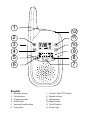
A belt clip is included and fitted to the back of the handset. The belt clip enables the handset
to be attached to a belt, waistband or similar. You can remove the belt clip by lifting the small
locating tab and pushing the clip upwards..
Important!
Please note when programming all references to press = to press and then immediately release the button.
Switching the Handset on/off
Press and hold 1 for a few seconds to turn the handset on or off.
To communicate
1. Make sure that all handsets (and monitor unit) are set to the same channel and transfer code.
See below.
2. Press and hold PTT (Push To Talk) to speak.
Please note!
If you are unable to communicate it may be because different channels or transfer codes have been selected, the
battery is running low or the units are too far apart.
Channel selection
All UHF/CB radio equipment share the available designated channels. If the chosen channel
is in use select an alternate channel, the selected channel number will be displayed in standby
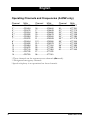
mode. Please refer to the frequency/channel allocation table on page 8.
1. Press w. The current selected channel flashes.
2. Select the desired channel using v/V.
3. Press PTT.
Transfer code selection
There are 38 transfer codes available which can be used to filter out unwanted signals.
However, your conversation may still be overheard irrespective of which code is used. To enable
communication between handsets (as well as monitor to handset), the same transfer code must
be used on all units. In order to communicate with equipment that cannot select a code, enter
code 0.
1. Press w repeatedly until the small digits in the top right hand corner of the display flash.
2. Scroll to the desired transfer code using v/V.
3. Press PTT to confirm.
Scanning
You can scan all available channels to locate any signals being transmitted. Once a signal has
been located the display will show the channel number, and a signal will be heard for a few
seconds.
You can press PTT to stop at the located channel.
Please note: while searching battery consumption will be significantly higher than normal.
1. Press w and { at the same time. The unit will start searching.
2. To stop scanning press w.
4
www.doro.com