1
Chapter 4
Reference
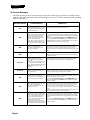
On-Screen Messages
This table describes some on-screen messages in the order of their message numbers. Find the message
number in the upper right corner of the message displayed on your TV screen, and then find the matching
number in this table.
Message Number
Possible Reason
112
Heavy rain, snow, or cloud cover
may be interfering with transmission
of the satellite signal, or there may
be other interference.
Note the local weather conditions. Contact your MDU building
manager for further information/instructions
005
The receiver may not yet have been
electronically linked with the Smart
Card, via the satellite signal. The
satellite dish may have moved so
that it is no longer picking up the
satellite signal. The cable
connections may have loosened or
have moisture inside. There may be
an interruption of the satellite signal.
If you have authorized the receiver, wait a few minutes to see if the
message is removed. Make sure that all required cables are in place,
and check that all cable connections are tight and dry (for outdoor
cables).
Check that the Signal Strength bar in the QAM/Signal menu is
green and displays the word Locked. If not, contact your MDU
building manager. If you have not authorized the receiver, call the
Commercial Customer Service Center for help.
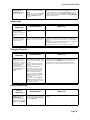
006
The receiver may not be connected
to an active telephone line.
The Smart Card credit limit may
have been suspended.
You must connect the receiver to an active telephone connection at
all times. If you install two or more receivers, you must connect
each receiver to an active telephone connection at all times.
Review your pay per view purchases to check the Smart Card credit
limit.
Phone signal not working correctly.
If connected with DSL phone line, install a DSL filter between the
receiver and the telephone wall jack. You can obtain the filter from
your DSL provider.
Remember that the program providers specify which programs
are “blacked out” for which viewers, not DISH Network.
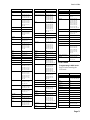
011, 012
Viewers in specific areas are
prohibited from watching certain
programs.
For example, viewers who live close
to a particular football stadium may
be prohibited from watching football
games that are played in that
stadium.
013, 014
You may have tried to tune to a
program on a channel which you
have not bought.
You must buy a channel before you can tune to a program on that
channel. Call the Customer Service Center to buy the channel, or if
you believe this message was displayed by mistake.
015
You may have just plugged in the
receiver, and it is acquiring the
satellite signal. Or, the receiver may
have temporarily lost the signal.
Wait a few minutes to see if the message is removed. Make sure that
all required cables are in place, and check that all cable connections
are tight and dry (for outdoor cables).
Check that the Signal Strength bar in the QAM/Signal menu is
green and displays the word Locked. If not, contact your MDU
building manager.
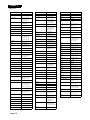
018
The receiver may not be connected
to an active telephone line.
The Smart Card credit limit may
have been exceeded.
You must connect the receiver to an active telephone connection at
all times. If you install two or more receivers, you must connect
each receiver to an active telephone connection at all times.
Review your pay per view purchases to check the Smart Card credit
limit.
Call the Customer Service Center for help checking the credit limit,
and/or to get authorization to make a purchase.
The receiver may not yet have been
electronically linked with the Smart
Card, via the satellite signal. The
satellite dish may have moved so
that it is no longer picking up the
satellite signal. The cable
connections may have loosened or
have moisture inside. There may be
an interruption of the satellite signal.
If you have authorized the receiver, wait a few minutes to see if the
message is removed. Make sure that all required cables are in place,
and check that all cable connections are tight and dry (for outdoor
cables).
008
022
Page 64
What to Do
Check that the Signal Strength bar in the QAM/Signal menu is
green and displays the word Locked. If not, contact your MDU
building manager.