1
RetroTube amp's FX loop, you can reduce the level at the FX Loop Send jack (30) to
somewhere between -20 dB and -10 dB by setting the two channel Volume knobs
between 1 and 4. Older effects pedals usually don't handle high input levels well. Even
a -10 dB signal can cause undesirable distortion.
8 Gain Channel 2
Gain control for the Channel 2. This Control knob determines input sensitivity when
Channel 2 is active. Use it to dial in the desired amount of preamp saturation level.
A tip from the designer:
Preamp Channel 2 is a lot hotter than Channel 1 because its baseline gain level is a lot
higher. It is roughly comparable to that of Channel 1 with Gain Boost activated.
However, its tonal structure is different, giving you yet another flavor of overdriven
tone to spice up your musical act.
Activating Gain Boost sends Channel 2 into very different sonic territory with
sustaining lead tone that is great for soloing.
If you push Channel 2 hard while Gain Boost is active, the preamp gain will be
substantial and noise such as hissing and any buzzing produced by guitar pickups will
be amplified considerably. If you wish to configure the preamp so that both Channel 2
and Gain Boost are on, you can activate the Noise Gate (see section 29) to largely
suppress such noise.
CAUTION: Extremely high gain and volume levels in Lead mode can produce powerful
feedback. Avoid feedback squeals; they can lead to hearing loss and damage
speakers! At higher volumes, back off the Gain and Treble levels in order to prevent
unchecked feedback!
9 Tone
This sound-shaping button mainly influences the upper midrange. When activated, it
boosts the frequency range between 500 Hz and 1 KHz.
The LED above the button lights up to indicate Tone is activated.
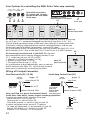
The Tone sound feature may also be switched using a Z-9 Custom Footswitch
connected to the S.A.C. Port (21) or a footswitch connected to jack (23).
For more details see the chapter 21 and 23 on page 11 and 12 !
A Tip from the Designer:
The Tone button voices specific midrange frequencies that are instrumental in finetuning a guitar's sound. The amp's sound will be thicker when it is activated.
If you want a less dominant midrange, leave this feature deactivated; that is, don't
push this button. The Tone button also lets you adapt Channel 2's fundamental sound
to suit different types of guitar pickups.
10 Bass
This is the preamp voicing section's passive low-frequency EQ for Channel 2.
11 Middle
This is the preamp voicing section's passive midrange EQ for Channel 2.
12 Treble
This is the preamp voicing section's passive high-frequency EQ for Channel 2.
8