1
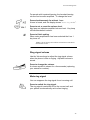
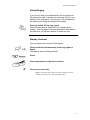
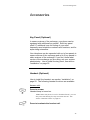
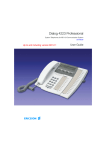
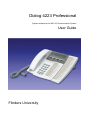
Dialog 4223 Professional
System telephones for MD110 Communication System
User Guide
Flinders University
Ericsson Dialog 4223
Table of Contents
Description ………………………………
Incoming Calls…………………………...
Outgoing Calls…………………………...
During Calls………………………………
Call Forwarding………………………….
Group Features………………………….
Other Useful Features…………………..
Settings…………………………………...
Accessories………………………………
Installation………………………………..
Glossary………………………………….
Index………………………………………
2
11
13
19
25
35
37
41
48
52
58
59
1
Ericsson Dialog 4223
Description
1
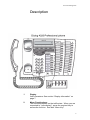
Display
3x40 characters. See section “Display information” on
page 7.
2
Menu Function keys
The functions depend on the traffic state. When you are
requested to “(see display)”, press the required key to
access the function. See also “Menu Key”
2
Ericsson Dialog 4223
3
Programming
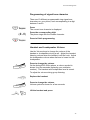
See section “Settings” on page 41.
4
Call-back
For indicating/activating Call-back. See Section “When
you receive a busy tone” on page 15. The feature can be
removed or moved to another programmable function key
by your system administrator.
5
Diversion (Follow-me)
For indicating/activating and deactivating Diversion
(Follow-me). See section “Call Forwarding” on page 25.
The feature can be removed or moved to another
programmable key by your system administrator.
6
Programmable function keys
To program numbers of functions, see section
“Programming of function keys” on page 41. All key
panel keys are programmable (except the Menu key).
7
Menu Key
When the phone is in idle mode, press to switch between
“idle display” and Menu key function descriptions.
Note: Depending on the system version, the key position
differs. To find the Menu Key for your system, look for display
reactions when you press any of the two keys. The key press
that changes the text of the Menu Function keys, is the key to be
used. The other key can be used as a programmable key.
8
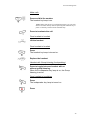
Transfer
For transferring call, see section “During Calls” on page
21.
9
Triple Access Line
For handling calls, Line 1 and 2 are available both for
incoming and outgoing calls. Inquiry can only be used for
outgoing calls.
10
Microphone
Used for handsfree conversation.
11
Clear
To disconnect calls or exit a function. Can always be
pressed instead of replacing the handset.
12
Headset Key
To handle headset calls and activate Headset Preset.
See section “Headset optional” on page 48.
3
Ericsson Dialog 4223
13
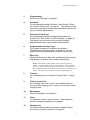
Loudspeaker on/off
a. To activate Group listening. See section “During
Calls” on page 18.
b. To activate handsfree conversation (Dialog 422
Office only see section “During Calls” on page 19.
c. To activate Loudspeaker Preset. See section
“Headset Preset” on page 50.
14
Mute
a. To switch the microphone on or off during call. See
section “Mute” on page 20.
b. To switch off the ring signal in idle more or when
ringing. See sections “Mute ring signal” on page 46.
and “Silent ringing” on page 47.
15
Volume control
To change the volume. See section “Settings” on page
41.
16
Loud Speaker
17
Handset
Supplied with hearing aid function as standard. An extra
handset can be connected, see section “Accessories” on
page 48.
18
Pull-out leaf for easy guide (optional)
19
Key panel
With 17 programmable keys. Up to four panels can be
connected. See section “Key panel (optional)” on page
48.
20
Designation Card
Your system administrator can print new designation
cards for you.
4
Ericsson Dialog 4223
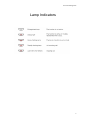
Lamp Indicators
5
Ericsson Dialog 4223
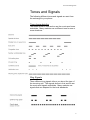
Tones and Signals
The following different tones and signals are sent from
the exchange to your phone.
Tone characteristics
The tones shown in this section are the most used tones
worldwide. Many markets use a different tone for one or
more situations.
Ring Signals
Three different ring signals inform you about the type of
the incoming call. The signals shown in this section are
the most used signals worldwide. Many markets use
signals that are adapted for the local standards.
6
Ericsson Dialog 4223
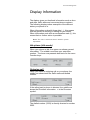
Display Information
The display gives you feedback information such as time
and date, traffic state and connected phone numbers.
The following displays show examples of the different
states your phone is in.
When information ends with three dots (...), this means
that the system is working or waiting for your action.
When information ends with an exclamation mark (!), this
means that no further action is possible.
Note: The order in which the date is stated is system
dependent.
Idle phone (idle mode)
When your phone is idle, the upper row shows general
information. The middle row shows your extension
number. The lower row presents lead texts for the menu
Function keys.
Outgoing call
When you make an outgoing call on your phone, the
middle row shows both the traffic state and dialled
number.
If the called party’s phone is diverted, the middle row
shows the Diversion information. > is the Diversion
symbol.
The dialled number (3333) is directly diverted to number
5555.
7
Ericsson Dialog 4223
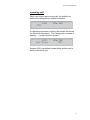
Incoming call
When you receive an incoming call, the middle row
flashes the calling party’s extension number.
If a diverting extension is calling, the middle row shows
the diversion information. The calling party’s number is
flashing. > is the Diversion symbol.
Number 2222 has dialled number 4444 and the call is
directly diverted to you.
8
Ericsson Dialog 4223
Menu Function Keys
The menu Function keys are used to access different
functions. Depending on which traffic state and category
of extension, the available functions change.
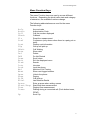
The following abbreviations are used for the menu
Function keys:
AcCo
AutCo
Call
CBack
Clr
Conf
Cost
CUp
CWait
Date
Del
DND
Down
Exit
Find
Intr
Lock
Mal
Next
Open
Page
Pick
RDial
Space
Start/Stop
Time
Tones
Up
Account code
Authorisation Code
Call the number displayed
Callback
Reset the measurement
Conference (only shown when there is a party put on
hold).
Display cost information
Group call pick up.
Call Waiting
Show date
Delete
Do Not Disturb
Scroll down
Exit the displayed menu
Search
Intrusion
Lock the phone
Malicious Call Tracing
Show next logged number
Unlock the phone
Paging
Call pick-up
Last Number Redial
Enter a space when writing names
Start/Stop time measurement
Display time measurement
Dialling during a connected call (Push button tones,
DTMF).
Scroll Up
9
Ericsson Dialog 4223
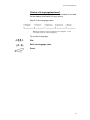
Choice of Language(optional)
One of the following languages can be chosen to be used
for the display information on your phone.
Digit 0-9 =the language code:
Note: By default 5-9 are programmed for English. To be
changed locally to other languages.
To choose a language:
Dial.
Enter the language code.
Press.
10
Ericsson Dialog 4223
Incoming Calls
Answer calls
A ringing signal and a flashing lamp indicate an incoming
call.
On line 1
Normally you will receive calls on Line 1.
Lift the handset.
On any other Line key
Lift the handset.
Press the flashing line key
Handsfree
Press the flashing line key.
You are connected to the caller via the loudspeaker and
the microphone.
Press to terminate a handsfree call.
11
Ericsson Dialog 4223
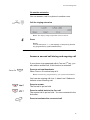
On another extension
You can answer a call to a phone in another room.
Call the ringing extension
Note: The display image might differ from the above.
Press
Notes:
You can also press Pick (see display) or Call pick up (function
key programmed by system administrator).
Answer a second call during and ongoing call
If your phone is programmed with a Free on 2nd key, you
can receive another call, if this function is activated.
Press to activate/deactivate.
When Free on 2 is active lamp is lit.
Note: Function Key programmed by your system administrator.
You have an ongoing call Line 1, when Line 2 flashes to
indicate a new incoming call:
Press to answer.
The first call is put on hold
Press to switch back to the first call
The second call is put on hold. You are connected to the
first caller.
Press to terminate the connected call
12
Ericsson Dialog 4223
Outgoing Calls
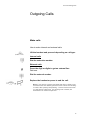
Make calls
How to make internal and external calls:
Lift the handset and proceed depending on call type:
Internal calls
Dial the extension number.
External calls
Press the digit or digits to get an external line.
Dial tone.
Dial the external number.
Replace the handset or press to end the call.
Note: If you receive a queue tone when the digit or digits to get
an external line are dialled (optional function Least Cost Routing
is used in the system), keep waiting. Once a line becomes free
you will receive a dial tone. If a warning tone is heard, the
selected line is marked “Expensive”.
13
Ericsson Dialog 4223
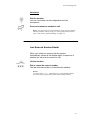
Handsfree
Dial the number
You are connected via the loudspeaker and the
microphone.
Press to terminate a handsfree call.
Note: You can make your calls faster by using common Speed
dialling numbers and by using your own programmed function
keys. See section “Speed Dialling” on page 16.
Last External Number Redial
When you initiate an external call the system
automatically stores all the dialled digits, irrespective of
whether the call was successful or not.
Lift the handset
Dial to repeat the stored number.
The last external number is automatically redialled.
Notes:
You also press RDial (see display) or Last Number Redial
(Function Key programmed by the system administrator).
14
Ericsson Dialog 4223
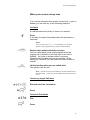
When you receive a busy tone
If you call an extension and receive a busy tone, or get no
answer you can use any of the following methods.
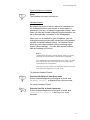
Call-back
If a called extension is busy or there is no answer:
Press
It can take a couple of seconds before the procedure is
executed.
Notes:
You can also press: CBack (see display) or Call-back
(function key programmed by system administrator).
Replace the handset to finish procedure
You are called back (recall ringing signal) when the
ongoing call is finished or the next time a new call is
finished. You have to answer within 8 seconds;
otherwise the Call-back service is cancelled. While
waiting for Call-back you can make and receive calls as
normal.
Lift the handset when you are called back
The system calls the ext.
Note: Call-backs can be activated on several extensions at
the same time. Call-backs from additional lines will recall on
Line 1.
Cancel any single Call-back
Dial and enter the ext number.
Press
Cancel all Call-backs
Dial
Press
15
Ericsson Dialog 4223
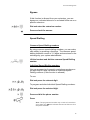
Bypass
If this function is allowed from your extension, you can
bypass an; activated diversion or activated follow me on a
specific extension.
Dial and enter the extension number.
Press and wait for answer.
Speed Dialling
Common Speed Dialling numbers
By using common speed dialling numbers, you can make
calls simply by pressing a few keys. The common speed
dialling numbers consist of 1-5 digits and are stored in the
exchange by your system administrator.
Lift the handset and dial the common Speed Dialling
number.
Individual Speed Dialling numbers
You can program ten frequently used phone numbers on
the digit keys 0-9 and use them as individual Speed
Dialling numbers (if this function is allowed).
To use:
Dial and press the relevant digit.
To program and alter Individual Speed Dialling numbers:
Dial and press the selected digit.
Press and dial the phone number
Press
Note: The programmed number may consist of a maximum
of 20 digits plus which indicates the second dial tone from
the public network.
16
Ericsson Dialog 4223
To erase one programmed number:
Dial and press selected digit.
Press
To erase all programmed numbers:
Dial
Press
Dial by a function key
Both functions and phone numbers can be programmed
on a function key. To programme a key, speak to your
system administrator.
Press the function key.
17
Ericsson Dialog 4223
Authorisation Code (Optional)
If you are assigned an authorisation code (1 to 7 digits),
affiliated to your own ext you can change the access level
on your ext. You can use the code for one call or you can
open the phone to some calls and lock it when leaving
the phone.
To use for a single call:
Dial.
Enter authorisation code and press
Verification tone.
Note: You can also press AutCo (see display), enter the code
and press Enter (see display).
Dial 0 to get an external line, and then dial the
external number.
To open an ext for some calls:
Dial
Enter authorisation code and press.
Verification tone.
Note: You can also press Open (see display), enter the code
and press Enter (see display).
To lock an extension:
Dial
Enter authorisation code and press.
Verification tone.
Note: You can also press Lock (see display), enter the code
and press Enter (see display).
18
Ericsson Dialog 4223
During Calls
Group Listening (Loudspeaking)
This function lets other people in your room listen to your
phone conversation. You speak in the handset while the
other party’s voice is heard on the speaker.
During an ongoing conversation:
Press to switch between loudspeaker and handset.
When the key lamp is lit, the other party’s voice is heard
on the loudspeaker.
Note: You can adjust the volume, See section “Settings” on
page 41.
From loudspeaking to handsfree
Replace the handset.
Handsfree conversation
From handsfree to loudspeaking
Lift the handset and press.
Press to end the call.
19
Ericsson Dialog 4223
Handsfree
Press and replace the handset
Handsfree conversation
Press to end the call.
From handsfree to handset
Lift the handset
Conversation via the handset
Mute
Press to switch the microphone on or off.
When the lamp is lit, the person on the line cannot hear
what is being said in your room.
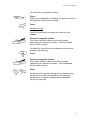
Inquiry
You have a voice connection on Line 1and want to make
an inquiry to an internal or external party.
Press
This first party is put on hold (Line 1 flashes slowly).
Note: You can also press Line 2
Call the Third Party
When the other party answers, you can switch between
the calls, Transfer the call, create a conference and end
one of the calls.
Press to end inquiry or call.
The third party is disconnected
Press to return to first call.
20
Ericsson Dialog 4223
Refer Back
The line key flashes for the call put on hold.
Press to put third party on hold.
First call is connected.
Press to put first call on hold
Third party is connected.
Note: You can also press Line 2 if you have initiated the
inquiry on line 2.
Press to terminate the connected call.
Transfer
You have an ongoing call and you want to transfer the
call to another extension.
Press
Note: You can also press a free line key.
Call the third party
Press before or after
The ongoing call is transferred.
Note: If you have put more than one call on hold, the last
call that was put on hold will be transferred. If the dialled ext
is busy or Transfer is not allowed, your phone will ring again.
21
Ericsson Dialog 4223
Conference
With this procedure you can include up to seven parties
in a conference. Only the conference leader (i.e. the
person initiating the conference) can admit participants.
During the conference a tone will be heard every 15th
second.
You have an ongoing conversation (Line 1) and want to
establish a phone conference. You will become the
conference leader.
Press.
Note: You can also press Line 2.
Call the third party.
Wait for an answer.
Press to establish conference
Note: You can also press Conf (see display).
Repeat the procedure to add more conference
members.
Replace the handset to leave the conference.
Note: A tone burst is heard each time a participant enters
or leaves the conference. When the conference leader
leaves the conference, the conference will continue with the
other included parties. The conversation is changed back
to a normal 2 party connection when there is only two
parties left.
22
Ericsson Dialog 4223
On Hold
You can temporarily put the ongoing call on hold. Calls
put on hold can be resumed from your own phone.
Individual
Press the ongoing call Line key and replace the
handset.
The key lamp flashes slowly.
Press the flashing Line again to resume the call.
23
Ericsson Dialog 4223
Call Metering
Call Duration
You can measure the elapsed time of your call. The
feature can be activated when your phone is ready for
dialling (internal dial tone is heard) , during an outgoing
call, or when you have a voice connection.
Note: System dependent. It can also be possible
to activate Call Duration when your phone is idle.
Time
Press to activate the Call Duration feature (see
display).
The display shows:
Start
Press to start time measurement (see display).
The elapsed time is shown.
Clr
Press to clear the time measurement (see display).
Date
Press to show date (see display).
Exit
Press to exit the call Duration feature (see display).
Other key functions that are available during call duration
mode:
Stop
Press to stop the time measurement (see display).
Time
Press to show time measurement (see display).
24
Ericsson Dialog 4223
Call Forwarding
Diversion
If you do not want to be disturbed or will be out of the
office, you can have all calls diverted to another
answering position. During diversion you will hear a
special dial tone. You can still make calls as usual.
Diversion can be direct, on no answer or on busy.
Order Direct Diversion from your ext
The call is diverted to an individual position, preprogrammed by your system administrator.
Note: Diversion can also be ordered or cancelled from the
answering position, use same procedure as in section
“Internal follow-me” page 27.
Press
Note: Function key programmed by your System
administrator. Lamp will be lit.
Dial and press.
Cancel Direct diversion from your own ext
Note: Diversion can also be ordered or cancelled from the
answering position, use same procedure as in section
“Internal follow-me” page 27.
Press
Note: Function key pre-programmed by your system
administrator. You can also use procedure below.
Dial.
Press.
25
Ericsson Dialog 4223
Diversion when there is no answer
Dial to order.
The incoming call is diverted after 3 rings.
Press.
Dial to cancel.
Press.
Diversion when caller receives busy tone
Dial to order.
`
Press
Dial to cancel
Press
26
Ericsson Dialog 4223
Internal Follow-me
All calls to your extension are diverted to another
extension of your choice (within the private network).
During the follow-me, your phone can still be used for
outgoing calls and you will hear a special dial tone when
you lift the handset.
Order from your own extension
Lift the Handset
Dial and enter the answering position
Press
Cancel from your own extension
Dial and Press
Redirect from answering position
If you move from one answering position to another
answering position, you can redirect Follow-me from that
new position.
Note: Internal Follow-me must be ordered from your own
extension before you can redirect from answering position.
Dial and enter your own extension number.
Press and enter the diversion number
Press to redirect
Calls are diverted to answering position.
27
Ericsson Dialog 4223
Cancel from answering position
Dial and enter your own extension number.
Press.
External Follow-me
If external Follow-me is allowed, you can have all calls to
your extension diverted to an external number of your
choice. During Follow-me, your phone can still be used
for outgoing calls and you will hear a special dial tone
when you lift the handset.
Order
Dial and enter the digit or digits to get an external line
and enter the external line.
Press.
Cancel
Dial
Press
28
Ericsson Dialog 4223
Personal Number (optional)
With this function you can be reached on your normal
office phone number even if you are in another room, out
of the office or at home, etc.
Depending on the functionality of your office exchange,
you can have either one individual single search profile or
you can choose between five individual search profiles.
A search profile can be designed to fit the situation, i.e. in
the office, travelling, at home, etc. Both internal or
external phone numbers can be used in a profile.
At your request, the search profiles are programmed or
modified by your system administrator. See section “To
design and order your search profiles” on page 33.
When the function is activated, incoming calls are
transferred to different phones or to back up services in
the order you choose. If an answering position in the
profile is busy, the call can be transferred to another
predefined position in the profile, i.e. voicemail or a
colleague. You can activate the function from your own
office phone or when out of the office, by using the Direct
Inward System Access Function (DISA).
To activate or change to another profile from your office
phone.
Dial
Press the search profile digit.
Press.
The display show the chosen search profile digit.
Notes:
You can also activate and change to another profile by
programming one function key/search profile (pre-assigned
by your system administrator). When the search profile is
active the key lamp is on. See section “Settings” on page
41. When another party is included in the activated profile,
a colleague or an operator etc., remember to inform about
your absence.
29
Ericsson Dialog 4223
To Cancel from your office phone
Dial.
Press
Note: If you have activated a profile via function key, you
can press this key instead of using the procedure above.
To activate or change to another profile from an external
phone
The external phone must be of push button type provided
with the hash key (#) and star key (*) or a mobile phone
adapted for dial tone pulses (DTMF).
Call the DISA function at your office.
Dial tone.
Dial
Enter the authorisation code and press.
Dial your own ext number and press.
Dial tone.
Dial
Dial your own extension number and press.
Press the search profile digit.
Press and replace the handset.
Note: When another party is included in the activated
profile, a colleague or an operator, etc., always remember
to inform about your absence. If voicemail is included in
the activated profile, always update your greeting with
absence information.
30
Ericsson Dialog 4223
To cancel from an external phone
The external phone must be of push button type provided
with the hash key (#) and star key (*) or a mobile phone
adapted for dial tone pulses (DTMF).
Call the DISA function at your office.
Dial tone.
Dial tone.
Dial the authorisation code and press.
Dial your own extension number and press.
Dial tone.
Dial
Dial your own extension number and press.
Replace the handset
To design and order your search profile
The search profiles are installed or changed by your
system administrator. In order to set up your profiles,
copy the setting form, fill in your new or changed profiles
and hand in to your system administrator.
31
Ericsson Dialog 4223
Important notes when designing your profiles:
•
Avoid ring times longer than 45 seconds for your
profiles
Usually the caller hangs up after 3-6 ring signals.
If you need a longer ring time, the maximum ring
time is 60 sec.
•
Consider the time you need to react and answer
on each answering position on your profile.
You might need up to 15 seconds to react and
answer a call on a desk or cordless phone and 2025 seconds for a mobile phone.
•
There must be an answering position at the end of
every profile. (Voicemail or operator/secretary)
If not, calls might end up unanswered.
•
Consider what should happen when you are busy
on the phone:
The available options are:
-
•
Activate Free on 2nd (if available)
Diversion to voicemail
Diversion to operator
If an answering machine, a fax or other answering
device is used as an early answering position, it
might interrupt the searching.
Disconnect the answering device, or design the
ring time so that they do not affect the searching.
•
If your system admits just one single profile,
design the profile only with your 2-3 most
frequently used positions.
If you add more numbers, there is a risk that the
caller hangs up before a latter position is called.
32
Ericsson Dialog 4223
•
If your system admits 1-5 personal profiles, design
the different profiles to fit your most frequently
used positions.
Make sure you use as few answering positions as
possible for each profile. Profile examples:
-
In the office
At home
Travelling
Absent/not reachable
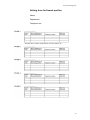
Example:
How to fill in your setting form for search profiles:
33
Ericsson Dialog 4223
Setting form for Search profiles
Name:
Department:
Telephone no.:
34
Ericsson Dialog 4223
Group Features
Group Call-pick-up
People working in a team can have their phones
programmed by the system administrator to form a callpick-up group.
In a call-pick-up group, any member can answer any
individual call to group members.
Press to answer.
Common bell group
Calls are signalled on a common bell.
Press to answer.
Group Hunting
An internal Group Hunting number is a common directory
number for a group of extensions. Calls to the group will
be indicated at a free extension in the group.
When you leave your phone temporarily, you make your
phone unavailable for incoming calls.
To leave a group temporarily
Dial and enter in your own extension.
Press
35
Ericsson Dialog 4223
To re-enter the group
Dial
Press.
If you are authorised you can divert all calls to your
group, to another extension or group:
Dial
Dial the number of the group to be diverted and
press.
Dial the extension number of the new answering
position.
Press
To cancel the diversion:
Dial
Dial the number of the group that has been diverted.
Press
36
Ericsson Dialog 4223
Other useful features
General deactivation
The following features can be simultaneously cancelled :
•
•
Call-back (all call-backs are cancelled)
Diversion/Internal and External Follow-me
Order
Dial
Press
Hot line
Ask your system administrator if you require this function.
Delayed Hot Line
When the handset of the delayed hot line phone is lifted
or when the line key is pressed, a timer is started. If no
digit is pressed before time out, a call is generated to a
specific extension or external line. If a digit is pressed
before time out the phone works as an ordinary phone.
Direct Hot Line
The same function as described above, but without a
delay. Only hotline calls can be placed from this line. To
be used e.g. as alarm phone, door phone etc
37
Ericsson Dialog 4223
Additional directory number
You can be assigned (programmed by your system
administrator) one or more Additional Directory Numbers
(lines) on three function keys.
To answer, make calls and use functions on the
additional directory lines, use below procedure.
Example:
To make a call on an additional directory line:
Lift the handset
Press
Note: Function key pre-programmed by your system
administrator.
Dial the extension
Multiple represented directory number
Your extension number can be programmed on a
dedicated key on other system telephones, i.e. the
number is “represented” on these phones.
This means that incoming calls to your extension can be
answered on any of these other phones by just pressing
the dedicated key. The dedicated key can also be
programmed with the possibility to call your extension
when pressed. This function has to be programmed by
your system administrator.
38
Ericsson Dialog 4223
DISA = Dialling Inward System Access
(Optional)
If you are assigned to use this function and you are
working externally, you can call your office and get
access to an external line in order to make business calls.
The business call will be charged to your extension
number or an account number. You will just be charged
for the call to the office.
The external phone must be off push button type
provided with the hash key(#) and star key (*) or a mobile
phone adapted for dial tone pulses (DTMF).
After a completed DISA call you must hang up before a
new DISA call can be made.
With Authorisation code
Call the DISA function at your office
Dial tone
Dial
Dial the authorisation code and press
Dial tone
Dial the external number
39
Ericsson Dialog 4223
Name and Number Log (optional)
With this function all unanswered calls to your phone will
be logged. By use of the menu Function keys under the
display you can browse the log, make calls to logged
numbers and delete logged numbers.
A Function key must be programmed by your system
administrator. The key lamp is switched on and will flash
when new unanswered calls have been logged, since last
time the key was activated.
Your phone must be idle and unlocked to be able to
browse the log.
To browse the number log
Press
Note: Function key programmed by your system
administrator.
The key lamp is switched off and the display shows the
number of stored numbers, time, date, name and the
number of the last unanswered call.
Note: In previous system versions, the display text New
missed calls is replaced with Unanswered calls.
Next
Press to show the next logged number (see display)
Del
Press to delete the displayed number (see display)
Call
Press to call the displayed number (see display)
Note: If missed call is an external number you cannot use
this feature as a “0” for an outside line must be dialled first.
Exit
Press to exit (see display)
40
Ericsson Dialog 4223
Settings
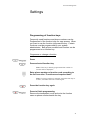
Programming of function keys
Frequently used functions and phone numbers can be
Programmed of the function keys for easy access. When
you want to use the function just press the key. Certain
functions must be programmed by your system
administrator. Both phone numbers and function can be
programmed on a function key.
Programme or change a function
Press
Press selected function key
Note: If the key is already programmed the number or
function will be displayed.
Enter phone number or function code according to
the list in section “Functions and required data”.
Note: If a wrong number is entered, press the clear key to
erase it, and then enter the number again.
Press the function key again.
Press to finish programming.
Remove the transparent cover and write the function
name or phone number beside the key
.
41
Ericsson Dialog 4223
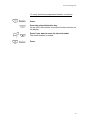
To verify and erase programmed number or function
Press.
Press the selected function key.
On the 4222 office phone, the stored number is shown on
the display.
Press if you want to erase the stored number.
The stored number is erased.
Press.
42
Ericsson Dialog 4223
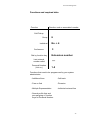
Functions and required data
Function
Function code or associated number
Call Pickup:
Group
Individual
Conference:
Dial by function key
6
No. + 4
3
Extension number
Last external
number redial
***
Personal Number
(List no,)
1-5
Functions that need to be programmed by your system
administrator:
- Additional lines
- Call-back
- Free on 2nd
- Diversion
- Multiple Representation
- Individual external line
- Search profile lists and
pre-assigning of function
keys for Personal Number.
43
Ericsson Dialog 4223
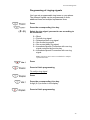
Programming of ringing signals
You have six programmable ring tones on your phone.
The different signals can be programmed on lines,
additional lines and multiple represented lines.
Press
Press the corresponding Line key.
Select the ring signal you want to use according to
the list below:
0 = Silent
1 = Periodic ring signal.
2 = Delayed periodic ring signal
3 = One muted ring signal
4 = One muted delay ring signal
5 = Immediate Speech Connection with one ring
signal controlled by function key
6 = Immediate Speech Connection with one ring
signal.
Note: Options 5 and 6 are not available for multiple
represented lines.
Press
Press to finish programming
To verify a ring signal
Press
Press the corresponding Line key.
A digit (0-6) is shown in the display.
Press to finish programming.
44
Ericsson Dialog 4223
Programming of signal tone character
There are 10 different programmable ring signal tone
characters on your phone, each corresponding to a digit
between 0 and 9.
Press
The current tone character is displayed.
Press the corresponding digit.
The phone rings with the chosen character.
Press to finish programming.
Handset and Loudspeaker Volume
Use the Volume keys to change the volume of the
handset or loudspeaker during a call. Adjust the handset
listening volume when the handset is off the hook. Adjust
the loudspeaker volume when dial tone is heard via the
loudspeaker.
Press to change the volume.
On the dialog 4222 Office phone, a volume symbol is
shown for a few seconds (replacing your extension
number). The handset and loudspeaker level is stored.
To adjust the volume during group listening:
Replace the handset.
Press to change the volume.
Volume symbol is shown for a few seconds.
Lift the handset and press.
45
Ericsson Dialog 4223
For people with impaired hearing, the handset hearing
volume can be extra amplified. To change the level:
Press simultaneously for at least 1 sec.
A tone is heard, and the display shows “Setting Mode”.
Press to set or reset the volume level.
Key lamp on indicates amplified volume level. Key lamp
off indicates default volume.
Press to finish setting.
When extra amplification has been selected the Line 1
key turns off.
Note: A level change also effects a headset connected to
the headset outlet.
Ring signal volume
Use the Volume keys to adjust the ring signal volume
when the phone is idle or ringing. Adjusted volume is
stored.
Press to change the volume.
A volume symbol is shown for a few seconds (replacing
your extension number).
Mute ring signal
You can suppress the ring signal for an incoming call.
Press to switch the ring signal.
The ring signal is switched off for the current call, and
your phone is automatically set to silent ringing.
46
Ericsson Dialog 4223
Silent Ringing
If you do not want to be disturbed by the ring signal but
still want to be able to answer an incoming call, you can
switch off the ring signal. Incoming are only indicated by
the flashing line lamp and display information.
Press to switch off the ring signal
The mute key lamp is switched on to indicate silent
ringing. The ring signal will automatically be switched on
the next time you lift the handset or press any key.
Display Contrast
You can adjust the contrast of the display.
Press and hold simultaneously until ring signal is
heard.
The display shows “Settings Mode”.
Press.
Press repeatedly to adjust the contrast.
Press to save and exit.
Note: To exit the menu without saving changes, press #
before you press any of the adjustment keys.
47
Ericsson Dialog 4223
Accessories
Key Panel (Optional)
In newer versions of the exchange, your phone can be
equipped with additional key panels. Each key panel
offers 17 additional keys for sorting of your most
frequently used telephone numbers and functions, and for
supervising extensions.
Your telephone can be expanded with up to four panels in
newer versions of the exchange and up to 2 key panels in
older versions of the exchange. If you don’t know what
version of the exchange you are using, ask your system
administrator. How to install the key panel, see section
“Installation” on page 52.
Headset (Optional)
How to install the headset, see section “installation” on
page 52. The following headset functions are available.
Answer calls
Press to answer
Headset lamp is turned on.
Note: When the phone is set for “Headset Preset”, you can
also press the flashing line key to answer the call. See
section “Headset Preset” on page 50.
Press to terminate the headset call.
48
Ericsson Dialog 4223
Make calls
Press and dial the number.
The headset key lamp is on.
Note: When the phone is set Headset preset, you can also
dial the number directly without pressing the headset key or
press a Line Key instead of the Headset key.
Press to terminate the call.
From headset to handset
Lift the handset
From handset to headset
Press
The headset key lamp is turned on.
Replace the handset
Headset with Group listening (loudspeaking)
Press to toggle between headset with or
without group listening.
When the Loudspeaker key lamp is on, the Group
listening is active.
From headset to handsfree
Press
The loudspeaker key lamp is turned on
Press
49
Ericsson Dialog 4223
From handsfree to headset
Press
The headset key lamp is turned on.
Headset Preset
By default the phone is set for calls to be connected to
the loudspeaker when you answer or make calls, by
pressing a Line key, so called Loudspeaker Preset. Also
when you dial the number without lifting the handset, the
call is automatically connected to the loudspeaker.
When you use a headset for your telephone, you can
change the setting to get calls connected to the headset
instead, so called Headset Preset. In Headset Preset
mode you can make headset calls by pressing digits
directly (direct dialling). You can also answer headset
calls by pressing a Line Key.
Notes:
Independent, the type of preset setting, when you lift the
handset, the call is always connected to the handset.
Also handsfree and loudspeaking work as usual, i.e. when
the Loudspeaker key is pressed, the call is temporarily
connected to the loudspeaker.
Activation and cancellation of Headset Preset can only be
done when the telephone is in idle mode.
To activate Headset Preset:
Press and hold for at least 4 seconds
A short acknowledgement tone signal is heard, and
“Headset Preset” is displayed for a few seconds.
To cancel Headset Preset:
Press to hold for at least 4 seconds
A short acknowledgement tone signal is heard, and
“Loudspeaker Preset” is displayed for a few
seconds.
50
Ericsson Dialog 4223
To check the current preset setting:
Press
Either the Loudspeaker or Headset key lamp is turned on,
indicating the current preset setting.
Press
Headset Volume
Use the Volume keys to change the volume of the
headset.
Press to change the volume.
The volume symbol is shown for a few seconds
(replacing your extension number). The set headset
volume level is stored.
To adjust the volume for the loudspeaker of the phone
during Group listening:
Press
Press to change the volume.
The volume symbol is shown for a few seconds
(replacing your extension number). The loudspeaker
volume level is stored.
Press.
For people with impaired hearing, the headset hearing
volume level can be extra amplified, use the same
procedure as in section “Handset and loudspeaker
volume” on page 45.
51
Ericsson Dialog 4223
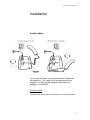
Installation
Install cables
You can put the cable to the handset notch underneath
the telephone. The cable to the exchange has to be
plugged in “LINE” and the handset cable has to be
plugged in “HANDSET”.
Change cables
To remove a cable, use a screwdriver to unlock the stop.
52
Ericsson Dialog 4223
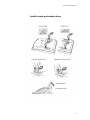
Install stands and adapt phone
53
Ericsson Dialog 4223
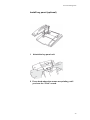
Install key panel (optional)
1
Attach the key panel unit
2 Press hard where the arrows are pointing, until
you hear the “Click” sound.
54
Ericsson Dialog 4223
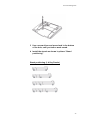
3 Use a screw driver and press hard in the bottom
of the hole, until you hear a weak sound.
4 Install the stands as shown in picture “Stand
positioning”
Stand positioning (1-4 Key Panels)
55
Ericsson Dialog 4223
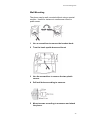
Wall Mounting
The phone can be wall mounted without using a special
console. Useful for instance in conference rooms or
public areas.
1
Use a screwdriver to remove the handset hook.
2
Turn the hook upside down and insert
3
Use the screwdriver to remove the two plastic
covers.
4
Drill wall holes according to measure.
5
Mount screws according to measures and attach
the phone.
56
Ericsson Dialog 4223
Placing the phone
Do not expose your phone to direct sunlight for long
periods. Keep the phone away from excessive heat and
moisture.
Cleaning
Clean your phone only with soft, water dampened cloth.
Using soap, or any other cleaning materials, may
discolour or damage the phone.
57
Ericsson Dialog 4223
Glossary
Additional Lines
One or more additional extension numbers
can be assigned to your phone, these are
programmed on free function keys.
Exchange
Switch. Your telephone switching system,
e.g. MD110 Communication System.
Idle mode
The state your phone is in when nothing is
activated; not calling, not ringing, not
diverting etc.
Speed Dialling number
Abbreviated number or short number, used
for making frequently used numbers faster
to dial.
Supervision
Your extension number can be represented
on a function key on other extensions (two
or more).
Traffic state
The different states your phone is in; calling,
ringing, diverted, etc.
58
Ericsson Dialog 4223
Index
A
Accessories 48
Headset 48
Key Panel 48
Additional directory number 38
Answer calls 11
Authorisation Code 18
B
Bypass 16
C
Call Duration 24
Call Forwarding 25
Diversion 25
External Follow-me 28
Internal Follow-me 27
Personal Number 29
Call metering 24
Call-back 15
Common Bell group 35
Common Speed Dialling numbers 16
Conference 22
D
Description 2
Choice of language 10
Display information 7
Lamp Indications 5
Menu Function Keys 9
Tones and Signals 6
Dial by a function key 17
DISA=Direct Inward Dialling System 39
Display information 7
Diversion 25
During calls 19
Conference 22
Group Listening (loudspeaking) 19
Handsfree 20
Handsfree to loudspeaking 19
Inquiry 20
Loudspeaking to handsfree 19
Microphone on or off 20
On hold 23
Transfer 21
E
External Follow-me 28
F
Free on 2nd 12
Functions and required data 43
G
General Deactivation 37
Glossary 59
Group Call-pick-up 35
Group Features 35
Group Hunting 35
Group listening (loudspeaking) 19
H
Handset and loudspeaker volume 45
Handsfree 20
Headset 48
Hot Line 37
Headset Preset 50
I
Incoming calls 11
Answer a second call 12
Handsfree 11
On another extension 12
On any other line key 11
On Line 1 11
Individual Speed Dialling numbers 16
Inquiry 20
Installation 52
Internal Follow-me 27
K
Key panel 48
L
Lamp indications 5
Language 10
Last External Number Redial 14
M
Make calls 13
Menu Function keys 9
Multiple represented directory number 38
Mute 20
Mute ring signal 46
59
Ericsson Dialog 4223
N
Name and Number log 40
O
On hold 23
Other useful features 37
Outgoing calls 13
Authorisation code 18
Bypass 16
Call-back 15
External calls 13
Handsfree 14
Internal calls 13
Last External Number Redial 14
Speed dialling 16
When you receive a busy tone 15
P
Personal number 29
Programming of functions 41
Programming of signal tone character 45
Programming of ring signals 44
Put a call on hold 23
S
Setting form for search profiles 34
Settings 41
Mute ring signal 46
Programming of functions 41
Programming of a signal tone
character 45
Programming of ring signals 44
Ring signal volume 46
Silent ringing 47
Speed dialling 16
T
Tones and signals 6
Transfer 21
V
Volume 45
W
When you receive a busy tone 14
R
Refer back 21
Ring signal volume 46
Ring signals 6
60