1
Listening to USB mass storage device/MP3 player
■
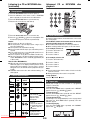
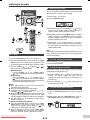
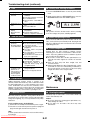
To play back USB/MP3 player with folder
mode on
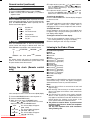
1 Press the USB button on the remote control or
FUNCTION button repeatedly on main unit to select
USB function. Connect the USB memory device that
has MP3/WMA format files on the unit. When the USB
memory is connected to the main unit, the device
information will be displayed.
2 Press the FOLDER button, and press the PRESET (
or ) button to select desired playback folder. To start
playback with folder mode on, go to step 4. To change
the playback folder, press the PRESET ( or ) button
to select another folder.
3 Select desired file to be played back by pressing the
or
button.
4 Press the
/ (CD/USB / ) button. Playback will start
and the file name will be displayed.
● Title, Artist and Album name are displayed if they are
recorded in the USB memory device.
● Display content can be changed by pressing the
DISPLAY button.
Note:
This product is not compatible with MTP and AAC file
systems from USB mass storage device or MP3 player.
■
■
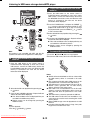
To remove USB memory device
1 Press the
(CD/USB
) button to stop playback.
2 Disconnect USB memory device from the USB terminal.
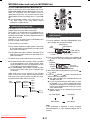
To play back USB/MP3 player with folder
mode off
1 Press the USB button on the remote control or
FUNCTION button repeatedly on main unit to select
USB function. Connect the USB memory device that
has MP3/WMA format files on the unit. When the USB
memory is connected to the main unit, the device
information will be displayed.
2 Select desired file to be played back by pressing the
or
button.
3 Press the
/ (CD/USB / ) button. Playback will start
and the file name will be displayed.
● Title, Artist and Album name are displayed if they are
recorded in the USB memory device.
● Display content can be changed by pressing the
DISPLAY button.
Note:
To pause playback:
Press the / (CD/USB
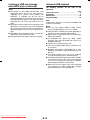
Notes:
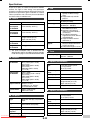
● SHARP will not be held liable for the loss of data whilst
the USB memory device is connected to the audio
system.
● Files compressed in MP3 and/or WMA format can be
played back when connected to the USB terminal.
● This USB memory’s format supports FAT 16 or FAT 32.
● SHARP cannot guarantee that all USB memory
devices will work on this audio system.
● USB cable is not recommended for use in this audio
system to connect to USB memory device. Use of the
USB cable will affect the performance of this audio
system.
● This USB memory cannot be operated via USB hub.
● The USB terminal in this unit is not intended for a PC
connection but is used for music streaming with a USB
memory device.
● External HDD-storage cannot be played back via USB
terminal.
● If the data inside the USB memory is large, it may take
longer time for the data to be read.
/ ) button.
Downloaded From Disc-Player.com Sharp Manuals
E-12