1
2. Setting up the Screen
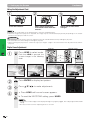
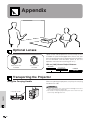
Position the projector perpendicular to the screen with all feet flat and level to achieve an optimal image.
Move the projector forward or backward if the edges of the image are distorted.
• The projector lens should be centred in the middle of the screen. If the lens centre is not perpendicular to the screen, the image will be
distorted, making viewing difficult.
• Position the screen so that it is not in direct sunlight or room light. Light falling directly onto the screen washes out colours, making viewing
difficult. Close the curtains and dim the lights when setting up the screen in a sunny or bright room.
• A polarising screen cannot be used with this projector.
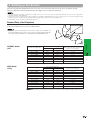
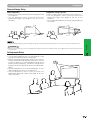
Standard Setup (Front Projection)
Place the projector at the required distance from the screen according
to the desired picture size (see the table below).
X
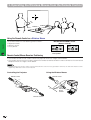
• Optional wide and telephoto lenses from Sharp are available for
specialised application. Please see your local Sharp Authorised LCD
Projector Dealer for details on the AN-T6EZ and AN-W6EZ lenses.
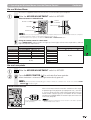
Picture size (diag.) (X)
762 cm (300⬙)
508 cm (200⬙)
381 cm (150⬙)
254 cm (100⬙)
213 cm (84⬙)
183 cm (72⬙)
152 cm (60⬙)
102 cm (40⬙)
WIDE Mode
(16:9)
Picture size (diag.) (X)
762 cm (300⬙)
508 cm (200⬙)
381 cm (150⬙)
338 cm (133⬙)
269 cm (106⬙)
254 cm (100⬙)
234 cm (92⬙)
213 cm (84⬙)
183 cm (72⬙)
152 cm (60⬙)
102 cm (40⬙)
Projection distance (L)
Maximum
14.3 m
9.8 m
7.2 m
4.9 m
4.0 m
3.4 m
2.9 m
1.9 m
Minimum
11.0 m
7.4 m
5.6 m
3.7 m
3.1 m
2.6 m
2.2 m
1.4 m
Projection distance (L)
Maximum
15.6 m
10.5 m
7.9 m
7.0 m
5.6 m
5.2 m
4.8 m
4.3 m
3.7 m
3.1 m
2.0 m
Minimum
12.0 m
8.1 m
6.1 m
5.4 m
4.3 m
4.0 m
3.7 m
3.3 m
2.8 m
2.4 m
1.5 m
H
Distance from the lens centre to the
bottom of the image (H)
Operation
NORMAL Mode
(4:3)
L
22.9 cm
15.2 cm
11.4 cm
7.6 cm
6.4 cm
5.5 cm
4.6 cm
3.1 cm
Distance from the lens centre to the
bottom of the image (H)
ⳮ37.4 cm
ⳮ24.9 cm
ⳮ18.7 cm
ⳮ16.6 cm
ⳮ13.2 cm
ⳮ12.5 cm
ⳮ11.5 cm
ⳮ10.5 cm
ⳮ9.0 cm
ⳮ7.5 cm
ⳮ5.0 cm
• Values with a minus (ⳮ) sign indicate the distance of the lens centre below the bottom of the screen.
18