1
ENGLISH
LC-45GX6U
TU-GD10U-T
OPERATION MANUAL
MANUAL DE OPERACIÓN
Sharp Plaza, Mahwah, New Jersey 07430-2135
SHARP CORPORATION
Printed on 100% post-consumer recycled paper.
Imprimé sur 100% de papier recyclé.
Impreso en 100% de papel reciclado de postconsumo.
Papel 100% Reciclado - Cuidado do Meio Ambiente.
Printed in Japan
Imprimé au Japon
Impreso en Japón
Impresso no Japão
TINS-B422WJZZ
04P07-JKG
MODE D’EMPLOI
MANUAL DE OPERAÇÃO
SHARP ELECTRONICS CORPORATION
LIQUID CRYSTAL TELEVISION
TÉLÉVISEUR ACL
TELEVISOR CON PANTALLA DE CRISTAL LIQUIDO
TELEVISOR DE CRISTAL LÍQUIDO
OPERATION MANUAL
MODE D’EMPLOI
MANUAL DE OPERACIÓN
MANUAL DE OPERAÇÃO
ESPAÑOL
AVC SYSTEM/SYSTÈME AVC/SISTEMA AVC/SISTEMA AVC
PORTUGUÊS
LC-45GX6U
TU-GD10U-T
FRANÇAIS
45oo DISPLAY/ECRAN 45oo/PANTALLA 45oo/TELA 45oo
ENGLISH
LC-45GX6U
TU-GD10U-T
LIQUID CRYSTAL TELEVISION
ENGLISH
OPERATION MANUAL
• The illustrations and on-screen displays in this operation
manual are for explanation purposes and may vary slightly
from the actual operations.
• Some items may be grayed out. They are not selectable.
IMPORTANT:
To aid reporting in case of loss or theft, please record
the TV’s model and serial numbers in the space
provided. The numbers are located at the rear of the
TV and the AVC System.
Model No.:
Serial No.:
IMPORTANT INFORMATION
WARNING: TO REDUCE THE RISK OF FIRE OR ELECTRIC SHOCK, DO
NOT EXPOSE THIS PRODUCT TO RAIN OR MOISTURE.
CAUTION
RISK OF ELECTRIC SHOCK
DO NOT OPEN
CAUTION: TO REDUCE THE RISK OF ELECTRIC SHOCK,
DO NOT REMOVE COVER (OR BACK).
NO USER-SERVICEABLE PARTS INSIDE.
REFER SERVICING TO QUALIFIED SERVICE
PERSONNEL.
LC-45GX6U(E)-001-019
1
The lightning flash with arrow-head
symbol, within an equilateral
triangle, is intended to alert the user
to the presence of uninsulated
“dangerous voltage” within the
product’s enclosure that may be of
sufficient magnitude to constitute a
risk of electric shock to persons.
The exclamation point within a
triangle is intended to alert the user
to the presence of important
operating and maintenance
(servicing) instructions in the
literature accompanying the product.
04.7.8, 8:40 AM
IMPORTANT INFORMATION
CAUTION: TO PREVENT ELECTRIC SHOCK, MATCH WIDE BLADE OF PLUG TO
WIDE SLOT, FULLY INSERT.
CAUTION:
DO NOT PLACE THIS PRODUCT ON AN UNSTABLE CART, STAND, TRIPOD, BRACKET, OR
TABLE. THE PRODUCT MAY FALL CAUSING SERIOUS PERSONAL INJURY AND SERIOUS
DAMAGE TO THE PRODUCT. USE ONLY WITH A CART, STAND, TRIPOD, BRACKET, OR TABLE
RECOMMENDED BY THE MANUFACTURER OR SOLD WITH THE PRODUCT. FOLLOW THE
MANUFACTURER’S INSTRUCTIONS WHEN INSTALLING THE PRODUCT AND USE MOUNTING
ACCESSORIES RECOMMENDED BY THE MANUFACTURER. A PRODUCT AND CART
COMBINATION SHOULD BE MOVED WITH CARE. QUICK STOPS, EXCESSIVE FORCE, AND
UNEVEN SURFACES MAY CAUSE THE PRODUCT AND CART COMBINATION TO OVERTURN.
WARNING: FCC Regulations state that any unauthorized changes or modifications to this equipment not expressly
approved by the manufacturer could void the user’s authority to operate this equipment.
CAUTION:
This product satisfies FCC regulations when shielded cables and connectors are used to connect the unit to other
equipment. To prevent electromagnetic interference with electric appliances such as radios and televisions, use
shielded cables and connectors for connections.
DECLARATION OF CONFORMITY
SHARP LIQUID CRYSTAL TELEVISION, MODEL TU-GD10U-T(AVC System)
This device complies with Part 15 of the FCC Rules. Operation is subject to the following two conditions:
(1) This device may not cause harmful interference, and (2) this device must accept any interference
received, including interference that may cause undesired operation.
RESPONSIBLE PARTY:
SHARP ELECTRONICS CORPORATION
Sharp Plaza, Mahwah, New Jersey 07430-2135
TEL: 1-800-BE-SHARP
For Business Customers: URL http://www. sharpusa. com
INFORMATION:
This equipment has been tested and found to comply with the limits for a Class B digital device, pursuant to
Part 15 of the FCC Rules. These limits are designed to provide reasonable protection against harmful
interference in a residential installation. This equipment generates, uses and can radiate radio frequency
energy and, if not installed and used in accordance with the instructions, may cause harmful interference to
radio communications. However, there is no guarantee that interference will not occur in a particular
installation. If this equipment does cause harmful interference to radio or television reception, which can be
determined by turning the equipment off and on, the user is encouraged to try to correct the interference by
one or more of the following measures:
—Reorient or relocate the receiving antenna.
—Increase the separation between the equipment and receiver.
—Connect the equipment into an outlet on a circuit different from that to which the receiver is connected.
—Consult the dealer or an experienced radio/TV technician for help.
“Note to CATV system installer: This reminder is provided to call the CATV system installer’s attention to Article 820-40 of the
National Electrical Code that provides guidelines for proper grounding and, in particular, specifies that the cable ground shall be
connected to the grounding system of the building, as close to the point of cable entry as practical.”
This product utilizes tin-lead solder, and fluorescent lamp containing a small amount of mercury. Disposal of these
materials may be regulated due to environmental considerations. For disposal or recycling information, please contact
your local authorities or the Electronic Industries Alliance: www.eia.org
2
LC-45GX6U(E)-001-019
2
04.7.8, 8:40 AM
DEAR SHARP CUSTOMER
Thank you for your purchase of the Sharp Liquid Crystal Television. To ensure safety and many years
of trouble-free operation of your product, please read the Important Safety Instructions carefully
before using this product.
IMPORTANT SAFETY INSTRUCTIONS
Electricity is used to perform many useful functions, but it can also cause personal injuries and property damage if
improperly handled. This product has been engineered and manufactured with the highest priority on safety. However,
improper use can result in electric shock and/or fire. In order to prevent potential danger, please observe the following
instructions when installing, operating and cleaning the product. To ensure your safety and prolong the service life of
your Liquid Crystal Television, please read the following precautions carefully before using the product.
1)
2)
3)
4)
5)
6)
7)
8)
Read these instructions.
Keep these instructions.
Heed all warnings.
Follow all instructions.
Do not use this apparatus near water.
Clean only with dry cloth.
Do not block any ventilation openings. Install in accordance with the manufacturer's instructions.
Do not install near any heat sources such as radiators, heat registers, stoves, or other apparatus (including
amplifiers) that produce heat.
9) Do not defeat the safety purpose of the polarized or grounding-type plug. A polarized plug has two blades with
one wider than the other. A grounding type plug has two blades and a third grounding prong. The wide blade or
the third prong are provided for your safety. If the provided plug does not fit into your outlet, consult an
electrician for replacement of the obsolete outlet.
10) Protect the power cord from being walked on or pinched particularly at plugs, convenience receptacles, and the
point where they exit from the apparatus.
11) Only use attachments/accessories specified by the manufacturer.
12) Use only with the cart, stand, tripod, bracket, or table specified by the manufacturer, or sold with the
apparatus. When a cart is used, use caution when moving the cart/apparatus combination to avoid
injury from tip-over.
13) Unplug this apparatus during lightning storms or when unused for long periods of time.
14) Refer all servicing to qualified service personnel. Servicing is required when the apparatus has been damaged
in any way, such as power-supply cord or plug is damaged, liquid has been spilled or objects have fallen into
the apparatus, the apparatus has been exposed to rain or moisture, does not operate normally, or has been
dropped.
15) Power Sources — This product should be operated only from the type of power source indicated on the
marking label. If you are not sure of the type of power supply to your home, consult your product dealer or local
power company. For products intended to operate from battery power, or other sources, refer to the operating
instructions.
16) Overloading — Do not overload wall outlets, extension cords, or integral convenience receptacles as this can
result in a risk of fire or electric shock.
17) Object and Liquid Entry — Never push objects of any kind into this product through openings as they may
touch dangerous voltage points or short-out parts that could result in a fire or electric shock. Never spill liquid
of any kind on the product.
18) Damage Requiring Service — Unplug this product from the wall outlet and refer servicing to qualified service
personnel under the following conditions:
a) When the AC cord or plug is damaged,
b) If liquid has been spilled, or objects have fallen into the product,
c) If the product has been exposed to rain or water,
d) If the product does not operate normally by following the operating instructions.
Adjust only those controls that are covered by the operating instructions as an improper adjustment of
other controls may result in damage and will often require extensive work by a qualified technician to
restore the product to its normal operation,
e) If the product has been dropped or damaged in any way, and
f) When the product exhibits a distinct change in performance – this indicates a need for service.
19) Replacement Parts — When replacement parts are required, be sure the service technician has used
replacement parts specified by the manufacturer or have the same characteristics as the original part.
Unauthorized substitutions may result in fire, electric shock, or other hazards.
20) Safety Check — Upon completion of any service or repairs to this product, ask the service technician to
perform safety checks to determine that the product is in proper operating condition.
21) Wall or ceiling mounting — When mounting the product on a wall or ceiling, be sure to install the product
according to the method recommended by the manufacturer.
3
LC-45GX6U(E)-001-019
3
04.7.8, 8:40 AM
IMPORTANT SAFETY INSTRUCTIONS
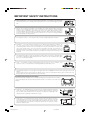
• Water and Moisture — Do not use this product near water – for example, near a bath tub,
wash bowl, kitchen sink, or laundry tub; in a wet basement; or near a swimming pool; and the
like.
• Stand — Do not place the product on an unstable cart, stand, tripod or table. Placing the
product on an unstable base can cause the product to fall, resulting in serious personal
injuries as well as damage to the product. Use only a cart, stand, tripod, bracket or table
recommended by the manufacturer or sold with the product. When mounting the product on
a wall, be sure to follow the manufacturer’s instructions. Use only the mounting hardware
recommended by the manufacturer.
• Selecting the location — Select a place with no direct sunlight and good ventilation.
• Ventilation — The vents and other openings in the cabinet are designed for ventilation. Do
not cover or block these vents and openings since insufficient ventilation can cause
overheating and/or shorten the life of the product. Do not place the product on a bed, sofa,
rug or other similar surface, since they can block ventilation openings. This product is not
designed for built-in installation; do not place the product in an enclosed place such as a
bookcase or rack, unless proper ventilation is provided or the manufacturer’s instructions are
followed.
• The Liquid Crystal panel used in this product is made of glass. Therefore, it can break when
the product is dropped or applied with impact. Be careful not to be injured by broken glass
pieces in case the panel breaks.
• Heat — The product should be situated away from heat sources such as radiators, heat
registers, stoves, or other products (including amplifiers) that produce heat.
• The Liquid Crystal panel is a very high technology product with 6,220,800 thin film transistors, giving you fine picture
details.
Occasionally, a few non-active pixels may appear on the screen as a fixed point of blue, green or red. Please note
that this does not affect the performance of your product.
Precautions when transporting the Display
When transporting the Display, never carry it by holding onto the speaker. Be sure to always
carry the Display by two people holding it with two hands—one hand on each side of the
Display.
• Lightning — For added protection for this television equipment during a lightning
storm, or when it is left unattended and unused for long periods of time, unplug it
from the wall outlet and disconnect the antenna. This will prevent damage to the
equipment due to lightning and power-line surges.
• Power Lines — An outside antenna system should not be located in the vicinity of
overhead power lines or other electric light or power circuits, or where it can fall
into such power lines or circuits. When installing an outside antenna system, extreme
care should be taken to keep from touching such power lines or circuits as contact
with them might be fatal.
4
LC-45GX6U(E)-001-019
4
04.7.8, 8:41 AM
IMPORTANT SAFETY INSTRUCTIONS
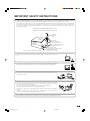
• Outdoor Antenna Grounding — If an outside antenna is connected to the television equipment, be sure the antenna
system is grounded so as to provide some protection against voltage surges and built-up static charges.
Article 810 of the National Electrical Code, ANSI/NFPA 70, provides information with regard to proper grounding of
the mast and supporting structure, grounding of the lead-in wire to an antenna discharge unit, size of grounding
conductors, Iocation of antenna-discharge unit, connection to grounding electrodes, and requirements for the
grounding electrode.
EXAMPLE OF ANTENNA GROUNDING AS PER
NATIONAL ELECTRICAL CODE, ANSI/NFPA 70
ANTENNA
LEAD IN
WIRE
GROUND
CLAMP
ELECTRIC
SERVICE
EQUIPMENT
NEC —NATIONAL ELECTRICAL CODE
ANTENNA
DISCHARGE UNIT
(NEC SECTION 810-20)
GROUNDING CONDUCTORS
(NEC SECTION 810-21)
GROUND CLAMPS
POWER SERVICE GROUNDING
ELECTRODE SYSTEM
(NEC ART 250, PART H)
• To prevent fire, never place any type of candle or flames on the top or near the TV
set.
• To prevent fire or shock hazard, do not expose this product to dripping or splashing.
No objects filled with liquids, such as vases, should be placed on the product.
• To prevent fire or shock hazard, do not place the AC power cord under the TV set
or other heavy items.
• Turn off the main power and unplug the AC cord from the wall outlet before handling.
• Use a soft cloth and gently wipe the surface of the display panel. Using a hard
cloth may scratch the panel surface.
• Use a soft damp cloth to gently wipe the panel when it is really dirty.
(It may scratch the panel surface when wiped strongly.)
• If the panel is dusty, use an anti-static brush, which is commercially available, to
clean it.
• To protect the panel, do not use a dirty cloth, liquid cleaners or chemical cloth to
clean it, such materials may damage the panel surface.
• Do not display a still picture for a long time, as this could cause an afterimage to remain.
5
LC-45GX6U(E)-001-019
5
04.7.8, 8:41 AM
Contents
IMPORTANT INFORMATION ……………………… 1
DEAR SHARP CUSTOMER ………………………… 3
IMPORTANT SAFETY INSTRUCTIONS …………… 3
Contents ……………………………………………… 6
Trademarks …………………………………………… 7
COPYRIGHT AND LICENSE NOTICE …………… 7
Supplied accessories ……………………………… 8
Preparation ………………………………………… 10
Where to place the System …………………… 10
Setting the System …………………………… 11
Setting the AVC System with the stand ……… 13
Removing speakers …………………………… 14
Removing the stand …………………………… 15
Setting the Display on the wall ……………… 15
Inserting the batteries ………………………… 16
Using the remote control unit ………………… 16
Cautions regarding remote control unit … 16
Part names ………………………………………… 17
Display ………………………………………… 17
AVC System …………………………………… 18
Remote control unit …………………………… 19
Watching TV ……………………………………… 20
Antennas ……………………………………… 20
Cable TV/VCR connection …………………… 20
Outdoor antenna connection ………………… 22
Connecting the AC cord ……………………… 23
Turning on/off the power ……………………… 24
Initial setup ……………………………………… 25
Changing channels-Analog-TV ……………… 26
Changing channels-Digital-TV ……………… 26
Changing volume/sound ……………………… 27
Setting MTS/SAP stereo mode ……………… 28
Setting Digital broadcasting audio mode …… 28
Connecting Digital Cable Module …………… 29
Basic adjustment settings ……………………… 30
AV input mode menu items …………………… 30
PC input mode menu items …………………… 31
EZ setup ………………………………………… 31
Channel Setup ………………………………… 32
Antenna Setup – DIGITAL – Air ……………… 34
Favorite channel setting ……………………… 35
Language setting ……………………………… 35
Picture adjustments …………………………… 36
OPC setting ………………………………… 37
C.M.S. (Color Management System) …… 37
Color temperature ………………………… 38
Sharpness Enhancement ………………… 38
Automatic Contrast ……………………… 38
I/P Setting ………………………………… 39
Film Mode (3:2 pull-down) ……………… 39
3D-Y/C ……………………………………… 39
Monochrome ……………………………… 39
Sound adjustment ……………………………… 40
Dolby Virtual …………………………………… 40
Power control …………………………………… 41
Power control for AV source ……………… 41
Power control for PC source ……………… 41
Digital Setup …………………………………… 42
Video Setup ………………………………… 42
Audio Setup ……………………………… 43
Using memory card ……………………………… 44
Important notes on using memory card …… 44
Card Setup mode menu items ……………… 46
Recording a still image ……………………… 48
Displaying a still image ……………………… 48
Displaying slide show …………………………
Setting Slide Show ……………………………
My Program ……………………………………
Audio Select ……………………………………
Protecting/unprotecting still image files ……
Deleting a still image file ………………………
Deleting all still image files ……………………
Recording a motion picture ……………………
Displaying a motion picture …………………
Rec. Mode ………………………………………
Pre Record ………………………………………
Repeat Play ……………………………………
Protecting/unprotecting motion picture files …
Deleting a motion picture file …………………
Deleting all motion picture files ………………
Format ……………………………………………
Using external equipment ………………………
Displaying an external equipment image ……
Connecting a DVD player ……………………
Connecting a VCR ……………………………
Connecting a game console
or camcorder ………………………………
Connecting a Digital TV STB (Air or Cable) …
Connecting HDMI equipment …………………
Displaying an image from HDMI
equipment …………………………………
Connecting a PC ………………………………
Connecting D-VHS Decks
(i.LINK connection) ………………………
About i.LINK ………………………………
i.LINK connection …………………………
Connecting two or more D-VHS decks …
Setting the recording mode (i.LINK) ……
Setting the Standby Mode (i.LINK) ………
Selecting a D-VHS deck (i.LINK) …………
Disabling the System’s operation of
a D-VHS deck (i.LINK) …………………
Deleting a preset D-VHS deck (i.LINK) …
Controlling an i.LINK device ………………
Automatic input switching to i.LINK ……
Recording digital programs
with a D-VHS deck (i.LINK) ……………
Useful adjustment settings ………………………
Image position (AV input mode only) ………
Moving the picture on the screen ……………
Connecting external speakers ………………
Selecting speakers ……………………………
Audio Quality Control …………………………
Auto Sync. adjustment (PC input mode only) …
Fine Sync. adjustment (PC input mode only) …
Input Select ……………………………………
Input Label ………………………………………
Picture Flip ………………………………………
AV MODE ………………………………………
View Mode for 4:3 Programs …………………
View Mode for HD Programs …………………
View Mode (for PC input mode) ………………
Input signal (for PC input mode) ……………
3D Noise Reduction ……………………………
Mosquito Noise Reduction ……………………
Audio Only ………………………………………
Output Select ……………………………………
Quick Shoot ……………………………………
Sleep timer ………………………………………
Title Display Type ………………………………
6
LC-45GX6U(E)-001-019
6
04.7.8, 8:41 AM
48
49
49
49
50
50
50
51
51
51
52
52
52
53
53
53
54
54
55
56
56
57
58
58
59
60
60
60
60
61
61
62
62
63
63
64
65
66
66
66
67
68
68
69
69
70
71
71
72
72
72
73
74
74
74
74
75
75
75
76
Contents
Closed caption ………………………………… 77
Caption Size ……………………………… 78
Font Style …………………………………… 78
Foreground Color ………………………… 79
Foreground Opacity ……………………… 79
Background Color ………………………… 79
Background Opacity ……………………… 80
Character Edge …………………………… 80
Secret number setting for parental control
(AV input mode only) ……………………… 81
Parental control (setting V-CHIP level) ……… 83
How to temporarily release
the V-CHIP BLOCK ……………………… 87
Reactivating the temporarily released
V-CHIP BLOCK …………………………… 87
Center Channel Input ………………………… 88
Other viewing options …………………………… 89
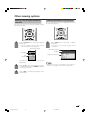
Viewing a list of Digital broadcast channels … 89
Viewing information of the program ………… 89
Twin picture functions ………………………… 90
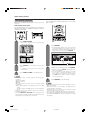
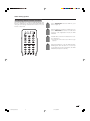
Presetting remote control function …………… 91
Appendix ………………………………………… 96
Troubleshooting ………………………………… 96
Attention about Digital broadcasting ………… 97
PC compatibility chart ………………………… 97
RS-232C port specifications ………………… 98
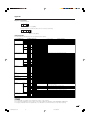
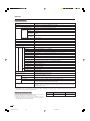
Specifications ……………………………… 100
Optional accessories ……………………… 100
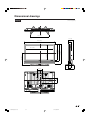
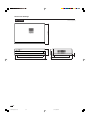
Dimensional drawings ………………………… 101
Trademarks
• Manufactured under license from Dolby Laboratories. “Dolby”, “Pro Logic” and the double-D symbol
are trademarks of Dolby Laboratories.
• Manufactured under license from BBE Sound, Inc.
Licensed by BBE Sound, Inc. under USP4638258, 5510752 and 5736897. BBE and BBE symbol are registered
trademarks of BBE Sound, Inc.
• “HDMI, the HDMI logo and High-Definition Multimedia Interface are trademarks or registered trademarks of HDMI
Licensing LLC.”
• CableCARD™ is a trademark of Cable Television Laboratories, Inc.
COPYRIGHT AND LICENSE NOTICE
• It is the intent of Sharp that this product be used in full compliance with the copyright laws of the United States and that
prior permission be obtained from copyright owners whenever necessary.
• This product incorporates copyright protection technology that is protected by U.S. patents and other intellectual property
rights. Use of this copyright protection technology must be authorized by Macrovision, and is intended for home and
other limited viewing uses only unless otherwise authorized by Macrovision. Reverse engineering or disassembly is
prohibited. U. S. Patent Nos. 4,631,603; 4,577,216; 4,819,098; 4,907,093; 5,315,448; 6,381,747; and 6,516,132.
• This digital television is capable of receiving analog basic, digital basic and digital premium cable television programming
by direct connection to a cable system providing such programming. A security card provided by your cable operator is
required to view encrypted digital programming. Certain advanced and interactive digital cable services such as videoon-demand, a cable operator's enhanced program guide and data-enhanced television services may require the use of
a set-top box. For more information call your local cable operator.
7
LC-45GX6U(E)-001-019
7
04.7.8, 8:41 AM
Supplied accessories
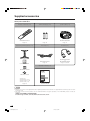
Make sure the following accessories are provided with the product.
AVC System: TU-GD10U-T
Remote control unit (g1)
“AAA” size battery (g2)
System cable (g1)
RRMCGA242WJSA
Page 16
Page 16
QCNW-C656WJZZ
Page 11
Stand unit (for AVC System) (g1)
AC cord (g1)
RF cable (g1)
QACCD3097CEPZ
Page 11
QCNW-A342WJZZ
or
QCNWGA061WJZZ
Pages 21 and 22
CDAI-A104WJSA
PSPAHA314WJZZ
Operation manual (g1)
GLEGGA013WJZZ
LC-45GX6U
TU-GD10U-T
XBPSN50P16JS0
Stand (g1)
Stand spacer (g4)
Stand cushion (g4)
Stand screw (g2)
Page 13
TINS-B422WJZZ
NOTE
• Always use the AC cord supplied with the Liquid Crystal Television and the one supplied with the AVC System for each
respective unit.
• AC cords enclosed in this product are for 110-125V. When using this product on the 220-240V, please consult the
following:
SHARP ELECTRONICS CORPORATION
6100 Blue Lagoon Drive, Suite 230, Miami, Florida 33126, U.S.A.
8
LC-45GX6U(E)-001-019
8
04.7.30, 2:30 PM
Supplied accessories
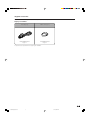
Make sure the following accessories are provided with the product.
Display: LC-45GX6U
AC cord (g1)
Cable clamp (g1)
QACCDA036WJPZ
Page 11
LHLDW0110CESD
Page 12
• Speakers are attached when shipping LC-45GX6U.
9
LC-45GX6U(E)-001-019
9
04.7.8, 8:41 AM
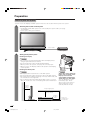
Preparation
Where to place the System
“System” means the Display and AVC System. First select the location where to place the System.
1
Selecting the location of the System
• The Display and the AVC System are connected by the system cable. (See page
11 for details.)
• Select a place with good ventilation.
System cable
AVC System
Display
2
Setting the System in place
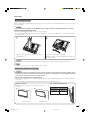
Handling the Display
CAUTION
• Do not remove the stand and speaker from the Display unless
using an optional bracket to mount it.
• Keep enough space above and behind the Display.
• When you move the System, carry it by two or more people.
• When you move the Display, hold the side portion of the Display,
not the speaker.
Handling the AVC System
CAUTION
CAUTION
• Do not put a VCR or other device on the AVC System.
• Keep enough space above and on the sides of the AVC System.
• Do not block the ventilation openings on the top and left side, and
the exhaust fan on the right side.
• Do not spread a thick cloth beneath the AVC System, or cover it
with one, as this can cause overheating and result in malfunction.
4 inches
(10 cm)
or more
Adjust the screen with both
hands. Put one hand on the
Display and rotate the
screen while steadying the
stand with your other hand.
You can adjust the screen
horizontally up to 10 degrees. Please note that you
cannot adjust the screen
vertically with this model.
Keep enough space
2 inches
(5 cm) or more
2 inches
(5 cm) or
more
10
LC-45GX6U(E)-001-019
10
04.7.9, 7:20 AM
There is an
exhaust fan on
the right side.
Preparation
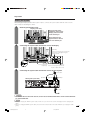
Setting the System
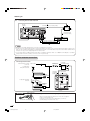
After putting the Display and the AVC System in place, connect the system cables and AC cords. Use the
cable clamps for bundling the cables.
1
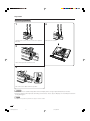
Removing the terminal cover
Display (rear view)
Press the two hooks
toward the center of the
Display and remove the
cover toward you.
Press down the four
upper hooks to remove
the cover toward you.
2
Connecting the system cable and the AC cord to the Display
(WHITE)*
Connect the plug into the terminal
and secure it by tightening the
thumb screws.
(BLACK)
System cable
Connect the plug
(GRAY)**
completely. Connect the plug firmly until the
hooks on both sides click.
AC cord
3
Connecting the system cable and the AC cord to the AVC System
System cable
AVC System (rear view)
(BLACK)
(WHITE)*
(GRAY)**
AC cord
CAUTION
• TO PREVENT RISK OF ELECTRIC SHOCK, DO NOT TOUCH UN-INSULATED PARTS OF ANY CABLES WITH THE
AC CORD CONNECTED.
NOTE
* When you unplug the WHITE system cable, make sure you unscrew the screws thoroughly before unpluging the
cable.
** When you unplug the GRAY system cable, press the hooks on both sides of the cable inward as you unplug the cable
gently.
LC-45GX6U(E)-001-019
11
04.7.8, 8:41 AM
11
Preparation
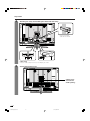
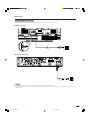
4
Attaching the clamp and bundling the cables with the clamp
Fasten the speaker
cable with the holder.
Cable clamp
Insert the cable clamp in the hole on the Display as shown.
5
Closing the terminal cover
Cables come
out from the
small opening.
12
LC-45GX6U(E)-001-019
12
04.7.8, 8:41 AM
Preparation
Setting the AVC System with the stand
How to install the AVC System vertically using the stand unit.
• Use the supplied stand unit for installing the AVC System vertically in an upright position.
1
Stick each spacer to the
stand as shown.
Peel each spacer away from the paper
and attach to the four bulging areas
on the stand.
Stand
spacer
2
Attach each cushion to
the stand as shown.
Peel each cushion
away from the
paper and attach
to the four areas
at the bottom.
Bulge
Stand cushion
Attaching point
3
Fit the stand to the AVC
System.
Insert the stand into the AVC
System, making sure that the
thick and thin bulges of the
stand align with the big and
small holes on the AVC
System.
Bulge
Attaching point
Bulge
Hole
4
Attach the stand using the
stand screws as shown.
The AVC System installed
vertically with the stand.
Stand screw
NOTE
• When mounting the AVC System vertically, always use the supplied stand. Be careful not to block vent holes when
standing upright directly on the floor or a flat surface as this can result in equipment failure.
13
LC-45GX6U(E)-001-019
13
04.7.9, 7:21 AM
Preparation
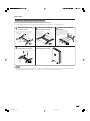
Removing speakers
1
4
Unfasten the screw used to secure the speaker
bracket.
Unfasten the screws.
2
Take off the speaker terminal cover.
3
Disconnect the cable from the speaker.
CAUTION
• Do not remove the stand and speaker from the Display unless using an optional bracket to mount it.
• Before performing work spread cushioning over the base area to lay the Display on. This will prevent it from
being damaged.
NOTE
• To attach the speakers, perform the steps in reverse order.
14
LC-45GX6U(E)-001-019
14
04.7.8, 8:41 AM
Preparation
Removing the stand
Before detaching (or attaching) stand, unplug the AC cord from the AC input terminal and the system cable
from the Display.
CAUTION
• Do not remove the stand from the Display unless using an optional wall mount bracket to mount it.
Before attaching/detaching stand
• Before performing work make sure to turn off the System.
• Before performing work spread cushioning over the base area to lay the Display on. This will prevent it from
being damaged.
2
1
Unfasten the four screws used to secure the
stand in place.
Detach the stand from the Display.
(Hold the stand so it will not drop from the edge of
the base area.)
CAUTION
• Do not remove the stand and speaker from the Display unless using an optional bracket to mount it.
NOTE
• To attach the stand, perform the above steps in reverse order.
Setting the Display on the wall
CAUTION
• Installing the Liquid Crystal Television requires special skill that should only be performed by qualified service
personnel. Customers should not attempt to do the work themselves. SHARP bears no responsibility for improper
mounting or mounting that results in accident or injury.
Using an optional bracket to mount the Display
• You can ask a qualified service personnel about using the optional AN-37AG2 bracket to mount the Display
to the wall.
• Carefully read the instructions that come with the bracket before beginning work.
Hanging on the wall
AN-37AG2 wall mount bracket. (See the bracket instructions
for details.)
About setting the Display angle
Angle of Display
Vertical mounting
With Speakers
Removed
With Speakers
Attached
10˚
0˚
10˚
Angular mounting
15
LC-45GX6U(E)-001-019
15
04.7.9, 7:21 AM
Preparation
Inserting the batteries
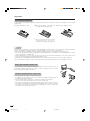
If the remote control fails to operate Liquid Crystal Television functions, replace the batteries in the remote
control unit.
1 Open the battery cover.
2 Insert two “AAA” size batteries 3 Close the battery cover.
(supplied with the product).
• Place the batteries with their terminals
corresponding to the (e) and (f)
indications in the battery compartment.
CAUTION
Improper use of batteries can result in chemical leakage or explosion. Be sure to follow the instructions below.
• Place the batteries with their terminals corresponding to the (e) and (f) indications.
• Do not mix batteries of different types. Different types of batteries have different characteristics.
• Do not mix old and new batteries. Mixing old and new batteries can shorten the life of new batteries or cause
chemical leakage in old batteries.
• Remove batteries as soon as they are worn out. Chemicals that leak from batteries can cause a rash. If you
find any chemical leakage, wipe thoroughly with a cloth.
• The batteries supplied with this product may have a shorter life expectancy due to storage conditions.
• If you will not be using the remote control unit for an extended period of time, remove batteries from it.
Using the remote control unit
Use the remote control unit by pointing it towards the remote control sensor on
the Display. Objects between the remote control unit and the remote control
sensor may prevent proper operation.
Cautions regarding remote control unit
• Do not expose the remote control unit to shock.
In addition, do not expose the remote control unit to liquids, and do not place
in an area with high humidity.
• Do not install or place the remote control unit under direct sunlight.
The heat may cause deformation of the remote control unit.
• The remote control unit may not work properly if the remote control sensor on
the Display is under direct sunlight or strong lighting. In such cases, change
the angle of the lighting or the Display, or operate the remote control unit
closer to the remote control sensor.
16
LC-45GX6U(E)-001-019
16
04.7.8, 8:41 AM
Part names
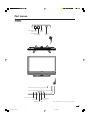
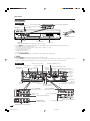
Display
VOLUME buttons
(VOLl/k )
INPUT
button
CHANNEL buttons
(CHs/r)
Remote control sensor
OPC sensor
POWER
button
OPC indicator
SLEEP indicator
POWER indicator
* OPC: Optical Picture Control (see page 37.)
17
LC-45GX6U(E)-001-019
17
04.7.8, 8:41 AM
Part names
AVC System
Front view
STANDBY/ON indicator
INPUT 3 terminal (VIDEO)
INPUT 3 terminals (AUDIO L/R)
INPUT 3 terminal (S-VIDEO)
CARD indicator
POWER button
How to open the door.
RESET*
SYSTEM RESET**
Headphone
(When connecting headphones, the sound from the speakers is muted.)
PC CARD slot
* Press RESET if the system cannot return to its original state after performing various operations.
•
•
•
•
•
•
AV MODE resets to DYNAMIC (Fixed)
TV channel returns to initial channel setting (Air:2ch, Cable:1 or 2ch)
Twin picture resets to normal
Audio setting initializes
Dolby virtual resets to Off
Image position initializes
** Press SYSTEM RESET if the system does not operate after starting up.
NOTE
• Pressing RESET will not work if the System is in standby mode.
• Pressing RESET will not delete channel preset or secret number. See page 82 for clearing the secret number when you
know it. See page 103 for initializing to the factory preset values when you forget your secret number.
Rear view
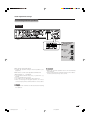
ANALOG A
OUT terminal
CENTER CHANNEL INPUT
INPUT 5 terminal (DVI-I)
Input 5 terminal
ANALOG A IN
(AUDIO)
terminal
ANALOG B IN
terminal
EXTERNAL SPEAKER terminals
INPUT 4
terminal
(HDMI)
RS-232C DISPLAY OUTPUT 3 terminal
terminal
DISPLAY OUTPUT 1 terminal
DISPLAY
OUTPUT 2
terminal
AC INPUT
terminal
DC OUTPUT
terminal
(Terminal for expanded
functionality in the near future.)
CableCARD slot
i.LINK terminals
DIGITAL AUDIO
OUPUT terminal
DIGITAL IN
terminal
INPUT 1 COMPONENT
video terminals (Y, PB, PR)
INPUT 2 COMPONENT
video terminals (Y, PB, PR)
INPUT 1 terminal
(VIDEO)
INPUT 2 terminal (VIDEO)
INPUT 1 terminals (AUDIO L/R)
INPUT 2 terminals (AUDIO L/R)
MONITOR OUTPUT
terminals (AUDIO L/R)
INPUT2 terminal (S-VIDEO)
MONITOR OUTPUT terminal (VIDEO)
18
LC-45GX6U(E)-001-019
18
04.7.8, 8:41 AM
Part names
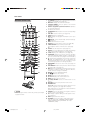
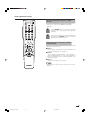
Remote control unit
1
1
2
3
17
4
2
3
18
5
6
19
7
8
9
4
10
5
20
11
12
13
7
21
22
23
14
15
8
9
10
24
25
26
16
17
6
27
11
28
29
30
31
12
13
14
15
16
32
18
19
20
21
33
22
23
24
25
26
27
28
29
NOTE
30
• When using the remote control unit, point it at the Liquid
Crystal Television.
31
32
33
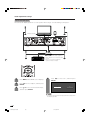
TV POWER: Switches the Liquid Crystal Television
power on or Standby. (See page 24.)
DISPLAY: Displays the channel information.
SOURCE POWER: Turns the power of the external
equipment on and off.
External equipment operational buttons: Operates
the external equipment.
0 – 9: Sets the channel.
A-ANALOG-B: Each button selects the corresponding
antenna.
l: Sets the volume. (See page 27.)
VOL k/l
CARD: Switches to card mode.
INFO: Displays the program information screen. (See
page 89.)
Virtual: Selects Virtual Dolby Surround settings.
(See page 27.)
EXIT: Turns off the menu screen.
SELECT: Selects the active screen. (See page 90.)
TWIN PICTURE: Sets the twin picture mode.
Press again to return to normal screen. (See page
90.)
SLEEP: Sets the sleep timer. (See page 75.)
AUDIO: Selects the MTS/SAP or the audio mode during
multi-channel audio broadcasts. (See page 28.)
i.LINK: Displays the i.LINK panel. (See page 62.)
FUNCTION: Switches the remote control for TV, CBL/
SAT, VCR, DVD and AUDIO operation. Indicator lights
up for the current mode. (See page 91 to 94 for details.)
: When pressed all buttons on the remote control unit
will light. The lighting will turn off if no operations are
performed within about 5 seconds. This button is used
for performing operations in low-light situations.
VIEW MODE: Selects the screen size. (See pages 72
and 73.)
FLASHBACK: Returns to the previous channel or input
external mode. (See page 26.)
INPUT: Selects a Liquid Crystal Television input source.
(TV, INPUT 1, INPUT 2, INPUT 3, INPUT 4, INPUT 5,
i.LINK, Card) (See pages 54 and 70.)
DIGITAL: Receives digital broadcasts.
s: Selects the channel.
CH r/s
MUTE: Mutes the sound. (See page 27.)
CH LIST: Displays the channel list screen.
MENU: Displays the menu screen.
a/b/c/d/ENTER: Selects a desired item on the
screen.
RETURN: Returns to the previous menu screen.
FAVORITE CH
A, B, C, D: Selects four preset favorite channels in four
different categories. (See page 35 for details.)
While watching, you can toggle the selected channels
by pressing A, B, C and D.
FREEZE: Sets the still image. Press again to return to
normal screen. (See page 90.)
CC: Displays captions during closed-caption source.
(See page 77.)
EDIT: Registers favorite channel.
AV MODE: Selects an audio or video setting. (See
page 72.) (AV mode: STANDARD, MOVIE, GAME,
USER, DYNAMIC (Fixed), DYNAMIC. PC mode:
STANDARD, USER.)
19
LC-45GX6U(E)-001-019
19
04.7.9, 7:22 AM
Watching TV
Simple operations for watching a TV program
Antennas
To enjoy a clearer picture, use an outdoor antenna. The following is a brief explanation of the types of connections
that are used for a coaxial cable. If your outdoor antenna uses a 75-ohm coaxial cable with an F-type connector,
plug it into the antenna terminal at the rear of the AVC System.
F-type connector
1. A 75-ohm system is generally a round cable with F-type
connector that can easily be attached to a terminal without
tools (Commercially available).
75-ohm coaxial cable (round)
2. A 300-ohm system is a flat “twin-lead” cable that can be
attached to a 75-ohm terminal through a 300/75-ohm
adapter (Commercially available).
300-ohm twin-lead cable (flat)
Cable TV/VCR connection
• Be sure to connect the antenna or the cable converter as follows. Signal reception may fail if improperly connected.
• Be sure to remember what kind of connection is made with your System.
• The connection type will determine whether to select “Air” or “Cable” for both ANALOG-A and B when configuring “Air/
Cable” settings.
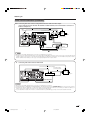
A-1. Connecting with cable TV Converter and VCR
Coaxial Antenna Cable (commercially available)
Coaxial Antenna Cable (commercially available)
Coaxial Antenna Cable
(commercially available)
Rear Terminals
OUT
Signal splitter
(commercially
available)
IN
Cable TV converter
(commercially available)
Cable lead-in
Coaxial Antenna Cable (commercially available)
VCR
VIDEO AUDIO
OUT
IN
Video Cable (commercially available)
Audio Cable (commercially available)
NOTE
• Be sure to remember what kind of connection is made with your System.
• Shown here is the preferred method of connecting a VCR and CATV Converter to your System if you are in an area with
good signal reception. This way you can view either TV programs or VCR tapes and not be concerned about the position
of the VCR’s TV/VCR switch and you can enjoy stereo tape playback from a stereo VCR.
• While in Standby, no signal is output from ANALOG-A OUT.
20
LC-45GX6U(E)-020-029
20
04.7.9, 7:23 AM
Watching TV
Cable TV/VCR connection (continued)
A-2. Connecting with cable converter using AUX terminals for audio and video output.
(If your cable TV converter has both RF OUTPUT and AUX terminals, it is recommended to connect it as
shown in example A-1.)
Coaxial Antenna Cable (commercially available)
RF
Cable
(Supplied)
Coaxial Antenna Cable (commercially available)
Rear Terminals
OUT
Signal splitter
(commercially
available)
IN
Cable lead-in
Cable TV converter
(commercially available)
VIDEO AUDIO
VCR
VIDEO AUDIO
OUT
IN
Video Cable
(commercially available)
Audio Cable
(commercially available)
NOTE
• Be sure to remember what kind of connection is made with your System.
• Shown here is the preferred method of connecting a VCR and CATV Converter to your TV if you are in an area with good
signal reception. This way you can view either TV programs or VCR tapes and not be concerned about the position of the
VCR’s TV/VCR switch and you can enjoy stereo tape playback from a stereo VCR.
B.
Connecting with Cable Converter without VCR
Coaxial Antenna Cable (commercially available)
Coaxial Antenna Cable
(commercially available)
Rear Terminals
OUT
Signal splitter
(commercially
available)
IN
Cable TV converter
(commercially available)
Cable lead-in
Coaxial Antenna Cable
(commercially available)
NOTE
• Be sure to remember what kind of connection is made with your System.
• Switching between ANALOG-A and ANALOG-B is possible by pressing the A-ANALOG-B button on the remote control.
• A good color picture depends on a good TV signal. So does good multi-channel sound. Ask your dealer for advice on
how to install your outdoor antenna to receive the best possible signal.
• If you subscribe to Cable TV or have a central antenna for your building, you may not need an outdoor antenna.
21
LC-45GX6U(E)-020-029
21
04.7.8, 8:43 AM
Watching TV
C.
Connecting Antenna Cable with VCR
RF Cable
(Supplied)
Coaxial Antenna Cable (commercially available)
Rear Terminals
Signal splitter
(commercially
available)
Cable lead-in
Coaxial Antenna Cable
(commercially available)
VCR
VIDEO AUDIO
OUT
IN
Video Cable (commercially available)
Audio Cable (commercially available)
NOTE
• Be sure to remember what kind of connection is made with your System.
• Shown here is the preferred method of connecting a VCR to your TV if you are in an area with good signal reception. This
way you can view either TV programs or VCR tapes and not be concerned about the position of the VCR’s TV/VCR switch
and you can enjoy stereo tape playback from stereo VCR.
• If your lead cable is a 300-ohm twin-lead cable or UHF/VHF separate cable, use a 300/75-ohm adapter or combiner
(output side is 75-ohm coaxial) to connect to the TV (see below).
Outdoor antenna connection
Connecting Antenna Cable
Cable without a CATV
converter
Home Antenna
terminal (75-ohm)
Cable TV lead-In
Signal splitter
(commercially
available)
Combination
VHF/UHF antenna
or 75-ohm coaxial cable (round)
300-ohm twin-lead (flat)
Separate VHF/UHF
antenna
Coaxial cable
(commercially available)
Coaxial cable
(commercially
available)
RF Cable (Supplied)
300/75-ohm adapter
(commercially available)
VHF
UHF
ANTENNA ANTENNA
300-ohm
twin-lead
300-ohm twin-lead
Combiner
(commercially
available)
IN OUT
or
75-ohm coaxial cable
F-type connector
NOTICE
75-ohm coaxial cable
F-type connector should be finger-tightened only.
When connecting the RF cable to the TV set, do not tighten
F-type connector with tools.
If tools are used, it may cause damage to your TV set.
(The breaking of internal circuit, etc.)
22
LC-45GX6U(E)-020-029
22
04.7.8, 8:43 AM
Watching TV
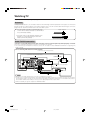
Connecting the AC cord
Connect the AC cords after all component connections have been completed.
Display (rear view)
AC cord
AVC System (rear view)
AC cord
NOTE
• Always turn off the main power of the Display when connecting the AC cords.
• Disconnect the AC cords from the AC outlet, Display and AVC System when the System is not going to be used for a long
period of time.
23
LC-45GX6U(E)-020-029
23
04.7.8, 8:43 AM
Watching TV
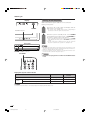
Turning on/off the power
Display
Make sure that the system cable is connected before
turning on the power.
POWER
1
Plug in the AC cords of both the Display and the
AVC system. (See page 23.)
• The system enters standby mode or turns on depending on
its status at the time the power was shut down.
POWER indicator
2
When the system is standby mode: Press POWER
on the Display or the AVC system, or TV POWER on
the remote control to turn on the power.
• To go to standby mode when the system is on, press POWER
on the Display or the AVC system, or TV POWER on the remote
control.
• To turn off the power completely, remove the AC cords from
the power outlet when the system is in standby mode.
AVC System
NOTE
POWER POWER indicator
TV POWER
• The initial setup starts when the System powers on for the first time. If the
System has been turned on before, the EZ setup will not be invoked. See
page 31 to try EZ setup from the Setup menu.
• If you are not going to use this System for a long period of time, be sure
to remove the AC cords from the power outlet.
CAUTION
• Please do not unplug the AC cord when the POWER indicator
is red.
Display/AVC System status indicator
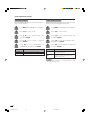
ON
w/o CableCARD
When CableCARD
inserted
Lighting (Blue)
Lighting (Blue)
Lights off
Lights off
—
Lighting (Red)
OFF (Standby)
Standby
CableCARD is downloading data.
NOTE
• Check if the system cable is connected properly when display indicator flashes red.
24
LC-45GX6U(E)-020-029
24
04.7.8, 8:43 AM
Watching TV
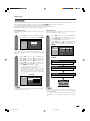
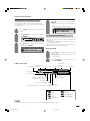
Initial setup
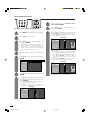
When you turn on the TV for the first time, it will automatically memorize the broadcasting channels where you
live. Perform the following steps before you press TV POWER on the remote control unit.
1. Insert the batteries into the remote control unit. (See page 16.)
2. Connect the antenna cable to the AVC System. (See pages 20 to 22.)
3. Plug in the AC cord to the AC outlet. (See page 23.)
Language setting
Select from among 3 languages: English, French and
Spanish.
1
Press a/b to select the desired language
listed on the screen, and then press ENTER.
Channel search
Channel auto search makes the System look for all
channels viewable in the set area.
3
Language
Air/Cable
CH Search
English
Français
Español
Press c/d to select “Yes” for ANALOG-A,
then press a/b to move down.
Press c/d to select “Yes” for ANALOG-B,
then press a/b to move down.
Press c/d to select “Yes” for DIGITAL (Air/
Cable), and press a/b to move down.
Select “Search Start”, and then press
ENTER.
Language
Air/Cable
CH Search
Antenna setting
Make sure what kind of connection is made with your System
when selecting “Air” or “Cable” for both ANALOG-A, B and
DIGITAL.
2
ANALOG-A
Yes
No
ANALOG-B
Yes
No
DIGITAL (Air)
Yes
No
Search Start
Press c/d to select “Air” or “Cable” for
ANALOG-A, then press a/b to move down.
Press c/d to select “Air” or “Cable” for
ANALOG-B, then press a/b to move down.
Press c/d to select “Air” or “Cable” for
DIGITAL, then press a/b to move down.
Press ENTER to enter the setting.
Example
CH Search
ANALOG-A Air
• This operation makes the System search for
both ANALOG-A, B and DIGITAL.
• There are 3 kinds of CATV system, including
Standard, HRC and IRC. Select the one
matches to your System. Select Auto when you
do not know which one to select for ANALOG
antenna.
[ 25 ]
Found
[ 20 ]
[ 25 ]
Found
[ 20 ]
CH Search
ANALOG-B Air
CH Search
Example
DIGITAL
Language
Air
[ 25 ]
Found
[ 25 ]
Air/Cable
CH Search
ANALOG-A
Air
ANALOG-B
Air
DIGITAL
Air
ANALOG-A
Air
2
Audio
:
MONO
NOTE
• For digital, the “Cable” option will be displayed only when
the CableCARD is inserted.
NOTE
• Make sure what kind of connection is made with your
System when selecting “Air” or “Cable” for both ANALOGA, B and DIGITAL.
• If no channel is found, make sure what kind of connection
is made with your TV and try EZ Setup again (see page
31).
25
LC-45GX6U(E)-020-029
25
04.7.8, 8:43 AM
Watching TV
Please note: your new AQUOS Liquid Crystal Television is capable of receiving the full range of cable-TV channels available
today, from the most advanced digital and HDTV channels, to the more traditional analog channels. As the transition toward
full digital TV continues, some cable-TV systems in the USA will have a mixture of analog and digital channels in their
lineups. When you are viewing analog cable-TV channels and wish to switch to viewing digital cable-TV channels, you must
press the DIGITAL button (located just below the numbers) on the remote control first. In similar fashion, when you are
viewing digital channels and wish to switch to viewing analog channels, you must press either the ANALOG-A or ANALOGB button (depending on whether you have your cable connected to the A or B terminal) on the remote first.
Changing channels - Analog-TV
You can change channels in several ways.
Changing channels - Digital-TV
You can change channels in several ways.
As well as the methods outlined below, you can also select
programs using the Channel List. (See page 89.)
NOTE
• While watching a broad cast, press A-ANALOG-B to view
the image received from the other tuner.
NOTE
• While watching a broad cast, press DIGITAL.
Method 1
Using CHr/s on the remote control unit or on the
display.
■ Digital - Air (Two-part Number)
Method 2
1. Press FLASHBACK to switch to the previously tuned
channel.
2. Press FLASHBACK again to switch back to the
currently tuned channel.
NOTE
• FLASHBACK will not work if no channel has been
changed after TV is turned on.
Method 3
Using remote control buttons (0-9 and ENTER) to select
up to 125 channels for VHF/UHF/CATV.
To select a 1 or 2-digit channel number
(e. g., Channel 5):
Press 5s ENTER
ANALOG-A
Method 1
When you press CHr/sor FLASHBACK, repeat the
same steps for Analog-TV.
Method 2
Using remote control buttons (0-9, • (DOT) and
ENTER) to select the channels including a decimal
point.
To select a 4-digit channel number
(e. g., Channel 22.1):
Press 2 s2s•(DOT) s1s ENTER
DIGITAL
Air
DIGITAL
2
Air
DIGITAL
22
Air
DIGITAL
22.
Air
22.1
DIGITAL
Air
22.1
NOTE
Air
ANALOG-A
5
• Complete the above steps within a few seconds.
• When you enter 0-9 and •(DOT), channel selection will
be made if there is no operation for a few seconds.
Air
5
NOTE
• When selecting a 1-digit channel number, it is not
necessary to press 0 before the number.
• When you enter 0-9 only, channel selection will be made
if there is no operation for a few seconds.
• • (DOT) can be used instead of ENTER.
To select a 3-digit channel number
(e. g., Channel 115):
Press 1s1s5
ANALOG-B Cable
ANALOG-B Cable
ANALOG-B Cable
1
11
115
■ Digital - Cable (One-part Number)
Method 1
When you press CHr/sor FLASHBACK, repeat the
same steps for Analog-TV.
Method 2
Using remote control buttons (0-9 and ENTER) to select
the channels including a decimal point.
To select a 3-digit channel number
(e. g., Channel 310):
Press 3s1s0sENTER
DIGITAL
3
Cable
DIGITAL
31
Cable
DIGITAL
Cable
310
DIGITAL
Cable
310
NOTE
• When you enter 0-9 only, channel selection will be made
if there is no operation for a few seconds.
• If you push “0” by itself, nothing will happen.
NOTE
• When you enter 0-9 only, channel selection will be made
if there is no operation for a few seconds.
26
LC-45GX6U(E)-020-029
26
04.7.8, 8:43 AM
Watching TV
■ Using MUTE on the remote control unit
Changing volume/sound
Mutes the current sound output.
■ Changing the volume
You can change the volume on the Display or on the
remote control unit.
Display
1
Press MUTE.
• “M” has been displayed on the screen for 30
minutes, and the sound is silenced.
VOL l/k
20
Mute
l
■ Using VOL k/l
• To increase the volume, press VOL k.
• To decrease the volume, press VOL l.
NOTE
• Within 30 minutes of pressing MUTE, mute can be
canceled by using one of the methods below.
• Mute will cancel if you press VOL k/l or MUTE.
• Mute will be canceled after 30 minutes have passed.
However, the TV will not suddenly output a loud sound as
the volume level is set to 0 automatically.
Volume adjustment
20
■ Using
NOTE
Virtual on the remote control unit
• VOL l/kon the Display operates the same as VOL k/l
on the remote control unit.
Audio status
Output Select
Output device
Fixed
Variable
Speaker
Variable sound
Mute
MONITOR OUT
Constant as
specified
Variable sound
Virtual produces Dolby virtual effect from the
speakers. Each time you press
Virtual, the mode
changes between On and Off.
Dolby Virtual sound options
* When “Output Select” is set to “Variable”, the indicator on
the screen changes as shown below.
20
• On: Makes it possible to enjoy natural, realistic
surround sound.
• Off: Outputs the normal sound.
Dolby Virtual : Off
Dolby Virtual : On
NOTE
NOTE
• See page 75 for details on the output select function.
• You can have the same settings by choosing “Dolby
Virtual” on the menu items. (See page 40.)
27
LC-45GX6U(E)-020-029
27
04.7.8, 8:43 AM
Watching TV
Setting MTS/SAP stereo mode
The System has a feature that allows reception of
sound other than the main audio for the program. This
feature is called Multi-channel Television Sound (MTS).
The System with MTS can receive mono sound, stereo
sound and Secondary Audio Programs (SAP). The SAP
feature allows a TV station to broadcast other
information, which could be audio in another language
or something completely different like weather
information.
Setting Digital broadcasting audio
mode
The types of audio transmitted in a digital broadcast
include SURROUND as well as MONO and STEREO.
In addition, it is possible for multiple audio tracks to
accompany a single video track.
Press AUDIO to toggle
between audio modes.
You can enjoy Hi-Fi stereo sound or SAP
broadcasts where available.
• Stereo broadcasts
View programs like live sporting events, shows and
concerts in dynamic stereo sound.
• SAP broadcasts
Receive TV broadcasts in either MAIN or SAP sound.
MAIN sound: The normal program soundtrack (either in
mono or stereo).
SAP sound: Listen to second language, supplementary
commentary and other information. (SAP is mono sound.)
Examples: when receiving Digital broadcasting
DIGITAL
Air
2.2
Audio1
:
STEREO
If stereo sound is difficult to hear.
• Obtain a clearer sound by manually switching to fixed
mono-sound mode.
NOTE
DIGITAL
Air
2.2
Audio2
:
STEREO
• MTS only operates while in TV mode.
You can change MTS as
shown below to match
the television broadcast
signal.
DIGITAL
2.2
Audio3
Examples: when receiving MTS and SAP
STEREO mode
ANALOG-A
Air
MAINkSAP mode
ANALOG-A
:
Audio
STEREO
ANALOG-A
Air
:
:
ANALOG-A
Audio
Air
:
SAP
MONO mode
ANALOG-A
2
:
Air
2
MONO
STEREOkSAP mode
Audio
MAIN
ANALOG-A
2
Audio
Air
2
2
Audio
Air
2
ST(SAP)
ANALOG-A
Audio
:
MONO
Air
2
Audio
:
SAP(ST)
ANALOG-A
Air
2
28
LC-45GX6U(E)-020-029
Audio
:
MONO
28
Air
04.7.8, 8:43 AM
:
SURROUND
Watching TV
Connecting Digital Cable Module
Digital Cable Module is called CableCARD™. By attaching the CableCARD, you can receive various digital
services provided by your Cable Company. To obtain and use a CableCARD you need to first submit an
application. Please contact your cable company to discuss receiving an application.
NOTE
• If your cable company does not have CableCARD available, you must connect to the cable-TV set-top box via component
video or DVI in order to receive HDTV programs. (See page 57.)
■ When you change your address (See page 95)
■ About EAS(Emergency Alert System) (See page 95)
2
Press c/d to select “Digital Setup”, a/b to
select “CableCARD MENU”, a/b to select
“Pairing Information”, and then press
ENTER.
Conditional Access
Pairing Information
Diagnostic Screen
DIGITAL IN terminal CableCARD slot
1
Turn on the POWER.
2
Connect the antenna cable to DIGITAL IN.
ECM
• The words “Pairing Information” may be replaced by a
different expression depending on the manufacturer of the
CableCARD.
3
3
Select “Cable” from “Air/Cable” in Channel
setup mode. (See page 32)
4
Insert the CableCARD (upper side facing up)
into the CableCARD slot.
A message will appear on the screen. Call
the number on the screen and tell the
operator the CableCARD ID and Host ID
numbers displayed on the screen.
CableCARD Dialog
CableCARD(tm) Pairing Status
In order to start cable service
for this device, please contact
your cable provider
1-888-555-2222
• A message will appear on the screen. (It might
take a couple of minutes before the message
appears.) Call the number on the screen and
tell the operator the CableCARD ID and Host
ID numbers displayed on the screen.
CableCARD(tm) ID:
7-561-034-449-009
Host ID:
0-100-331-784-018
CableCARD(tm) Pairing Status
• If there is a white triangle at the right side of the screen, the
screen is not showing the entire message. Press a/b on
your remote control to display the rest of the message.
• When there is a “LINK” button on the screen, there is a link
to the next page. Press ENTER to go to the next page.
In order to start cable service
for this device, please contact
your cable provider
1-888-555-2222
CableCARD™ ID:
7-561-034-449-009
Host ID:
0-100-331-784-018
CableCARD(tm)
Diagnostic Information
Power: ON
In band: O.K.
NOTE
Out of band: O.K.
• Do not insert any PCMCIA card other than CableCARD
into the CableCARD slot.
• Please do not pull the AC cord out while the CableCARD
is inserted.
• After inserting the CableCARD, it may take several minutes
before video output from the selected channel appears
on screen.
Video: O.K.
Audio: O.K.
LINK
Removing CableCARD
1
■ If the above procedure does not work,
please follow the following steps instead.
• Turn on the POWER.
• Check that the CableCARD upgrade screen is
not displayed. If it is displayed, wait until it
disappears.
• Remove the cableCARD.
Disconnecting the cable antenna
1
Press MENU and the MENU screen display.
1
• Turn on the POWER.
• Check that the CableCARD upgrade screen is
not displayed. If it is displayed, wait until it
disappears.
• Disconnect the cable antenna.
29
LC-45GX6U(E)-020-029
29
04.7.8, 8:44 AM
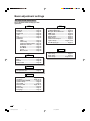
Basic adjustment settings
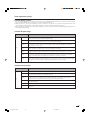
AV input mode menu items
List of AV menu items to help you with
operations
Picture
OPC ................................................ Page 37
Backlight ........................................ Page 36
Contrast ......................................... Page 36
Brightness ..................................... Page 36
Color ............................................... Page 36
Tint ................................................. Page 36
Sharpness ...................................... Page 36
Advanced
C.M.S. ................................... Page 37
Color Temp. ......................... Page 38
Sharpness Enhancement ... Page 38
Automatic Contrast ............ Page 38
I/P Setting ............................ Page 39
Film Mode ............................ Page 39
3D-Y/C .................................. Page 39
Monochrome ....................... Page 39
Audio
Option
Audio Only ..................................... Page 74
3D Noise Reduction ...................... Page 74
Mosquito Noise Reduction .......... Page 74
HDMI Setup .................................... Page 58
Input Select .................................... Page 70
Output Select ................................. Page 75
Quick Shoot ................................... Page 75
Center Channel Input ................... Page 88
Caption Setup ......................... Pages 77-80
Title Display Type .......................... Page 76
Digital Setup
CableCARD MENU ........................ Page 29
Video Setup ................................... Page 42
Audio Setup ................................... Page 43
i.LINK Setup ........................... Pages 61, 64
Treble .............................................. Page 40
Bass ............................................... Page 40
Balance .......................................... Page 40
Dolby Virtual .................................. Page 40
Power Control
No Signal Off ................................. Page 41
No Operation Off ........................... Page 41
Setup
EZ Setup ................................. Pages 31-32
CH Setup ................................. Pages 32-33
Antenna Setup-DIGITAL ............... Page 34
Speaker Setup ............................... Page 68
Input Label ..................................... Page 71
Parental CTRL ........................ Pages 81-87
Position .......................................... Page 66
Picture Flip .................................... Page 71
Language ....................................... Page 35
30
LC-45GX6U(E)-030-034
30
04.7.8, 8:44 AM
Basic adjustment settings
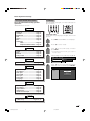
*PC input mode menu items
List of PC menu items to help you with
operations
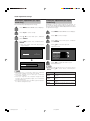
EZ Setup
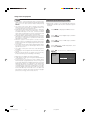
You can run EZ Setup again, even after setting up the
preset channels.
*When INPUT5 is set to PC.
Picture
OPC ................................................ Page 37
Backlight ........................................ Page 36
Contrast ......................................... Page 36
Brightness ..................................... Page 36
Red ................................................. Page 36
Green .............................................. Page 36
Blue ................................................ Page 36
Advanced
C.M.S. ................................... Page 37
Sharpness Enhancement ... Page 38
Audio
Treble .............................................. Page 40
Bass ............................................... Page 40
Balance .......................................... Page 40
Dolby Virtual .................................. Page 40
Language setting
Select from among 3 languages: English, French and
Spanish.
1
Press MENU and the MENU screen displays.
2
Press c/d to select “Setup”.
3
Press a/b to select “EZ Setup”, and then
press ENTER.
• If you already set the Secret No., go to step 4. If
not, skip to step 5.
4
Input the 4-digit secret number by using 0 – 9.
MENU
[Setup ... EZ Setup]
Setup
Power Control
Secret No.
Option
– – – –
Power Management ...................... Page 41
5
Press a/b to select the desired language
listed on the screen, and then press ENTER.
Setup
Language
Speaker Setup ............................... Page 68
Input Signal ................................... Page 74
Auto Sync. ..................................... Page 69
Input Label ..................................... Page 71
Fine Sync. ...................................... Page 69
Picture Flip .................................... Page 71
Language ....................................... Page 35
Air/Cable
CH Search
English
Français
Español
Option
Audio Only ..................................... Page 74
Input Select .................................... Page 70
Output Select ................................. Page 75
Quick Shoot ................................... Page 75
Center Channel Input ................... Page 88
Digital Setup
i.LINK Setup ........................... Pages 61, 64
31
LC-45GX6U(E)-030-034
31
04.7.8, 8:45 AM
Basic adjustment settings
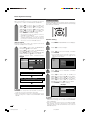
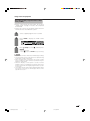
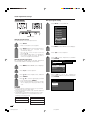
Antenna setting
Make sure what kind of connection is made with your TV when
selecting “Air” or “Cable” for ANALOG-A, B and DIGITAL.
6
Press c/d to select “Air” or “Cable” for
ANALOG-A, then press a/b to move down.
Press c/d to select “Air” or “Cable” for
ANALOG-B, then press a/b to move down.
Press c/d to select “Air” or “Cable” for
DIGITAL, then press a/b to move down.
Press ENTER to enter the setting.
• This operation makes the Channel search for
ANALOG-A, B and DIGITAL.
• There are 3 kinds of CATV system, including
Standard, HRC and IRC. Select the one matches
to your System. Select Auto when you do not know
which one to select for ANALOG antenna.
Channel search
Channel auto search makes the System look for all
channels viewable in the set area.
7
Press c/d to select “Yes” for ANALOG-A,
then press a/b to move down.
Press c/d to select “Yes” for ANALOG-B,
then press a/b to move down.
Press c/d to select “Yes” for DIGITAL (Air/
Cable), and press a/b to move down.
Select “Search Start”, and then press
ENTER.
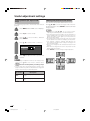
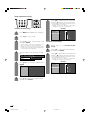
Channel Setup
If initial setup does not memorize all the channels in
your region, follow the instructions below to manually
memorize the channels.
Antenna setting
1
Press MENU and the MENU screen displays.
2
Press c/d to select “Setup”.
3
Press a/b to select “CH Setup”, and then
press ENTER.
• If you already set the Secret No., input the 4digit secret number here. See page 81 for
setting a secret number.
Air/Cable
Language
CH Search
Air/Cable
CH Search
ANALOG-A
Yes
No
ANALOG-B
Yes
No
DIGITAL (Air)
Yes
No
CH Memory
ANALOG-A
Air
ANALOG-B
Air
DIGITAL
Air
Search Start
Searching TV channels
Example
MENU
ANALOG-A Air
MENU
Press a/b to select “Air/Cable”, and then
press ENTER.
[ 25 ]
Found
[ 20 ]
5
Press c/d to select “Air” or “Cable” for
ANALOG-A, then press a/b to move down.
Press c/d to select “Air” or “Cable” for
ANALOG-B, then press a/b to move down.
Press c/d to select “Air” or “Cable” for
DIGITAL, then press a/b to move down.
Press ENTER to enter the setting.
Example
[Setup ... EZ Setup ... CH Search]
ANALOG-B Air
MENU
4
[Setup ... EZ Setup ... CH Search]
[ 25 ]
Found
[ 20 ]
[Setup ... EZ Setup ... CH Search]
Air/Cable
DIGITAL
Air
[ 25 ]
Found
[ 25 ]
CH Search
CH Memory
NOTE
• If no channel is found, make sure what kind of connection is
made with your System and try EZ setup again.
• Make sure what kind of connection is made with your System
when selecting “Air” or “Cable” for both ANALOG-A, B and
DIGITAL.
ANALOG-A
Air
ANALOG-B
Air
DIGITAL
Air
NOTE
• Make sure what kind of connection is made with your
System when selecting “Air” or “Cable” for both ANALOGA, B and DIGITAL.
• There are 3 kinds of CATV system, including Standard,
HRC and IRC. Select the one matches to your System.
Select Auto when you do not know which one to select for
ANALOG antenna.
32
LC-45GX6U(E)-030-034
32
04.7.8, 8:45 AM
Basic adjustment settings
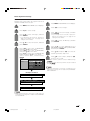
Channel search
Channel memory setting
Channel auto search makes the System look for all
channels viewable in the set area.
1
2
3
5
Press MENU and the MENU screen displays.
2
Press c/d to select “Setup”.
3
Press a/b to select “CH Setup”, and then
press ENTER.
Press MENU and the MENU screen displays.
Press c/d to select “Setup”.
Press a/b to select “CH Setup”, and then
press ENTER.
• If you already set the Secret No., input the 4digit secret number here. See page 81 for
setting a secret number.
4
1
• If you already set the Secret No., input the 4digit secret number here. See page 81 for
setting a secret number.
4
Press a/b to select “CH Memory”, and then
press ENTER.
5
Press a/b to select ANALOG-A, B or
DIGITAL (Air), DIGITAL (Cable), CableCARD,
and then press ENTER.
6
Press a/b and press c/d to select the
channel you want to skip or not.
7
Press a/b to select “Skip”, and press c/d
to select “On” or “Off”.
Press a/b to select “CH Search”, and then
press ENTER.
Press c/d to select “Yes” for ANALOG-A,
then press a/b to move down.
Press c/d to select “Yes” for ANALOG-B,
then press a/b to move down.
Press c/d to select “Yes” for DIGITAL (Air/
Cable), and press a/b to move down.
Select “Search Start”, and then press
ENTER.
Air/Cable
CH Search
CH Memory
ANALOG-A
Yes
No
ANALOG-B
Yes
No
DIGITAL (Air)
Yes
No
• On: Skips channels. (Channel selection disabled using
r/s
s.)
CHr
• Off: Does not skip channels. (Channel selection enabled
r/s
s.)
using CHr
NOTE
Search Start
• Make sure what kind of connection is made with your
System when selecting “Air” or “Cable” for both ANALOGA, B and DIGITAL.
Example: CH Search
MENU
[Setup ... CH Setup ... CH Search]
ANALOG-A Air
MENU
DIGITAL
Found
[ 20 ]
[Setup ... CH Setup ... CH Search]
ANALOG-B Air
MENU
[ 25 ]
[ 25 ]
Found
[ 20 ]
[Setup ... CH Setup ... CH Search]
Air
[ 25 ]
Found
[ 25 ]
NOTE
• Make sure what kind of connection is made with your
System when selecting “Air” or “Cable” for both ANALOGA, B and DIGITAL.
33
LC-45GX6U(E)-030-034
33
04.7.8, 8:45 AM
Basic adjustment settings
Antenna Setup – DIGITAL – Air
In order to receive digital air broadcasts, you need a
digital broadcast antenna. You can set the antenna
configuration through the Antenna Setting screen.
Antenna setting
1
Press MENU and the MENU screen displays.
2
Press c/d to select “Setup”.
3
Press a/b to select “Antenna Setup DIGITAL”, and then press ENTER.
• If you already set the Secret No., input the 4digit secret number here. See page 81 for
setting a secret number.
4
Press a/b to select “Signal Strength”.
Signal Strength
Channel Strength
Signal Strength
Current
0
Max
0
Make sure the signal strength of each
channel received is correctly adjusted.
• This function is available for DIGITAL (Air) only.
1
Input the channel number. (See page 26.)
2
Press a/b to select “Channel Strength”, and
then press ENTER.
3
Adjust the direction of the antenna to obtain
the maximum signal strength and then press
ENTER.
Signal Strength
1 2 CH
Channel Strength
Signal Strength
Current
0
Max
0
34
LC-45GX6U(E)-030-034
34
04.7.8, 8:45 AM
Basic adjustment settings
Favorite channel setting
3
This function allows you to program 4 favorite channels,
in 4 different categories. By setting the favorite
channels in advance, you can select your favorite
channels easily.
Press a/b/c/d to select the channel you
want to delete, and then press ENTER.
A
B
ANALOG-A
ANALOG-A
3
18
C
D
D-Air
10.1
ANALOG-A
125
4
ANALOG-B
ANALOG-B
33
51
Press c/d to select “Yes”, and then press
ENTER.
Yes
A
No
B
C
D
ANALOG-A
3
D-Air
10.1
ANALOG-A
1
2
125
Select the channel you want to register as a
favorite channel.
Press EDIT.
ANALOG-B
ANALOG-B
33
51
NOTE
• You can delete all the favorite channels by selecting “All
Data Clear” in step 2 in Delete favorite channel.
3
Press a/b to select “Register”, and then
press ENTER.
Language setting
You can also select a language from the Setup menu.
Select from among 3 languages: English, French and
Spanish.
Register
1 Data Clear
All Data Clear
4
Press a/b/c/d to select the position in the
area, and then press ENTER to register.
A
B
C
1
Press MENU and the MENU screen displays.
2
Press c/d to select “Setup”.
3
Press a/b to select “Language”, and then
press ENTER.
4
Press a/b to select the desired language
listed on the screen, and then press ENTER.
D
ANALOG-A
3
English
Français
Español
Delete favorite channel
1
Press EDIT and the favorite channel screen
displays.
2
Press a/b to select “1 Data Clear”, and then
press ENTER.
35
LC-45GX6U(E)-035-041
35
04.7.8, 8:46 AM
Basic adjustment settings
Picture adjustments
Adjusts the picture to your preference with the following
picture settings.
1
Press MENU and the MENU screen displays.
2
Press c/d to select “Picture”.
3
Press a/b to select a specific adjustment
item.
4
Press c/d to adjust the item to your desired
position.
NOTE
• For resetting all adjustment items to factory preset values,
press a/b to select “Reset”, press ENTER, press c/d
to select “Yes”, and then press ENTER.
Adjustments for AV source
MENU
Adjustments for PC source
[Picture]
MENU
Picture
Audio
OPC
Off
On
[Picture]
Picture
On : Display
Audio
OPC
Off
On
On : Display
Backlight
[+16] –16
+16
Backlight
[+16] –16
+16
Contrast
[+30]
[+30]
+40
0
+40
Contrast
Brightness [
0] –30
+30
Brightness [
0] –30
+30
Color
[
0] –30
+30
Red
[
0] –30
+30
Tint
[
0] –30
+30
Green
[
0] –30
+30
Sharpness [
0] –10
+10
Blue
[
0] –30
+30
Advanced
Advanced
Reset
Reset
Selected item
cbutton
dbutton
Selected item
0
cbutton
dbutton
Backlight
The screen dims
The screen brightens
Backlight
The screen dims
The screen brightens
Contrast
For less contrast
For more contrast
Contrast
For less contrast
For more contrast
Brightness
For less brightness
For more brightness
Brightness
For less brightness
For more brightness
Color
For less color
intensity
For more color
intensity
Red
For weaker red
For stronger red
Tint
Skin tones become
purplish
Skin tones become
greenish
Green
For weaker green
For stronger green
Sharpness
For less sharpness
For more sharpness
Blue
For weaker blue
For stronger blue
NOTE
NOTE
• Select “Advanced” and then press ENTER to set “C.M.SHue”, “C.M.S-Saturation”, “C.M.S-Value”, “Color Temp.”,
“Sharpness Enhancement”, “Automatic Contrast”, “I/P
Setting”, “Film Mode”, “3D-Y/C” or “Monochrome”. See
pages 37 to 39.
• Select “Advanced” and then press ENTER to set “C.M.SHue”, “C.M.S-Saturation”, “C.M.S-Value” and “Sharpness
Enhancement”.
36
LC-45GX6U(E)-035-041
36
04.7.8, 8:46 AM
Basic adjustment settings
OPC setting
C.M.S. (Color Management System)
Automatically adjusts the brightness of the screen.
1
2
3
4
Press MENU and the MENU screen displays.
Press c/d to select “Picture”.
Press a/b to select “OPC”.
Color tone is managed using the six-color adjustment
setting.
1
Press MENU and the MENU screen displays.
2
Press c/d to select “Picture”.
3
Press a/b to select “Advanced”, and then
press ENTER.
4
Press a/b to select “C.M.S-Hue”, and then
press ENTER.
Press c/d to select “On” or “On: Display”.
OPC
Off
On
On : Display
Backlight
[+16] –16
+16
Contrast
[+30]
0
+40
Brightness [
0] –30
+30
Color
[
0] –30
+30
Tint
[
0] –30
+30
Sharpness [
0] –10
+10
• You can select “C.M.S-Saturation” or “C.M.SValue” here instead of selecting “C.M.S-Hue”.
5
Press a/b to select a specific adjustment
item. Press c/d to adjust the item to your
desired position.
C. M. S.-Hue
Advanced
C. M. S.-Saturation
R
[ 0]
–30
+30
C. M. S.-Value
Y
[ 0]
–30
+30
G
[ 0]
–30
+30
C
[ 0]
–30
+30
B
[ 0]
–30
+30
M
[ 0]
–30
+30
Reset
Changing reds
closer to
magenta or yellow.
Selected item
Description
Off
The brightness is fixed at the value set in
“Backlight” (see page 36).
On
Automatically adjusts
On: Display
Displays the OPC effect on the screen while
adjusting the brightness of the screen.
Reset
C.M.S-Hue
This is a standard to adjust the color either
more reddish or more bluish in tone.
C.M.SSaturation
C.M.SValue
Increases or decreases the saturation of a
selected color.
NOTE
• When set to “On”, the OPC senses the surrounding light
and automatically adjusts the backlight brightness. Make
sure no object obstructs the OPC sensor, which could
affect its ability to sense surrounding light.
• When set to “On: Display”, OPC effect displays on the
screen while OPC is adjusting the screen brightness.
Description
Selected item
A higher value makes the image brighter.
A lower value makes the image darker.
NOTE
• For resetting all adjustment items to the factory preset
values, press a/b to select “Reset”, and then press
ENTER.
37
LC-45GX6U(E)-035-041
37
04.7.8, 8:46 AM
Basic adjustment settings
Color temperature
Automatic Contrast
For a better white balance, use color temperature
correction.
Adjusts black level and white level in images
automatically as appropriate to a particular scene.
1
Press MENU and the MENU screen displays.
1
Repeat steps 1 to 3 in Color temperature.
2
Press c/d to select “Picture”.
2
Press a/b to select “Automatic Contrast”,
and then press ENTER.
3
Press a/b to select “Advanced”, and then
press ENTER.
3
Press c/d to select “On” or “Off”, and then
press ENTER.
4
Press a/b to select “Color Temp.”, and then
press ENTER.
C. M. S-Hue
Description
Selected item
On
Off
Automatically adjusts
For normal images
C. M. S-Saturation
C. M. S-Value
High
Color Temp.
Mid-High
Sharpness Enhancement
Middle
Automatic Contrast
Mid-Low
I/P Setting
Low
Film Mode
3D-Y/C
Monochrome
5
Press a/b to select the desired level, and
then press ENTER.
Description
Selected item
High
Mid-High
Middle
Mid-Low
Low
White with Bluish tone
White with Reddish tone
Sharpness Enhancement
Provides sharper images with more depth by adjusting
background sharpness.
1
Repeat steps 1 to 3 in Color temperature.
2
Press a/b to select “Sharpness
Enhancement”, and then press ENTER.
3
Press c/d to select the desired level, and
then press ENTER.
• The higher the number of the level, the more
sharpness and depth you will get in images.
38
LC-45GX6U(E)-035-041
38
04.7.8, 8:46 AM
Basic adjustment settings
I/P Setting
3D-Y/C
Converts input signals from interlace to progressive.
1
Press MENU and the MENU screen displays.
2
Press c/d to select “Picture”.
3
Press a/b to select “Advanced”, and then
press ENTER.
4
5
Press a/b to select “I/P Setting”, and then
press ENTER.
Press c/d to select “Fast” or “Slow”, and
then press ENTER.
NOTE
• “I/P Setting” is not selectable when channel display shows
an input resolution of 480P or 720P.
Provides high quality images with minimal dot crawl
and cross color noise.
1
Repeat steps 1 to 3 in I/P Setting.
2
Press a/b to select “3D-Y/C”, and then
press ENTER.
3
Press a/b to select the desired level, and
then press ENTER.
Description
Selected item
Standard
Fast
Slow
Normal adjustment
For movie image
For still image
NOTE
• 3D-Y/C is available only for Composite Video input.
Monochrome
Film Mode (3:2 pull-down)
Automatically detects a film-based source (originally
encoded at 24 or 30 frames/second), analyzes it then
recreates each still film frame for high-definition picture
quality.
1
For viewing a video in monochrome.
1
Repeat steps 1 to 3 in I/P Setting.
2
Press a/b to select “Monochrome”, and
then press ENTER.
Repeat steps 1 to 3 in I/P Setting.
C. M. S-Hue
C. M. S-Saturation
2
Press a/b to select “Film Mode”, and then
press ENTER.
C. M. S-Value
Color Temp.
Sharpness Enhancement
3
On
Off
Automatic Contrast
Press c/d to select “On”, and then press
ENTER.
I/P Setting
Film Mode
3D-Y/C
Description
Selected item
Off
On
Normal viewing mode
Detects, analyzes, converts film source
Monochrome
3
Press c/d to select “On”, and then press
ENTER.
Description
Selected item
Off
On
Normal color
For viewing in monochrome
39
LC-45GX6U(E)-035-041
39
04.7.8, 8:47 AM
Basic adjustment settings
Sound adjustment
Dolby Virtual
You can adjust the sound quality to your preference
with the following settings.
1
Press MENU and the MENU screen displays.
2
Press c/d to select “Audio”.
MENU
Power Control
Treble
[ 0]
–15
+15
Bass
[ 0]
–15
+15
Balance
[ 0]
L
Dolby Virtual
VIRTUAL DOLBY DIGITAL is a technology certified by
Dolby Laboratories that creates a virtualized surround
sound experience from two speakers using Dolby Pro
Logic or Dolby Pro Logic II.
VIRTUAL DOLBY DIGITAL retains all the original
multichannel audio information and provides the
listener with the sensation of being surrounded by
additional speakers.
[Audio]
Audio
You can enjoy the SURROUND 2ch stereo with Dolby
Pro Logic II technology.
1
Press MENU and the MENU screen displays.
2
Press c/d to select “Audio”.
3
Press a/b to select “Dolby Virtual”, and
then press ENTER.
R
[Off]
Reset
3
4
Press a/b to select a specific adjustment
item.
[Audio ... Dolby Virtual]
Audio
Power Control
Press c/d to adjust the item to your desired
position.
Selected item
Treble
MENU
cbutton
For weaker treble
dbutton
Treble
[ 0]
–15
+15
Bass
[ 0]
–15
+15
Balance
[ 0]
L
Dolby Virtual
For stronger treble
R
[Off]
Reset
Bass
For weaker bass
Balance
Decrease audio from Decrease audio from
the right speaker
the left speaker
For stronger bass
4
Press c/d to select “On”, and then press
ENTER.
NOTE
NOTE
• Audio menu is grayed out when Output Select is set to
“Variable” or when headphones are in use.
• Balance and Audio Quality Control are grayed out when
Dolby Virtual is set to “On”.
• For resetting all adjustment items to factory preset values,
press a/b to select “Reset”, press ENTER, press c/d
to select “Yes”, and then press ENTER.
• You can choose Dolby Virtual by pressing
Virtual on
the remote control unit.
• Audio menu is grayed out when Output Select is set to
“Variable” or when headphones are in use.
• Balance and Audio Quality Control are grayed out when
Dolby Virtual is set to “On”.
• For some discs, setup may be required on your DVD. In
this case, please refer to the operation manual of your
DVD player.
• You may not get the Dolby Virtual Surround effect if you
adjust “Treble” or “Bass” setting.
40
LC-45GX6U(E)-035-041
40
04.7.8, 8:47 AM
Basic adjustment settings
Power control for PC source
Power control
Power control setting allows you to save energy.
Power control setting allows you to save energy.
Power management
Power control for AV source
When set, the power will automatically shut down.
No signal off
When set to “Enable”, the power will automatically shut
down if no signal inputs for 15 minutes.
1
Repeat steps 1 and 2 in No signal off.
1
Press MENU and the MENU screen displays.
2
Press a/b to select “Power Management”,
and then press ENTER.
2
Press c/d to select “Power Control”.
3
Press a/b to select “Mode1” or “Mode2”,
and then press ENTER.
3
Press a/b to select “No Signal Off”, and
then press ENTER.
Off
Mode1
4
Press c/d to select “Enable”, and then
press ENTER.
Mode2
Selected item
Enable
Off
• No power management
• Factory preset value.
Mode1
• If no signal inputs for 8 minutes, the power
shuts down.
• Even if you start using the PC and the signal
inputs again, the TV stays off.
• The System turns on again by pressing TV
POWER on the remote control unit. (See
page 24).
• Pressing POWER on the display will have
the same result.
Mode2
• If no signal inputs for 8 seconds, the TV
enters standby mode.
• When you start using the PC and the signal
inputs again, the System turns on.
• Five minutes before the power shuts down,
remaining time displays every minute.
NOTE
• “Disable” is factory preset value.
• When a TV program finishes, this function may not operate.
• Does not function in conjunction with digital broadcasts.
No operation off
When set to “Enable”, the power will automatically shut
down if there is no operation for 3 hours.
1
Description
Disable
Repeat steps 1 and 2 in No signal off.
2
Press a/b to select “No Operation Off”, and
then press ENTER.
3
Press c/d to select “Enable”, and then
press ENTER.
NOTE
• If you turn off the power by disconnecting AC cord when
setting “Mode2” in power management, the TV may not
function properly after turning the power on again. In such
case, press TV POWER on the remote control unit.
• Press POWER on the display will have the same result.
• Five minutes before the power shuts down,
remaining time displays every minute.
NOTE
• “Disable” is factory preset value.
41
LC-45GX6U(E)-035-041
41
04.7.8, 8:47 AM
Basic adjustment settings (DIGITAL)
REC Picture Size
Digital Setup
Select the screen size to record on 16:9 video.
This setting allows you to set the image of Digital
broadcasting.
1
Press MENU and the MENU screen displays.
2
Press c/d to select “Digital Setup”.
3
Press a/b to select “Video Setup”, and then
press ENTER.
4
Press a/b to select “REC Picture Size”, and
then press ENTER.
Video Setup
You can adjust the settings for Digital image.
Screen Size
Set the format of image of Digital broadcasting.
1
2
Press MENU and the MENU screen displays.
Press c/d to select “Digital Setup”.
Screen Size
REC Picture Size
3
Press a/b to select “Video Setup”, and then
press ENTER.
4 : 3 TV
4
Press a/b to select “Screen Size”, and then
press ENTER.
5
Screen Size
REC Picture Size
Manual
5
Auto
Press c/d to select the desired picture size,
and then press ENTER.
Selected item
Description
4:3 TV
Bars may appear on the top and
bottom with some programs
16:9 TV
Displays in full screen
Press c/d to select “Manual” or “Auto”.
Selected item
Description
Manual
Broadcasts in formats other than
480i will be converted and
displayed in the 1080i format.
With 480i broadcasts you can
change the screen size to the
size of your choice.
Auto
All broadcasts will be converted
and displayed in the 1080i
format.
NOTE
• "Manual" is factory preset value.
42
LC-45GX6U(E)-042-053
16 : 9 TV
42
04.7.8, 8:48 AM
Basic adjustment settings (DIGITAL)
Audio Setup
You can output digital audio to an AV amp or similar
device whose DIGITAL AUDIO INPUT terminal is
connected to the DIGITAL AUDIO OUTPUT terminal
on the AVC System. Please select an audio output
format compatible with the audio format of the program
you are watching and the equipment connected.
1
Press MENU and the MENU screen displays.
2
Press c/d to select “Digital Setup”.
3
Press a/b to select “Audio Setup”, and then
press ENTER.
4
Press a/b to select “PCM” or "Dolby Digital",
and then press ENTER.
PCM
Dolby Digital
Selected item
PCM
Dolby Digital
Description
The optical output terminal outputs
audio signal by PCM form. If your
digital audio system does not
support Dolby Digital, select "PCM".
The optical output terminal outputs
audio signal by Dolby Digital form.
It reproduces sound from surround
program of digital.
43
LC-45GX6U(E)-042-053
43
04.7.8, 8:48 AM
Using memory card
Important notes on using memory card
• We will not be liable for misuse of the LCD TV set, any troubles during use, or other problems, or any damages
arising out of the use of the LCD TV set, except for the cases for which we are liable by statute.
• If you or other people misuse the LCD TV set, or the LCD TV set is affected by static electricity or electrical
noise, the recorded data may be in danger of being changed or lost.
• If you are making a record of importance, run a test in advance to ensure that the recording would be performed
correctly in terms of picture or sound quality.
• We do not capture responsibility nor compensate even if pictures or sound could not be recorded correctly
because of troubles.
Copyright
Duplicating images and music by copying and/or editing from videocassettes and/or TV programs that are
subject to copyrights is only permitted when the edited or copied versions are used for personal pleasure.
With the exception of cases when the user personally is the owner of the copyrights of the object in question
or when specific and written permission has been obtained from the owner(s) of the object in question, the
user is not permitted to make copies and/or duplications and/or edited versions as this constitutes a violation
of the copyright laws, possible exposing the user to demands for compensation for damages. Therefore,
strictly adhere to the existing copyright laws.
In addition when using image data that includes third parties, the use without prior permission of these
images may constitute an intrusion on the privacy of third parties, so strictly refrain from such usage.
The recording formats
Still picture
Motion Picture
Recording/Playback file format
JPEG (DCF compliant)
Size of a captured still picture
640g480 dots
Recording file format
SP/LP... ASF (Motion Picture: MPEG-4 compliant, Sound: WMA-compliant)
EP........ ASF (Motion Picture: MPEG-4 compliant, Sound: G.726-compliant)
Size of a recorded motion
picture/number of frames
SP ... Size: 320g240 dots, Frame: approx. 30 frames/sec
LP ... Size: 320g240 dots, Frame: approx. 30 frames/sec
EP ... Size: 320g240 dots, Frame: approx. 15 frames/sec
Playback file format
ASF (Motion Picture: MPEG-4 compliant, Sound: WMA-compliant)
ASF (Motion Picture: MPEG-4 compliant, Sound: G.726-compliant)
Approximate number of recordable pictures/time
Still Pictures
Picture size
640g480
Still picture
Memory card
32MB
128MB
Approx. 300 pictures
Approx. 1000 pictures
* Recordable numbers may vary depending on the receiving condition of the LCD TV set and/or content of images.
Motion pictures
Recordable time
Memory card capacity
Picture size
Recording mode
320g240
SP
Approx. 10 min.
Approx. 4h.
320g240
LP
Approx. 30 min.
Approx. 10h.
320g240
EP
Approx. 1h.
Approx. 25h.
256MB
5GB
• Recordable time may vary depending on receiving condition of the LCD TV set or content of images.
• The maximum amount of data you can record on a memory card is 1,024 pictures in total including still and motion
pictures.
44
LC-45GX6U(E)-042-053
44
04.7.8, 8:48 AM
Using memory card
You can use memory cards (commercially available)
for recording and playing back pictures.
• Please use an appropriate PC card adapter
(commercially available) for each memory card.
• Following memory cards are available. (Note that
names for memory cards vary depending on
manufacturers.)
Memory card name
SD Memory Card
Storage capacity
Commercially available memory cards
PC card adapter
SD Memory
Card
PC Card Hard Disk
miniSD™ Card
512 MB or less
mini SD™ Card
32 MB or less
CompactFlash
MultiMediaCard
xD Picture Card
2 GB or less
MultiMediaCard
128 MB or less
SmartMedia
128 MB or less
Memory Stick
128 MB or less
Memory Stick PRO
1 GB or less
Microdrive
2 GB or less
xD Picture Card
CompactFlash
SmartMedia
Memory Stick
Microdrive
Memory Stick
PRO
128 MB or less
PC Card Hard Disk
5 GB or less
* Each memory card name is a trademark.
* The capacity of memory card is approximate. The
capacity varies depending on the manufacturer.
• To read picture files recorded with digital cameras,
use the PC card adapter recommended by the
corresponding manufacturer. (The names for PC
card adapters vary depending on manufacturers.)
• For directions for use of digital cameras or PC card
adapters, please refer to the operation manual
provided for each product.
• Please use an appropriate PC card adapter
(commercially available) for each memory card.
Preparing a memory card
Insert a memory card (commercially available) into a PC
card adapter (commercially available).
Example:
Inserting the SD memory card into a PC card adapter.
You can playback DCF compliant JPEG pictures
captured with other devices in the card playback
mode.
• DCF (Design rule for Camera File system) is a
standard of the Japan Electronics and Information
Technology Industries Association (JEITA). This
standard specifies the image file format used for
images shot with a digital camera.
• Some motion pictures recorded with other devices
may not be played back correctly.
Notes on using memory cards and PC card adapter
Please note the following when using memory cards and PC card adapters to avoid corruption of data or
malfunction of the LCD TV set.
• If you use memory cards other than those shown above, recording or playing back pictures are not
guaranteed.
• Some PC card adapters have restrictions of memory card capacity. Refer to the relevant operation manual
for such restrictions.
• Some pictures which have been created, modified, or copied on your PC may not be played back.
• Do not bend, drop or apply a shock to memory cards or PC card adapters.
• Keep memory cards or PC card adapters away from heat, water or direct sunlight.
• Do not dismantle or modify memory cards or PC card adapters.
• Refer to the appropriate operation manuals for details on using or keeping memory cards or PC card
adapters.
• Do not turn the LCD TV set off while a memory card is in operation (e.g. playing back, recording or
displaying a slideshow).
45
LC-45GX6U(E)-042-053
45
04.7.8, 8:48 AM
Using memory card
Card Setup mode menu items
Still Setup
Slide Show
Interval
1-10/15/20/25/30/
45/60 Sec.
15/30/60 Min.
Order
Normal/Random/
My Program
On/Off
Repeat
Card
Setup
Video Setup
Format
My Program
Setup/Delete All
Audio Select
Off/TV/Input1-Input5
File Operation
Protect/Delete File/ Delete All
Rec. Mode
SP/LP/EP
Pre Record
On/Off
Repeat Play
Off/File/All
File Operation
Protect/Delete File/Delete All
Yes/No
Slide show operation panel
1
CARD - STILL
0001/0045
Motion picture operation panel
1
2
ORDER:NORMAL
PREV.
Rotate the image
Pause
Go to previous image
Start slide show
Stop slide show
Go to next image
6
5
REPEAT:OFF
PLAY
0 0 : 1 5 : 2 5
4 5
4
PLAY
NEXT
MODE : SP
3
3
0001/0045
CARD - VIDEO
REPEAT:OFF
SLIDE SHOW
1
2
3
4
5
6
2
6
1
2
3
4
5
6
7
8
9
10
11
12
13
7
8
9 10 11
12 13
Action
Go back to the beginning of the file
Pause
Repeat playback setting
Go to the beginning of the next file
Recording mode
Counter
Current action
Reverse
Playback
Stop
Fast forward
Slow playback
Precautions when playing back PC image data on the LCD TV
Recording formats of image data:
When recording image data on the LCD TV, the recording formats are as follows.
• When recording motion pictures: The SD_VIDEO folder is created and the data is stored in. When playing the card,
the SD_VIDEO recording format is recognized.
• When recording still pictures: The DCIM folder is created and the data is stored in. When playing the card, the
DCIM recording format is recognized.
When playing the card, record PC data in a recording format the LCD TV can recognize.
1. When copying motion pictures from a PC to a card recorded with the LCD TV, first place the pictures in the
SD_VIDEO folder before playing them.
2. When copying still pictures from a PC to a card recorded with the LCD TV, first place the pictures in the DCIM
folder before playing them.
3. When using a new card for copying motion pictures, first format the card and create an SD_VIDEO folder before
placing the data in the folder for playback.
4. When using a new card for copying still pictures, first format the card and create a DCIM folder before placing the
data in the folder for playback.
When creating, revising, or copying images using your PC, the edited images may not playback correctly.
46
LC-45GX6U(E)-042-053
46
04.7.8, 8:48 AM
Using memory card
Inserting a PC card adapter
• Press in the EJECT button if it is popped out.
• Insert a memory card to a PC card adapter
beforehand. (See page 45.)
• Insert the PC adapter card slowly.
Selecting Still and Video mode
1
Press CARD and the card mode screen
displays.
2
Press c/d to select “Still” or “Video”, and
then press ENTER.
• When in CARD mode, press 0-9, CH r/s,
FAVORITE CH or INPUT to switch either TV or
AV input mode.
PC CARD slot
CARD indicator
• CARD indicator lights up green when the card is
inserted.
Ejecting the card
• Make sure the card indicator lights up green.
1
Press EJECT button.
• EJECT button is popped up.
EJECT button
2
Press EJECT button again.
NOTE
• Please do not insert a CableCARD in the PC Card slot.
• When “Please insert a PC card” is displayed, eject the
PC card adapter, and then insert the PC card adapter
slowly all the way to the end.
• When over a thousand files are in a card, it takes several
minutes to load. (approx. 5 minutes.)
• Even if the blue light is on, you can not record on a card
right after you inserted it.
• Make sure the CARD indicator lights green when you take
out a card. Never take out a card when the CARD indicator
lights red. This may damage the card.
47
LC-45GX6U(E)-042-053
47
04.7.8, 8:48 AM
Using memory card
Recording a still image
Displaying a still image
You can record a still image on the card.
1
Press CARD and the card mode screen
displays.
2
Press c/d to select “Still”, and then press
ENTER.
3
Press a/b/c/d to select a file you want to
display, and then press ENTER.
Still
1
Press FREEZE.
Video
File 1
File 2
File 3
File 4
File 5
File 6
File 7
File 8
File 9
• To display the files that are in the previous or
next page, select c/d on the index screen and
press ENTER.
• When viewing a still image, by pressing VIEW
MODE the image size changes. Normal – Full.
This function does not work when displaying
the index screen.
Still
Cooking Time
Onion
x1
Tomato
x1
Potato
x1
Displaying slide show
1
2
Press REC.
Repeat steps 1 to 3 in Displaying a still
image above.
• The operation panel displays.
Still
CARD - STILL
0001/0045
Cooking Time
PREV.
Onion
Still image captured on card.
Tomato
Potato
x1
Press ENTER to update the still image.
Cooking Time
2
Press a/b/c/d to select d, and then press
ENTER.
• Slide show starts.
• Operate slide show with the operation panel
appears on the screen.
• To turn off the operation panel, press CARD
on the remote control.
NOTE
• See page 46 for operation panel function.
• You can not rotate the image during slide show. Stop slide
show to rotate the image.
NOTE
The input signals available for recording are S-Video and
Composite Video, except for copy-guarded or V-chip
blocked programs.
48
48
NEXT
x1
Still
LC-45GX6U(E)-042-053
REPEAT:OFF
SLIDE SHOW STOP
x1
• “Still image captured on card.” displays.
3
ORDER:NORMAL
04.7.8, 8:49 AM
Using memory card
Setting Slide Show
My Program
You can adjust the interval, order and repeat settings.
1
Press CARD and the card mode screen
displays.
2
Press MENU and the MENU screen displays.
3
Press c/d to select “Card Setup”.
4
5
Press a/b to select “Still Setup”, and then
press ENTER.
Press a/b to select “Slide Show”, and then
press ENTER.
You can select up to thirty-two pictures and specify
the order for displaying in slide show.
1
Repeat steps 1 to 4 in Setting Slide Show.
2
Press a/b to select “My Program”, and then
press ENTER.
3
Press c/d to select “Setup”, and then press
ENTER.
4
Press a/b/c/d to select the files, and then
press ENTER.
5
Repeats the operation in step 4. (You can
select up to 32 files.)
6
After selecting all the files you want, press
RETURN to return to MENU.
Slide Show
My Program
Audio Select
Interval
File Operation
Order
Repeat
5 s.
Normal
On
Off
To cancel My Program setting
6
1
Performs step 1 and 2 in My Program.
2
Press c/d to select “Delete All”, and then
press ENTER.
3
Press c/d to select “Yes”, and then press
ENTER.
Press a/b/c/d to select the desired slide
show setting, and then press ENTER.
Description
Selected item
Interval
Set the frame interval for a slideshow.
Order
Set the frame order for a slideshow. See
the right column for My Program setting.
Repeat
If set to On, the slideshow will play again
after showing the last frame.
• All the registered numbers are cleared.
Audio Select
You can enjoy the audio from TV or other external
equipment during the still image playback.
1
Repeat steps 1 to 4 in Setting Slide Show.
2
Press a/b to select “Audio Select”, and then
press ENTER.
3
Press a/b/c/d to select the desired sound
output, and then press ENTER.
49
LC-45GX6U(E)-042-053
49
04.7.8, 8:49 AM
Using memory card
Protecting/unprotecting still image files
Deleting a still image file
You can protect any file you do not want to delete.
1
Repeat steps 1 to 4 in Setting Slide Show.
2
Press a/b to select “File Operation”, and
then press ENTER.
Slide Show
1
Repeat steps 1 to 4 in Setting Slide Show.
2
Press a/b to select “File Operation”, and
then press ENTER.
3
Press a/b to select “Delete File”, and then
press ENTER.
4
Press a/b/c/d to select the file you want
to delete, and then press ENTER.
My Program
Audio Select
Protect
File Operation
Delete File
Delete All
5
3
Press a/b to select “Protect”, and then
press ENTER.
6
4
Press a/b/c/d to select the file you want
to protect, and then press ENTER.
7
• Protect mark ( ) displays.
• Select the file with a protect mark and press
ENTER to cancel file protect.
5
Repeats the operation in step 4.
6
After setting the files you want to protect,
press RETURN to return to MENU.
Press c/d to select “Yes”, and then press
ENTER.
Repeat the operations in steps 4 and 5
above.
After deleting the images you no longer need,
press RETURN to return to MENU.
NOTE
• You cannot delete a protected file on the card.
• Do not turn off the power or take out a card when deleting
a file. The card may malfunction.
Deleting all still image files
NOTE
• You cannot delete a protected file on the card.
1
2
Repeat steps 1 to 4 in Setting Slide Show.
Press a/b to select “File Operation”, and
then press ENTER.
3
Press a/b to select “Delete All”, and then
press ENTER.
4
Press c/d to select “Yes”, and then press
ENTER.
NOTE
• You cannot delete a protected file on the card.
• Do not turn off the power or take out a card when deleting
a file. The card may malfunction.
50
LC-45GX6U(E)-042-053
50
04.7.30, 2:32 PM
Using memory card
Displaying a motion picture
1
Press CARD and the card mode screen
displays.
2
Press c/d to select “Video”, and then press
ENTER.
3
Press a/b/c/d to select the file you want
to play, and then press ENTER.
• Video playback starts.
4
Press CARD again to display the operation
panel.
• See page 46 for the operation panel
information.
• When viewing a motion picture, by pressing
VIEW MODE the picture size changes.
Small – Medium – Large.
Recording a motion picture
Use this setting to record images you are currently
watching.
Record with the settings made in “Rec. Mode” and
“Pre Record”.
Rec. Mode
Use this setting for recording images you are currently
watching. You can select the recording mode (picture
quality) for a motion picture.
1
Press CARD and the card mode screen
displays.
2
Press MENU and the MENU screen displays.
3
Press c/d to select “Card Setup”.
NOTE
The input signals available for recording are S-Video and
Composite Video, except for copy-guarded or V-chip
blocked programs.
4
Press a/b to select “Video Setup” and then
press ENTER.
To display the remaining record time.
5
Press a/b to select “Rec. Mode”, and then
press ENTER.
1
Press REC to start recording.
• CARD indicator lights up red.
• Recording information displays in the lower
right corner of the screen.
2
Press H to stop recording.
Press DISPLAY while not recording.
Rec. Mode
• Remaining record time displays in the lower right corner
of the screen.
Pre Record
Repeat Play
•
•
•
•
NOTE
Do not remove the AC cord from the socket.
Recording stops if you press TV POWER on the remote
control while recording.
When card has no capacity for recording, “Card is full”
displays and stops recording.
You cannot change the channel or switch the input source
while recording.
File Operation
SP
LP
EP
6
Press a/b to select the desired mode, and
then press ENTER.
51
LC-45GX6U(E)-042-053
51
04.7.8, 8:49 AM
Using memory card
Pre Record
Protecting/unprotecting motion picture files
You can record the picture slightly before the point
where you pressed the record button, enabling you to
record just the scene you wanted.
1
2
You can protect any file you do not want to delete.
1
Press CARD and the card mode screen
displays.
Repeat steps 1 to 4 in Rec. Mode.
Press a/b to select “Pre Record”, and then
press ENTER.
Rec. Mode
2
Press MENU and the MENU screen displays.
3
Press c/d to select “Card Setup”.
4
Press a/b to select “Video Setup”, and then
press ENTER.
5
Press a/b to select “File Operation”, and
then press ENTER.
Pre Record
Repeat Play
File Operation
On
3
Off
Rec. Mode
Press c/d to select “On”, and then press
ENTER.
Pre Record
Repeat Play
File Operation
Protect
Delete File
Delete All
Repeat Play
You can specify one file or all files to replay repeatedly.
1
Repeat steps 1 to 4 in Rec. Mode.
6
Press a/b to select “Protect”, and then
press ENTER.
2
Press a/b to select “Repeat Play”, and then
press ENTER.
7
Press a/b/c/d to select the file you want
to protect, and then press ENTER.
3
Press a/b to select desired setting, and
then press ENTER.
Selected item
Description
Off
No playback or repeat.
File
Plays back and repeats one file.
All
Plays back all movie files on the card then
repeats.
• Protect mark ( ) displays.
• Select the file with a protect mark and press
ENTER to cancel file protect.
8
Repeats the operation in step 7.
9
After setting the files you want to protect,
press RETURN to return to MENU.
52
LC-45GX6U(E)-042-053
52
04.7.8, 8:49 AM
Using memory card
Deleting a motion picture file
1
Repeat steps 1 to 5 in Protecting/
unprotecting motion picture files.
2
Press a/b to select “Delete File”, and then
press ENTER.
3
Press a/b/c/d to select the file you want
to delete, and then press ENTER.
4
Press c/d to select “Yes”, and then press
ENTER.
5
Repeat the operations in steps 3 and 4
above.
6
After deleting the images you no longer need,
press RETURN to return to MENU.
Format
1
Press MENU and the MENU screen displays.
2
Press c/d to select “Card Setup”.
3
Press a/b to select “Format” and then
press ENTER.
4
Press c/d to select “Yes”, and then press
ENTER.
Yes
NOTE
• You cannot delete a protected file on the card.
• Do not turn off the power or take out a card when deleting
a file. The card may malfunction.
No
NOTE
• Formatting a card deletes all files including the ones which
set to protect.
• Do not turn off the power or take out a card while it is
being formatted.
Deleting all motion picture files
1
Repeat steps 1 to 5 in Protecting/
unprotecting motion picture files.
2
Press a/b to select “Delete All”, and then
press ENTER.
3
Press c/d to select “Yes”, and then press
ENTER.
NOTE
• You cannot delete a protected file on the card.
• Do not turn off the power or take out a card when deleting
a file. The card may malfunction.
53
LC-45GX6U(E)-042-053
53
04.7.30, 2:32 PM
Using external equipment
You can connect many types of external equipment to your System, like a DVD player, VCR, Digital TV tuner, PC,
HDMI equipment, game console and camcorder. To view external source images, select the input source from
INPUT on the remote control unit or on the Display.
Displaying an external equipment image
Explanation here is for the setting when connecting
DVD to INPUT1 terminal.
Selecting the INPUT signal
1
Press MENU and the MENU screen displays.
2
Press c/d to select “Option”.
3
Press a/b to select “Input Select”, and then
press ENTER.
MENU
[Option ... Input Select]
Option
Audio Only
Digital Noise Reduction
Input Select
INPUT button
Output Select
To watch a DVD image, select “INPUT1” from “INPUT
SOURCE” menu using INPUT on the remote control
unit or on the Display. (See page 70.)
[Low]
[Auto]
[Fixed]
Quick Shoot
[Off]
Center Channel Input
[Off]
Caption Setup
Title Display type
[No]
INPUT SOURCE
4
TV
INPUT1
Select the desired signal type.
For INPUT1 signal
MENU
INPUT2
INPUT3
[Option ... Input Select]
Auto
INPUT4
COMPONENT
VIDEO
INPUT5
i.LINK
CARD
NOTE
• If the image does not come in clearly, you may need to
change the input signal type setting on the “Input Select”
menu.
The setting is stored and can be selected on the
“INPUT SOURCE” menu.
CAUTION
• To protect all equipment, always turn off the TV before
connecting to a DVD player, VCR, Digital TV tuner, PC,
HDMI equipment, game console, camcorder or other
external equipment.
NOTE
• See pages 55 to 60 for external equipment connection.
• Please refer to the relevant operation manual (DVD player,
PC, etc.) carefully before making connections.
• Each time INPUT is pressed, the input source toggles.
• Refer to your external equipment operation manual for
the signal type.
54
LC-45GX6U(E)-054-059
54
04.7.8, 8:50 AM
Using external equipment
Connecting a DVD player
You can use the INPUT 1, INPUT 2, INPUT 4 or INPUT 5 terminals when connecting to a DVD player and other
audiovisual equipment.
When using component cable.
AVC System
(rear view)
Component video cable
(commercially available)
Audio cable (commercially available)
DVD player
When using composite cable.
AVC System
(rear view)
AV cable (commercially available)
DVD player
When using DVI cable. (INPUT 5)
AVC System
(rear view)
ø 3.5mm stereo minijack cable
(commercially available)
DVI cable
(Commercially available)
NOTE
• See page 58 for connecting a DVD player with HDMI
terminal.
DVD player
55
LC-45GX6U(E)-054-059
55
04.7.8, 8:50 AM
Using external equipment
Connecting a VCR
You can use the INPUT 2 terminal when connecting a VCR and other audiovisual equipment.
AVC System (rear view)
AV cable
(commercially available)
VCR
Connecting a game console or camcorder
A game console, camcorder and some other audiovisual equipment are conveniently connected using the
INPUT 3 terminals.
NOTE
• The S-video terminal has priority over the video terminals.
AVC System (front view)
AV cable (commercially available)
S-video cable
(commercially available)
Game console/Camcorder
56
LC-45GX6U(E)-054-059
56
04.7.8, 8:51 AM
Using external equipment
Connecting a Digital TV STB (Air or Cable)
You can use the INPUT 1, INPUT 2, INPUT 4 or INPUT 5 terminals when connecting a Digital TV STB (Air or
Cable) and other audiovisual equipment.
NOTE
• If your cable-TV company has CableCARD available, you can also use the CableCARD to receive HDTV programs.(See
page 29.)
When using component cable.
AVC System (rear view)
Component video cable (commercially available)
Audio cable
(commercially available)
When using composite cable.
Digital TV STB
AVC System (rear view)
AV cable
(commercially available)
When using DVI cable. (INPUT 5)
Digital TV STB
AVC System (rear view)
ø 3.5mm stereo minijack cable
(commercially available)
DVI cable
(Commercially available)
Digital TV STB
NOTE
• See page 58 for connecting a Digital TV STB with HDMI
terminal.
57
LC-45GX6U(E)-054-059
57
04.7.8, 8:51 AM
Using external equipment
Connecting HDMI equipment
Please use the INPUT 4 terminal when connecting HDMI equipment.
HDMI equipment
HDMI cable
(Commercially available)
AVC System (rear view)
Displaying an image from HDMI equipment
1
To watch an HDMI equipment image, select
“INPUT4” from “INPUT SOURCE” menu
using INPUT on the remote control unit or
on the Display. (See page 70.)
5
Press a/b to select the desired item and
press ENTER.
6
Press a/b/c/d to select the desired setting
and press ENTER.
INPUT SOURCE
TV
INPUT1
HDMI Setup
items
INPUT2
Signal
Type
Auto/RGB/YCbCr
4:4:4/YCbCr 4:2:2
Select the signal type from
an HDMI terminal. Unless
the image quality looks
obviously poor, select Auto.
Color
Matrix
Auto/ITU601/
ITU709
Select the internal color
space conversion method
when an RGB signal is
input. Normally, select
Auto.
Dynamic
Range
Standard/
Out of standard
Select the signal amplitude
range. Normally, select
Standard.
Selectable items
INPUT3
INPUT4
INPUT5
i.LINK
CARD
2
Press MENU and the MENU screen displays.
3
Press c/d to select “Option”.
4
Press a/b to select “HDMI Setup”, and then
press ENTER.
Auto View Enable/Disable
Description
Set whether or not to use
VIEW MODE based on
signal recognition,
including an HDMI signal.
NOTE
MENU
• Refer to your external equipment operation manual for
the signal type.
[Option ... HDMI Setup]
Option
3D Noise Reduction
Mosquito Noise Reduction
[Low]
[Off]
HDMI Setup
58
LC-45GX6U(E)-054-059
58
04.7.8, 8:51 AM
Using external equipment
Connecting a PC
Use the INPUT 5 terminal to connect a PC.
NOTE
• Refer to page 97 for a list of PC signals compatible with the System.
AVC System (rear view)
RGB/DVI conversion cable
(Commercially available)
ø 3.5 mm stereo minijack cable
(commercially available)
PC with analog RGB terminal
DVI cable
(Commercially available)
ø 3.5 mm stereo minijack cable
(commercially available)
PC with DVI terminal
59
LC-45GX6U(E)-054-059
59
04.7.8, 8:51 AM
Using external equipment
Connecting D-VHS Decks (i.LINK
connection)
Connecting two or more D-VHS decks
Up to 16 D-VHS decks can be connected using a
daisy-chain connection with i.LINK cables.
About i.LINK
i.LINK is an interface connection using a serial
transfer system and is able to transfer multimedia
data, such as digital images and digital sound,
between devices that have i.LINK terminals.
i.LINK is a term defined in the IEEE 1394 (Institute of
Electrical and Electronics Engineers) standard.
Currently, the transfer speeds are at 100 Mbps, 200
Mbps and 400 Mbps, each of them expressed as
S100, S200 and S400 respectively. On this System,
the maximum speed is 400 Mbps.
i. LINK devices that can be connected to this
TV.
Only D-VHS decks can be connected to this System.
Other devices such as DVD recorders, digital video
cameras, computers or computer peripheral devices
do not meet the specifications for this System and
therefore, cannot be connected.
When 3 or more D-VHS decks are connected,
branch connection can be used. With branch
connections, up to 62 D-VHS decks can be
connected.
Materials that can be recorded with the i.LINK
Only digital programs can be recorded by D-VHS
decks connected to this System using the i.LINK.
i.LINK recording is not compatible with ground-wave
broadcasts or external input signals (INPUT
terminals 1 through 5).
i.LINK connection
E.g. When only one D-VHS deck is connected:
NOTE
• Please make sure the shapes of the terminal and the plug
match, and insert the plug into the terminal straight, not
on an angle.
• Use either one of the terminals. These two terminals do
not differ in quality or function.
D-VHS deck
Only an i.LINK cable is needed to connect the AVC
System and the D-VHS deck. (VIDEO, S-VIDEO, and
AUDIO terminals need not be connected.)
Cautions regarding i.LINK connection
• Please use S400 type i.LINK cables.
• Some i.LINK devices may not relay data if their power
is off. This System can relay data during power off,
by selecting “Active” in the “Standby Mode” option
in “i.LINK Setup”. (See Page 61.)
• Please do NOT use a loop connection as shown in
the diagram.
• When using the i.LINK, do not turn off the power of,
or pull the cable from i.LINK devices, even if those
i.LINK devices are not in use. This may affect the
picture and the sound from a D-VHS deck in use.
• If devices such as DVD recorders, digital video
cameras, computers and computer peripheral
devices which are not compatible with this System,
are connected to the System using i.LINK, other
i.LINK connections may be disrupted.
60
LC-45GX6U(E)-060-065
60
04.7.8, 8:52 AM
Using external equipment
Setting the recording mode (i.LINK)
• The function for automatically adjusting the recording
mode of connected D-VHS decks can be turned on
or off.
• Since most of the currently available D-VHS decks
automatically recognize the transfer rates of the
pictures and sound being recorded and control the
recording mode accordingly, you should always set
this Mode to “Pass thru” in normal circumstances.
• Depending on the D-VHS deck used and the type of
broadcast being recorded, this System may not
adjust the recording mode properly. In this case,
please set the “Recording Mode” to “Pass thru”.
Setting the Standby Mode (i.LINK)
• Power consumption during standby mode can be
minimized by changing the setting of the “Standby
Mode” in “i.LINK Setup”.
• When i.LINK is not in use, select “Inactive” in
“Standby Mode”.
1
Press MENU and the MENU screen displays.
2
Press c/d to select “Digital Setup”.
1
Press MENU and the MENU screen displays.
3
Press a/b to select “i.LINK Setup”, and then
press ENTER.
2
Press c/d to select “Digital Setup”.
4
Press a/b to select “Standby Mode”, and
then press ENTER.
3
Press a/b to select “i.LINK Setup”, and then
press ENTER.
5
Press c/d to select “Active” or “Inactive”,
and then press ENTER.
4
Press a/b to select “Recording Mode”, and
then press ENTER.
5
Press c/d to select “Auto” or “Pass thru”,
and then press ENTER.
• Normally, this should be set to “Pass thru”.
“Active”: Power continues to pass through the i.LINK
circuit so data can be relayed.
“Inactive”: Power consumption is minimized during
stand-by mode. Data cannot be relayed at this
setting.
NOTE
• When the main power of the System is in standby mode
(POWER indicator lights off), i.LINK control commands
cannot be received from a D-VHS deck. This does not
change even if the “Standby Mode” is set to “Active”. To
control the System from a D-VHS deck, turn the System
power on (POWER indicator lights up in blue).
• Data cannot be relayed between i.LINK devices when all
the following conditions are met: 1) More than one i.LINK
device is connected to the System with i.LINK cables, 2)
“Standby Mode” is set to “Inactive”, and 3) The power of
the System is in standby mode (POWER indicator lights
off). When the System is connected between two i.LINK
devices in series, select “Active” in “Standby Mode” or
connect the System at an end of the series as shown in
the diagram.
61
LC-45GX6U(E)-060-065
61
04.7.8, 8:52 AM
Using external equipment
Selecting a D-VHS deck (i.LINK)
Disabling the System’s operation of a DVHS deck (i.LINK)
• In order to control a D-VHS deck from the System,
you must first choose the D-VHS deck to be
controlled.
• One D-VHS deck can be chosen from up to 16 i.LINK
connected decks.
• All D-VHS decks connected with i.LINK cables
should automatically appear in the selection screen.
1
1
Press i.LINK to display the i.LINK control
panel.
Press i.LINK to display the i.LINK control
panel.
1
Model
00 : 00 : 00
STOP
D-VHS
1
Model
00 : 00 : 00
STOP
Input
D-VHS
Input
PWR
PLAY
PWR
PLAY
• When there is no D-VHS deck connected, the
message “No i.LINK model is available” appears. In
this case, please connect a D-VHS deck. (See page
60.)
• When there is no D-VHS deck selected, the selection
screen appears. In this case, please go to step 3.
2
• By disabling the System’s operation of a D-VHS deck,
the deck can be operated from another i.LINK
device.
• When there is no D-VHS deck connected, “No i.LINK
model is available” appears. Please connect one.
(See page 60.)
• When there is no D-VHS deck selected, the selection
screen appears. Please go to step 3.
2
Press a/b/c/d to select “Model”, and
press ENTER.
• Selection screen appears.
Press a/b/c/d to select “Model”, and
press ENTER.
Type
Manufacturer
Model
• Selection screen appears.
Type
Manufacturer
Model
3
3
Press a/b to select a device, and then press
ENTER.
• The control panel for the D-VHS deck appears.
Press b to select “Cancel Connection” and
press ENTER.
• Operation of the D-VHS deck from the System
is disabled.
Type
NOTE
Model
Cancel Connection
• Devices that cannot be used with this System will not
appear in the selection screen.
• When an item in the selection screen is grayed out, the
item is not recognized by the System and cannot be
selected. (The item may not be connected properly.)
62
LC-45GX6U(E)-060-065
Manufacturer
62
04.7.8, 8:52 AM
Using external equipment
Deleting a preset D-VHS deck (i.LINK)
4
Press c to select “Delete”, and then press
ENTER.
• Preset D-VHS decks can be selected from a list.
• If a D-VHS deck is connected, it cannot be deleted
from the list.
1
2
Type
Manufacturer
Press i.LINK to display the i.LINK control
panel.
Model
STOP
D-VHS
Input
PWR
00 : 00 : 00
PLAY
Press a/b to select a device to be deleted,
and then press ENTER.
Type
Manufacturer
Model
Cancel Connection
Press a/b/c/d to select “Model”, and then
press ENTER.
1
3
• The selected D-VHS deck is deleted from the
list.
• Select “Cancel” to undelete a device.
Controlling an i.LINK device
• An i.LINK compatible D-VHS deck can be controlled
from the System using the i.LINK control panel on
the screen.
• The steps in “i.LINK Setup” on page 61 need to be
completed beforehand.
• Please also refer to the operation manual of the DVHS deck to be used with this System.
Basic operation
Model
1
Press i.LINK to display the i.LINK control
panel.
• The i.LINK button is also used to exit the i.LINK
control panel.
2
Press a/b/c/d to select a function, and
then press ENTER.
i.LINK control panel
i.LINK device
Status Display number
Manufacturer
Model
Go to Model
Selection
screen
1
Current operation
Tape Counter
Model
00 : 00 : 00
PLAY
D-VHS
Select input
Input
PWR
PLAY
Timer Status
(D-VHS recorder can not be
operated when timer is set)
Function selected
with the cursor
Cassette inserted
Type of Videotape/Tape Format
Write Protect on
(When the defeat tabs are broken recording is impossible)
PWR
Power On/Off
SKIP BACK
STOP
REWIND
PLAY
FAST FORWARD
PAUSE
SKIP FORWARD
REC START
NOTE
• The input selection button is used to select either digital broadcasting or i.LINK input.
63
LC-45GX6U(E)-060-065
63
04.7.8, 8:52 AM
Using external equipment
NOTE
Automatic input switching to i.LINK
• Even when a connected D-VHS deck is playing, input
signal can be switched to digital broadcasting by shifting
the cursor to the input selection button and pressing
ENTER.
• This System may not be able to operate some D-VHS
decks using the control panel, or to display picture and/
or sound input from some D-VHS decks.
• Depending on the D-VHS deck, this System’s i.LINK may
not allow viewing of VHS and S-VHS tape or analog
recorded D-VHS tape. In this case, connect the D-VHS
deck’s analog output with the System’s analog input, and
switch the System’s input mode to external input.
• If a D-VHS deck is operated with the System’s control panel
during timer recording, the recording may fail. Do not use
the System’s control panel to operate the D-VHS deck
during timer recording.
• When the System’s control panel is used to record a
program, what is recorded with the D-VHS deck are the
pictures and sound of the digital program that the System
is receiving.
• To record the picture and sound of a digital program which
the System is receiving, use D-VHS tape. VHS or S-VHS
tape will not record.
• The i.LINK control panel cannot be used during timer
recording.
• There may be some programs which D-VHS decks cannot
record.
• With some D-VHS decks, the quality of the picture may
be distorted during fast forwarding or rewinding.
• IEEE 1394 is the IEEE’s international standard.
• i.LINK and the i.LINK logo are registered trademarks of
Sony Electronic, Inc.
• A copy protection technology is used on D-VHS decks
that incorporate copyright protection. This technology has
received the approval of the Digital Transmission Licensing
Administrator (DTLA), an organization that administers
copyright protection technologies. Some picture and
sound data have restrictions on duplication. Such data
cannot be digitally copied using the i.LINK. Some picture
and sound data may not be able to be sent back and
forth between a D-VHS deck that has DTLA copyright
protection technology and one that does not.
• Input mode can be set to automatically switch to
i.LINK when a D-VHS deck connected to the System
is played.
1
Press MENU to display the MENU screen.
2
Press c/d to select “Digital Setup”, and then
press ENTER.
3
Press a/b to select “i.LINK setup”, and then
press ENTER.
4
Press a/b select “i.LINK Autoswitch”, and
then press ENTER.
5
Press c/d to select “Yes”, and then press
ENTER.
i.LINK Autoswitch
Recording Mode
Standby Mode
Yes
64
LC-45GX6U(E)-060-065
64
04.7.8, 8:52 AM
No
Using external equipment
Recording digital programs with a D-VHS
deck (i.LINK)
• Before commencing this procedure, the steps in
“i.LINK Setup” on page 61 need to be completed
beforehand.
• Please also refer to the operation manual of the DVHS deck to be used with this System.
1
Select a digital program to be recorded.
2
Press i.LINK to display the i.LINK control
panel.
1
Model
00 : 00 : 00
STOP
3
D-VHS
Input
PWR
PLAY
Press a/b/c/d to select E, and then press
ENTER.
• Recording starts.
• Select H and press ENTER to stop recording.
NOTE
• Input mode cannot be switched to i.LINK during recording.
• Some D-VHS decks may not be able to be operated using
the Display’s i.LINK control panel.
• When a D-VHS deck connected to the System is under
timer recording, the deck cannot be operated using the
Display’s control panel.
• When the Display’s control panel is used to record a
program, what is recorded with the D-VHS deck are the
pictures and sound of the digital program that the System
is receiving.
• To record the picture and sound of a digital program which
the System is receiving, use D-VHS tape. VHS or S-VHS
tape will not record.
65
LC-45GX6U(E)-060-065
65
04.7.8, 8:52 AM
Useful adjustment settings
Image position (AV input mode
only)
For adjusting a picture’s horizontal and vertical
position.
1
Moving the picture on the screen
You can move the picture around on the screen.
Press a/b/c/d to move an image on the screen to
the desired position. Press ENTER to return to the initial
image position.
Press MENU and the MENU screen displays.
NOTE
2
Press c/d to select “Setup”.
3
Press a/b to select “Position”, and then
press ENTER.
4
Press a/b to select “H-Pos.” or “V-Pos.”.
H-Pos.
[ 0]
–10
+10
V-Pos.
[ 0]
–20
+20
Reset
5
• While pressing a/b/c/d, an on-screen image,
“Adjusting Position” displays to the desired position.
• This setting cannot be stored. Once the TV shuts down or
enters standby mode, the setting is erased. To move the
picture around the screen again, you must perform the
above procedure again.
• The image position setting using the steps on this page
can be stored. Select either according to your objectives.
• “TV”, “INPUT1”, “INPUT2”, “INPUT3” and “INPUT4” can
each adjust the image position setting on this page. The
same for view modes.
• An on-screen image from PC and card cannot be moved
around.
• Even when the image fills the screen, its position can be
adjusted with this function.
• Press ENTER to reset the image to original positions.
Press c/d to adjust the item to your desired
position.
NOTE
• For resetting all adjustment items to the factory preset
values, press a/b to select “Reset”, and then press
ENTER.
• Adjustments are stored separately according to input
source.
• You can easily move the image position as shown on this
page, but when the power is switched off the image will
return to the previously memorized position.
Selected item
Description
H-Pos.
Centers the image by moving it to the left
or right.
V-Pos.
Centers the image by moving it up or
down.
66
LC-45GX6U(E)-066-074
66
04.7.8, 8:53 AM
Useful adjustment settings
Connecting external speakers
Rear view
How to connect the
speaker cable
1 Push down
the tab.
2 Insert the
end of the
cable.
3 Lift the tab
back up.
When using external speakers
• Change the speaker setting to external speakers. (See
page 68.)
Make sure to connect the speaker terminal and
cable polarity (L, +) properly
CAUTION
• Make sure external speakers have 4 ohm and 10 watt
specifications.
• Connect the plus/minus terminals with the correct cables.
Incorrect connection may cause a short.
• The speaker terminals have plus (L) and minus (+)
polarity.
• Plus is red and minus is black.
• The cables are also divided into plus and minus.
• When connecting the left/right speakers, be sure to
connect the plus/minus terminals with the correct cables.
NOTE
• Unplug the AC cord from the AC outlet before installing
the speakers.
67
LC-45GX6U(E)-066-074
67
04.7.8, 8:53 AM
Useful adjustment settings
Selecting speakers
Audio Quality Control
You can output audio using the supplied speakers or
other external speakers.
Audio Quality Control automatically optimizes the audio
quality to suit internal (supplied) speakers.
1
Press MENU and the MENU screen displays.
1
Press MENU and the MENU screen displays.
2
Press c/d to select “Setup”.
2
Press c/d to select “Setup”.
3
Press a/b to select “Speaker Setup”, and
then press ENTER.
3
Press a/b to select “Speaker Setup”, and
then press ENTER.
4
Press a/b to select “Speaker”, and then
press ENTER.
4
Press a/b to select “Audio Quality Control”,
and then press ENTER.
5
Press c/d to select “SPEAKER-A” or
“SPEAKER-B”, and then press ENTER.
5
Press c/d to select “Equalizer” or “Flat”, and
then press ENTER.
Description
Selected item
SPEAKER-A
Speakers connected to the Display.
SPEAKER-B
Speakers connected to the AVC System.
Description
Selected item
Equalizer
Sets the optimum Audio Quality Control for
the attached speakers.
Flat
When you are using your own speakers,
output the original sound without using
Audio Quality Control.
NOTE
• When DOLBY Virtual is on, Audio Quality Control
automatically sets to Flat.
68
LC-45GX6U(E)-066-074
68
04.7.8, 8:54 AM
Useful adjustment settings
Auto Sync. adjustment (PC input
mode only)
For automatically adjusting the PC image.
1
Press MENU and the MENU screen displays.
2
Press c/d to select “Setup”.
3
Press a/b to select “Auto Sync.”, and then
press ENTER.
4
Press c/d to select “Yes”, and then press
ENTER.
• Auto Sync. starts and “Now adjusting the
image” displays.
MENU
Fine Sync. adjustment (PC input
mode only)
Ordinarily you can easily adjust the picture as
necessary to change image position using Auto Sync.
In some cases, however, manual adjustment is needed
to optimize the image.
1
Press MENU and the MENU screen displays.
2
Press c/d to select “Setup”.
3
Press a/b to select “Fine Sync.”, and then
press ENTER.
4
Press a/b to select the specific
adjustment item.
[Setup ... Auto Sync.]
Yes
H-Pos.
[ 90]
–
+
V-Pos.
[ 39]
–
+
Clock
[ 90]
–
+
Phase
[ 20]
–
+
No
Reset
5
30%
NOTE
• When Auto Sync. is successful, “Auto Sync completed
successfully” displays. If not, Auto Sync. failed.
• Auto Sync. may fail even if “Auto Sync completed
successfully” displays.
• Auto Sync. may fail if the computer image has low
resolution, has unclear (black) edges, or is moved while
executing Auto Sync.
• Be sure to connect the PC to the AVC System and switch
it on before starting Auto Sync.
Press c/d to adjust the item to your
desired position.
NOTE
• For resetting all adjustment items to the factory preset
values, press a/b to select “Reset”, and then press
ENTER.
Description
Selected item
H-Pos.
Centers the image by moving it to the left
or right.
V-Pos.
Centers the image by moving it up or
down.
Clock
Adjust when the image flickers with vertical
stripes.
Phase
Adjust when characters have low contrast
or when the image flickers.
69
LC-45GX6U(E)-066-074
69
04.7.8, 8:54 AM
Useful adjustment settings
Input Select
DVI input signal setting
1
Press INPUT to select INPUT5.
INPUT SOURCE
TV
INPUT1
Display
INPUT2
INPUT3
INPUT4
INPUT button
INPUT5
Selecting input source
i.LINK
Use this menu to select the input source.
CARD
1
Press INPUT.
• A list of selectable sources appears.
2
2
Press MENU and the MENU screen displays.
3
Press c/d to select “Option”.
4
Press a/b to select “Input Select”, and then
press ENTER.
Press INPUT again to select the input source.
• An image from the selected source
automatically displays.
• You can also select the input source by
pressing a/b.
• If the corresponding input is not plugged in,
you cannot change the input. Be sure to
connect the equipment beforehand.
Selecting input signal type
MENU
For setting the signal type of external equipment
connected to INPUT 1 and Input 2 terminals.
[Option ... Input Select]
Option
Audio Only
1
Input Select
Press MENU and the MENU screen displays.
[ANALOG PC]
Output Select
2
Press c/d to select “Option”.
3
Press a/b to select “Input Select”, and then
press ENTER.
4
Press a/b to select a signal type you want
to set, and then press ENTER.
• If the selected signal type is incorrect, images
are not displayed or displayed without any
color.
5
Quick Shoot
[Off]
Center Channel Input
[Off]
Press a/b to select the equipment
connected to INPUT 5 terminal, and then
press ENTER.
MENU
[Option ... Input Select]
DIGITAL PC
ANALOG PC
DIGITAL AV
ANALOG AV
NOTE
• If you set INPUT1 and INPUT2 to Auto, the System will
automatically select the input signal.
• Check the operation manual of the external equipment
for the signal type.
• Setting INPUT 1 and INPUT 2 signal selection to “Auto”
when other equipment is connected will result in the
following connectivity priority.
INPUT 1
INPUT 2
1. COMPONENT VIDEO
1. COMPONENT VIDEO
2. VIDEO
2. S-VIDEO
3. VIDEO
70
LC-45GX6U(E)-066-074
70
[Fixed]
04.7.8, 8:54 AM
Useful adjustment settings
Picture Flip
Input Label
Lets you set the input terminal displayed using the
INPUT SOURCE menu or channel display.
You can set the orientation of the picture.
1
Repeat steps 1 and 2 in Input Label.
2
Press a/b to select “Picture Flip”, and then
press ENTER.
3
Press a/b to select the desired mode, and
then press ENTER.
[Standard]: normal image.
1
Press MENU and the MENU screen displays.
2
Press c/d to select “Setup”.
ABC
[Mirror]: mirror image.
3
Press a/b to select “Input Label”, and then
press ENTER.
4
Press a/b/c/d to select the new name for
the channel, and then press ENTER.
CBA
INPUT SOURCE
[Upside Down]: upside down image.
TV
DVD
INPUT2
ABC
INPUT3
INPUT4
INPUT5
i.LINK
[Rotate]: rotated image.
CARD
ABC
(Example)
NOTE
• You cannot change labels if the INPUT SOURCE is TV,
i.LINK or CARD.
71
LC-45GX6U(E)-066-074
71
04.7.8, 8:54 AM
Useful adjustment settings
AV MODE
View mode for 4:3 Programs
AV MODE gives you six viewing options to choose
from to best match environment of the System, which
can vary due to factors like room brightness, type of
program watched or the type of image input from
external equipment.
1
Press VIEW MODE.
• The View mode menu displays.
• The menu lists the view mode options
selectable for the type of video signal currently
received.
2
Press VIEW MODE or a/b while the View
mode menu is still on the screen.
• You can sequentially select a view mode that
has its own aspect ratio.
1
2
Press AV MODE.
View Mode
• Present AV MODE displays.
Side Bar
S. Stretch
Press AV MODE again before the mode
displayed on the screen disappears.
Zoom
Stretch
• The mode changes as shown below.
Mode selection for TV, INPUT 1 to 5, i.LINK and CARD
mode (Example)
Side Bar:
AV MODE: STANDARD
AV MODE: MOVIE
AV MODE: DYNAMIC
AV MODE: GAME
Suitable for viewing
conventional 4:3 programs
in their normal format.
S.Stretch: Suitable for stretching 4:3
(Smart
programs to fill the screen.
stretch)
AV MODE: DYNAMIC (Fixed)
AV MODE: USER
[ANALOG-A]
Mode selection for the PC terminal
(Example)
Zoom:
Suitable for viewing widescreen 2.35:1 anamorphic
DVDs in full screen.
Stretch:
This mode is useful for
1.78:1 DVDs. When
viewing 1.85:1 DVDs,
stretch mode will still show
very thin black bands at the
top and bottom of the
screen.
AV MODE: USER [PC]
AV MODE: STANDARD
Selected item
Description
STANDARD
For a highly defined image in a normally
bright room
MOVIE
For a movie
GAME
Lowers image brightness for easier viewing
USER
Allows the user to customize settings as
desired. You can set the mode for each
input source.
DYNAMIC
(Fixed)
Changing image and sound settings to
factory preset values. No adjustments are
allowed.
DYNAMIC
For a clear-cut image emphasizing high
contrast for sports viewing
View Mode for HD Programs
The following modes are available for HD programs.
S.Stretch:
(Smart
stretch)
Suitable for stretching 4:3 programs to fill the
screen.
Zoom:
Suitable for viewing wide-screen 2.35:1 aspectratio programs in full screen.
Suitable for viewing wide-screen 1.78:1 aspectratio programs.
When viewing 1.85:1 programs, stretch mode
will still show very thin black bands at the top
and bottom of the screen.
Dot by Dot: Detects the resolution of the signal and
displays an image with the same number of
pixels on the screen.
Stretch:
NOTE
• You can select a different AV MODE item for each input
mode. (For example, select STANDARD for TV input and
DYNAMIC for VIDEO input.)
NOTE
• When using Dot by Dot, it is possible to see noise or bars
around different outer portions of the screen. Please
change view mode to correct this.
72
LC-45GX6U(E)-066-074
72
04.7.8, 8:54 AM
Useful adjustment settings
a
View Mode
Normal
Zoom
Stretch
View mode (for PC input mode)
You can select the screen size.
NOTE
• Connect the PC before making adjustments. (See page
59.)
• Selectable screen size may vary with input signal type.
Dot by Dot
1
Press VIEW MODE.
• The View mode menu displays.
2
Press VIEW MODE or a/b to select a
desired item on the menu.
a
Screen size images.
Input signal
Normal
Zoom
Stretch
Dot by Dot
Keeps the original
aspect ratio in a full
screen display.
Keeps the original
aspect ratio in a full
screen display. The
top and bottom of
the image is slightly
cropped.
An image fully fills
the screen.
Detects the
resolution of the
signal and
displays an image
with the same
number of pixels
on the screen.
73
LC-45GX6U(E)-066-074
73
04.7.8, 8:54 AM
Useful adjustment settings
Input signal (for PC input mode)
• Some input signals may have to be registered manually
to display properly.
• The pairs of input signals (resolutions) in the list below
are not distinguishable when received. In such case, you
have to set the correct signal manually. After setting once,
it will display when the same signal (resolution) is input
again.
640g400
3
Press a/b to select “3D Noise Reduction”,
and then press ENTER.
4
Press a/b to select the desired level, and
then press ENTER.
Off
720g400
High
640g480
848g480
1024g768
1280g768
Low
NOTE
• You can only select the “Input Signal” on the Setup menu
when receiving one of the 6 input signals listed above.
Mosquito Noise Reduction
Reduces fine detail mosquito noise.
1
1
Repeat steps 1 and 2 in 3D Noise
Reduction.
2
Press a/b to select “Mosquito Noise
Reduction”, and then press ENTER.
3
Press a/b to select the desired level, and
then press ENTER.
Press MENU and the MENU screen displays.
Description
Selected item
2
3
Press c/d to select “Setup”.
Off
High
Low
For normal images
For enhanced Mosquito Noise Reduction
For moderate Mosquito Noise Reduction
Press a/b to select “Input Signal” and then
press ENTER.
Audio Only
4
Press a/b to select the desired input signal
on the display.
Example
640 x 480
When listening to music from a music program, you
can set the Liquid Crystal display off and enjoy audio
only.
1
Repeat steps 1 and 2 in 3D Noise
Reduction.
2
Press a/b to select “Audio Only”, and then
press ENTER.
3
Press c/d to select “On”, and then press
ENTER.
848 x 480
3D Noise Reduction
Produces a clearer video image.
Description
Selected item
1
2
Press MENU and the MENU screen displays.
On
Audio is output without screen image.
Off
Both screen images and audio are output.
Press c/d to select “Option”.
74
LC-45GX6U(E)-066-074
74
04.7.8, 8:54 AM
Useful adjustment settings
Output Select
Sleep timer
Allows you to select what controls the audio output.
1
Press MENU and the MENU screen displays.
2
Press c/d to select “Option”.
3
Press a/b to select “Output Select”, and
then press ENTER.
4
Variable
1
Sleep Timer: Remaining
Description
• Sound via speaker is adjusted with VOL
k/l on the remote control unit or VOL l/
k on the Display.
• Sound via the MONITOR OUTPUT terminal
is not adjustable and constantly outputs.
Press SLEEP.
• Remaining time displays when sleep timer has
been set.
Press c/d to select “Fixed” or “Variable”,
and then press ENTER.
Selected item
Fixed
Allows you to set a time when the TV automatically
switches to standby.
2
30
Each time you press SLEEP, the remaining
time switches as shown below.
• When set, the time automatically starts counting
down.
• If you want to adjust the sleep timer, you can
press SLEEP twice then change the time
setting.
• Five minutes before time expires, the remaining
time displays each minute.
• Sound via the MONITOR OUTPUT terminal
is adjusted with VOL k/l on the remote
control unit or VOL l/k on the Display.
• Sound via speaker is muted.
Quick Shoot
Use Quick Shoot to view fast-action video more clearly.
1
Repeat steps 1 and 2 in Output Select.
2
Press a/b to select “Quick Shoot”, and then
press ENTER.
3
Press c/d to select “On”, and then press
ENTER.
NOTE
Sleep Timer:
Off
Sleep Timer:
30
Sleep Timer:
60
Sleep Timer:
90
Sleep Timer:
120
• If video noise occurs, turn the function “Off”.
NOTE
• Select “Off” by pressing SLEEP to cancel the sleep timer.
• If the sleep timer is activated when set to zero, the TV will
enter STANDBY mode.
75
LC-45GX6U(E)-075-088
75
04.7.8, 8:55 AM
Useful adjustment settings
Title Display Type
Select the CH display when changing channels for
digital broadcasting.
1
Press MENU and the MENU screen displays.
2
Press c/d to select “Option”.
3
Press a/b to select “Title Display Type”, and
then press ENTER.
4
Press c/d to select “Yes” or “No”, and then
press ENTER.
Selected item
Description
Yes
“Program Info.” displays
No
“Program Info.” does not display
76
LC-45GX6U(E)-075-088
76
04.7.8, 8:56 AM
Useful adjustment settings
Closed caption
• Your System is equipped with an internal closed caption decoder. Closed caption is the system which allows
you to view conversations, narration, and sound effects in TV programs and home videos as subtitles on your
Display.
• Digital Closed Caption which is new service on Digital TV programs allow broadcaster to change caption size
and font style and so on. “ENG”(English) or “SPA”(Spanish) or “FRA”(French) or other language codes will be
displayed on the screen.
• Not all programs and videos offer closed caption. Please look for the “N” symbol to ensure that captions will
be shown.
• “CC1” or “CC2” displays subtitles of TV dramas and news programs while allowing a full view of the picture.
• “Text1” or “Text2” superimposes on the picture other information (e.g. TV guide, weather) that is independent
of the TV in progress.
1
Press CC.
• Present Closed caption information displays.
2
Press CC while the Closed caption
information is still on the screen.
• You can sequentially select a closed caption
service which you prefer.
ANALOG-A
Air
2
Audio
CC
:
:
MONO
1/2 CC1
Closed caption
information
• Depending on the signal, information such as
1/4 or 1/2 will appear.
1/2 shows the first of two services.
Example:
If a program has three services(Digital
CC(ENG), CC1 and Text1), closed caption
toggles like below.
1/3 ENG
2/3 CC1
3/3 Text1
OFF
• If selected service has gone and there are the
other services, the other service will be selected
temporarily and service name on the screen
will be displayed with round brackets “( )”.
Examples:
If digital CC has gone after a program has two
services(Digital CC(ENG) and CC1), closed
caption information will be change like below.
1/2 ENG
1/1 CC1
NOTE
• See page 78 to 80 for the detailed closed caption settings.
• When using Twin Picture functions (see page 90), Closed
Caption on the program of the active screen will be
displayed.
• When using Freeze functions, closed caption will not be
displayed on the right screen (still image).
• When the program contains no closed caption, “- -”
displays in the closed caption information.
• If the language code, e.g.“ENG”, is not found on Digital
TV programs, “- -” will be shown.
• Four kinds of closed caption service(CC1, CC2, Text1,
Text2) are available. However, selectable service(CC1,
CC2, Text1, Text2) are depends on the programs contains.
77
LC-45GX6U(E)-075-088
77
04.7.8, 8:56 AM
Useful adjustment settings
Caption Size
Font Style
Select a caption size.
Select a font style.
1
Press MENU and the MENU screen displays.
1
Press MENU and the MENU screen displays.
2
Press c/d to select “Option”.
2
Press c/d to select “Option”.
3
Press a/b to select “Caption Setup”, and
then press ENTER.
3
Press a/b to select “Caption Setup”, and
then press ENTER.
4
Press a/b to select “Caption Size”.
4
Press a/b to select “Font Style”.
5
Press c/d to select the desired style.
ABC
123
Caption Size
Default
Font Style
Default
Foreground Color
Default
Foreground Opacity
Default
Background Color
Default
Background Opacity
Default
Character Edge
Default
Reset
5
Press c/d to select the desired size.
NOTE
• Default: The caption size specified by broadcasting station
or default size.
• For resetting all adjustment items to the factory preset
values, press a/b to select “Reset”, and then press
ENTER.
Description
Selected item
Default
The font specified by broadcasting station
or default font.
Type 0
Type 1
Type 2
Type 3
Type 4
Type 5
Type 6
Type 7
Proportional font used in the MENU screen.
Monospaced with serifs.
Proportionally spaced with serifs.
Monospaced without serifs.
Proportionally spaced without serifs.
Casual font type.
Cursive font type.
Small capitals.
NOTE
• For resetting all adjustment items to the factory preset
values, press a/b to select “Reset”, and then press
ENTER.
78
LC-45GX6U(E)-075-088
78
04.7.8, 8:56 AM
Useful adjustment settings
Foreground Color
Foreground Opacity
Select a character foreground color.
Select a foreground opacity value.
1
Press MENU and the MENU screen displays.
1
Repeat steps 1 to 3 in Foreground Color.
2
Press c/d to select “Option”.
2
Press a/b to select “Foreground Opacity”.
3
Press a/b to select “Caption Setup”, and
then press ENTER.
3
Press c/d to select the desired value.
4
Press a/b to select “Foreground Color”.
ABC
123
Caption Size
Default
Font Style
Default
Foreground Color
Default
Foreground Opacity
Default
Background Color
Default
Background Opacity
Default
Character Edge
Default
NOTE
• Default: The foreground opacity value specified by
broadcasting station or default opacity value.
• For resetting all adjustment items to the factory preset
values, press a/b to select “Reset”, and then press
ENTER.
Background Color
Select a character background color.
Reset
5
1
Repeat steps 1 to 3 in Foreground Color.
2
Press a/b to select “Background Color”.
3
Press c/d to select the desired color.
Press c/d to select the desired color.
NOTE
• Default: The foreground color specified by broadcasting
station or default color.
• For resetting all adjustment items to the factory preset
values, press a/b to select “Reset”, and then press
ENTER.
NOTE
• Default: The background color specified by broadcasting
station or default color.
• For resetting all adjustment items to the factory preset
values, press a/b to select “Reset”, and then press
ENTER.
79
LC-45GX6U(E)-075-088
79
04.7.8, 8:56 AM
Useful adjustment settings
Background Opacity
Select a background opacity value.
1
Press MENU and the MENU screen displays.
2
Press c/d to select “Option”.
3
Press a/b to select “Caption Setup”, and
then press ENTER.
4
Press a/b to select “Background Opacity”.
ABC
123
Caption Size
Default
Font Style
Default
Foreground Color
Default
Foreground Opacity
Default
Background Color
Default
Background Opacity
Default
Character Edge
Default
Reset
5
Press c/d to select the desired value.
NOTE
• Default: The background opacity value specified by
broadcasting station or default opacity value.
• For resetting all adjustment items to the factory preset
values, press a/b to select “Reset”, and then press
ENTER.
Character Edge
Select a character edge.
1
Press MENU and the MENU screen displays.
2
Press c/d to select “Option”.
3
Press a/b to select “Caption Setup”, and
then press ENTER.
4
Press a/b to select “Character Edge”.
5
Press c/d to select the desired setting.
NOTE
• Default: The character edge specified by broadcasting
station or default edge.
• For resetting all adjustment items to the factory preset
values, press a/b to select “Reset”, and then press
ENTER.
80
LC-45GX6U(E)-075-088
80
04.7.8, 8:56 AM
Useful adjustment settings
Secret number setting for parental
control (AV input mode only)
5
Allows you to use a secret number to protect certain
settings from being accidentally changed.
Select “New Secret No.”, and then press
ENTER.
Input the new 4-digit secret number by using
0 – 9.
New Secret No.
IMPORTANT:
Three conditions must be met to enable V-Chip (see
pages 83 to 87):
1 Secret No. is registered.
2 V-Chip settings have been made.
3 “Status” is set to “On”.
Secret No. Clear
Input Secret No.
6
– – – –
New Secret No.
– – – –
Reconfirm
– – – –
Input the same 4-digit number on the
“Reconfirm” screen as in step 5 to confirm.
New Secret No.
Secret No. Clear
Input Secret No.
7
– – – –
New Secret No.
* * * *
Reconfirm
– – – –
Press RETURN to start configuring V-Chip
settings. (See pages 84 and 86 for details.)
Setting parental control status
Used to enable or disable the parental control function.
1
Repeat steps 1 to 3 in Setting a secret
number.
• Secret number setting menu displays.
Setting a secret number
2
Input the 4-digit secret number by using 0 –
9.
1
Press MENU and MENU screen displays.
3
Press a/b to select “Status”, and then press
ENTER.
2
Press c/d to select “Setup”.
4
Press c/d to select “On” or “Off”, and then
press ENTER.
3
• Select “On” to enable and “Off” to disable
Parental CTRL.
Press a/b to select “Parental CTRL”, and
then press ENTER.
V-Chip
Secret No.
4
Status
Press a/b to select “Secret No.”, and then
press ENTER.
TV MENU
On
Off
[Setup ... Parental CTRL]
V-Chip
Secret No.
Status
NOTE
• You can skip step 1 and 2 above while in Parental CTRL
screen.
81
LC-45GX6U(E)-075-088
81
04.7.8, 8:56 AM
Useful adjustment settings
Clearing the secret number
Allows you to clear your secret number.
1
• Secret number setting menu displays.
Changing the secret number
Allows you to change your current secret number.
1
Repeat steps 1 to 3 in Setting a secret
number.
Repeat steps 1 to 3 in Setting a secret
number.
2
Input the 4-digit secret number by using 0 –
9.
3
Press a/b to select “Secret No.”, and then
press ENTER.
4
Press a/b to select “Secret No. Clear”, and
then press ENTER.
5
Press c/d to select “Yes”, and then press
ENTER.
• Secret number setting menu displays.
2
Input the 4-digit secret number by using 0 –
9.
3
Press a/b to select “Secret No.”, and then
press ENTER.
• Your secret number is cleared.
New Secret No.
4
Press a/b to select “New Secret No.”, and
then press ENTER.
5
Input the old 4-digit number you have set
using 0 – 9.
MENU
Secret No. Clear
Yes
No
[Setup ... Parental CTRL]
New Secret No.
NOTE
Secret No. Clear
6
Input Secret No.
– – – –
New Secret No.
– – – –
Reconfirm
– – – –
Input the new 4-digit number using 0 – 9.
New Secret No.
Secret No. Clear
7
Input Secret No.
– – – –
New Secret No.
– – – –
Reconfirm
– – – –
• See page 81 for re-registering with a new secret number
after being cleared.
• As a precautionary measure, make a note of your
secret number and keep it in a familiar place. If you
lose or forget your secret number, initialize the
Liquid Crystal Television to return all settings except
for the TV channel settings to factory preset values.
(See page 103.)
• If the secret number is cleared the Status setting
automatically sets to “Off”. “V-Chip” and “Status” will not
be selectable from the menu.
Input the same 4-digit number on the
“Reconfirm” screen as in step 6 to confirm.
New Secret No.
Secret No. Clear
Input Secret No.
– – – –
New Secret No.
* * * *
Reconfirm
– – – –
82
LC-45GX6U(E)-075-088
82
04.7.8, 8:56 AM
Useful adjustment settings
Parental control (setting V-CHIP level)
V-CHIP is an electronic filtering device built into your System. This tool gives parents a great degree of control
over broadcasts accessed by their children. It allows parents to select programs judged suitable for child
viewing while blocking ones judged not suitable. It does so automatically once you activate the V-CHIP feature
in your Liquid Crystal Television.
“V-Chip” and “Status” will not be selectable from the menu if you do not first configure your secret
number. (See page 81 for Secret number setting for parental control.)
• The U.S. has two rating systems for viewing content: TV Parental Guidelines and movie ratings.
• The TV Parental Guidelines work in conjunction with the V-CHIP to help parents screen out inappropriate
television shows from their children.
• Movie ratings are used for original movies rated by the Motion Picture Association of America (MPAA) as
watched on cable TV and not edited for television. The V-CHIP can also be set to block MPAA-rated movies.
Voluntary movie rating system (MPAA)
Rating
Description
G
General audiences. All ages admitted.
PG
Parental guidance suggested. Some material may not be suitable for children.
PG-13
Parents strongly cautioned. Some material may be inappropriate for children under 13.
R
Restricted. Under 17 requires accompanying parent or adult guardian (age varies in some
jurisdictions).
Age
MENU
NC-17
No one 17 and under admitted.
X
X is an older rating that is unified with NC-17 but may be encoded in the data of older movies.
a
• If you select “PG-13”, this will automatically block the higher ratings
“R”, “NC-17” and “X”.
[Setup ... Parental CTRL]
MPAA
TV Guidelines
G
Can. English Ratings
PG
Can. French Ratings
PG-13
NOTE
• Voluntary movie rating system only uses an age-based rating.
R
NC-17
X
NONE
TV Parental Guidelines
Content
V
(Violence)
S
(Sexual
situation)
TV-PG (Parental Guidance suggested)
X
X
X
X
TV-14 (Parents strongly cautioned)
X
X
X
X
TV-MA (Mature audience only)
X
X
X
Rating
FV
(Fantasy
violence)
L
D
(Adult
(Sexually
language) suggestive
dialog)
TV-Y (All children)
TV-Y7 (Directed to older children)
Suggested
age
X
TV-G (General audience)
X: Content rating can be set.
83
LC-45GX6U(E)-075-088
83
04.7.8, 8:56 AM
Useful adjustment settings
TV Parental Guidelines (TV Guidelines)
Voluntary movie rating system (MPAA)
1
2
Press MENU and the MENU screen displays.
1
Repeat steps 1 to 5 in Voluntary movie
rating system (MPAA).
2
Press a/b to select “TV Guidelines”, and
then press ENTER.
3
Press a/b to adjust the item to your desired
position. “ ” indicates the item is blocked.
• The setting automatically enters “Block” for any
ratings below your selection.
Press c/d to select “Setup”.
Example
MPAA
3
Press a/b to select “Parental CTRL”, and
then press ENTER.
• Secret number setting menu displays only
when “Secret No.” is set. (See page 81.)
• “V-Chip” and “Status” will not be selectable
from the menu if you do not first configure your
secret number. (See page 81.)
4
Input the 4-digit secret number by using 0 –
9.
5
Press a/b to select “V-Chip”, and then press
ENTER.
MENU
[Setup ... Parental CTRL]
TV Guidelines
TV-Y
Can. English Ratings
TV-Y7
Can. French Ratings
TV-G
L
TV-PG
S
D
TV-14
V
TV-MA
FV
NONE
When setting an individual content-based rating
item, do as follows:
1 Press d to access block content items from
the currently selected age-based rating item.
2 Press a/b to select an individual item, and
then press ENTER to unblock (“ ” is
removed). Repeat the same steps for other
items.
3 Press c or RETURN to register after all
individual content rating items are set.
Example
V-Chip
Secret No.
MPAA
Status
TV Guidelines
TV-Y
Can. English Ratings
TV-Y7
Can. French Ratings
TV-G
L
TV-PG
S
D
TV-14
V
TV-MA
FV
NONE
6
Press a/b to select “MPAA”, and then press
ENTER.
7
Press a/b to adjust the item to your desired
position. “ ” indicates the item is blocked.
Press RETURN.
• If Status is not set to “On” the configuration
settings will not work. (See page 81.)
• The setting automatically enters “Block” for any
ratings below your selection.
• If Status is not set to “On” the configuration
settings will not work. (See page 81.)
Example
MPAA
TV Guidelines
G
Can. English Ratings
PG
Can. French Ratings
PG-13
R
NC-17
X
NONE
84
LC-45GX6U(E)-075-088
84
04.7.8, 8:56 AM
Useful adjustment settings
Canadian Rating Systems
• The TV rating systems in Canada are based on the Canadian Radio-Television and Telecommunications
Commission (CRTC) policy on violence in television programming.
• While violence is the most important content element to be rated, the structure developed takes into
consideration other program content like language, nudity, sexuality and mature themes.
• When setting the V-CHIP on the Canadian system you can choose either the Canadian English ratings or the
Canadian French ratings.
Canadian English ratings
Rating
Age
Description
E
Exempt: Includes news, sports, documentaries and other information programming; talk
shows, music videos, and variety programming.
C
Children: Intended for younger children under the age of 8 years. Pays careful attention to
themes that could threaten their sense of security and well-being.
C8e
Children over 8 years old: Contains no portrayal of violence as the preferred, acceptable,
or only way to resolve conflict; nor encourage children to imitate dangerous acts which
they may see on the screen.
G
General: Considered acceptable for all age groups. Appropriate viewing for the entire
family, contains very little violence, physical, verbal or emotional.
PG
Parental Guidance: Intended for a general audience, but may not be suitable for younger
children (under the age of 8) because it could contain controversial themes or issues.
14e
Over 14 Years: Could contain themes where violence is one of the dominant elements of
the storyline, but it must be integral to the development of plot or character. Language
usage could be profane and nudity present within the context of the theme.
18e
Adults: Intended for viewers 18 years and older and might contain depictions of violence,
which while related to the development of plot, character or themes, are intended for adult
viewing. Could contain graphic language and portrayals of sex and nudity.
Canadian French ratings
Rating
Age
Description
E
Exempt programming.
G
General: All ages and children, contains minimal direct violence, but may be integrated
into the plot in a humorous or unrealistic manner.
8anse
General but inadvisable for young children: May be viewed by a wide public audience, but
could contain scenes disturbing to children under 8 who cannot distinguish between
imaginary and real situations. Recommended for viewing with parent.
13anse
Over 13 years: Could contain frequent violent scenes and therefore recommended for
viewing with parent.
16anse
Over 16 years: Could contain frequent violent scenes and intense violence.
18anse
Over 18 years: Only for adult viewing. Could contain frequent violent scenes and extreme
violence.
85
LC-45GX6U(E)-075-088
85
04.7.8, 8:56 AM
Useful adjustment settings
7
Press a/b to adjust the item to your desired
position. “ ” indicates the item is blocked.
• The setting automatically enters “Block” for any
ratings below your selection.
• If Status is not set to “On” the configuration
settings will not work. (See page 81.)
Example
Canadian English ratings
MPAA
1
Press MENU and the MENU screen displays.
TV Guidelines
E
Can. English Ratings
C
C8+
Can. French Ratings
G
2
PG
Press c/d to select “Setup”.
14+
18+
NONE
3
Press a/b to select “Parental CTRL”, and
then press ENTER.
• Secret number setting menu displays only
when “Secret No.” is set. (See page 81.)
• “V-Chip” and “Status” will not be selectable
from the menu if you do not first configure your
secret number. (See page 81.)
4
Input the 4-digit secret number by using 0 –
9.
MENU
[Setup ... Parental CTRL]
Setup
Option
Secret No.
5
– – – –
Canadian French ratings
1
Repeat steps 1 to 5 in Canadian English
ratings.
2
Press a/b to select “Can. French Ratings”,
and then press ENTER.
3
Press a/b to adjust the item to your desired
position. “ ” indicates the item is blocked.
• The setting automatically enters “Block” for any
ratings below your selection.
• If Status is not set to “On” the configuration
settings will not work. (See page 81.)
Example
Press a/b to select “V-Chip”, and then press
ENTER.
MPAA
TV Guidelines
E
V-Chip
Can. English Ratings
G
Secret No.
Can. French Ratings
8ans+
13ans+
Status
16ans+
18ans+
NONE
6
Press a/b to select “Can. English Ratings”,
and then press ENTER.
86
LC-45GX6U(E)-075-088
86
04.7.8, 8:57 AM
Useful adjustment settings
How to temporarily release the V-CHIP
BLOCK
• The V-CHIP BLOCK is working and censors a
broadcast, “V-CHIP HAS BEEN ACTIVATED.”
displays.
1
Press ENTER while the V-CHIP is working
and then the secret number setting menu
displays.
2
Enter your 4-digit secret number with 0 – 9
and then press ENTER. At this time V-CHIP
BLOCK temporarily releases.
Reactivating the temporarily released
V-CHIP BLOCK
• You can reactivate the temporarily released V-CHIP
BLOCK as shown below.
Method 1:
Select “Status” setting from the Parental CTRL menu
to reactivate BLOCK. See page 81.
Method 2:
Select “V-Chip” setting (“MPAA”, “TV Guidelines”,
“Can. English Ratings” or “Can. French Ratings”)
from the Parental CTRL to reactivate BLOCK. See
pages 84 and 86.
Method 3:
Switch off the AVC System power.
NOTE
• Performing any of the three above will activate the V-CHIP
BLOCK.
87
LC-45GX6U(E)-075-088
87
04.7.8, 8:57 AM
Useful adjustment settings
Center Channel Input
You can use the display speakers as center speaker when using 5.1ch surrounding sound system.
Display speaker
* Connect to external audio equipment
which supports 5.1ch surround sound
system.
Refer to your external equipment
operation manual for details.
1
Press MENU and the MENU screen displays.
2
Press c/d to select “Option”, and then press
ENTER.
3
Press a/b to select “Center Channel Input”,
and then press ENTER.
4
Press c/d to select “On” , and then press
ENTER.
On
Off
NOTE
• Sound from Center Channel Input terminal is output from
the display speaker.
88
LC-45GX6U(E)-075-088
88
04.7.8, 8:57 AM
Other viewing options
Viewing a list of Digital broadcast
channels
You can view a list of all currently available digital
broadcast channels.
1
Press CH LIST while watching a digital
broadcast.
Viewing information of the program
You can view information about a digital broadcast you
are currently watching.
1
Press INFO while watching a digital
broadcast.
• A list of all digital channels (Air or Cable)
currently available will be displayed.
Broadcast station
CH LIST
Air/Cable
WGBH-SD
2.2
PBS-HD
2.10
WGBH-DX
(Example) Channel List Screen for Air
Broadcasts
2
3
Broadcast station
Program
WGBH-SD
WGBH DTV Broadcast Signal
[DIGITAL Air]
2.1
CH.
Number
• Information of the current program will be
displayed.
Press a/b to select the channel you want
to watch, and then press ENTER to display
the selected channel.
Program information
Input Info.
Video
Audio
CC
Ratings
Optic. REC
i.LINK REC
480i
STEREO
--OK
OK
Sample program information
NOTE
• Sometimes the name of the program is not broadcast. In
that case, the program name will not be displayed.
Press c/d to scroll between pages of the
Channel List.
89
LC-45GX6U(E)-089-095
89
04.7.8, 8:58 AM
Other viewing options
Twin picture functions
Allows you to display two pictures on the screen at
one time.
Picture and still image
You can display two same-sized pictures – one moving
and one still.
Twin picture in all cases
You can display two same-sized pictures except when
inputting from INPUT 4 (HDMI) and INPUT 5 (DVI-I)
terminals and CARD.
1
Press TWIN PICTURE.
• Twin picture displays and a selected input
source image displays.
1
Press FREEZE.
• A moving image displays on the left screen and
a still image displays on the right screen. The
still image is one frame captured from a moving
image at the moment you press FREEZE.
FREEZE
2
Press SELECT to set either screen to be
active.
• “z” displays on the active screen, which has
sound output.
3
2
• Each time you press ENTER, the image on the
right screen updates.
• If a PC card with enough capacity is inserted
in the system, a message will appear on the
screen asking you whether to save the image.
Press REC on the remote control if you want to
save. (See page 48.)
Press TWIN PICTURE to exit twin picture.
NOTE
• This function does not work under the following input
conditions:
1INPUT 4 (HDMI)
2INPUT 5 (DVI-I)
3CARD
4Two pictures from the same source (e.g. INPUT 1 and
INPUT 1)
5An image will appear on the right side only if it is a 480i
signal.
*An SDTV image has a 480p signal, so it will not appear
either.
• When this function is not available, “No dual screen display
available” will display.
• Pressing ANALOG-A, B, DIGITAL while viewing in Twin
Picture mode (TV image and video image) with TV selected
will display the TV image of the other tuner.
Update the still image by pressing ENTER.
3
Press FREEZE to exit still image.
NOTE
• This function does not work in INPUT 4 (HDMI), INPUT 5
(DVI-I) and CARD.
• When this function is not available, “No displaying still
image available” will display.
• Another image can be saved if a PC card with enough
capacity is inserted in the system.
• The still image is automatically erased after 30 minutes.
• If you are using FREEZE and a broadcast activates the VCHIP BLOCK, FREEZE will cancel and a block message
will appear.
90
LC-45GX6U(E)-089-095
90
04.7.8, 8:58 AM
Other viewing options
Presetting remote control function
You can operate the connected AV products (AV
Receiver, Cable Box, SAT tuner, DTV, VCR, DVD, LD)
using the presetting manufacturer function for your
remote control unit.
Presetting manufacturer codes
1
Press FUNCTION until the LED for your
device lights up.
2
After the LED for your device lights up, if you
press FUNCTION for three seconds and
enter the code registration mode, the LED
will blink.
3
Press 0 – 9 to enter the manufacturer code.
(See page 92.)
• Preset mode is finished once the LED no longer
lights up.
4
After registering the code, the LED will stop
blinking then turn off after one second. (If
you perform an incorrect operation, the LED
will blink quickly then turn off.)
91
LC-45GX6U(E)-089-095
91
04.7.8, 8:58 AM
Other viewing options
Manufacturer codes
REMOTE CONTROL
CODE NUMBER
VCR BRAND
Akai
Audio
Broksonic
Canon
Capehart
Craig
Curtis Mathis
Daewoo
DBX
Dynatech
Emerson
Fisher
Funai
G.E.
Goldstar
Hitachi
Instant Replay
JC Penney
JVC
Kenwood
Lloyds
Magnavox
Magnin
Marantz
Memorex
Minolta
Mitsubishi
Montgomery Ward
Multitech
NEC
Panasonic
Pentax
Philco
Philips
RCA
Realistic
Samsung
Sanyo
Scott
Sears
Sharp
Shintom
Sony
Sound Design
Sylvania
Symphonic
Tatung
Teac
Teknika
Thomas
TMK
Toshiba
Video Concepts
Yamaha
Zenith
25, 26, 37
15, 22, 30
32
04
34
10, 31
04
34
15, 22, 30
29
21, 32, 35
09, 10, 11
28, 29
04
24
06, 47
04
04, 06, 24, 30
15, 41, 42, 53
14, 15
29
04, 05, 08
31
30
04, 10, 24, 29
06
17, 18, 39, 40
02, 43
29
15, 22, 30
44, 45
05, 06
05
05, 08
06, 07, 33, 51
01, 02, 10, 24
23, 31
10, 14, 52
20
06, 11, 24
01, 02, 03
36
12, 13, 38
29
05, 08
29
15
15, 29
27, 29
29
21
19, 20
30
15, 29, 30
16
DVD/LD BRAND
02
09, 13
21
04
04
06
02, 22
04, 23
08, 11, 20
03
03, 24
07, 12
01, 10
05, 25
04
02
04
Denon
JVC
Kenwood
Magnavox
Marantz
Mitsubishi
Panasonic
Philips
Pioneer
Proscan
RCA
Samsung
Sharp
Sony
Toshiba
Yamaha
Zenith
CATV/SAT BRAND
Anvision
Cable Star
Eagle
General Instrument
Jerrold
Magnavox
Oak Sigma
Panasonic
Philips
Pioneer
Randtek
RCA
Scientific Atlanta
Sony
Viewstar
Zenith
92
REMOTE CONTROL
CODE NUMBER
04, 05
04, 05
05
02, 03, 07, 12, 13, 14,
19, 22
02, 03, 07, 12, 13, 14,
19, 22, 31, 32, 33, 34,
35, 36, 37, 38, 39, 40
04, 05, 09, 14, 17, 18,
20, 21, 24, 25
8
16, 23
04, 05, 09, 15, 17, 18,
20, 21, 24, 25
08, 10, 29, 30, 43*, 46
04, 05
16, 27, 44*, 45*
01, 26
28
04, 05, 09, 15, 17, 18,
20, 21, 24, 25
06, 14
NOTE
• Numbers marked with* are SAT codes, all others are
CATV codes.
AUDIO BRAND
REMOTE CONTROL
CODE NUMBER
01
Sharp
92
LC-45GX6U(E)-089-095
REMOTE CONTROL
CODE NUMBER
04.7.8, 8:58 AM
Other viewing options
Cable control buttons
When the FUNCTION is set to CBL/SAT the cable
converter connected to the System can operate using
1 to 4.
1
1
SOURCE POWER
Turns the cable converter power on and off.
2
0–9
Press a button (or buttons) that corresponds to the
channel that you wish to watch.
3
FLASHBACK *
Press to switch between the current channel and the
channel you were watching immediately before.
3
4
CH r/s
Press CH r or CH s to tune in a higher or lower
channel.
4
* Some manufacturers do not preset FLASHBACK.
2
NOTE
• CABLE and SAT cannot be selected at the same time.
SAT control buttons
1
2
1
SOURCE POWER
Turns the Satellite broadcast tuner power on and off.
2
0 – 9, • (DOT)
Press a button (or buttons) that corresponds to the
channel that you wish to watch.
3
ENTER, a/b/c/d
ENTER: Press to activate the selected function.
a/b/c/d: Press the button to select items on the SAT
GUIDE screen or SAT MENU screen.
NOTE
• CABLE and SAT cannot be selected at the same time.
3
93
LC-45GX6U(E)-089-095
93
04.7.8, 8:58 AM
Other viewing options
VCR control buttons
8
The remote control unit button will function as follows
when the FUNCTION of the remote control unit is set
to VCR.
• When the input selector button having the same
number as the input terminal connecting the VCR is
pressed, the VCR can operate using 1 to 8.
2
4
7
3
5
6
1
1
CH r/s
Press to select the channel of the TV tuner on the VCR.
2
SOURCE POWER
Turns the power of the VCR on and off.
3
F
Sets pauses and still pictures.
4
G
Rewinds the tape and allows picture search.
5
H
Stops the tape transport.
6
REC
Starts recording.
7
J
Rapidly advances the tape and allows picture search.
8
I
Starts playback.
DVD control buttons
The remote control unit button will function as follows
when the FUNCTION of the remote control unit is set
to DVD.
• When the input selector button having the same
number as the input terminal connecting a DVD
player is pressed, these players can operate using
1 to 10.
3 10
5
6
2
1
1
U
Pressing quickly once takes you to the start of the next
chapter. Each time you press it, you move ahead to the
start of the next chapter.
2
T
Pressing quickly once takes you to the start of the
chapter currently playing. Each time you press it, you
move back to the start of the previous chapter.
3
SOURCE POWER
Turns the power of the DVD player on and off.
4
F
Sets pauses and still pictures.
5
G
Continue pressing to go backward.
6
H
Playback stops when pressing once.
With some DVD players, pressing the button twice may
open the disc tray.
7
MENU
When this button is pressed, the DVD menu will display.
8
ENTER, a/b/c/d
ENTER: Press to activate the selected function.
a/b/c/d: Press the button to select items on the DVD
MENU screen.
9
J
Continue pressing for fast forward.
9
4
7
8
10 I
Starts playback.
94
LC-45GX6U(E)-089-095
94
04.7.8, 8:58 AM
Other viewing options
Notice
■ When you change your address
• If you change your address, please return the
CableCARD to your Cable Provider Company.
• You will need to request a new CableCARD from the
cable provider at your new location.
■ About EAS(Emergency Alert System)
• In the case of a national emergency, natural disaster,
or other emergency situation, Cable MSO will
broadcast an Emergency Alert System Message
(EAS message). When this unit receives an EAS
message, if the level of emergency is comparatively
low, an alert text message will be displayed on
screen. If the level of emergency is high, the receiver
will be force tuned to a details channel.
• Alert text messages will be displayed, and force
tuning will occur, even during paid programming.
Even when force tuning is active, the user can still
change the channel.
• If the unit is force tuned to a channel that has been
blocked by Parental Control, the Parental Control
setting will be given priority.
NOTE
• If you have a digital cable antenna connected, you can
receive EAS messages whether CableCARD is inserted
or not.
• EAS messages may be broadcast not only via digital
cable, but also via Analog Cable (ANALOG-A) or overthe-air Analog transmission (ANALOG-B).
• When force tuning occurs, Video output from the
MONITOR OUTPUT terminal will also be switched to the
details channel.
• An alert text message does not output from MONITOR
OUTPUT terminal.
• If force tuning occurs during twin picture mode, twin
picture display will be automatically terminated and the
details channel will be displayed on the full screen.
95
LC-45GX6U(E)-089-095
95
04.7.8, 8:58 AM
Appendix
Troubleshooting
Problem
Possible Solution
• No power
• Make sure the Display and the AVC System are connected correctly. (See page
11.)
• Check if you pressed TV POWER on the remote control unit. (See page 24.)
If the indicator on the Display lights up red or off, press POWER on the
Display or the AVC system.
• Is the AC cord disconnected? (See page 23.)
• Unit cannot be operated.
• External influences such as lightning, static electricity, may cause improper
operation. In this case, operate the unit after first turning on the power of the
Display and AVC System or unplugging the AC cord and replugging it in after 1
or 2 minutes.
• Remote control unit does not
operate.
•
•
•
•
•
• Picture is cut off/with sidebar
screen.
• Is the image position correct? (See page 66.)
• Are screen mode adjustments such as picture size made correctly? (See pages
72 and 73)
• When playing back video in card
mode, a part of the image is
missing or the image is out of
position.
• The video playback setting has been affected as a result of moving the image
position when playing back a still image in card mode.
It is recommended not to move the image position when playing back images
from a card.
• Strange color, light color, or color
misalignment
• Adjust the picture tone. (See pages 36 to 39.)
• Is the room too bright? The picture may look dark in a room that is too bright.
• Check the input signal setting. (See page 70.)
• Power is suddenly turned off.
• Is the sleep timer set? (See page 75.)
• Check the power control settings. (See page 41.)
• The unit’s internal temperature has increased.
Remove any objects blocking vent or clean the vent.
• No picture
•
•
•
•
•
•
•
• No sound
• Is the volume too low? (See page 27.)
• Is “Variable” selected in “Output Select”? (See page 75.)
• Is correct speaker output (“SPEAKER-A” or “SPEAKER-B”) selected in “Speaker”?
(See page 68.)
• Is “On” selected in “Center Channel Input”? (See page 88.)
• Upgrade is displayed continuously.
• Verify your antenna cable is connected property.
• Reinsert the CableCARD. If after reinserting the cableCARD and verifying the
antenna cable, and the trouble still exists. Please contact your Cable Provider
Company.
Is the FUNCTION set correctly? Set it to the TV setting position.
Are batteries inserted with polarity (e, f) aligned? (See page 16.)
Are batteries worn out? (Replace with new batteries.)
Are you using it under strong or fluorescent lighting?
Is a fluorescent light illuminated near the remote control sensor?
Is connection to other components correct? (See pages 55 to 61.)
Is correct input signal source selected after connection? (See page 70.)
Is the correct input selected? (See page 70.)
Is a non-compatible signal being input? (See page 97.)
Is picture adjustment correct? (See pages 36 to 39.)
Is “On” selected in “Audio Only”? (See page 74.)
If, after inserting the CableCARD, you are unable to receive broadcast service,
remove the CableCARD and reinsert.
Cautions regarding use in high and low temperature environments
96
• When the unit is used in a low temperature space (e.g. room, office), the picture may leave trails or appear slightly
delayed. This is not a malfunction, and the unit will recover when the temperature returns to normal.
• Do not leave the unit in a hot or cold location. Also, do not leave the unit in a location exposed to direct sunlight or near
a heater, as this may cause the cabinet to deform and the Liquid Crystal panel to malfunction.
Storage temperature: –4°F to +140°F (–20°C to +60°C)
LC-45GX6U(E)-096-106
96
04.7.8, 8:59 AM
Appendix
Attention about Digital broadcasting
■ The error message about reception of broadcast
The example of an error message
displayed on a screen
Error code
Possible Solution
• Failed to receive broadcast.
E202
• Check the antenna cable. Check that the antenna is correctly
setup.
• No broadcast now.
E203
• Check the broadcast time in the program guide.
■ The cautions about i.LINK
Cautions sentence
Possible Solution
• Record/Playback may fail on the selected model.
• Displayed when you have selected a device that is not
compatible with the System, or that does not have DTLA copy
protection technology installed.
• Wrong connection or no i.LINK connection was
found. Refer to Operation Manual on connection.
• Displayed when a problem is experienced with a connection
using i.LINK cable. Check the connection, and re-connect the
cable if necessary.
• The selected model is disable to Rec/PLAY. Check
that no other model is used.
• Displayed when the device you have selected is already being
used by another i.LINK connected device. To operate the
selected device from the System, you will first have to override
control from the other device.
PC compatibility chart
PC/MAC
Resolution
PC
640 x 400
720 x 400
VGA
640 x 480
WVGA
SVGA
848 x 480
800 x 600
XGA
WXGA
MAC13"
MAC16"
MAC19"
SXGA
VGA
SVGA
XGA
1024 x 768
1280 x 720
1280 x 768
1280 x 1024
640 x 480
832 x 624
1024 x 768
Horizontal Frequency Vertical Frequency
31.5 kHz
37.9 kHz
31.5 kHz
37.9 kHz
31.5 kHz
37.9 kHz
37.5 kHz
43.3 kHz
31.5 kHz
35.1 kHz
37.9 kHz
48.1 kHz
46.9 kHz
53.7 kHz
48.4 kHz
56.5 kHz
60.0 kHz
68.7 kHz
45.0 kHz
48.1 kHz
64.0 kHz
34.9 kHz
49.7 kHz
60.2 kHz
60 Hz
85 Hz
60 Hz
85 Hz
60 Hz
72 Hz
75 Hz
85 Hz
60 Hz
56 Hz
60 Hz
72 Hz
75 Hz
85 Hz
60 Hz
70 Hz
75 Hz
85 Hz
60 Hz
60 Hz
60 Hz
67 Hz
75 Hz
75 Hz
VESA Standard
O
O
O
O
O
O
O
O
O
O
O
O
O
O
O
O
Apple and Macintosh are registered trademarks
of Apple Computer, Inc.
DDC is a registered trademark of Video Electronics
Standards Association.
Power Management is a registered trademark of
Sun Microsystems, Inc.
VGA and XGA are registered trademarks of
International Business Machines Co., Inc.
97
LC-45GX6U(E)-096-106
97
04.7.8, 8:59 AM
Appendix
RS-232C port specifications
PC Control of the System
• When a program is set, the Display can be controlled from the PC using the RS-232C terminal.
The input signal (PC/AV) can be selected, the volume can be adjusted and various other adjustments and
settings can be made, enabling automatic programmed playing.
• Attach an RS-232C cable cross-type (commercially available) to the supplied Din/D-Sub RS-232C for the
connections.
NOTE
• This operation system should be used by a person who is accustomed to using computers.
Communication conditions
Set the RS-232C communications settings on the PC to match the display’s communications conditions.
The Display’s communications settings are as follows:
Baud rate:
Data length:
Parity bit:
Stop bit:
Flow control:
9,600 bps
8 bits
None
1 bit
None
Communication procedure
Send the control commands from the PC via the RS-232C connector.
The display operates according to the received command and sends a response message to the PC.
Do not send multiple commands at the same time. Wait until the PC receives the OK response before sending
the next command.
Command format
Eight ASCII codes e CR
C1 C2 C3 C4 P1 P2 P3
Command 4-digits
P4
Parameter 4-digits
Command 4-digits:Command. The text of four characters.
Parameter 4-digits:Parameter 0 – 9, x, blank, ?
Return code
Parameter
Input the parameter values, aligning left, and fill with blank(s) for the remainder. (Be sure that 4 values are input for the
parameter.)
When the input parameter is not within an adjustable range, “ERR” returns. (Refer to “Response code format”.)
Any numerical value can replace the “x” on the table.
0
0
0
0
⫺
3
0
1
0
0
0
0
5
9
5
When “?” is input for some commands, the present setting value responds.
?
?
?
?
?
98
LC-45GX6U(E)-096-106
98
04.7.8, 8:59 AM
Appendix
Response code format
Normal response
O
K
Return code (0DH)
Problem response (communication error or incorrect command)
E
R
R
Return code (0DH)
Command table
• Commands not indicated here are not guaranteed to operate.
CONTROL ITEM
POWER SETTING
INPUT SELECTION A
TOGGLE
TV
INPUT1-5
i.LINK
CARD
INPUT 1
INPUT SELECTION B
COMMAND PARAMETER
P O W R 0 _ _ _
I T G D x _ _ _ (Toggle)
I T V D 0 _ _ _
I A V D * _ _ _ Input terminal number (1–5)
L I N K x _ _ _
I C R D x _ _ _
I N P 1 0 _ _ _ AUTO
1 _ _ _ VIDEO
2 _ _ _ COMPONENT
INPUT 2
I N P 2 0 _ _ _ AUTO
1 _ _ _ AV/Y-C
2 _ _ _ COMPONENT
INPUT 5
I N P 5 5 _ _ _ DIGITAL PC
6 _ _ _ ANALOG PC
7 _ _ _ DIGITAL AV
8 _ _ _ ANALOG AV
AV MODE SELECTION
A V M D 0 _ _ _ (Toggle)
1 _ _ _ STANDARD
2 _ _ _ MOVIE
3 _ _ _ GAME
4 _ _ _ USER
5 _ _ _ DYNAMIC (Fixed)
6 _ _ _ DYNAMIC
VOLUME
V O L M * * _ _ Volume (0–60)
H-POSITION H P O S * * * _ AV mode. (Ⳳ10)
* * * _ INPUT5: AV mode. (Ⳳ90)
POSITION
* * * _ PC mode. (0–180)
V-POSITION V P O S * * * _ AV mode. (Ⳳ20)
* * * _ INPUT5: AV mode. (Ⳳ50)
* * * _ PC mode. (0–100)
CLOCK
C L C K * * * _ Only PC mode. (0–180)
PHASE
P H S E * * * _ Only PC mode. (0–40)
VIEWMODE
W I D E 0 _ _ _ (Toggle) [AV]
1 _ _ _ Side Bar [AV]
2 _ _ _ S.Stretch [AV]
3 _ _ _ Zoom [AV]
4 _ _ _ Stretch [AV]
5 _ _ _ Normal [PC]
6 _ _ _ Zoom [PC]
7 _ _ _ Stretch [PC]
8 _ _ _ Dot by Dot [PC] [AV]
MUTE
M U T E 0 _ _ _ (Toggle)
1 _ _ _ On
2 _ _ _ Off
Dolby Virtual
A C D V 0 _ _ _ (Toggle)
1 _ _ _ On
2 _ _ _ Off
AUDIO SELECTION
A C H A x _ _ _ (Toggle)
SLEEP TIMER
O F T M 0 _ _ _ OFF
1 _ _ _ OFF TIMER – 30 MIN.
2 _ _ _ OFF TIMER – 60 MIN.
3 _ _ _ OFF TIMER – 90 MIN.
4 _ _ _ OFF TIMER – 120 MIN.
DIRECT
CHANNEL
D C C H * * * _ The channel number of TV
CHANNEL
(1–125)
(ANALOG)
DIRECT
D A 2 P * * * * (0100-9999)
D C 2 U * * * _ (1-999)
CHANNEL
(DIGITAL)
D C
L
*
*
*
_ (0-999)
ANTENNA SELECT
D
D
C
C
A
C 1 0
C 1 1
H U P
H D W
N T S
CC
C
L
*
*
x
x
0
1
2
3
x
*
*
_
_
_
_
_
_
_
*
*
_
_
_
_
_
_
_
*
*
_
_
_
_
_
_
_
CH UP
CH DOWN
2
C
P
CONTROL CONTENTS
It shifts to standby.
It input-switches by the toggle. (It is the same as an input change key)
It input-switches to TV. (A channel remains as it is. (Last memory))
It input-switches to INPUT1~INPUT5.
It input-switches to i.LINK.
It shifts to CARD mode.
An input change is also included.
Although it can choose now, it is toggle operation in inside.
Although it can choose now, it is toggle operation in inside.
An input change is included if it is not TV display.
In Air, 2–69ch is effective.
In Cable, 1–125ch is effective.
DIGITAL Air (Two-Part numbers, 2-digit plus 2-digit)
DIGITAL Cable (Two-Part numbers, 3-digit plus 3-digit)
Front half of DIGITAL CABLE CHANNEL NO. (Designate major channel)
DIGITAL Cable (Two-Part numbers, 3-digit plus 3-digit)
Rear half of DIGITAL CABLE CHANNEL NO. (Designate minor channel)
(0-9999)
DIGITAL Cable (One-Part numbers, 5-digit, less than 10,000)
(0-6383)
DIGITAL Cable (One-Part numbers, 5-digit, more than 10,000)
The channel number of TV Ⳮ1 If it is not TV display, it will input-switch to TV. same function as CHr
The channel number of TV ⳮ1 If it is not TV display, it will input-switch to TV. same function as CHs
(Toggle)
ANALOG-A s ANALOG-B s DIGITAL
ANALOG-A
ANALOG-B
DIGITAL
(Toggle)
Toggle operation of a closed caption.
NOTE
• If an underbar (_) appears in the parameter column, enter a space.
• If an asterisk (*) appears, enter a value in the range indicated in brackets under CONTROL CONTENTS.
• As long as that from which the parameter (g) in the table is a numerical value, it may write anything.
99
LC-45GX6U(E)-096-106
99
04.7.8, 8:59 AM
Appendix
Specifications
Item
LCD panel
Number of dots
TV-standard (CCIR)
TV
Function
Receiving VHF/UHF
Channel
CATV
Digital Terrestrial
Broadcast (8VSB)
Digital cable
(64/256 QAM)
Audio multiplex
Model: LC-45GX6U (Display) TU-GD10U-T (AVC System)
45o Advanced Super View & BLACK TFT LCD
6,220,800 dots (1920 m 1080 m 3 dots)
American TV Standard ATSC/NTSC System
VHF 2-13ch, UHF 14-69ch
1-125ch
2-69ch
1-135ch
BTSC System
Brightness
450 cd/m2
Backlight Life
60,000 hours (at Backlight Standard position)
Viewing angles
H : 170° V : 170°
Audio amplifier
10W m 2
Speakers
Ø 8cm 2pcs, Ø 2.5cm 2pcs
Rear INPUT 1
Terminals AVC
AV in, COMPONENT in
System
INPUT 2
AV in, COMPONENT in, S-VIDEO in
INPUT 4
HDMI in (Type-A) with HDCP
INPUT 5
Audio in, DVI-I in with HDCP
ANALOG ANTENNA 75 q Unbalance, F Type for VHF/UHF/CATV in m 2, out m 1
DIGITAL ANTENNA
75 q Unbalance, F Type for Digital Air/Cable in m 1
MONITOR OUTPUT AV out
EXTERNAL SPEAKER 4 q 10W (L/R)
CENTER CHANNEL INPUT
RCA pin
DIGITAL AUDIO OUTPUT
i.LINK
PC CARD slot
CableCARD slot
DC OUTPUT
Front INPUT 3
Headphones
OSD language
Optical Digital audio output m 1 (PCM/Dolby Digital)
IEEE1394 m 2 with DTCP
68 pin PCMCIA m 1
68 pin PCMCIA m 1
DC 9 V 7 W MAX
S-VIDEO in, AV in
Power Requirement
AC 120 V, 60 Hz for North America
AC 110–240 V, 50/60Hz for others
66 W (7.0 W Standby with AC 120 V)
Power
AVC System
Consumption
Display
Weight
Ø 3.5mm jack
English/French/Spanish
260 W (0.5 W Standby with AC 120 V)
AVC System
15.9 lbs./7.2 kg (w/o stand), 16.3 lbs./7.4 kg (with stand)
Display
48.5 lbs./22 kg (Display only), 57.3 lbs./26 kg (with Display and speaker), 67.2
lbs./30.5 kg (with Display, speaker and stand)
Accessories
Operation manual (m1), Remote control unit (m1), System cable (m1), AC
cord (m2), “AAA” size battery (m2), AVC System stand unit (m1), Cable clamp
(m1), RF cable (m1)
• As part of policy of continuous improvement, SHARP reserves the right to make design and specification changes for product improvement
without prior notice. The performance specification figures indicated are nominal values of production units. There may be some
deviations from these values in individual units.
Optional accessories
The listed optional accessories are available for these AQUOS
models. Please purchase it at your nearest shop.
• Additional optional accessories may be available in the near
future. When purchasing, please read the newest catalogue for
compatibility and check the availability.
No.
Part name
Part number
1
Tilting wall-mount bracket
AN-37AG2
100
LC-45GX6U(E)-096-106
100
04.7.8, 8:59 AM
Dimensional drawings
Display
Unit: inch/(mm)
2621/32 (677)
545/64 (145)
4243/64 (1084)
323/32
(86.5)
1863/64 (482.1)
31 / (802)
297/32 (742)
37 64
2525/64 (645)
2129/32 (556.7)
1815/16 (989.1)
33/4
(95)
423/32(120)
723/64 (187)
77/8 (200)
77/8 (200)
101
LC-45GX6U(E)-096-106
101
04.7.8, 8:59 AM
Dimensional drawings
AVC System
3/16 (5)
3 47/64 (95)
1159/64 (303)
Unit: inch/(mm)
14 23/64 (365)
159/64 (49)
16 59/64 (430)
5/64 (2)
102
LC-45GX6U(E)-096-106
102
8 21/32 (220)
1159/64 (303)
04.7.8, 8:59 AM
HOW TO SET THE FACTORY PRESETS
Check that the power indicator is not on.
Remove the AC cord of the AVC System and switch off the power.
Press and hold down RESET at the same time as you re-insert the AC Cord into the outlet and switch on the
AVC System.
All setting items (except TV channel) return to the factory presetting.
NOTE
• Running the factory presetting operation also clears the secret number.
You can run the EZ Setup again by using the following steps.
1
2
3
4
5
Turn on the power of the Display and the AVC System.
Press MENU. (Make sure the menu screen displays.)
Press c/d to select “Setup”.
Press a/b to select “EZ Setup”.
Press ENTER.
NOTE
• If the secret number setting screen displays, you need to enter your secret number.
• If you forget your secret number, refer to HOW TO SET THE FACTORY PRESETS above.
The secret number is
.
NOTE
• As a precautionary measure, make a note of your secret number above, scissor it from this manual, and keep it in a
familiar place.
103
LC-45GX6U(E)-096-106
103
04.7.8, 8:59 AM
Calling for Service
For location of the nearest Sharp Authorized Service, or to obtain product literature, accessories, supplies, or
customer assistance, please call 1-800-BE-SHARP.
LIMITED WARRANTY
CONSUMER LIMITED WARRANTY
SHARP ELECTRONICS CORPORATION warrants to the first consumer purchaser that this Sharp brand product (the
“Product”), when shipped in its original container, will be free from defective workmanship and materials, and agrees that it
will, at its option, either repair the defect or replace the defective Product or part thereof with a new or remanufactured
equivalent at no charge to the purchaser for parts or labor for the period(s) set forth below.
This warranty does not apply to any appearance items of the Product nor to the additional excluded item(s) set forth below
nor to any Product the exterior of which has been damaged or defaced, which has been subjected to improper voltage or
other misuse, abnormal service or handling, or which has been altered or modified in design or construction.
In order to enforce the rights under this limited warranty, the purchaser should follow the steps set forth below and provide
proof of purchase to the servicer.
The limited warranty described herein is in addition to whatever implied warranties may be granted to purchasers by law.
ALL IMPLIED WARRANTIES INCLUDING THE WARRANTIES OF MERCHANTABILITY AND FITNESS FOR USE ARE
LIMITED TO THE PERIOD(S) FROM THE DATE OF PURCHASE SET FORTH BELOW. Some states do not allow limitations
on how long an implied warranty lasts, so the above limitation may not apply to you.
Neither the sales personnel of the seller nor any other person is authorized to make any warranties other than those
described herein, or to extend the duration of any warranties beyond the time period described herein on behalf of Sharp.
The warranties described herein shall be the sole and exclusive warranties granted by Sharp and shall be the sole and
exclusive remedy available to the purchaser. Correction of defects, in the manner and for the period of time described
herein, shall constitute complete fulfillment of all liabilities and responsibilities of Sharp to the purchaser with respect to the
Product, and shall constitute full satisfaction of all claims, whether based on contract, negligence, strict liability or otherwise.
In no event shall Sharp be liable, or in any way responsible, for any damages or defects in the Product which were caused
by repairs or attempted repairs performed by anyone other than an authorized servicer. Nor shall Sharp be liable or in any
way responsible for any incidental or consequential economic or property damage. Some states do not allow the exclusion
of incidental or consequential damages, so the above exclusion may not apply to you.
THIS WARRANTY GIVES YOU SPECIFIC LEGAL RIGHTS. YOU MAY ALSO HAVE OTHER RIGHTS WHICH VARY FROM
STATE TO STATE.
Model Specific Section
Your Product Model Number & Description:
LC-45GX6U LCD Color Television (Display)
TU-GD10U-T LCD Color Television (AVC System)
(Be sure to have this information available when you need
service for your Product.)
Warranty Period for this Product:
One (1) year parts and labor from the date of purchase.
Additional Item(s) Excluded from
Warranty Coverage (if any):
Non-rechargeable batteries.
Where to Obtain Service:
From a Sharp Authorized Servicer located in the United States.
To find the location of the nearest Sharp Authorized Servicer,
call Sharp toll free at 1-800-BE-SHARP.
What to do to Obtain Service:
Contact your Sharp Authorized Servicer to obtain in-home
service for this Product. The Servicer will come to your home
and if it is necessary to remove the Product, the Servicer will
reinstall it. Be sure to have Proof of Purchase available.
TO OBTAIN PRODUCT INFORMATION, CALL 1-800-BE-SHARP OR VISIT www.sharpusa.com
SHARP ELECTRONICS CORPORATION
Sharp Plaza, Mahwah, New Jersey 07430-2135
SHARP CORPORATION
104
LC-45GX6U(E)-096-106
104
04.7.8, 8:59 AM
VALID IN CANADA ONLY
LIMITED WARRANTY
Consumer Electronics Products
Congratulations on your purchase!
Sharp Electronics of Canada Ltd. (hereinafter called “Sharp”) gives the following express warranty to the first consumer purchaser for this
Sharp brand product, when shipped in its original container and sold or distributed in Canada by Sharp or by an Authorized Sharp Dealer:
Sharp warrants that this product is free, under normal use and maintenance, from any defects in material and workmanship. If any such
defects should be found in this product within the applicable warranty period, Sharp shall, at its option, repair or replace the product as
specified herein.
This warranty shall not apply to:
(a) Any defects caused or repairs required as a result of abusive operation, negligence, accident, improper installation or inappropriate
use as outlined in the owner’s manual.
(b) Any Sharp product tampered with, modified, adjusted or repaired by any party other than Sharp, Sharp’s Authorized Service Centres
or Sharp’s Authorized Servicing Dealers.
(c) Damage caused or repairs required as a result of the use with items not specified or approved by Sharp, including but not limited to
head cleaning tapes and chemical cleaning agents.
(d) Any replacement of accessories, glassware, consumable or peripheral items required through normal use of the product including but
not limited to earphones, remote controls, AC adapters, batteries, temperature probe, stylus, trays, filters, belts, ribbons, cables and
paper.
(e) Any cosmetic damage to the surface or exterior that has been defaced or caused by normal wear and tear.
(f) Any damage caused by external or environmental conditions, including but not limited to transmission line/power line voltage or liquid
spillage.
(g) Any product received without appropriate model, serial number and CSA/cUL markings.
(h) Any products used for rental or commercial purposes.
(i) Any installation, setup and/or programming charges.
Should this Sharp product fail to operate during the warranty period, warranty service may be obtained upon delivery of the Sharp product
together with proof of purchase and a copy of this LIMITED WARRANTY statement to an Authorized Sharp Service Centre or an
Authorized Sharp Servicing Dealer. In home warranty service may be provided at Sharp’s discretion on any Sharp television with the
screen size of 27” or larger and on any Sharp Over-the-Range Microwave Oven.
This warranty constitutes the entire express warranty granted by Sharp and no other dealer, service centre or their agent or employee is
authorized to extend, enlarge or transfer this warranty on behalf of Sharp. To the extent the law permits, Sharp disclaims any and all
liability for direct or indirect damages or losses or for any incidental, special or consequential damages or loss of profits resulting from a
defect in material or workmanship relating to the product, including damages for the loss of time or use of this Sharp product or the loss
of information. The purchaser will be responsible for any removal, reinstallation, transportation and insurance costs incurred. Correction of
defects, in the manner and period of time described herein, constitute complete fulfillment of all obligations and responsibilities of Sharp
to the purchaser with respect to the product and shall constitute full satisfaction of all claims, whether based on contract, negligence, strict
liability or otherwise.
WARRANTY PERIODS:
Audio Products
Camcorder
DVD Products
Projector
LCD & Plasma Display TV
Microwave Oven
Television Products
VCR Products
Vacuum Cleaner
Parts & Labour (exceptions noted)
1 year
1 year
1 year
1 year (lamp 90 days)
1 year
1 year (magnetron component-4 additional years)
1 year (picture tube component-1 additional year)
1 year
1 year
To obtain the name and address of the nearest Authorized Sharp Service Centre or Dealer, please contact:
SHARP ELECTRONICS OF CANADA LTD. 335 Britannia Road East, Mississauga, Ontario L4Z 1W9
For more information on this Warranty, Sharp Extended Warranty
Offers, Sharp Canada Products, Accessory Sales, Dealer or Service
Locations, please call (905) 568-7140
Visit our Web site: www.sharp.ca
Revision 04/22/03
105
LC-45GX6U(E)-096-106
105
04.7.8, 8:59 AM