1
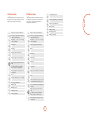
DVD Device Mode
The d Device Mode button configures the CR402 to
control the functions of Arcam DVD and Blu-ray Disc
players, although this can be changed. Pressing this
button also selects DVD as the source.
P
EQ
!
POP UP
U
OK
' Up
< Left
Open/close disc tray.
RPT
M
FAV+
)
FAV–
(
TRIM
Y
DIRECT
Z
Cycles through the repeat options (track,
disc, etc).
Fast rewind
Fast forward
Press and release to skip back to the
beginning of the current/previous track.
Press and release to skip forwards to the
beginning of the next track.
Stereo direct on/off. Provides a direct
analogue path from the analogue inputs to
the left and right front outputs. Switches off
any surround processing modes and shuts
down the DSP circuits for the best stereo
sound quality.
SYNC
#
EFFECT
;
SUB
%
DISC MENU
i
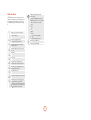
AV Device Mode
VCR Device Mode
The a Device Mode button configures the CR402 to
control the functions of a television or other display
device. You will need to configure this Device Mode to
work with your equipment. Pressing this button also
selects AV as the source.
The w Device Mode button selects VCR as the source.
P
> Right
, Down
0…9 Searches for and plays the track
corresponding to the key pressed when
playing CD.
D
Navigate setup and BD/DVD programme
selection menus.
O selects the highlighted file or enters the
highlighted menu on the screen – equivalent
to ‘Enter’ or ‘Select’ on some remote
controls.
Toggles power between standby and on.
Cycles through the front panel display’s
brightness options.
Activates BD/DVD player menu, if
available.
0…9 Functions as original remote number key –
usually for channel selection.
d + ' Power on from Standby
d + , Standby from Power on
D
d + > increases the picture resolution,
note for BD only on the home screen.
RPT
.
Returns navigation to the top level of the
menu (‘Home’).
M
AUDIO
Changes audio decode format (Dolby
Digital, DTS, etc).
Y
g
SUBT
f
TRIM
DIRECT
Z
Cycles through subtitle options, if available.
DISC MENU
A
Resets remote to AMP mode.
T
Displays programming screen on Arcam
DVD players.
x
Clears bookmark, search and programme
display entries on Arcam DVD players.
N
Displays the Memory function
(Bookmarks).
e
Displays Status Info on Arcam DVD
players.
Toggles power between standby and on.
(Some TVs require you to use a number key
to turn them on.)
i
POP UP
U
OK
Display INFO or OSD (On Screen Display)
function, if available.
AV, this function is TV specific.
Channel down
Channel up
Displays picture information, this function
is TV specific.
Guide
Navigate setup and programme selection
menus.
O confirms a selection (equivalent to
‘Enter’ or ‘Select’ on some remotes).
Stop playback of a BD or DVD.
.
Returns navigation to the top level of the
menu (‘Home’).
SUBT
Cycles through subtitle options, if available.
f
Toggles pause and playback of current track.
A
Resets remote to AMP mode
T
RED key for Text TV
Start recording (on products that have this
feature).
x
GREEN key for Text TV
N
YELLOW key for Text TV
Disc menu
e
BLUE key for Text TV
4
The VCR page allows code learning from a dedicated
VCR remote – see “customising the CR402” on page
7.