1
View Photos & Personal Videos
View Photos & Personal Videos
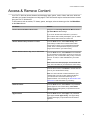
Any photos and personal videos you upload to Amazon Cloud Drive are automatically available on your
Fire TV Stick when you register your Amazon account. You can also display photos and personal videos
from some Fire Tablets and Fire phone.
Note: You can disable access to your photos and personal videos by setting up Parental Controls. To learn more, go
to Set Up Parental Controls on page 15.However, if you view your images/videos then a thumbnail of your photo/video
will still show up in your recently viewed items. This content will still be blocked if you restrict photos in Parental
Controls.
Second
1. To view photos and personal videos from your Cloud Drive:
a. From the Home screen, select Photos.
b. Navigate the lists:
•
All - Scroll right and left to view thumbnails of all of your photos and videos. Use the filters at the
top to jump to a specific year or month. Select a photo or video to view the full-sized version, and
then scroll right and left to continue viewing the full-sized versions of your photos and videos.
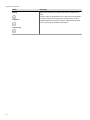
Press the Back
button on your remote to return to the thumbnails.
•
Albums - Select an album to view the photos and videos in it.
•
Videos - Select a video to watch it. Use the playback controls on the remote to pause, play,
rewind, and forward.
Tip: While viewing a collection of photos or videos, press the Menu
Uploaded. You can also sort images by Newest First or Oldest First.
button to sort by Date Taken or Date
2. To display photos and personal videos directly from your Fire tablet:
a. From your device, tap Photos.
b. Swipe from the left edge of the screen, and select a category or album.
c. Tap the Second Screen
icon at the top to display your photos and/or videos on your TV.
To learn more, go to Use Fire TV Stick with a Second Screen Device on page 46.
Note: Compatible Fire devices include:
Kindle Fire HD 2nd Generation
Kindle Fire HDX
Fire HD 6
Fire HD 7
Amazon Fire phone
Figure
Video: Photos, Personal Videos, and Screen Savers
10:
61