1
Setup
Setup
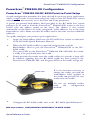
PowerScan™ PM8300-DK/BC-80X0 Point-to Point Configuration
1.
2.
3.
4.
Connect a BC-80X0 cradle to the Host. For installation and connection
information see the BC-80X0 Quick Reference Manual.
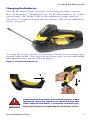
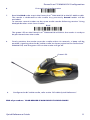
Charge the PowerScan™ PM8300-DK battery using an BC-80X0 or the
C-8000 charger as described in this Quick Reference manual. A full
charge takes 4 hours if using an external power supply; while it takes up
to 10 hours if supplying power through the USB port.
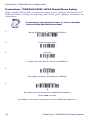
Configure the reader as described in this Quick Reference PowerScan™ PM8300-DK/BC-80X0 Point-to-Point Setup.
Configure the BC-80X0 cradle. See BC-80X0 Configuration in the
BC-80X0 Quick Reference.
or
PowerScan™ PM8300-DK/BC-80X0 Stand Alone Configuration
1.
2.
3.
4.
Connect an BC-80X0 cradle to the Host. For installation and connection
information see the BC-80X0 Quick Reference Manual.
Charge the PowerScan™ PPM8300-DK battery using an BC-80X0 or
the
C-8000 charger as described in this Quick Reference manual. A full
charge takes 4 hours if using an external power supply; while it takes up
to 10 hours if supplying power through the USB port.
Configure the reader as described in this Quick Reference PowerScan™ PM8300-DK/BC-80X0 Stand Alone Setup.
Configure the BC-80X0 cradle. See BC-80X0 Configuration in the
BC-80X0 Quick Reference.
or
PowerScan™ PM8300-DK/STAR-System™ Configuration
1.
2.
8
Charge the PowerScan™ PM8300-DK battery using an BC-8000 or the
C-8000 charger as described in this Quick Reference manual. A full
charge takes 4 hours if using an external power supply; while it takes up
to 10 hours if supplying power through the USB port.
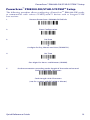
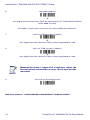
Configure the reader as described in this Quick Reference
PowerScan™ PM8300-DK/STAR-System™ Setup.
PowerScan™ PM8300-DK 16-Key Reader