1
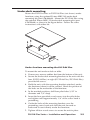
Rack mounting the DVI DA4 Plus
The DVI DA4 Plus can be mounted on the following (optional)
rack shelves:
•
RSF 123 (3.5" deep, 1U rack shelf kit: part # 60-190-20)
•
RSB 123 (3.5" deep, 1U basic rack shelf: part # 60-604-20)
•
RSU 126 (6" deep, 1U rack shelf kit: part # 60-190-10)
•
RSB 126 (6" deep, 1U basic rack shelf: part # 60-604-10)
•
RSU 129 (9.5" deep, 1U rack shelf kit: part # 60-190-01)
•
RSB 129 (9.5" deep, 1U basic rack shelf: part # 60-604-01)
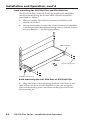
To mount the units, follow these instructions:
1.
Remove the rubber feet if these have been installed on the
bottom of the unit.
2.
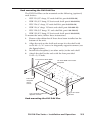
Align the unit on the shelf and secure it to the shelf with
two 4-40 x 3/16" screws in diagonally opposite corners (see
the figure below).
3.
Install false faceplate(s) or other unit(s) to the rack shelf.
4.
Attach the shelf to the rack with the four provided
10-32 x 3/4" bolts.
1U Universal Rack Shelf
1/2 Rack Width Front False
Faceplate
Front false
faceplate
uses 2
screws.
Use 2 mounting holes on
opposite corners.
(2) 4-40 x 3/16"
Screws
Rack mounting the DVI DA4 Plus
DVI DA Plus Series • Installation and Operation
2-3