1
AIMS (AGA INTELLIGENT MANAGEMENT SYSTEM)
CONTROLS
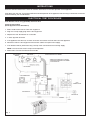
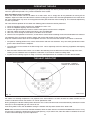
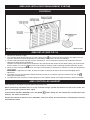
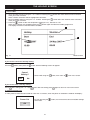
Fig. 16
DESN 515283
AIMS SET-UP (SEE FIG. 16)
1. Connect the electricity supply.
2. Turn the right hand control knob from the OFF setting to the
normal manual control setting. The cooker will heat
up until it reaches the normal temperature as indicated by the black line on the heat indicator.
3. The left hand control knob will alter the oven temperature. Turn it clockwise to increase the temperature and anticlockwise to decrease the temperature.
To obtain the required roasting oven temperature the control knob will need to be set about halfway. We recommend
that the cooker is run on the
Normal manual setting for two days, before switching to AIMS (automatic control).
4. When the normal temperature has been set within the black band, it should not be necessary to alter the temperature
control again.
REMEMBER: If adjustment is made, to leave the cooker to stand for at least 4 hours before attempting further
adjustment.
5. The cooker can now be switched to AIMS (automatic control), by turning the right hand control knob from the
setting to the AIMS setting.
6. The AIMS hand set can then be used to programme the required settings (see AIMS (automatic) control instructions.
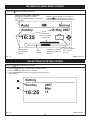
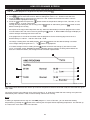
AIMS CONTROLLER HANDSET
This handset is designed to operate within the kitchen area.
When transferring information from or to the controller always operate the handset in front of the cooker, this
gives the strongest communication signal.
If the handset indicates ‘OFFLINE’, press the BACK
between the cooker and handset.
button firmly, this will activate the communication link
Should the handset continue to show ‘OFFLINE’, allow one minute for the handset to automatically reconnect
itself with the cooker.
17