1
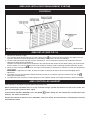
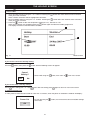
THE HOLIDAY SCREEN
Press the
programme.
button to activate this screen and to move through the different operations and set a holiday
1. Set a start date and time using the + or - buttons. Pressing the
button after each field has been entered to
move you to the next field.
When a field is selected it will be highlighted in dark blue.
2. Set an end date and time using the + or - buttons. Pressing the
button after each field has been entered to
move you to the next field.
3. Press the
button to alter the temperature setting to ‘Low’, ‘Slumber’ or ‘Off’
When all the settings are completed press the
button again to enable the Holiday programme.
The display will return to the Main Menu Screen.
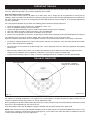
3
2
1
Fig. 21
DESN 515275
Once a holiday mode has been set it will show as ‘Holiday Enabled’ on the main menu screen.
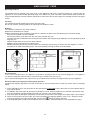
If you wish to cancel the holiday setting:
Press the
button, then press the
button and the following screen will appear:
Cancel
Holiday?
Yes
Select YES using the
button, then return to
main menu screen.
No
If you wish to alter a holiday setting:Press
, alter setting (use + or - then
), then after last setting press
again to return to main menu screen.
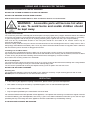
In event of a power cut
If mains power is lost/or disconnected for more than 15 minutes, when the power is restored the handset will display:-
Power Cut
By then pressing the
to the base.
OK
21
button, this will send the correct time/date settings