1
Section 3 - Configuration
Inbound Filters
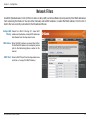
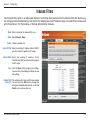
The Inbound Filter option is an advanced method of controlling data received from the Internet. With this feature you
can configure inbound data filtering rules that control data based on an IP address range. Inbound Filters can be used
with Virtual Server, Port Forwarding, or Remote Administration features.
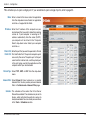
Name: Enter a name for the inbound filter rule.
Action: Select Allow or Deny.
Enable: Check to enable rule.
Source IP Start: Enter the starting IP address. Enter 0.0.0.0 if
you do not want to specify an IP range.
Source IP End: E n t e r t h e e n d i n g I P a d d r e s s. E n t e r
255.255.255.255 if you do not want to specify
and IP range.
Save: Click the Save button to apply your settings.
You must click Save Settings at the top to save
the settings.
Inbound Filter This section will list any rules that are created.
Rules List: You may click the Edit icon to change the
settings or enable/disable the rule, or click the
Delete icon to remove the rule.
D-Link DIR-635 User Manual
42