1
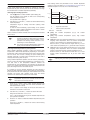
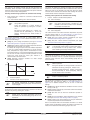
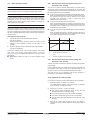
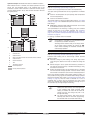
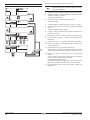
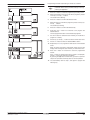
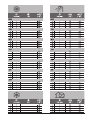
Programming space cooling is carried out as follows:
Programming space cooling
NOTE
Returning to previous steps in the programming
procedure without saving modified settings is done by
pressing the pr button.
1
Press the < button to enter the programming/consulting mode.
2
Select the operation mode you would like to program by means
of the pi and pj buttons.
The actual mode is blinking.
3
Press the < button to confirm the selected mode.
The time is blinking.
4
Consult the action by means of the pi and pj buttons.
5
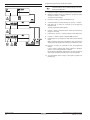
Hold down the < button for 5 seconds to program the detailed
actions.
The first programmed action appears.
5 sec
6
Use the < button to select the action number you would like to
program or to modify.
7
Use the pi and pj buttons to set the correct action time.
8
Use the ébi and ébj buttons to set the leaving water
temperature.
9
Use the bi and bj buttons to set the room temperature.
10
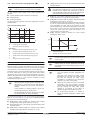
Use the ba button to select x to switch cooling and the
remote controller off.
11
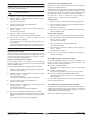
Repeat steps 6 to 10 to program the other actions.
When all actions have been programmed, make sure that the
display shows the highest action number you would like to save.
5 sec
12
Press the < button for 5 seconds to store the programmed
actions.
If the < button is pressed when action number 3 is displayed,
actions 1, 2 and 3 are stored but 4 is deleted.
You automatically return to step 5.
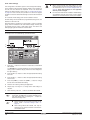
By pressing the pr button several times, you return to previous
steps in this procedure and finally return to normal operation.
13
Operation manual
15
You automatically return to step 5, start again to program the
following day.
EKHVMRD50+80AAV1 + EKHVMYD50+80AAV1
Daikin Altherma indoor unit
4PW61264-1A – 10.2010