1
instruction Sheet
5081T-HT
LIQ_MAN_ABR_5081T-HT/Rev. L
January 2015
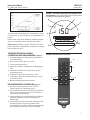
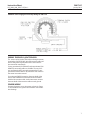
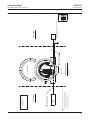
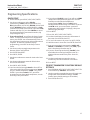
fiGure 1. Transmitter display during calibration and
programming. The program display screen allows access
to calibration and programming menus.
1
8
2
F
A
U
L
T
7
To achieve optimum performance, standardize the sensor
in the process at the conductivity and temperature of
interest.
H
O
L
D
6
™
150
TranSMiTTer diSplay durinG
caliBraTion and proGraMMinG
(figure 1)
3
CALIBRATE PROGRAM DIAGNOSE
Results under real process conditions, at different temperatures, or using other sensors may differ from above.
rTd accuracy: Utilizing a perfect 100 Ohm RTD after 1
point temperature standardiztion, temperature reading
can be as good as ±0.5°C.
mS
CALIBRATE
EXIT
5
NEXT
4
ENTER
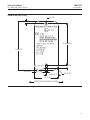
fiGure 2. infrared remote controller
1. Continuous display of conductivity, % concentration,
or custom reading.
4.
2. Units: µS/cm, mS/cm, ppm, %, or none.
3. Current menu appears here.
4. Submenus, prompts, and diagnostic readings appear
here.
3.
5. Commands available in each submenu or at each
prompt appear here.
6. Hold appears when the transmitter is in hold.
7. Fault appears when the transmitter detects a sensor
or instrument fault.
1.
2.
8. ™ flashes during digital communication.
infrared reMoTe conTroller (figure 2)
1. Pressing a menu key allows the user access to
calibrate, program, or diagnostic menus.
2. Press ENTER to store data and settings. Press NEXT to
move from one submenu to the next. Press EXIT to
leave without storing changes.
3. Use the editing keys to scroll through lists of allowed
settings or to change a numerical setting to the
desired value.
4. Pressing HOLD puts the transmitter in hold and sends
the output current to a pre-programmed value.
Pressing RESET causes the transmitter to abandon the
present operation and return to the main display.
3