1
Digidim 503AV / 505 RS232 AV Interface User Guide
Helvar Ltd.
Contents
1.
Overview.............................................................................................................................1
1.1. DIGIDIM and DALI .....................................................................................................1
1.2. DALI Safety Note .......................................................................................................1
1.3. Isolation .....................................................................................................................1
1.4. Byte Format ...............................................................................................................1
1.5. References ................................................................................................................1
2.
Interface Power ...................................................................................................................2
2.1. 505 Interface Power ...................................................................................................2
Old type (black case) .................................................................................................2
New type (transparent case) ......................................................................................2
Both types..................................................................................................................2
2.2. 503AV Interface Power ..............................................................................................2
3.
Connection..........................................................................................................................3
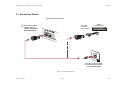
3.1. Connection Details .....................................................................................................4
3.2. 505 Interface RS232 Connector .................................................................................5
Old Interface (Black Case) .........................................................................................5
New Interface (Transparent Case)..............................................................................5
4.
Operating Modes.................................................................................................................6
4.1. 505 Operational Default .............................................................................................6
4.2. 503AV Operational Default.........................................................................................6
5.
Installation...........................................................................................................................6
5.1. 505 Installation...........................................................................................................6
5.2. 503AV Installation ......................................................................................................6
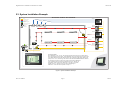
5.3. System Installation Example ......................................................................................7
6.
Programming a DIGIDIM system .........................................................................................8
7.
Messages ...........................................................................................................................8
7.1. Message Handling .....................................................................................................8
Synchronisation .........................................................................................................8
Data Transfer .............................................................................................................8
7.2. Message Structure .....................................................................................................8
Transmission to Interface ...........................................................................................8
Return from Interface .................................................................................................8
DALI System Traffic ...................................................................................................9
DALI Component Addressing .....................................................................................9
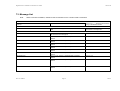
7.3. Message List............................................................................................................ 10
8.
Appendices ....................................................................................................................... 13
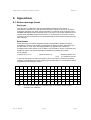
8.1. Return message format............................................................................................ 13
Reply type................................................................................................................ 13
Data formats ............................................................................................................ 13
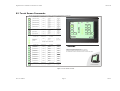
8.2. Touch Screen .......................................................................................................... 14
Doc. No. 7860076
Page i
Issue 8