1
16. The Matrix
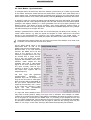
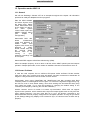
The mixer window of TotalMix looks and operates similar to mixing desks, as it is based on a
conventional stereo design. The matrix display presents a different method of assigning and
routing channels, based on a single channel or monaural design. The matrix view of the HDSP
mixer looks and works like a conventional patchbay, adding functionality way beyond
comparable hardware and software soutions. While most patchbays will allow you to connect
inputs to outputs with just the original level (1:1, or 0 dB, as known from mechanical
patchbays), TotalMix allows you to use a freely definable gain value per crosspoint.
Matrix and TotalMix are different ways of displaying the same processes. Because of this both
views are always fully synchronized. Each change in one view is immediately reflected in the
other view as well.
16.1 Elements of the Surface
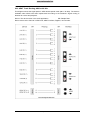
The visible design of the TotalMix Matrix is mainly determined by the architecture of the HDSP
system:
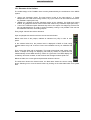
•
•
Horizontal labels: All hardware outputs
Vertical labels: All hardware inputs. Below are all
playback channels (software playback)
•
Green 0.0 dB field. Standard 1:1 routing
•
Black gain field. Shows the current gain value as dB
•
Orange gain field. This routing is muted.
To maintain overview when the window size has been reduced, the left and upper labels are
floating. They won't left the visible area when scrolling.
16.2 Operation
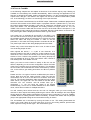
Using the Matrix is a breeze. It is very easy to indentify the current crosspoint, because the
labels light up in orange according to the mouse position.
If input 1 is to be routed to output 1, use the mouse and click one time on crosspoint In1 / 1.
The green 0.0 dB field pops in, another click removes it. To change the gain (equals the use of
a different fader position, see simultaneous display of the mixer view), hold Ctrl down and drag
the mouse up or down, starting from the gain field. The value within the field changes
accordingly. The corresponding fader in the mixer view is moving simultaneously, in case the
currently modified routing is visible.
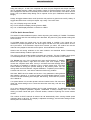
Note the difference between the left side, representing the inputs and software playback
sources, and the upper side, representing the hardware outputs. If you move a fader in row 1 or
2 in TotalMix, only the specific levels (max. 2) of this routing will change in the Matrix. But
moving a fader in row 3 will make all vertically activated levels move at once (for example
63/64, analog output).
A gain field marked orange indicates activated Mute status an. Mute can only be changed in
the mixer view.
User’s Guide HDSP System HDSP 9652 © RME
32