1
Controller Basic Programming Mode
OR
Programming the Timers
1.
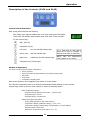
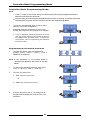
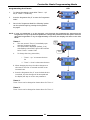
To change the settings, press either 'Timer 1 - Up’
key or 'Timer 3 - Down' key.
2.
Press the Programme Key ‘P’ to enter the ‘Programme
Mode’.
3.
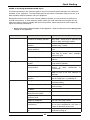
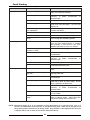
Once in the ‘Programme Mode’ the following ‘options
can be cycled through by pressing the Programme
Key again.
NOTE: If only one parameter is to be changed, cycle through the parameters by depressing the
Programme ‘P’ key to the desired parameter, change the parameter and then press and hold
down the Programme ‘P’ key for approximately 3 seconds, the display will return to the ‘Idle
Mode’.
'Timer 1’.
a.
The user access's 'Timer 1’ immediately upon
entering ‘Programme Mode’.
b.
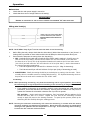
The stored time is displayed (Default; 3:00)
with flashing colon and the green LED indicator
below 'Timer 1’ remains ‘ON’.
a.
To change the time, press either;
i. 'Timer 1 - Up ’ to increase the time.
Or
ii. 'Timer 3 - Down' to decrease the time.
d. When changing the time, the value changes at a
slow rate for the first 10 seconds and then at an
increased rate.
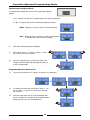
a. Press the Programme Key ‘P’ once the desired time
is reached, the time change will be accepted and
the display will step on to the next parameter.
'Timer 2’.
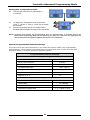
'Timer 2’ time can be changed as shown above for 'Timer 1’.
'Timer 3'.
'Timer 3’ time can be changed as shown above for 'Timer 1’.
31
Green
LED
Flashing
Colon