1
10
User Manual of IR Speed Dome
2.2 Basic Operations
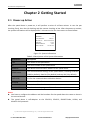
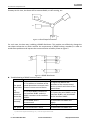
You can operate the speed dome using a control device, including the control keyboard, DVR, DVS,
etc. In this manual, accessing the speed dome via the web browser will be taken as an example.
Panning and tilting:
Click the direction buttons to control the pan and tilt movement of the speed dome.
Zooming:
Click the ZOOM+ and ZOOM- buttons to control the zooming.
Focusing:
Click the FOCUS+ and FOCUS- buttons to adjust the focus.
Iris:
Click the IRIS+ and IRIS- buttons to adjust the iris.
2.3 System-defined Presets
Purpose:
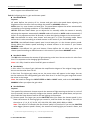
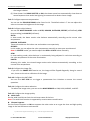
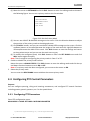
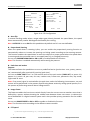
The section lists the system-defined presets with special functions. These presets cannot be edited
but can be only called through a control device, e.g. a DVS or web browser. To call the
system-defined presets remotely, you can choose the preset number from the list in the PTZ control
panel. Please refer to table below for details.
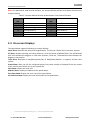
For instance, preset 99 is the “Start auto scan”. If you call the preset 99, the speed dome starts auto
scan function.
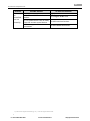
Table 2-2 System-defined Presets
Preset NO.
33
34
35
36
37
38
39
40
41
42
43
44
46
92
Function
Auto-flip
Return to home position
Patrol 1
Patrol 2
Patrol 3
Patrol 4
IR cut filter in
IR cut filter out
Pattern 1
Pattern 2
Pattern 3
Pattern 4
Enable fast patrol
Enable limit stops
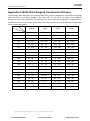
Preset NO.
93
94
95
96
97
98
99
100
101
102
103
104
105
Function
Set manual limit stops
Remote reboot
Access main menu
Stop scanning
Start random scanning
Start frame scanning
Start auto scanning
Start tilt scanning
Start panorama scanning
Patrol 5
Patrol 6
Patrol 7
Patrol 8
© Hikvision Digital Technology Co., Ltd. All Rights Reserved.
/R&DOO
ZZZFFWYLUHODQGLH
VKRS#FFWYLUHODQGLH