1
Chapter 1 - Setting Up
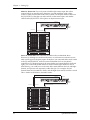
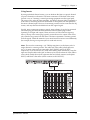
Mono In - Stereo Out. If you only want to feed the Q20 a mono input, but wish to
connect both of its outputs back to the mixer, you will need three audio cables.
Connect a cable from an effect send to the [L] INPUT of the Q20, another cable from
the [L] OUTPUT of the Q20 to an effect return or other mixer input, and another
cable from the [R] OUTPUT of the Q20 to an adjacent mixer input.
Left Input
Left and
Right
Outputs
Aux Send 3
Stereo Aux Returns
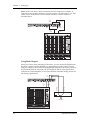
Stereo In - Stereo Out. This connection is similar to the one described above.
However, by utilizing two sends from the mixer, we add one more cord and can now
send a stereo signal to the Q20Õs inputs. Example, if you connected effect sends 3 and 4
to the [L] and [R] INPUTS, and had a stereo instrument (such as a keyboard)
connected to two channel inputs of the mixer (either one panned hard left and hard
right), you would send the left channel to send 3 and the right channel to send 4.
Alternatively, you could have two discrete effect sends between the Left and Right
channel, and process each separately within the Q20. For example, the Left
channel (from send 3) could be a chorus, and the Right (from send 4) could be a reverb.
This is similar to Dual Mono, described earlier.
Left Input
Right Input
Left and
Right
Outputs
Aux Send 3
12
Aux Send 4
Stereo Aux Returns
Q20 Reference Manual