1
POWER
ON
OFF
TURBO
ERROR
1
2
3
4
TEMP
COLD
5
FREEZE
6
7
OPERATOR CONTROL PANEL FOR:
CF-25, CF-35, CF-40, CF-50, CF-80, CF-110
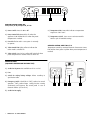
1.) Power Switch. Press for ON or OFF
2.) Power Control LED. Green LED is lit when the
appliance is ON. Yellow LED is lit when the preset
temperature is reached.
6.) Temperature LEDs. Seven LEDs indicate a temperature
range from +50°F to 0°F.
7.) Temperature Switch. Press once to activate next LED.
Hold to cycle all available settings.
3.) Error LED. Flashes red in case system is not ready
to operate.
OPERATOR CONTROL PANEL FOR: CF-18
4.) Turbo Control LED. Lights yellow to indicate the
turbo mode is switched on.
5.) Turbo Switch. Press for fast cooling. Will switch off when
preset temperature is reached. Press to switch off.
Temperature control by rotational electronic thermostat. Power
LED switches from green to yellow when preset temperature is
reached.
CONNECTOR PANEL
(EQUIPMENT DEPENDING ON APPLIANCE TYPE)
LOW
1.) Socket for AC power. Not available on CF-18 or CF-25.
MED HIGH
EMERGENCY
ON
2.) Fuse.
OFF
3.) Switch for setting battery voltage. Values according to
specification table.
4.) Emergency Switch. Should be in “OFF” position for normal
operation. “ON” position keeps cooling function running
continuously and bypasses the control panel in case of
electronic defect. (not on CF-18)
5.) Socket for DC supply.
4
WAECO USA • CF SERIES MANUAL
1
2
3
4
5