1
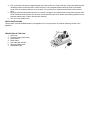
FOR HOUSEHOLD AND LIGHT COMMERCIAL USE ONLY FEATURES Low water light indicator Regular tap water or 50/50 tap/distilled water 50 p.s.i operating pressure Ceramic terminal block 12-gauge heavy-duty wiring Up to 4 hours of steam STEAM CLEANING Adjustable steam nozzle with foot pedal (i500A) IMPORTANT: When you want to dispose of the appliance, NEVER throw it in the garbage. Instead, go to your closest recycling station or waste collection centre for subsequent treatment. In this way, you will be contributing to looking after the environment. TECHNICAL DATA Full aluminum-plated heating element at 800W –120V Boiler power i500: 1000W Working pressure i500: 3,5 bar Tank nominal capacity of model i500: 2,5 Litres HOW TO ASSEMBLE AND USE 1. Remove the steam station from its packing and make sure all packing has been removed (including the protective bags). Put the station on a flat and solid surface. 2. Screw the nozzle into the steam fitting and plug in the 4-pin receptacle for the electronic foot pedal. 3. Unscrew the safety cap (1). Fill the boiler with a maximum of 8.45 cups (2 litres) of water for the i500 series. Use the funnel supplied, making sure you do not overfill the tank (you can also use the water stick to determine the water level in the steam tank). 4. Insert the plug into the electrical outlet; switch on the boiler (4) and steam button (3). When the two button lights come on, the steam device and boiler are working. 5. Wait 10 minutes for the boiler to reach maximum pressure. Once it reaches 50 psi, the unit is now ready to operate. NOTE: The red light on the boiler switch (4) will turn on and off during use, indicating that the heating element is activated or not. 6. NOTE: When you call for steam for the first time (after having turned the boiler on) you might notice a fast decrease in pressure. This is normal for the first time. 7. The steam station is ready for use. 8. Push the steam button or the foot pedal for steam. 9. This steam product is equipped with a low water warning light (5). During operation, if the light comes on, it indicates that the unit requires more water to operate. If this occurs, please follow these steps. a) Turn off the boiler switch (4). b) Press the foot pedal to ensure there is no more steam in the boiler. c) Slowly open the pressure cap (1) and refill to the required level with warm water. d) Replace the cap, tighten and wait for it to build up pressure again. e) NOTE: Failure to shut off the boiler when the warning light is on may result in damaging the heating element, which will void the warranty. IMPORTANT When you are finished using the boiler for the day, unscrew the fill cap one-turn on the unit to release the steam/air from the tank. This will eliminate the vacuum that may cause damage to the pressure gauge. The boiler must be cleaned periodically and any sediment/mineral buildup removed from inside the unit; otherwise, it may become clogged. The period between cleanings depends on the frequency of use and the quality/hardness of the water used. If the unit is in daily use with regular municipal tap water, we recommend a cleaning every two weeks to a month. TO CLEAN THE BOILER UNIT 1. Unplug the unit from the wall. 2. Disconnect the steam nozzle (i500A) from the boiler unit. (The steam nozzle on the i500A may be left on the unit if desired. It does not affect the cleaning instructions.) 3. Add a mixture of 1 part white vinegar to 5 parts water and pour inside the boiler tank to capacity. Let the vinegar solution sit overnight.