1
Congratulations on your new iPhone Bluetooth®
Headset. Follow the instructions to get started.
Pair the Headset with iPhone
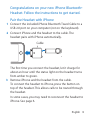
1 Connect the included iPhone Bluetooth Travel Cable to a
USB 2.0 port on your computer (not on the keyboard).
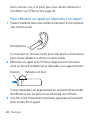
2 Connect iPhone and the headset to the cable. The
headset pairs with iPhone automatically.
Cable
The first time you connect the headset, let it charge for
about an hour until the status light on the headset turns
from amber to green.
3 Remove iPhone and the headset from the cable.
To connect the headset to iPhone, press the button on
top of the headset. This allows calls to be routed through
the headset.
In some cases, you may need to reconnect the headset to
iPhone. See page 6.
English 3















![[Télécommande Mini Blu]](http://vs1.manualzilla.com/store/data/006492990_1-7dc24fc0209550f63dc1cec60b36cc76-150x150.png)