1
EN 20
5.8.8
5.
L05L AA
Service Modes, Error Codes, and Fault Finding
Audio Processing
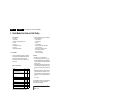
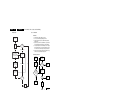
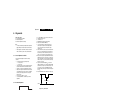
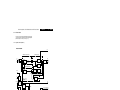
No Sound
Picture Ok,
No Sound
Tuner IF Ok
Not Ok
Check Tuner/IF
Ok
Check AUDOUTLSL &
AUDOUTLSR pin at
UOCIII
Not Ok
Check UOCIII IC
Ok
Check Audio
Amplifier
Not Ok
Check Audio
Power Supply
Check Power
Supply
Ok
Check Audio
Amplifier Circuit
and loud speaker
Not Ok
Replace Audio
Amplifier
Ok
Check NVM
E_14480_065.eps
201005
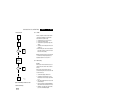
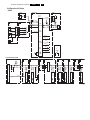
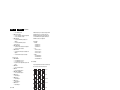
Figure 5-13 Fault finding tree “No sound”
No RF Audio for QSS/Inter-Carrier Stereo Sets.
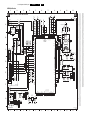
1. Check pin 99 and 100 for SIF signal (for QSS) or pin 104
and 105 for video with SIF (for Inter-Carrier)
2. If signal is not present, check for the QSS/FMI bit settings.
Check also the NVM data.
3. If signals are present and still no audio, check the audio
supply voltage +8V are present.
4. If still no audio signal at UOCIII output, the UOCIII is faulty.
No AV Audio.
1. Check troubleshooting methods in section “Source
Selection”.
2. Check the output of the UOCIII to see if there is signal
available. If no, check the normal operating condition and
also the NVM data.
3. If still no audio signal at UOCIII output, the UOCIII is faulty.
Note: If there is audio signal at UOCIII output and no audio at
loudspeaker, proceed to Audio Amplifier troubleshooting
methods.
5.8.9
Audio Amplifier
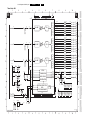
No RF as well as AV Audio at the Loudspeaker:
1. Check that the normal operation condition of the amplifier
is met.
2. If normal operation conditions are met, check the continuity
from UOCIII output to input of the amplifier.
3. If continuity is there and still no audio, check speaker wire
connections. If still no audio, amplifier IC might be faulty.