1
Connecting External AV Components
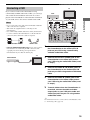
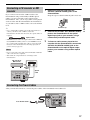
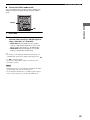
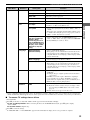
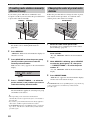
Connecting a CD recorder or MD
recorder
1
Anti-dust cap
y
• Use a commercially available optical cable (shown below) to
connect your CD recorder or MD recorder to the
CinemaStation. To make all connections, two optical cables are
required.
2
Connect the OPTICAL OUT (DIGITAL AUDIO)
jack on the CinemaStation to the optical
digital input jack on your recorder using a
commercially available optical cable.
3
To listen to audio sources played on the
recorder with the CinemaStation, connect the
OPTICAL IN (DIGITAL AUDIO) jack on the
CinemaStation to the optical digital output
jack on your recorder using another optical
cable.
Optical cable
• AM/FM broadcasts cannot be output from this unit’s OPTICAL
OUT (DIGITAL AUDIO) jack. To record AM/FM broadcasts,
use a commercially available audio cable to connect the VCR
OUT jack on the CinemaStation to the analog input jack on
your recorder (see page 55).
Notes
• Do not connect the power cable of the CinemaStation until all
cable connections are completed.
• Turn off the AV component before connecting it to the
CinemaStation.
CD recorder or
MD recorder
OPTICAL
OUT
IN
Optical
cable
S VIDEO
MONITOR
OUT
VIDEO
MONITOR VCR
OUT
OUT
DIGITAL
AUDIO
Optical
cable
IN
(DVD ONLY)
VIDEO
IN
VCR
IN
OUT
OPTICAL
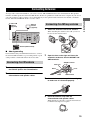
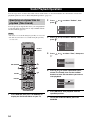
Connecting the Power Cables
After you made all connections, connect the power cables of the CinemaStation and subwoofer.
SPEAKERS
R
FRONT
L
CENTER FRONT
To an AC wall outlet
SURROUND
SURROUND
SPEAKER IMPEDANCE: 6 MIN.
17
PREPARATION
If you connect a CD recorder or MD recorder to the
CinemaStation using commercially available optical
cables, you can record audio sources played on the
CinemaStation. Also, you can enjoy audio sources played
on the recorder with the CinemaStation. For information
on your CD recorder or MD recorder, refer to the manual
for it.
Remove the anti-dust caps from the
OPTICAL (DIGITAL AUDIO) jacks on the
CinemaStation.
Keep the cap to re-attach it when the jack is not in use.