1
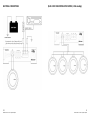
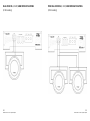
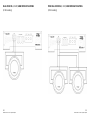
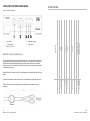
TWIN 4 OHM SUBWOOFER APPLICATIONS (2 Ohm Loading)
POST-INSTALLATION
After completing the installation, follow these steps to set the Gain/Crossover Controls and then perform the
Final System Checks.
1.
Turn the Gain Control all the way counter-clockwise (Min)
2.
Turn the vehicle’s ignition switch to the ON position, and then turn the ON/OFF switch on the source
unit(s) to the ON position. Set all Tone or Equalisation controls to “flat” positions, and turn Loudness
off
3.
Play your music source unit and set the Volume Control at 75% of full level. If the system uses an
equaliser, set it’s frequency controls to “flat” positions
4.
Slowly increase the Gain Control. Stop when you hear a slight distortion of audio (beyond this point
the subwoofer driver voice coil is at risk of severe damage not covered by warranty)
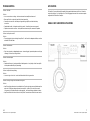
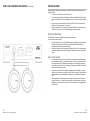
SETTING THE CROSSOVER
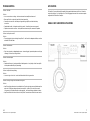
The VIBE MonoBox IV features fully adjustable crossovers, low pass and subsonic.
To set the crossover, follow these steps:
1.
2.
Using the Frequency (Hz) Control, select the desired frequency. Depending on the type of subwoofer
driver and enclosure the low pass filter should be set to achieve perfect integration between
subwoofer output and the rest of the car audio system.
Switching on the subsonic filter will enable a lower frequency limit to be set. The subwoofer output
can often be cleaned up in terms of clarity and definition if the subsonic output from the amplifier is
limited.
FINAL SYSTEM CHECKS
8
VIBE MonoBox IV Class D Digital Amplifier
1.
Start the engine and turn on the source unit. After a two -second delay, slowly increase the Volume
Control and listen to the audio. If you hear any noise, static, distortion or no sound at all, check the
connections, and also refer to Troubleshooting. Depending on your system design, the levels may
become quite loud even at low Volume Control settings. Until you get an "audio feel" of the system's
power, use care when adjusting controls.
2.
Increase the volume and verify that the amplifier reproduces audio without distortion. If you hear
distortion, check the connections and verify that the Gain Control is set correctly. Another possibility is
damaged speakers or under-powered speakers. Once again refer to Troubleshooting for additional
help.
3.
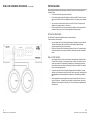
A distorting subwoofer is not as easily heard, listen for pops and visually check that the cone is not
moving at full excursion. If the amplifier at any time enters into a protection mode, note the code
displayed by the controller and switch the system off. Check the relevant section highlighted by the
code and re-start.
13
VIBE MonoBox IV Class D Digital Amplifier