1
QMS magicolor 2+ Print System
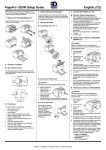
If you have a duplex model,
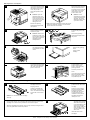
remove any tape securing
the duplexer’s rear cover.
If not, skip to step 4.
3
Remove any tape securing
the top and front covers.
4
Squeeze the latch near the
upper-right corner of the
front cover to open the
printer’s front cover.
Open the duplexer’s rear
cover.
Remove the packing
materials and tape inside
the duplexer.
Remove any packing
material from the printer’s
waste toner pack.
5
Caution: Open the
duplexer’s rear cover
before opening the top
of the printer. Forced
opening of the printer’s
top cover first may
damage the unit.
Caution: This is
necessary as it makes
room for the OPC belt
cartridge. You could
damage the OPC belt
if you don’t do this.
» Note: The following illustrations show the printer
without the duplexer. However, the instructions
are the same for both models.
6
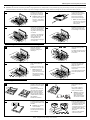
Pull the latch to release the
and open the printer’s top
cover.
" #$
%&& Caution: Remove the
waste toner pack once
and reinstall it to ensure
that it has not become
dislodged during
transportation.
Remove any packing
materials and tape inside
the printer.
!
7
Caution: Remove the
two shipping spacers
from between the fuser
rollers.
If you have a duplex model,
reach inside the duplexer’s
rear cover to access the
printer’s rear cover.
9
Open the media cassette(s)
and remove any packing
material.
8
Close the media
cassette(s).
Pull the handle on the
printer’s rear cover to
open it, and remove any
packing material.
10
Close the printer’s rear
cover.
If you have a duplex model,
keep the duplexer’s rear
cover open until you have
completed step E4.
C. Installing the Toner Cartridges
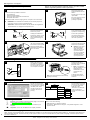
Remove the toner
cartridges from their
shipping cartons.
1
Remove the orange
protective cover from each
cartridge.
2
Holding a cartridge with
both hands, gently rock it
five or six times horizontally.
Align the toner cartridge
with the cartridge guides,
and gently push the
cartridge into the printer
until you begin to feel
resistance. Then pull the
cartridge back approximately 1/4 inch.
Pull the tab to remove the
tape.
Caution: Do not hold the toner cartridge
vertically.
Caution: Don’t push the toner cartridge in until you hear a click or force
it. If you hear a click, you’ve locked it into place incorrectly. Pull the toner
cartridge out so that it’s firmly seated but not locked into place.
3
While the cartridges may appear not to be fully inserted, closing the front
cover will guide them to their final position.
'( )'
2
EDNord - Istedgade 37A - 9000 Aalborg - telefon 96333500
Caution: Each toner
cartridge has a colored
label that corresponds
to a colored label to the
right of the cartridge
slots. Always install the
toner cartridge in the
slot with a label of the
same color.
Install the other toner
cartridges.