1
3. Controls/Speaker Adjustment
3.1 The front (control) panel
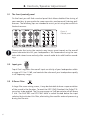
On the front you will find a control panel that allows detailed fine-tuning of
your monitors to your particular room acoustics and personal listening preferences. The following tips are intended to assist you at using the controls in
the best manner.
Figure 3:
Control panel
Please note that using the controls may have a great impact on the overall
sound characteristics of your loudspeakers. We recommend using the controls with utmost care and only after several audio tests with familiar recordings.
3.2 Input gain
‘Input Gain’ regulates the overall input sensitivity of your loudspeaker within
a range of -10 to +10 dB, and controls the volume of your loudspeaker equally
in all frequency ranges.
3.3 X-Curve Filter
In large film score mixing rooms, it may be desirable to have a representation
of the sound in the theatres. To meet the ISO 2969 Standard, the Dolby™ Xcurve has to be applied. The X-curve engages a 3 dB per octave roll-off above
2 kHz. The S6A Mk2 and S7A Mk2 have a switch located below the input
selector that activates this filter, eliminating the need for external processing
during the film mix.
6