1
T6--PRH, T6--PHP, T6--PAC
Preferredt Series
Programmable Thermostat
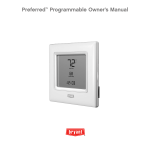
Owner’s Manual
YOU WILL LOVE THIS THERMOSTAT.
You have the Preferredt thermostat. This unique device’s state-- of-- the-- art
technology makes it easier than ever for you to keep your home comfortable.
Designed to be as smart – and smart-- looking – as any of the other electronics in
your home, your new ultra-- thin profile Preferred thermostat offers programming
options to fit your lifestyle – not anybody else’s. Let this manual show you how
easy it is to enjoy the newest experience in home comfort.
Designed and Assembled
in the USA.
1
TABLE OF CONTENTS
BUTTON IDENTIFICATION . . . . . . . . . . . . . . . . . . . . . . . . . . . . . . . . . . . . . 6
ON--SCREEN INDICATORS . . . . . . . . . . . . . . . . . . . . . . . . . . . . . . . . . . . . 8
QUICK START
Setting the time and date . . . . . . . . . . . . . . . . . . . . . . . . . . . . . . . . . . . . . . . . 10
Setting the temperatures for heating and cooling . . . . . . . . . . . . . . . . . . . 12
Holding the temperature . . . . . . . . . . . . . . . . . . . . . . . . . . . . . . . . . . . . . . . . 14
Using the ExP – Expansion Port – to program the thermostat . . . . . . . . 15
PROGRAMMING THE THERMOSTAT
Determining your programming schedule . . . . . . . . . . . . . . . . . . . . . . . . . 16
Setting up your schedule when all days of the week will follow the
same schedule . . . . . . . . . . . . . . . . . . . . . . . . . . . . . . . . . . . . . . . . . . . . . . . . . 21
Setting up your schedule when all days of the week won’t follow the
same schedule . . . . . . . . . . . . . . . . . . . . . . . . . . . . . . . . . . . . . . . . . . . . . . . . 23
Using the programmable fan . . . . . . . . . . . . . . . . . . . . . . . . . . . . . . . . . . . . 25
Programming a vacation schedule . . . . . . . . . . . . . . . . . . . . . . . . . . . . . . . . 26
Activating your vacation program . . . . . . . . . . . . . . . . . . . . . . . . . . . . . . . 27
OPERATING THE THERMOSTAT
Using the thermostat to turn the heating and cooling system off . . . . . . 29
2
TABLE OF CONTENTS
Using the fan . . . . . . . . . . . . . . . . . . . . . . . . . . . . . . . . . . . . . . . . . . . . . . . . 29
Changing the humidity level . . . . . . . . . . . . . . . . . . . . . . . . . . . . . . . . 30
Using normal humidify . . . . . . . . . . . . . . . . . . . . . . . . . . . . . . . . . . . . . . 30
Using auto humidify . . . . . . . . . . . . . . . . . . . . . . . . . . . . . . . . . . . . . . . . . 31
How to turn off the humidify or dehumidify feature . . . . . . . . . . . . . . 32
Using emergency heat (heat pump systems only) . . . . . . . . . . . . . . . . . . . 33
ADVANCED PROGRAMMING OPTIONS
Advanced programming display codes chart . . . . . . . . . . . . . . . . . . . . . . . 34
Clearing the reset reminders . . . . . . . . . . . . . . . . . . . . . . . . . . . . . . . . . . . . 35
Changing from Fahrenheit to Celsius . . . . . . . . . . . . . . . . . . . . . . . . . . . . . 37
Adjusting or turning off the continuous backlighting . . . . . . . . . . . . . . . 38
Keypad lockout . . . . . . . . . . . . . . . . . . . . . . . . . . . . . . . . . . . . . . . . . . . . . . . 40
Unlocking the keypad . . . . . . . . . . . . . . . . . . . . . . . . . . . . . . . . . . . . . . . . 41
Changing from programmable to nonprogrammable . . . . . . . . . . . . . . . . 43
Changing the number of programming periods . . . . . . . . . . . . . . . . . . . 44
Turning on the programmable fan feature . . . . . . . . . . . . . . . . . . . . . . . . . 45
Turning off the daylight savings time feature . . . . . . . . . . . . . . . . . . . . . . 46
3
TABLE OF CONTENTS
SPECIAL FEATURES
Hybrid Heat (heat pump systems only) . . . . . . . . . . . . . . . . . . . . . . . . . . . 47
Service reminders . . . . . . . . . . . . . . . . . . . . . . . . . . . . . . . . . . . . . . . . . . . . . 47
Outdoor temperature display . . . . . . . . . . . . . . . . . . . . . . . . . . . . . . . . . . . . 47
Auto changeover . . . . . . . . . . . . . . . . . . . . . . . . . . . . . . . . . . . . . . . . . 48
Smart Recovery . . . . . . . . . . . . . . . . . . . . . . . . . . . . . . . . . . . . . . . . . . . . . . . 48
WHAT IF . . .
“Auxiliary heat on” is displayed (heat pump systems only) . . . . . . . . . . 49
“Em heat” is displayed (heat pump systems only) . . . . . . . . . . . . . . . . . . 49
There is a power outage . . . . . . . . . . . . . . . . . . . . . . . . . . . . . . . . . . . . . . . . 49
You get a service reminder message . . . . . . . . . . . . . . . . . . . . . . . . . . . . . . 50
You get a system error message . . . . . . . . . . . . . . . . . . . . . . . . . . . . . . . . . . 50
COMMON TERMS AND WHERE TO FIND THEM
Auto changeover . . . . . . . . . . . . . . . . . . . . . . . . . . . . . . . . . . . . . . . . . . . . . . 51
Auxiliary heat (heat pump systems only) . . . . . . . . . . . . . . . . . . . . . . . . . 51
Backlighting . . . . . . . . . . . . . . . . . . . . . . . . . . . . . . . . . . . . . . . . . . . . . . . . . 51
Daylight savings time . . . . . . . . . . . . . . . . . . . . . . . . . . . . . . . . . . . . . . . . . . 51
Dehumidify . . . . . . . . . . . . . . . . . . . . . . . . . . . . . . . . . . . . . . . . . . . . . . . . . . 52
4
TABLE OF CONTENTS
Emergency heat (heat pump systems only) . . . . . . . . . . . . . . . . . . . . . . . . 52
ExP – Expansion Port . . . . . . . . . . . . . . . . . . . . . . . . . . . . . . . . . . . . . . . . . 52
Hold . . . . . . . . . . . . . . . . . . . . . . . . . . . . . . . . . . . . . . . . . . . . . . . . . . . . . . . . 52
Hybrid Heat . . . . . . . . . . . . . . . . . . . . . . . . . . . . . . . . . . . . . . . . . . . . . . . . . . 52
Humidify . . . . . . . . . . . . . . . . . . . . . . . . . . . . . . . . . . . . . . . . . . . . . . . . . . . 53
Mode . . . . . . . . . . . . . . . . . . . . . . . . . . . . . . . . . . . . . . . . . . . . . . . . . . . . . . . . 53
Override . . . . . . . . . . . . . . . . . . . . . . . . . . . . . . . . . . . . . . . . . . . . . . . . . . . . . . 53
Programmable fan . . . . . . . . . . . . . . . . . . . . . . . . . . . . . . . . . . . . . . . . . . . . . 53
Service reminders . . . . . . . . . . . . . . . . . . . . . . . . . . . . . . . . . . . . . . . . . . . . . . 54
Smart Recovery . . . . . . . . . . . . . . . . . . . . . . . . . . . . . . . . . . . . . . . . . . . . . . . 54
Temporary hold . . . . . . . . . . . . . . . . . . . . . . . . . . . . . . . . . . . . . . . . . . . . . . . 54
Time period . . . . . . . . . . . . . . . . . . . . . . . . . . . . . . . . . . . . . . . . . . . . . . . . . . 54
WARRANTY . . . . . . . . . . . . . . . . . . . . . . . . . . . . . . . . . . . . . . . . . . . . . . . . . . 56
5
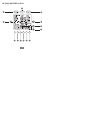
BUTTON IDENTIFICATION
c
b
d
a
e
f
g
m
l
k
j
6
i
h
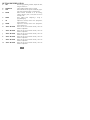
BUTTON IDENTIFICATION
a.
SET
b.
c.
SCHEDULE
FAN
d.
MODE
e.
DONE
f.
UP
g.
DOWN
h.
“SOFT” BUTTON
i.
“SOFT” BUTTON
j.
“SOFT” BUTTON
k.
“SOFT” BUTTON
l.
“SOFT” BUTTON
m.
“SOFT” BUTTON
Enters the programming schedule, adjusts the clock,
changes calendar, etc.
Choose follow schedule, hold, or vacation
Selects whether the fan operates continuously (on) or
only when needed for heating or cooling (auto)
Selects whether thermostat is set for heating,
cooling, emergency heat, or auto (heat and cool as
needed), or off
Saves settings when completing a set-- up or
programming step
Adjusts the currently chosen value (temperature,
clock, calendar, etc.)
Adjusts the currently chosen value (temperature,
clock, calendar, etc.)
Selects the on-- screen indicator directly above the
button for adjustment
Selects the on-- screen indicator directly above the
button for adjustment
Selects the on-- screen indicator directly above the
button for adjustment
Selects the on-- screen indicator directly above the
button for adjustment
Selects the on-- screen indicator directly above the
button for adjustment
Selects the on-- screen indicator directly above the
button for adjustment
7
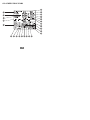
ON--SCREEN INDICATORS
6
5
7
4
8
9
3
10
2
11
12
1
13
14
15
16
25
24
23
22l 21 20 19 18 17
8
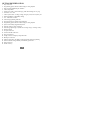
BUTTON IDENTIFICATION
1.
2.
3.
4.
5.
6.
7.
8.
9.
10.
11.
12.
13.
14.
15.
16.
17.
18.
19.
20.
21.
22.
23.
24.
25.
Day of the week
Programming option; indicates which settings are being adjusted
Filter, UV lamp, humidifier pad reminders
Current temperature
Current prog. routine – follow sched. prog., hold current settings, run vac. prog.
Fan mode – on or auto
Current system mode – heating, cooling, emergency heat, heat/cool (auto), off
Indicates humidify or dehumidify settings
F/C – Fahrenheit or Celsius
Advanced programming indicators
Keypad is locked (no padlock means unlocked)
Programming option; indicates which settings are being adjusted
System is in auxiliary (supplemental) mode
Selected cooling set point; cooling on
Selected htg setpoint; htg on (2 indicates 2nd stage of htg or cooling is active)
Heating setpoint
Year part of the date
Vacation schedule return date
Day part of the date
Length of time for temporary temperature hold
Month part of the date
Outdoor temperature; also displays other information during programming
Indicates whether setting humidify or dehumidify preferences
Time period start
Period of the day
9
QUICK START
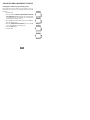
Setting the time and date
You must set the time and date before you can use any of the thermostat’s
programming features.
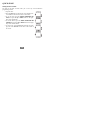
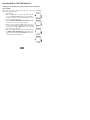
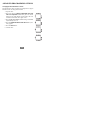
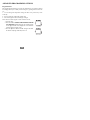
1. Open the door.
2. Press the set button on the left. The screen will show the
word clock on the left and the time on the bottom.
3. To set the hour, press the button underneath the
hour, then press the up or down button on the right.
Stop at the desired hour.
4. To set the minutes, press the button underneath the
minutes, then press the up or down button on the right.
Stop at the desired number.
5. To set the date, press the set button until the screen displays the word calendar and the date on the bottom of
the screen.
10
QUICK START
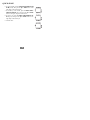
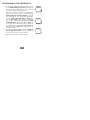
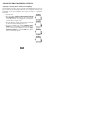
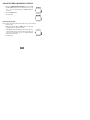
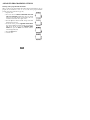
6. To set the month, press the button underneath the letter M (month), then press the up or down button on the
right. Stop at the desired month.
7. To set the day of the month, press the button underneath the letter D (day), then press the up or down
button on the right. Stop at the desired date.
8. To set the year, press the button underneath the letter Y (year), then press the up or down button on the
right. Stop at the desired year.
9. Close the door.
11
QUICK START
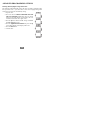
Setting or changing the temperatures for heating and cooling
Your thermostat is installed with pre-- set heating and cooling temperature settings.
You can use these or change them so your home is as warm or as cool as you would
like it to be. You can also temporarily change the temperature after you’ve
programmed your thermostat according to your specific schedule needs.
These steps will temporarily hold the temperature where you set it for two hours
until the next programmed cycle begins.
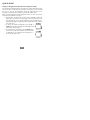
1. Open the door. You will see an arrow next to the word heat or cool in the
upper right corner on the screen, depending on the mode your system is in.
(If it’s the first time you’ve used the thermostat, it will say heat.) The pre-programmed heating or cooling temperature is displayed in a box at the bottom of the screen.
2. To change the displayed temperature, press the up or
down button located on the right side of the display until
you reach the desired setting.
3. To change the other temperature, press the mode button
above the screen. The arrow will move to the word cool
or heat and the screen will show that temperature in a
box in the lower right corner.
12
QUICK START
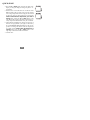
4. Press the up or down button, located to the right of the
display, to change the displayed setting. Stop on the desired setting.
5. When there are arrow indicators next to both the words
heat and cool at the top right of the screen, the heating
and cooling temperatures are also displayed at the bottom
of the screen. You can change either one by pressing the
button underneath the temperature you want to
change, then pressing the up or down button on the
right. Repeat the process for the other temperature if necessary and press the done button when you are finished.
6. The thermostat will hold these changes for two hours or
until the next programmed cycle begins, as indicated by
the words temporary hold for 2:00 next to the set temperatures. To change the amount of time the temperature
is on hold, press the button under the hold hours or
minutes. Then press the up or down button on the
right. Stop at the desired amount of hold time.
7. Close the door.
13
QUICK START
Holding the temperature
Here’s how to override your programmed temperature settings and hold the
temperature at a specific setting without the temperature changing during the next
programmed period.
1. Open the door.
2. Press the schedule button at the top. The arrow will
move to the word hold under the button.
3. The screen displays the set temperature in the lower
right. To change that temperature, press the up or down
button on the right. The temperature will stay at the setting you selected until you release the hold.
4. To change the heating temperature when the cooling temperature is displayed – and vice versa – press the mode
button at the top of the screen until the arrow moves to
your choice – heat or cool. Then press the up or down
button on the right to reach your desired temperature setting.
5. To return the temperature to the pre-- set level for that time
period, press the mode button until the arrow moves to
follow schedule.
6. Close the door.
14
QUICK START
Using the ExP – Expansion Port – to program the thermostat
Your Preferredt thermostat has an unique ExP –
Expansion Port – that allows you to use a digital
memory card to program the thermostat on your
computer. The ExP is sold as an accessory.
Remove the dual port digital memory card and insert it in your computer’s digital or
USB memory card reader. Follow the onscreen instructions to program
temperatures, the corresponding time, and the day of the week. You can even
schedule your thermostat to remind you to change your furnace filter, the UV light
or humidifier pad. When you’ve completed the process on your computer, simply
reinsert the card back into the ExP port on the thermostat. It will automatically
transfer the settings on the card to the thermostat.
15
PROGRAMMING THE THERMOSTAT
Determining your programming schedule
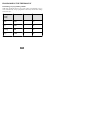
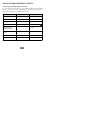
Unlike many thermostats, this one gives you the option of programming every day
of the week differently. It is pre-- programmed at the factory with the same settings
for all seven days:
Monday
through
Sunday
Time
Heat
Cool
Wake
6 AM
68
76
Day
8 AM
60
85
Evening
5 PM
68
76
Sleep
10 PM
60
82
16
PROGRAMMING THE THERMOSTAT
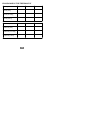
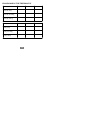
You can change those settings easily. Each day in your schedule must have four
time periods. The thermostat thinks of these time blocks in terms of when people
wake up, when they leave for the day, when they return home, and when they go to
sleep. Use this blank grid to determine those time periods based on your own
schedule along with how warm or cool you want your home to be at those times.
Day of the week and
program period
Start time
Monday Wake
Monday Day
Monday Evening
Monday Sleep
17
Heat setting
Cool setting
PROGRAMMING THE THERMOSTAT
Tuesday Wake
Tuesday Day
Tuesday Evening
Tuesday Sleep
Wednesday Wake
Wednesday Day
Wednesday Evening
Wednesday Sleep
18
PROGRAMMING THE THERMOSTAT
Thursday Wake
Thursday Day
Thursday Evening
Thursday Sleep
Friday Wake
Friday Day
Friday Evening
Friday Sleep
19
PROGRAMMING THE THERMOSTAT
Saturday Wake
Saturday Day
Saturday Evening
Saturday Sleep
Sunday Wake
Sunday Day
Sunday Evening
Sunday Sleep
20
PROGRAMMING THE THERMOSTAT
Setting up your schedule when all days of the week will follow the same
schedule
Here’s how to program your thermostat when all seven days of the week will follow
the same schedule.
1. Open the door.
2. Press the set button on the left repeatedly until the screen
shows daily schedule in the center and the list of the
days of the week on the left. The arrows next to each day
indicate that you can program all seven days the same
way now.
3. Notice the arrow pointing to wake on the screen. To set
the wake time, press the button under the hour or minute
and then press the up or down button on the right and
stop at the desired wake time.
4. Next, set the heating temperature for that time period by
pressing the button under the heat set at: temperature
on the right and then pressing the up or down button until you reach the desired heating temperature.
21
PROGRAMMING THE THERMOSTAT
5. Set the cooling temperature for that time period by pressing the button under the cool set at: temperature on
the right and then pressing the up or down button until
you reach the desired cooling temperature.
6. Repeat this process for each of the three remaining time
periods for Monday – day, evening and sleep – by first
pressing the button under the four time periods to select the time period with the arrow. To change the start
at time, press the button under the time, then press the
up or down button, stopping on the desired time. To set
the heating temperature, press the button under heat
set at:, then press the up and down button, stopping on
the desired temperature. To set the cooling temperature,
press the button under cool set at:, then press the up
or down button, stopping on the desired temperature.
7. Press the done button on the right when you’ve completed the process.
8. Close the door.
22
PROGRAMMING THE THERMOSTAT
Setting up your schedule when all days of the week won’t follow the
same schedule
Here’s how to program your thermostat when one or more days will follow a
different schedule from the rest.
1. Open the door.
2. Press the set button on the left repeatedly until the
screen shows daily schedule in the center and the list of
the days of the week on the left. There will be an arrow
next to every day of the week.
3. Press the button under the days of the week until the
arrow is next to the day you want to program.
4. There is an arrow pointing to wake on the screen. To set
the wake time, press the button under the hour or minute
and then press the up or down button on the right and
stop at the desired wake time.
5. Next, set the temperature for that time period by pressing
the button under the heat set at: temperature on the
right and then pressing the up or down button until you
reach the desired heat temperature.
23
PROGRAMMING THE THERMOSTAT
6. Set the cooling temperature for that time period by pressing the button under the cool set at: temperature on
the right and then pressing the up or down button until
you reach the desired cooling temperature.
7. Repeat this process for each of the three remaining time
periods – day, evening and sleep – by first pressing the
button under the four time periods to select the
time period with the arrow. To change the start at time,
press the button under the hour or minute, then
press the up or down button, stopping on the desired
time. To set the heating temperature, press the button
under heat set at:, then press the up and down button, stopping on the desired temperature. To set the cooling temperature, press the button under cool set at:,
then press the up or down button, stopping on the desired temperature.
8. To set the schedule for another day, press the button under the days of the week on the left again until the
arrow is next to the day you want to program.
9. Repeat steps 4 through 7 to program that day.
24
PROGRAMMING THE THERMOSTAT
10. Continue to repeat step 8, then steps 4 through 7 to program remaining days.
11. Press the done button on the right when you’ve
completed the process.
12. Close the door.
Using the programmable fan
When you use the instructions on page 47 in the Advanced Programming Options
section to turn on the programmable fan feature, you can program the fan selection
to “auto” or “on” for each of the program schedule periods. When scheduling and
setting your program periods, simply press the fan button at the top to select auto
or on for that period. You can make this change in as many days and time periods
as desired.
25
PROGRAMMING THE THERMOSTAT
Programming a vacation schedule
You can program a special heating and cooling schedule to follow when you will be
gone for a vacation or an extended period of time.
1. Open the door.
2. Press the set button on the left side repeatedly until the
screen shows vacation settings on the right side, your
vacation heating and cooling temperatures in the lower
right, and humidify* on the bottom.
3. The selection box is around the heating temperature.
Press the up or down button to select your desired heating temperature.
4. To adjust your cooling temperature, press the button
under the cool set at temperature on the screen. The
selection box will move to that number.
5. Press the up or down button to select your desired cooling temperature.
6. To change the humidity setting, press the button under
humidify. The current setting will appear in the center of
the screen.
* Only homeowners with the T6-- PRH model of thermostat will see a ”humidify” icon.
26
PROGRAMMING THE THERMOSTAT
7. Press the up or down button on the side and stop at the
desired setting.
8. To change the fan from auto to on, press the fan button
at the top.
9. To change the thermostat mode to heat, cool, Em heat
or heat/cool (auto), press the mode button at the top
until the arrow is next to the option you want.
10. Press the done button.
11. Close the door.
Activating your vacation program
You must schedule a return date to activate your vacation settings before leaving.
The thermostat will begin following the vacation schedule after you’ve selected the
return date. On 12:00 AM on the return date, the thermostat will automatically
switch to the follow schedule option and run your programmed schedule.
27
PROGRAMMING THE THERMOSTAT
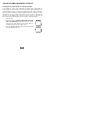
1. Press the schedule button at the top until the arrow is
next to vacation.
2. You will see the next day’s date at the bottom of the
screen under the words return on. There is a box around
the date. To set the date (D) you will return home, press
the up button and stop on the desired date.
3. If you need to change the month (M) for your return,
press the button under the month on the screen. The
selection box will move to the month number.
4. Press the up button to set the desired month.
5. Repeat this process to change the year (Y) if necessary.
6. Press the done button. This will instruct the thermostat to
begin adjusting to these settings immediately.
7. Close the door.
28
OPERATING THE THERMOSTAT
Using the thermostat to turn the heating and cooling system off
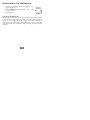
Here’s how to use the thermostat to turn the heating and cooling
system off.
1. Open the door.
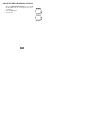
2. Press the mode button on the top left repeatedly until
the display shows off in the upper left.
3. Close the door.
Using the fan
When the fan is on, it helps distribute air throughout your home for a more even
temperature in all spaces. You can set the thermostat so that the fan runs only
during your heating and cooling cycles (auto mode) or to run continuously.
1. Open the door.
2. Press the fan button on the top. The arrow underneath
the button moves from auto to on.
3. When you want to return the fan to auto mode, press the
fan button again. You will see the arrow next to auto under the button.
4. Close the door.
29
OPERATING THE THERMOSTAT
Changing the humidity level
Your thermostat offers three humidity* options: normal, auto and off. It is set at the
factory for “normal humidify,” which is a fixed setting based on how much
humidity you want in the home. This humidity level remains constant, regardless of
the outdoor temperature. You can manually adjust the humidity level according to
your own preferences.
The second option, “auto humidify,” uses an outdoor temperature sensor (when
installed) to automatically adjust the inside humidity level according to the outside
temperature when the thermostat is set for auto humidify.
You can also turn off the humidify/dehumidify feature.
Using normal humidify
Here’s how to change the fixed (constant) humidity setting.
1. Open the door. You will see humidify at the bottom of the
screen when the operating mode is heat or dehumidify
when the operating mode is cool.
2. Press the button under humidify or dehumidify. The
screen will display the current setting.
* Only homeowners with the T6-- PRH model of thermostat will see a ”humidify” icon.
30
OPERATING THE THERMOSTAT
3. Press the up or down button to change the setting. It is
factory-- set at 26% for humidify and 60% for dehumidify. It there’s too much condensation on the windows, try
a lower number. If the air is too dry, try a higher number.
If your home is newer and has quality windows that
create a “tight” home, try a higher setting. If your home
is older, you might need a lower setting. You can set the
humidity between 10% and 46%; the dehumidify range
is from 46% to 66%.
4. Close the door.
Using auto humidify
The auto humidify feature automatically adjusts the amount of
humidity according to the outside temperature. It can be
manually adjusted when there is too much condensation
accumulating on windows or the air seems too dry. Here’s how
to switch to auto humidify and make adjustments.
1. Open the door. Press the button under humidify. You
will see the current humidity settings.
2. Press the mode button. You will see auto at the top, the
current humidity reading, and 5 set at, which is the factory setting for the auto humidify mode. (Auto indicates
you have put the thermostat in auto humidify mode.)
31
OPERATING THE THERMOSTAT
3. Press the up or down button to change this auto humidify set at number (1 through 9). If there is too much
condensation on the windows, select a number lower
than 5. If there seems to be a lot of static electricity,
which often means the air is too dry, select a number
higher than 5. If your home is newer and has quality
windows that create a “tight” home, try a higher setting.
If your home is older, you might need a lower setting.
4. Close the door.
How to turn off the humidify or dehumidify feature
Here’s how to turn off the humidify and/or dehumidify features.
1. Open the door. To turn off either feature, press the button under the word humidify or dehumidify.
2. Press the mode button until the screen says OF.
3. Close the door.
32
OPERATING THE THERMOSTAT
Using emergency heat (heat pump systems only)
Emergency heat is useful when the automatic auxiliary heat system can’t keep up
with demand. (Systems with heat pumps use “auxiliary heat” when it’s too cold
outside for the heat pump to heat the house without help. The display indicator for
this is auxiliary heat on.)
If the heat pump compressor that works with auxiliary heat fails, or if the heat pump
isn’t working at all, you can turn on the emergency heat for that extra help. (You’ll
know there’s a problem if the house can’t seem to get warm when it’s very cold
outside.) You want to avoid using emergency heat, though, because it’s the most
expensive option. And, of course, if you suspect a problem with your heat pump,
call your heating and cooling dealer immediately.
Here’s how to set your thermostat to use emergency heat.
1. Open the door.
2. Press the mode button repeatedly until the arrow under
the button moves to Em heat on the screen.
3. Close the door.
33
ADVANCED PROGRAMMING OPTIONS
Advanced programming display codes chart
You can customize several features of your thermostat. This chart shows which
features you can change and the codes associated with them. The codes will be
shown on the display when you follow the instructions.
Feature
Configuration Code
Change Indication
reset reminders
01
0 to 100%
Fahrenheit to Celsius
02
F or C
Backlighting
03
Of, 1, 2, 3, 4, 5
keypad lockout
04
Of, 1, 2, 3, padlock
programmable or
nonprogrammable
05
P or nP
number of program
periods
06
4 or 2
programmable fan
07
Of or On
daylight savings time
08
Of or On
34
ADVANCED PROGRAMMING OPTIONS
Clearing the reset reminders
The thermostat tells you when it’s time to change the UV light in the evaporator coil
box connected to the furnace (if equipped), humidifier pad (if equipped), and
furnace filter. (See page 49 for more information.) When the reminder icons are
displayed on the screen, pressing and holding the done button for about three
seconds clears all reminders on the screen. This might not be the best option when
you have multiple reminders but have done only one of the tasks. This option lets
you reset the reminders individually.
1. Open the door.
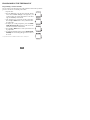
2. Press and hold the buttons underneath the heat
and cool setpoints simultaneously (the two bottom
buttons on the right). The screen will display 01 and up
to three reset reminders, as enabled by your installer.
One of the reminders will flash; the display will show
the percentage of time used by that reminder item.
3. Repeatedly press the set button until the reminder you
want to clear flashes.
4. Press and hold the done button for about three seconds
to remove the reminder. The percentage associated with
it will go down to zero.
35
ADVANCED PROGRAMMING OPTIONS
5. Press the done button.
6. Close the door.
36
ADVANCED PROGRAMMING OPTIONS
Changing from Fahrenheit to Celsius
Your thermostat is preset to display the temperature in degrees
Fahrenheit. You can change this to Celsius.
1. Open the door.
2. Press and hold the buttons underneath the heat
and cool setpoints simultaneously (the two bottom
buttons on the right) until the screen displays the reset
reminders and 01 in the lower right corner.
3. Press the up arrow button until 01 changes to 02 with
F (Fahrenheit) next to it.
4. Press the rightmost button under the F until C (Celsius) appears.
5. Press the done button.
6. Close the door.
37
ADVANCED PROGRAMMING OPTIONS
Adjusting or turning off the continuous backlighting
Your thermostat may feature a low level amount of backlighting until you press any
button, which increases the lighting temporarily. You can adjust the intensity of the
backlighting or turn if off completely. The range is off (OF) 1 to 5 brightness.
Here’s how.
1. Open the door.
2. Press and hold the buttons underneath the heat and
cool setpoints simultaneously (the two bottom buttons
on the right) until the screen displays the reset reminders
and 01 in the lower right corner.
3. Press the up arrow button until 01 changes to 03 with
the number 3 (default backlight) next to it.
4. To increase backlight level, press the rightmost lower
button then press the up arrow button until 4 or 5 appears. To decrease the backlight level, press the rightmost lower button then press the down arrow button
until 2, 1 or OF (off) appears.
38
ADVANCED PROGRAMMING OPTIONS
5. Press the done button.
6. Close the door.
39
ADVANCED PROGRAMMING OPTIONS
Keypad lockout
The keypad lockout feature lets you “lock” the thermostat at one of three levels that
increasingly limit anyone’s ability to make changes by pressing buttons. The levels
are:
1 – You can change the temperature settings, the time of day, and the day of the
week only
2 – You can change the temperature settings only
3 – The entire keypad is locked, allowing no changes
Here’s how to lock the keypad on each of the three levels.
1. Open the door.
2. Press and hold the buttons underneath the heat and
cool setpoints simultaneously (the two bottom buttons
on the right) until the screen displays the reset reminders
and 01 in the lower right corner.
3. Press the up arrow button until 01 changes to 04 with
the number 4 (change indication) next to it.
40
ADVANCED PROGRAMMING OPTIONS
4. Press the rightmost lower button then press the up
arrow button until the screen displays the level you
want – 1, 2 or 3. You will also see a padlock icon on
the screen.
5. Press the done button.
6. Close the door.
Unlocking the Keypad
Here’s how to temporarily unlock the keypad after you have locked it.
1. Open the door.
2. Press and hold the up and down buttons on the right
simultaneously for about five seconds.
3. The padlock icon will disappear. This means the keypad is unlocked and can be used. The keypad will revert
back to the locked state after you’ve stopped pushing
buttons for two minutes.
4. Close the door.
41
ADVANCED PROGRAMMING OPTIONS
Changing from programmable to nonprogrammable
It is possible to convert your thermostat’s operation from programmable to
nonprogrammable. This eliminates its advanced features. When switching to the
nonprogrammable format, you lose the programming, hold, vacation and Smart
Recovery features. Switching to nonprogrammable also means you’ll give up some
of the thermostat’s energy saving features. The time of day and day of the week will
still show on the display and you will be able to increase or decrease the
temperature settings manually. Here’s how to switch to nonprogrammable.
1. Open the door.
2. Press and hold the buttons underneath the heat
and cool setpoints simultaneously (the two bottom
buttons on the right) until the screen displays the reset
reminders and 01 in the lower right corner.
3. Press the up arrow button until 01 changes to 05 with
P (programmable) next to it.
42
ADVANCED PROGRAMMING OPTIONS
4. Press the rightmost lower button then press the up
arrow button until the screen displays nP (nonprogrammable).
5. Press the done button.
6. Close the door.
43
ADVANCED PROGRAMMING OPTIONS
Changing the number of programming periods
Your thermostat is preset with four time periods. You can
change this to two. Here’s how to change the number of periods
in the day.
1. Open the door.
2. Press and hold the buttons underneath the heat and
cool setpoints simultaneously (the two bottom buttons
on the right) until the screen displays the reset reminders
and 01 in the lower right corner.
3. Press the up arrow button until 01 changes to 06 with 4
(time periods) next to it.
4. Press the rightmost lower button then press the up
arrow button until the screen displays 2.
5. Press the done button.
6. Close the door.
44
ADVANCED PROGRAMMING OPTIONS
Turning on the programmable fan feature
When you turn on the programmable fan feature using these instructions, you can
program the fan selection to “auto” or “on” for each of the program schedule
periods. (Learn more about this on page 25.)
1. Open the door.
2. Press and hold the buttons underneath the heat
and cool setpoints simultaneously (the two bottom
buttons on the right) until the screen displays the reset
reminders and 01 in the lower right corner.
3. Press the up arrow button until 01 changes to 07 with
OF (fan mode) next to it.
4. To turn the fan on, press the rightmost lower button
then press the up arrow button until the screen displays
ON. To turn the fan off, press the rightmost lower
button then press the down arrow button until the
screen displays OF (off).
5. Press the done button.
6. Close the door.
45
ADVANCED PROGRAMMING OPTIONS
Turning off the daylight savings time feature
The thermostat will automatically change the clock according to daylight savings
time procedures twice a year. Here’s how to turn off the daylight savings time
feature so the clock doesn’t automatically change.
1. Open the door.
2. Press and hold the buttons underneath the heat
and cool setpoints simultaneously (the two bottom
buttons on the right) until the screen displays the reset
reminders and 01 in the lower right corner.
3. Press the up arrow button until 01 changes to 08 with
On (DST feature) next to it.
4. Press the rightmost lower button then press the up
arrow button until the screen displays OF for off.
5. Press the done button.
6. Close the door.
46
SPECIAL FEATURES
Hybrid Heat (heat pump with a furnace system only)
This thermostat works with the Bryant Hybrid Heat systems offering maximum
comfort and economy by automatically controlling whether your system delivers
heating with the heat pump, with the furnace, or with both options working
together.
Service reminders
The thermostat tells you when it’s time to change the UV light in the evaporator coil
box connected to the furnace (if equipped), humidifier pad (if equipped), and furnace
filter. Each reminder – check UV light, check hum pad, check filter – will be
displayed on the upper left of the screen. (For important safety reasons, ask your
dealer to replace your UV light.)
To remove the reminder after you or your dealer have replaced
the indicated product, press and hold the done button for about
three seconds.
Outdoor temperature display
The thermostat automatically displays the outdoor temperature only when the door
is closed.
47
SPECIAL FEATURES
Auto changeover
The thermostat displays one of five modes: heat, cool, Em heat (heat pump
version only), heat cool (auto mode) and off. When the mode selection is for both
heating and cooling – auto mode – the thermostat is in auto changeover mode. This
allows the system to switch from heating to cooling – or from cooling to heating –
to maintain the temperatures you’ve programmed. It does this automatically.
Smart Recovery
The Smart Recovery feature transitions your home from one temperature period
(wake, day, evening, sleep) to the next so that the your home’s temperature matches
the temperature setting at the start of each time period. This means, for example,
that if your sleep period temperature setting is lower than the period that precedes it,
the thermostat will start cooling down the home before the beginning of the
scheduled sleep period. It does this at an energy-- efficient rate. This not only helps
make your home as comfortable as possible, it also makes your thermostat more
cost effective. Call your dealer to adjust Smart Recovery settings.
48
WHAT IF . . .
“Auxiliary heat on” is displayed (heat pump and Hybrid Heat systems
only)
Auxiliary heat on applies only to the heat pump version. If it is on, you will see
auxiliary heat on. When it is displayed, it means the system has determined that it’s
too cold outside for your heat pump to heat the house without help, so it’s getting
help from the electric heaters. This happens automatically.
“Em heat” is displayed (heat pump and Hybrid Heat systems only)
Em heat is the display term for emergency heat and applies only to the heat pump
version. When emergency heat has been turned on, Em heat is displayed. You have
to turn on emergency heat manually – it doesn’t happen automatically – so if you
see Em heat on the display, it means somebody has turned it on.
There is a power outage
If you lose electricity, you won’t have to reprogram the thermostat because your
settings are retained in its memory.
49
WHAT IF . . .
You get a service reminder message
Service reminder messages – check UV light, check hum pad, check filter – tell
you that it’s time to change the UVC lamp in the evaporator coil box connected to
the furnace (when installed), humidifier pad (when installed), and furnace filter.
Make the indicated changes with the exception of the UV lamp – for important
safety reasons, ask your dealer to replace that.
You get a system error message
Here are the possible system error messages and what they mean:
E1 The system isn’t communicating properly. Call your heating and cooling
dealer for service.
- - The temperature sensor isn’t working. Call your heating and cooling dealer
for service.
E4 There’s an internal memory failure. Call your heating and cooling dealer for
service.
E5 The humidity sensor isn’t working. Call your heating and cooling dealer for
service.
50
COMMON TERMS AND WHERE TO FIND THEM
Auto changeover . . . . . . . . . . . . . . . . . . . . . . . . . . . . . . . . . . . . . . . . . . page 48
This feature automatically switches your system from heating to cooling – or from
cooling to heating – whenever necessary when in auto mode only (heat/cool).
Auxiliary heat (heat pump and Hybrid Heat systems only) . . . . . . page 33
Most heat pump systems can’t heat a home sufficiently when it gets very cold
outside so they use a supplemental heating source called auxiliary heat. The system
knows when to use this help and does so automatically. If it’s using auxiliary heat,
the display will show auxiliary heat on when you press the mode button. You have
no control over the auxiliary heat function.
Backlighting . . . . . . . . . . . . . . . . . . . . . . . . . . . . . . . . . . . . . . . . . . . . . . page 38
Backlighting illuminates your display. The backlight is on constantly at a dim level
that brightens when you push a button.
Daylight savings time . . . . . . . . . . . . . . . . . . . . . . . . . . . . . . . . . . . . . . page 46
The thermostat will automatically change the clock according to daylight savings
time procedures twice a year.
51
COMMON TERMS AND WHERE TO FIND THEM
Dehumidify . . . . . . . . . . . . . . . . . . . . . . . . . . . . . . . . . . . . . . . . . . . . . . . page 30
When your heating and cooling system is used to dehumidify the air and the
thermostat is set up to dehumidify, the thermostat will instruct it to remove moisture
from the air as necessary when the air conditioning is on.
Emergency heat (heat pump and Hybrid Heat
systems only) . . . . . . . . . . . . . . . . . . . . . . . . . . . . . . . . . . . . . . . . . . . . . . page 33
You can manually set the thermostat to use emergency heat but it is the most
expensive option. If it’s using emergency heat, the display will show Em heat.
EXP (Expansion Port) . . . . . . . . . . . . . . . . . . . . . . . . . . . . . . . . . . . . . page 15
The unique EXP – Expansion Port – allows you to use a digital memory card to
program the thermostat on your computer.
Hold . . . . . . . . . . . . . . . . . . . . . . . . . . . . . . . . . . . . . . . . . . . . . . . . . . . . . page 14
This function holds the current set temperature.
Hybrid Heat (heat pump with a furnace system only) . . . . . . . . . page 47
This Bryant heating and cooling system concept offers maximum comfort and
economy. When a Hybrid Heat system is installed, the thermostat automatically
controls whether your system delivers heating with the heat pump, with the furnace,
or with both options working together.
52
COMMON TERMS AND WHERE TO FIND THEM
Humidify . . . . . . . . . . . . . . . . . . . . . . . . . . . . . . . . . . . . . . . . . . . . . . . . . page 30
When your heating and cooling system includes a humidifier, the thermostat will
instruct it to add moisture to the air as necessary when the heat is on.
Mode . . . . . . . . . . . . . . . . . . . . . . . . . . . . . . . . . . . . . . . . . . . . . . . . . . . . . page 29
This term refers to the type of operation your system is performing. The options are
heat, cool, emergency heat, auto (heat/cool) and off.
Override . . . . . . . . . . . . . . . . . . . . . . . . . . . . . . . . . . . . . . . . . . . . . . . . . page 14
This happens when you temporarily disregard the thermostat’s programmed
temperature settings and schedules by using the temporary hold or hold options.
Programmable fan . . . . . . . . . . . . . . . . . . . . . . . . . . . . . . . . . . . . . . . . page 25
You can program the fan selection to “auto” or “on” for each of the program
schedule periods.
53
COMMON TERMS AND WHERE TO FIND THEM
Service reminders . . . . . . . . . . . . . . . . . . . . . . . . . . . . . . . . . . . . . . . . . page 47
The thermostat tells you when it’s time to change the UVC lamp (if
equipped), humidifier pad (if equipped) and furnace filter. (For safety reasons, ask your dealer to replace your UV lamp.)
Smart Recovery . . . . . . . . . . . . . . . . . . . . . . . . . . . . . . . . . . . . . . . . . . . page 48
This feature allows your system to shift from one temperature period to the next
scheduled period at an energy-- efficient rate.
Temporary hold . . . . . . . . . . . . . . . . . . . . . . . . . . . . . . . . . . . . . . . . . . page 12
This function lets you temporarily maintain your temperature settings. The system
will return to the scheduled settings during the next time period.
Time period . . . . . . . . . . . . . . . . . . . . . . . . . . . . . . . . . . . . . . . . . . . . . . page 16
The thermostat features four time periods – wake, day, evening and sleep. These
blocks of time are linked to temperatures you set according to how warm or cool
you want the house during those time periods.
54
NOTES PAGE
55
THERMOSTAT LIMITED WARRANTY
Bryant Heating & Cooling Systems
Limited Warranty for Thermostats
FOR WARRANTY SERVICE OR REPAIR:
Contact the installer or a Bryant dealer. You may be able to find the installer’s name on the
equipment or in your Owner’s Packet. You can also find a Bryant dealer online at
www.bryant.com
For help, contact: Bryant Heating & Cooling Systems, Consumer Relations, P.O. Box 4808,
Syracuse, New York 13221, Phone 1--800--428--4326
PRODUCT REGISTRATION: You can register your product online at www.bryant.com.
Model Number_______________________
Serial Number_______________________
Date of Installation____________________
Installed by_________________________
Name of Owner_______________________
Address of Installation_________________
Bryant Heating & Cooling Systems (hereinafter “Company”) warrants this product against
failure due to defect in materials or workmanship under normal use and maintenance as
follows. All warranty periods begin on the date of original installation. If a part fails due to
defect during the applicable warranty period Company will provide a new or remanufactured
part, at Company’s option, to replace the failed defective part at no charge for the part.
Alternatively, and at its option, the Company will provide a credit in the amount of the then
factory selling price for a new equivalent part toward the retail purchase price of a new
Company product. Except as otherwise stated herein, those are Company’s exclusive
obligations under this warranty for a product failure. This limited warranty is subject to all
provisions, conditions, limitations and exclusions listed below and on the reverse (if any) of
this document.
56
THERMOSTAT LIMITED WARRANTY
OWNER--OCCUPIED, RESIDENTIAL APPLICATIONS
This warranty is to the original purchasing owner and is transferable only to the extent and as
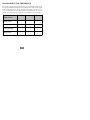
stated in the Warranty Conditions and below. The warranty period in years, depending on the
part and the claimant, is as shown in the chart below.
Limited Warranty (Years)
Original Owner
Subsequent Owner
10* (or 5)
5
Product
T6, T2, T1 Thermostats***
*
If properly registered within 90 days, otherwise 5 years (except in California and Quebec
and other jurisdictions that prohibit warranty benefits conditioned on registration, registration is not required to obtain longer warranty periods). See Warranty Conditions below.
***Applies only to Thermostats. Active electronic finished good accessories, such as the optional ExP module, have different warranty terms. See product for details.
OTHER RESIDENTIAL APPLICATIONS (Apartments, Rental Properties, etc.)
The warranty period is five (5) years. The warranty is to the original owner only and is not
transferable.
OTHER APPLICATIONS
The warranty is one (1) year on all such applications. The warranty is to the original owner
only and is not transferable.
LEGAL REMEDIES: The owner must notify the Company in writing, by certified or
registered letter to Bryant Heating & Cooling Systems, Warranty Claims, P.O. Box 4808,
Syracuse, New York 13221, of any defect or complaint with the product, stating the defect or
complaint and a specific request for repair, replacement, or other correction of the product
under warranty, mailed at least thirty (30) days before pursuing any legal rights or remedies.
57
THERMOSTAT LIMITED WARRANTY
WARRANTY CONDITIONS:
1. To obtain the longer warranty periods as shown in the table under original owner, for
the original purchaser, the product must be properly registered at www.bryant.com
within ninety (90) days of original installation. In jurisdictions where warranty terms
conditioned on registration are prohibited by law, registration is not required and the
longer warranty period shown will be apply.
2. Where a product is installed in a newly constructed home, the date of installation is the
date the homeowner purchased the home from the builder.
3. If the date of original installation cannot be verified, then the warranty period begins
ninety (90) days from the date of product manufacture (as indicated by the model and
serial number). Proof of purchase may be required at time of service.
4. The remainder of the first five years of warranty is freely transferable without
registration.
5. Product must be installed properly and by a licensed HVAC technician.
6. The warranty applies only to products remaining in their original installation location.
7. Installation, use, care, and maintenance must be normal and in accordance with
instructions contained in the Installation Instructions, Owner’s Manual and Company’s
service information.
8. Defective parts must be returned to the distributor through a registered servicing
dealer for credit.
LIMITATIONS OF WARRANTIES: ALL IMPLIED WARRANTIES AND/OR
CONDITIONS (INCLUDING IMPLIED WARRANTIES OR CONDITIONS OF
MERCHANTABILITY AND FITNESS FOR A PARTICULAR USE OR PURPOSE) ARE
LIMITED TO THE DURATION OF THIS LIMITED WARRANTY. SOME STATES OR
58
THERMOSTAT LIMITED WARRANTY
PROVINCES DO NOT ALLOW LIMITATIONS ON HOW LONG AN IMPLIED
WARRANTY OR CONDITION LASTS, SO THE ABOVE MAY NOT APPLY TO YOU.
THE EXPRESS WARRANTIES MADE IN THIS WARRANTY ARE EXCLUSIVE AND
MAY NOT BE ALTERED, ENLARGED, OR CHANGED BY ANY DISTRIBUTOR,
DEALER, OR OTHER PERSON, WHATSOEVER.
THIS WARRANTY DOES NOT COVER:
1. Labor or other costs incurred for diagnosing, repairing, removing, installing, shipping,
servicing or handling of either defective parts, or replacement parts, or new units.
2. Any product purchased over the Internet.
3. Normal maintenance as outlined in the installation and servicing instructions or Owner’s
Manual, including filter cleaning and/or replacement and lubrication.
4. Failure, damage or repairs from faulty installation, misapplication, abuse, improper
servicing, unauthorized alteration or improper operation.
5. Failure to start due to voltage conditions, blown fuses, open circuit breakers, or damages
due to the inadequacy or interruption of electrical service.
6. Failure or damage due to floods, winds, fires, lightning, accidents, corrosive environments
(rust, etc) or other conditions beyond the control of Company.
7. Parts not supplied or designated by Company, or damages resulting from their use.
8. Products installed outside the U.S.A. or its territories and Canada.
9. Electricity or fuel costs, or increases in electricity or fuel costs from any reason
whatsoever, including additional or unusual use of supplemental electric heat.
10. Any cost to replace, refill or dispose of refrigerant, including the cost of refrigerant.
11. ANY SPECIAL, INDIRECT OR CONSEQUENTIAL PROPERTY OR
COMMERCIAL DAMAGE OF ANY NATURE WHATSOEVER. Some states or
provinces do not allow the exclusion of incidental or consequential damages, so the above
limitation may not apply to you.
This Warranty gives you specific legal rights, and you may also have other rights which vary
from state to state or province to province.
39004DP479
08/2011
59
60
Copyright 2012 Bryant Heating & Cooling Systems, 7310 W Morris St. Indianapolis, IN 46231
OM---T6PRH ---05BR
Replaces: OM--- T6PRH--- 04BR
Edition Date: 05/12
Manufacturer reserves the right to change, at any time, specifications and designs without notice
and without obligations.