1
Record a Call
This feature uses your voice mail system to record your telephone
conversations.
Note: You may be required by law to inform the other party that you are
recording the conversation. For specific instructions, consult your system
administrator.
To start recording while on a 2-party call:
z
Press the Record Call key. (See Feature Keys for instructions on
programming a Record Call key to your phone.)
Note: Your system may be programmed to automatically begin recording
external calls when you or the other answers.
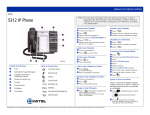
To control recording on a 5212 IP Phone, do one or all of the following:
z
z
To stop and save a recording, press the Record Call feature key.
To stop and erase a recording, press
(CANCEL).
To control recording on a 5224 IP Phone, do one or all of the following:
z
z
z
z
To pause recording, press the Pause softkey.
To resume recording after pausing, press the Resume softkey.
To stop a recording without saving it, press the Erase softkey or
(CANCEL).
To stop and save a recording, press the Save softkey.
Putting the call on hold saves the recording; taking the call off hold starts a
new recording. Depending on system programming, hanging up, or pressing
(TRANS/CONF) or a DSS key, may also save the recording.
To listen to a recording:
1. Lift the handset.
2. Access your voice mailbox.
3. Follow the prompts to retrieve the recording.
-41-