1
Revision C 12/09
Chapter 2: Diagnostics and Configuration
11
Chapter 2: Diagnostics and Configuration
The A798 printer performs a number of diagnostics that provide useful information about the operating status of the
printer. The following diagnostic tests are available.
• Start-up diagnostics
Performed during the printer’s start-up cycle.
• Runtime diagnostics
Performed during normal printer operation.
• Remote diagnostics
Maintained during normal operation and reported in the print test.
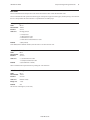
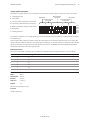
• The printer can be configured with the following settings and functions through the configuration menu that is printed
on the receipt. For more information on configuring the printer, see “Printer configuration” on page 16.
Communication interfaces
Diagnostic modes
RS-232C settings
Printer emulations/software options
Hardware options
Start-up Diagnostics
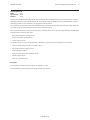
When the printer receives power or performs a hardware reset, it automatically performs the startup diagnostics (also
known as level 0 diagnostics) during the start-up cycle. The following diagnostics are performed:
• Turn off motors
• Perform boot CRC check of the firmware ROM, test external SRAM, test EEPROM, and test main program CRC
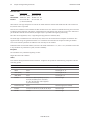
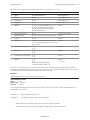
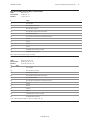
Failure causes Start-up Diagnostics to stop; the printer beeps and the LED flashes a set number of times, indicating the
nature of the failure. The table in the “Indicators” section (page 14) describes the specific tone and LED sequences.
• Check if paper is present
• Return the knife to the home position
Failure causes a fault condition. The table in the “Indicators” section (page 14) describes the specific tone and LED
sequences.
• Check if receipt cover is closed
Failure does not interrupt the start-up cycle.
When the start-up diagnostics are complete, the printer makes a two-tone beep (low then high frequency), the paper feed
button is enabled, and the printer is ready for normal operation.
If the printer has not been turned on before, or a new EEPROM has been installed, the default values for the printer
functions will be loaded into the EEPROM during start-up diagnostics.
A798-PG00001C