1
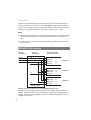
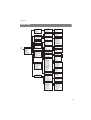
Features and Menus
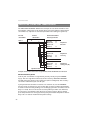
Message waiting: List of received short messages (please refer to the “Message
waiting” section on page 69) and voicebox messages (please refer to
Querying Voicebox starting on page 56)
E-mail: E-mail information (please refer to the section “E-mail” on page 69)
Active features: Displays active features which restrict reachability (see next
chapter on page page 82).
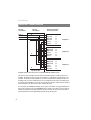
“Active features” Menu
This menu provides an overview of active features which impair your reachability.
The same menu entries are also in the main menu. You can deactivate features
here. The features are then removed from this menu. If there are no active features,
the idle display menu appears and no entry is shown.
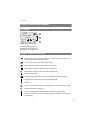
When idle, press the B Info key longer or select Active features in the “Info”
menu (see page 82). You see one or more entries …
Call blocking: Call blocking is activated; see the section “Call blocking” on page 76
Block call key: Call blocking is activated for individual INTERNAL/EXTERNAL key;
see the section “Block call key” on page 76
Call-waiting on/off: Call waiting on/off is activated; see the section “Call waiting
on/off” on page 76
Block intrusion: Block intrusion is activated; see the section “Block intrusion” on
page 76
Call diversion: For every activated call diversion, a menu entry is offered, e.g.
Divert key after time for the call diversion after time for a device key;
please refer to “Call diversions” Menu starting on page 68.
82