1
3
Hardware Installation
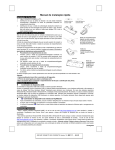
Step 1: Connect the receiver to your PC by plugging in the receiver’s USB plug
into your PC.
Front View of Receiver Plug
Back View of Receiver Plug
Step 2: Take the keyboard and make sure the batteries on the back are installed
correctly. (Follow the polarity signs in the battery compartment.)
ID Button
1.5V 2pcs
Bottom View of Keyboard
Step 3: Take the mouse and make sure the batteries on the back are installed
correctly. (Follow the polarity signs in the battery compartment.)
ID Button
Bottom View of
2001URF Mouse
Bottom View of
2001BRF Mouse
Remarks:
1. Both of the keyboard and 2001URF mouse use 2pcs.standard UM-3 (AA) 1.5V
alkaline batteries; 2001BRF mouse uses UM-4 (AAA)1.5V alkaline batteries.
2. Battery life is approximately 3-4 months, depending on the intensity of usage.
3. Make sure the receiver is placed in a location where is relatively free of strong
electromagnetic or transmission sources in order to ensure optimal reception
of the keyboard and mouse signal.
3