1
Appendix – Macro Key Programming & Usage
About the Macro Key (C key)
The “C” key can be used to automatically activate a series of commands of up to
16 keystrokes. These keystrokes, as a group, are called macros and are stored
in the system's memory.
You (or your installer) can program the “C” key to be used for these commands
(check with your installer if necessary).
Typical macro functions can include:
• Arming sequences: STAY, INSTANT, AWAY, or MAXIMUM
• Bypassing particular zones
• Activating relay(s) for turning on (or off) lights, fans, etc.
What to Include in a Macro Program
Over time, you may find that you frequently enter the same series of commands
into your keypad. For example, you may bypass the two upstairs window zones,
then turn on an exterior light, and then arm the security system in the AWAY
mode. Rather than entering the numerous keystrokes this would normally
require each time, you can program the “C” key to perform the entire sequence
by simply pressing the “C” key and then entering your 4-digit user code at the
prompt that immediately follows – a total of only five keystrokes.
If the “C” key has been set to function as a Macro key*, you can program this
key with any desired series of commands. Using this feature, up to 16
keystrokes can be programmed. The Macro can be initiated only when the
system is disarmed..
* Refer to the Security Codes section. To enable the “C” key to function as a macro
key, follow the procedure under “To Add or Change a Usere’s Code”.
How to Program a Macro Key
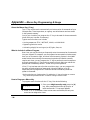
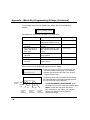
To program macro functions for the “C” key, first do the following:
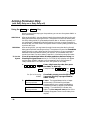
LRN WHICH MACRO?
0, 1 or 2
1. Enter your 4-digit security code, press the [#]
key, then press/hold the Macro [C] key for at
least two seconds. This prompt appears.
2. Enter “1” or “2”. Remember, there are two macros available, but only one
macro can be assigned to a user.
- 56 -