1
27 WIRELESS PROGRAMMING (OPTIONAL ACCESSORIES)
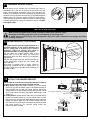
Activate the opener only when door is in full view, free of obstruction and properly adjusted. No one should
enter or leave garage while door is in motion. Do not allow children to operate push button(s) or remote(s).
Do not allow children to play near the door.
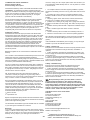
NOTE: The transmitter(s) and wireless wall button supplied with your opener are factory
programmed.
If you purchase additional transmitters, the garage door opener must
be programmed to accept the new remote code.
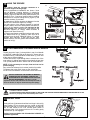
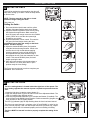
Program the Receiver to Match Additional Transmitter Codes:
Using the orange “LEARN” Button:
1. Press and hold down the transmitter button you wish to
program to the opener. The orange LED will flash to
indiciate it is receiving signal from the transmitter.
2. Press and release the “LRN” button.
3. The sourtesy LEDs will flash once.
Ensure the door is clear of obstruction, then test the transmitter.
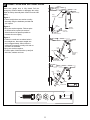
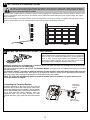
Using the Motion Detecting Control Panel
(optional accessory):
1. Press and hold the button on the hand-held remote that you wish to
operate your garage door (1).
2. While holding the remote button, press and hold the LIGHT button
on the Motion Detecting Control Panel (2).
3. Continue holding both buttons while you press the push bar on the
Motion Detecting Control Panel (all three buttons are held) (3).
4. Release buttons when the opener light flashes. It has learned the
code. If the light bulb is not installed, two clicks will be heard (4).
Now the opener will operate when the transmitter push button is
pressed. If you release the transmitter push button before the opener
light flashes, the opener has not learned the code.
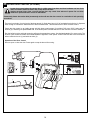
To Erase all Transmitter Codes:
To deactivate any unwanted remote, first erase all codes: Press and
hold the orange “learn” button on opener until the learn indicator light
goes out (approximately 6 seconds). All previous codes are now
erased. Reprogram each remote or keyless entry you wish to use.
in+
1
merl
3
2
1
merl
3
2
in+
LIGHT
LOCK
LOCK
LIGHT
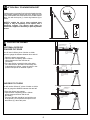
28 INSTALLING THE C940 WIRELESS WALL BUTTON
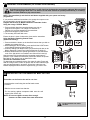
Transmitter can be fixed to the wall or car visor.
• Attach bracket to wall using the two flat head screws
provided.
• Slide the remote control onto bracket.
• Fix the warning against entrapment label near the wall
control (refer section 26).
NOTE: Do not over tighten screws, allow enough
clearance to slide remote down onto the bracket.
Locate minimum 1.5m above
the floor.
15
4