1
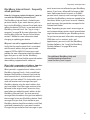
Typing
and editing
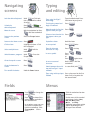
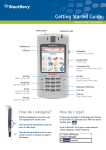
Navigating
screens
Lock the device/keyboard
Hold
or Click Lock
(set a password for added
security)
Unlock the
device/keyboard
Press
+
or
Double-click the trackwheel
Move the cursor
Roll the trackwheel or Press
+ Roll the trackwheel
Return to the previous
screen
Press the Escape button
Type using SureType™
technology
Type the whole word. Press
each letter key only once.
Finish typing a word and
begin a new word
Press
Move through the list that
appears when you type
Press
Select an item from the list Press
that appears when you
type
or
Return to the Home screen Press
Capitalize a letter
Hold the letter
Click an item
Highlight the item > Click
the trackwheel
Insert a period
Press
twice
+ the key
Hold
+ Roll the
trackwheel
Type the alternate
character on a key
Press
Select multiple items
Insert a symbol
Press
+
>
Press a letter
or
Press
again to see
Insert an accented
character
Hold a letter + Roll the
trackwheel
Switch between programs Hold
+ Press the
Escape button
Go to the top of a screen
Press
Go to the bottom of a
screen
Press
Turn on/off the device
Hold the Power button
Switch between the multi- In a text field, hold
tap and SureType™ input
methods
Type using multi-tap input Press a key once for the first
method
letter. Press a key twice for
the second letter.
Menus
Fields
Press
to change the
value in a field.
Click the trackwheel to view
the menu.
Press
to view all the
values that are available in
the selected field.
On the menu, click standard
menu items such as New,
iew, Edit, D
V
elete, Save,
ptions, and Help.
O
Additional menu items might
appear depending on the
item you have selected.
In an option screen, you can
also select an option and
click the trackwheel. Click
Change O
ption. Click a
value.