1
6. Serial Communications
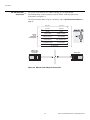
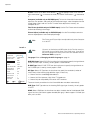
To interface the CinemaWall with a home theater automation/control system or a PC
running terminal emulation software, connect it to your control system or PC as shown in
Figure 3-4.
6.1
RS-232 Connection
and Port Configuration
Y
Configure the RS-232 controller or PC serial port as follows: odd parity, 8 data bits, 1 stop
bit and no flow control. Set the baud rate 9600, to match that of the CinemaWall RS-232
port.
EL
IM
IN
A
R
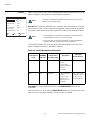
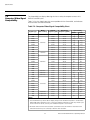
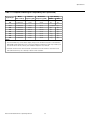
Table 6-1 lists the RS-232 command set. Command codes are in hexadecimal format.
Table 6-1. Serial Commands
Function
Power
ON
9FH
80H
60H
4EH
00H CDH
9FH
80H
60H
4FH
00H
CEH
DFH
80H
60H
47H
01H
01H
08H
DFH
80H
60H
47H
01H
02H
09H
DFH
80H
60H
47H
01H
05H
0CH
DFH
80H
60H
47H
01H
06H
0DH
DFH
80H
60H
47H
01H
0EH
15H
PC/RGB (DB-15HD)
DFH
80H
60H
47H
01H
07H
0EH
DVD/HD4 (HDMI)
DFH
80H
60H
47H
01H
1AH
21H
9FH
80H
60H
3EH
00H BDH
9FH
80H
60H
3FH
00H
BEH
NORMAL
DFH
80H
60H
0AH
01H
01H CBH
ISF DAY
DFH
80H
60H
0AH
01H
02H CCH
ISF NIGHT
DFH
80H
60H
0AH
01H
03H CDH
CUSTOM1
DFH
80H
60H
0AH
01H
04H
CEH
FILM
DFH
80H
60H
0AH
01H
05H
CFH
VIRTUALWIDE
DFH
80H
60H
51H
01H
02H
13H
LETTERBOX
DFH
80H
60H
51H
01H
03H
14H
STD 4:3
DFH
80H
60H
51H
01H
04H
15H
ANAMORPHIC
DFH
80H
60H
51H
01H
05H
16H
ON
DFH
80H
60H
7FH
03H
03H
09H
00H
4DH
OFF
DFH
80H
60H
7FH
03H
03H
09H
01H
4EH
ON
DFH
80H
60H
C1H
01H
01H
82H
OFF
DFH
80H
60H
C1H
01H
02H
83H
OFF
Input
Switch
Video1 (RCA)
Video2 (S-Video)
DVD/HD1 (RCA)
DVD/HD2 (RCA)
ON
OFF
Picture
Memory
Aspect
Ratio
Computer
Cinema
Mode
PR
DVD/HD3 (HDMI)
Audio Mute
Code Data
Note: Contact your Runco dealer or Runco Technical Support for a complete list of external control
codes if needed.
Runco CinemaWall Owner’s Operating Manual
45
6.2
Serial Command
Syntax