1
Checking and Setting the Drive’s SCSI ID
Checking and Setting the Drive’s SCSI ID
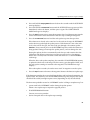
Each sled-mounted DLT2000XT tape drive is assigned a default SCSI ID of 6 at the
factory. Use hinv to determine if there are any other devices on the SCSI bus using ID 6.
If you install an additional DLT2000XT tape drive on the same bus as the first, it must be
configured with a different SCSI ID.
Caution: Improper SCSI implementation causes degraded system performance, a
system crash, possible data loss, or all three. Never set the drive to SCSI ID zero; this ID
is reserved specifically for the host SCSI controller circuitry. Never set the ID to a number
higher than 7.
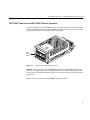
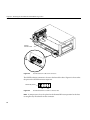
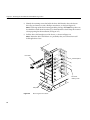
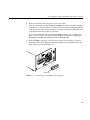
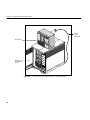
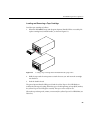
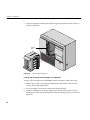
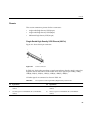
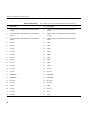
On the left side (near the front) of each sled-mounted DLT2000XT tape drive is a 10-pin
jumper plug that connects to the SCSI ID selector switch on the DLT2000XT tape drive’s
sled adapter board.
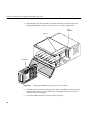
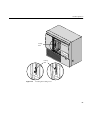
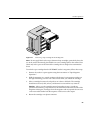
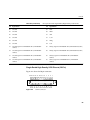
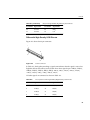
There are two jumper plugs; the SCSI cable must be plugged into the one that is nearest
the back of the unit. This cable must always be plugged in for the SCSI ID selector to
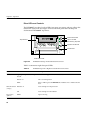
work. See Figure 2-2 to identify the cable and for the location of the selector switch. Do
not place jumpers on any other plugs on the drive.
11